


- Posts: 12
- Thank you received: 0
3 Post Moderation Rule for New Boarders (25 Jan 2021)
New boarders will have their posts moderated - Don't worry if you cannot see your post immediately.
FCPX project frame rate will NOT set at 29.97
- bonepicker
-
 Topic Author
- Offline
- New Member
-

Less
More
30 May 2021 00:37 #114705
by bonepicker
FCPX project frame rate will NOT set at 29.97 was created by bonepicker
This is a new problem and seems to stem from a parameter reset.
I often should at 60 fps for wildlife. I set my project frame rate at 29 and download and all is good.
But recently on 3 different cameras I set my project at 29fps, drop in 60 fps clips and they renders or show as 60 not 29 fps. In other words I have no slow motion.
If I drop a 29 fps clip into the timeline then it is fine. And, I have tried doing that first and then a 60 fps to no avail.
I have been using FCPx for years and never encountered this before.
I can work around by slowing down in post but that is not what I want to do.
Clearly I have screwed up some parameter or setting. Ideas?
Richard
I often should at 60 fps for wildlife. I set my project frame rate at 29 and download and all is good.
But recently on 3 different cameras I set my project at 29fps, drop in 60 fps clips and they renders or show as 60 not 29 fps. In other words I have no slow motion.
If I drop a 29 fps clip into the timeline then it is fine. And, I have tried doing that first and then a 60 fps to no avail.
I have been using FCPx for years and never encountered this before.
I can work around by slowing down in post but that is not what I want to do.
Clearly I have screwed up some parameter or setting. Ideas?
Richard
Please Log in to join the conversation.


30 May 2021 12:55 - 30 May 2021 13:00 #114706
by JoeEditor
Replied by JoeEditor on topic FCPX project frame rate will NOT set at 29.97
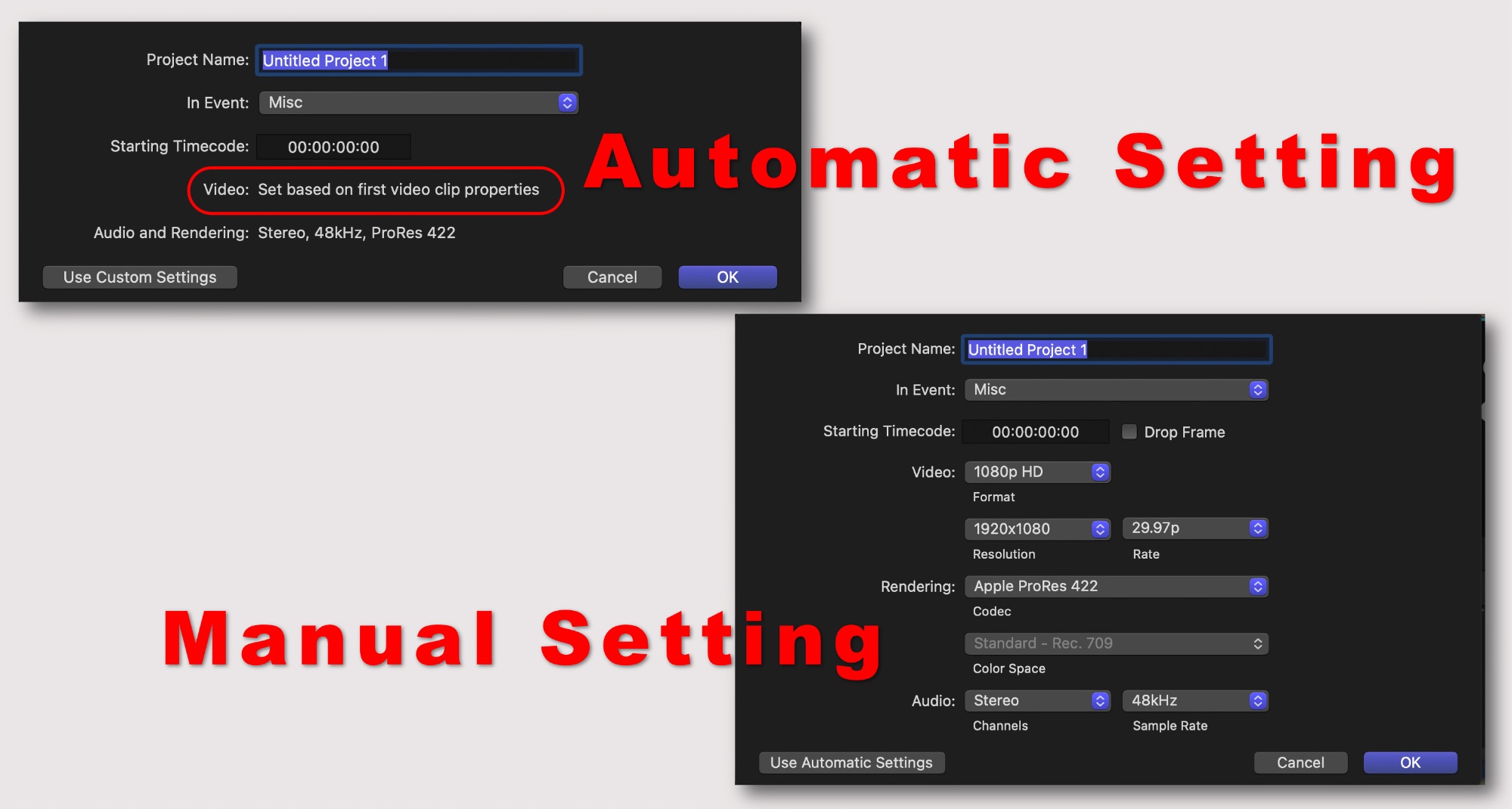
Be sure you're setting your Project to 29 and not Automatic. I'm betting it is being accidentally set to Automatic, thus conforming to 60 automatically to match the clips. That's the only way this can happen. There's no bug that's making Projects the wrong frame rate that I know of.
Last edit: 30 May 2021 13:00 by JoeEditor.
Please Log in to join the conversation.

30 May 2021 13:07 #114707
by joema
If a 60 fps source clip is added to a 30 fps timeline, the clip metadata should show as 60 fps if you select the clip in the timeline and look at the "Info" tab of the Inspector.
However that 60 fps clip by default will be "rate conformed" to the timeline frame rate (30 fps in your case) and you won't see slow motion. The easiest way to see the slow motion is select the 60 fps clip in the timeline, then pick Modify>Retime>Automatic Speed.
https://larryjordan.com/articles/fcp-x-automatic-speed-effect/
Replied by joema on topic FCPX project frame rate will NOT set at 29.97
bonepicker wrote: ...recently on 3 different cameras I set my project at 29fps, drop in 60 fps clips and they renders or show as 60 not 29 fps. In other words I have no slow motion...
If a 60 fps source clip is added to a 30 fps timeline, the clip metadata should show as 60 fps if you select the clip in the timeline and look at the "Info" tab of the Inspector.
However that 60 fps clip by default will be "rate conformed" to the timeline frame rate (30 fps in your case) and you won't see slow motion. The easiest way to see the slow motion is select the 60 fps clip in the timeline, then pick Modify>Retime>Automatic Speed.
https://larryjordan.com/articles/fcp-x-automatic-speed-effect/
Please Log in to join the conversation.
- bonepicker
-
Topic Author
- Offline
- New Member
-
Less
More
- Posts: 12
- Thank you received: 0
30 May 2021 14:38 #114708
by bonepicker
Replied by bonepicker on topic FCPX project frame rate will NOT set at 29.97
Thanks - no it is not set as automatic. I am setting the Project rate at 29.97. If I dropin a 60 fps clip it shows in the Inspector as 60fps both in the Video rate and the frame rate. Yes, I can do the Modify>retime but I have never had to do this before. Perhaps I always began the project with a 29 fps clip before? To my mind something has changed.
Please Log in to join the conversation.
30 May 2021 15:49 #114709
by joema
To my knowledge FCP behavior has never changed in this area. However there are a few cameras such as Blackmagic Pocket Cinema Cameras which have separate settings for sensor frame rate and project frame rate. The purpose is to flag camera metadata so the NLE will know certain clips should be handled in their native frame rate, not rate-conformed to the timeline. In those cases the camera setting may change which in turn makes the NLE behave differently.
Was any of this shot on a Blackmagic camera, or does the camera have a setting for "off speed shooting"?
Replied by joema on topic FCPX project frame rate will NOT set at 29.97
bonepicker wrote: ...Yes, I can do the Modify>retime but I have never had to do this before. Perhaps I always began the project with a 29 fps clip before? To my mind something has changed.
To my knowledge FCP behavior has never changed in this area. However there are a few cameras such as Blackmagic Pocket Cinema Cameras which have separate settings for sensor frame rate and project frame rate. The purpose is to flag camera metadata so the NLE will know certain clips should be handled in their native frame rate, not rate-conformed to the timeline. In those cases the camera setting may change which in turn makes the NLE behave differently.
Was any of this shot on a Blackmagic camera, or does the camera have a setting for "off speed shooting"?
Please Log in to join the conversation.
30 May 2021 17:26 #114710
by JoeEditor
Replied by JoeEditor on topic FCPX project frame rate will NOT set at 29.97
"... it shows in the Inspector as 60fps..."
Yes, always been like this, because the clip itself is 60, that's the clip. But it is conformed to 29. Just change the retime exactly as Joema says, and yes, it has always worked like this. I do slo-mo weekly. You've always had to do this to get in-camera slow-mo. I've never seen a clip automatically reconfirm itself, ever.
Yes, always been like this, because the clip itself is 60, that's the clip. But it is conformed to 29. Just change the retime exactly as Joema says, and yes, it has always worked like this. I do slo-mo weekly. You've always had to do this to get in-camera slow-mo. I've never seen a clip automatically reconfirm itself, ever.
Please Log in to join the conversation.
- bonepicker
-
Topic Author
- Offline
- New Member
-
Less
More
- Posts: 12
- Thank you received: 0
31 May 2021 04:05 #114713
by bonepicker
Replied by bonepicker on topic FCPX project frame rate will NOT set at 29.97
Joema - you win the prize. I think. I normally use a BM Ursa G2 so set the Project at 29 and slomo at whatever and of course use the Off Frame rate. On my last shoot I forgot to set the Off frame rate and everything was at 60 fps. Then I downloaded from my partners Nikon P950 and had the same problem, until I used the Modify.
So, I will do a few more tests and then carry on. I some times shoot with my Nikon d850 but not in slomo. As I thought - user error. Thanks to everyone for the advice. Richard
So, I will do a few more tests and then carry on. I some times shoot with my Nikon d850 but not in slomo. As I thought - user error. Thanks to everyone for the advice. Richard
Please Log in to join the conversation.
