


- Posts: 36
- Thank you received: 0
3 Post Moderation Rule for New Boarders (25 Jan 2021)
New boarders will have their posts moderated - Don't worry if you cannot see your post immediately.
Connected clips not working as expected in multicam
- realworldmedia
-
 Topic Author
- Offline
- Junior Member
-

Less
More
28 May 2021 13:50 #114686
by realworldmedia
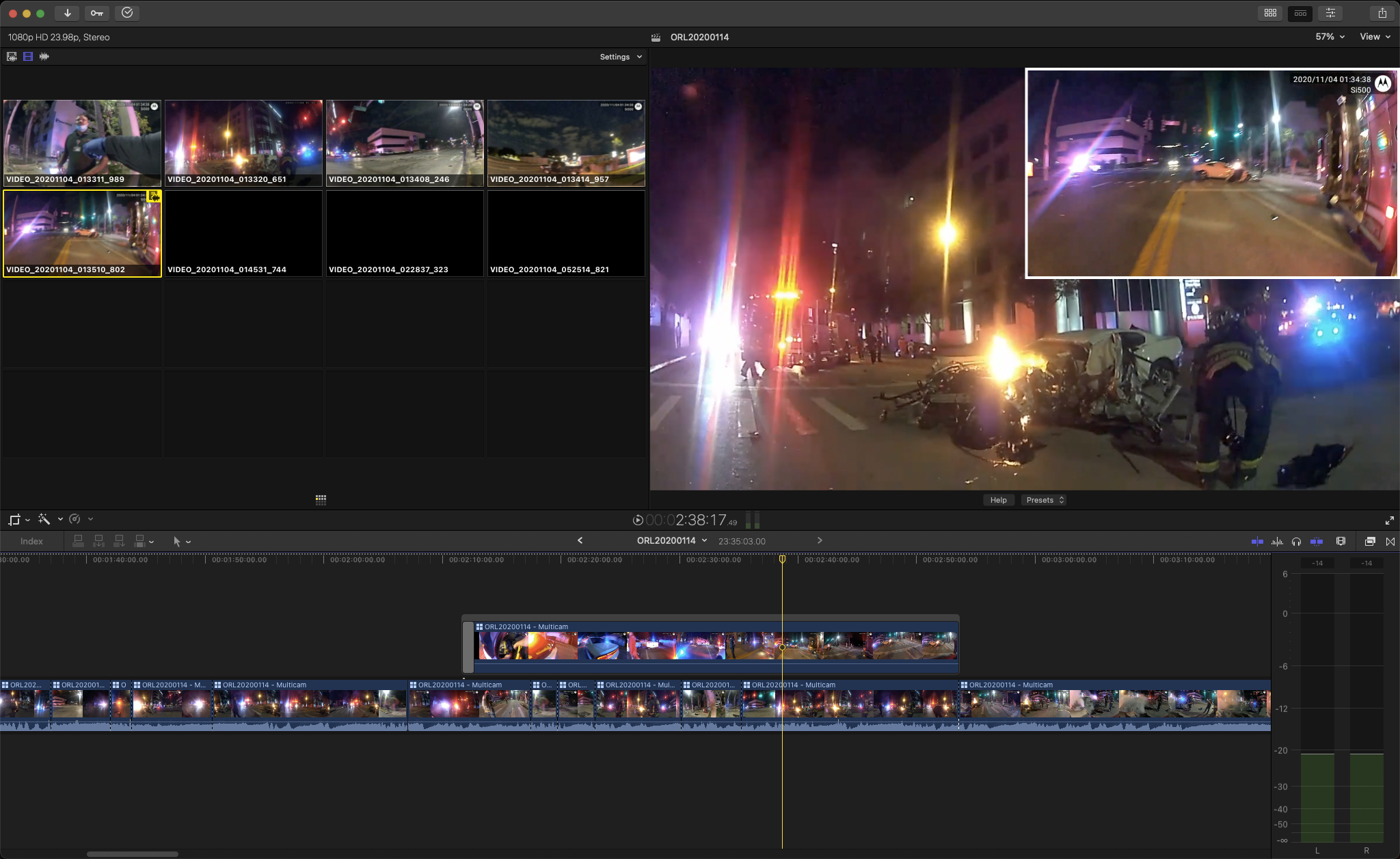
While working on a multicam project, I decided that a segment should include picture-in-picture. The secondary view was to show someone walking toward a scene while the primary view would be from a camera that is already present on scene. When the guy reached the scene, I would fade the PIP and the primary angle would cut to the previously-PIP angle.
No big deal, right?
I option-clicked a timeline segment that contained the PIP angle and dragged it up from the timeline. I then extended it left as needed, trimmed it, and then realized that it was connected to the timeline at the beginning of the clip. I needed the connection point toward or at the end, but the usual cmd+opt+click does nothing.
Screen shot attached.
What am I missing? I don't see any obvious problems with what I am trying to do.
No big deal, right?
I option-clicked a timeline segment that contained the PIP angle and dragged it up from the timeline. I then extended it left as needed, trimmed it, and then realized that it was connected to the timeline at the beginning of the clip. I needed the connection point toward or at the end, but the usual cmd+opt+click does nothing.
Screen shot attached.
What am I missing? I don't see any obvious problems with what I am trying to do.
Please Log in to join the conversation.


29 May 2021 13:52 #114697
by JoeEditor
Replied by JoeEditor on topic Connected clips not working as expected in multicam
You need to highlight and click the Storyline bar at the top. The Storyline itself is connected, not the clip inside of it.
Please Log in to join the conversation.
- Real World Media
-

- Offline
- New Member
-

Less
More
- Posts: 7
- Thank you received: 0
29 May 2021 18:26 #114700
by Real World Media
Replied by Real World Media on topic Connected clips not working as expected in multicam
Thank you 👍
Please Log in to join the conversation.
