


- Posts: 12
- Thank you received: 1
3 Post Moderation Rule for New Boarders (25 Jan 2021)
New boarders will have their posts moderated - Don't worry if you cannot see your post immediately.
Why can't I edit 4k?
- mortonrick
-
 Topic Author
- Offline
- New Member
-

Less
More
23 May 2021 13:26 #114607
by mortonrick
Why can't I edit 4k? was created by mortonrick
I have an iMac Pro - 3.2Ghz - 8 core. I constantly have a problem with stuttering, or worse, when editing - especially 4k. Yesterday I shot a bunch of clips on a GoPro 9 in 4k-60. Transferred the footage to a SanDisk Extreme pro SSD drive connected via USB-C. I chose LEAVE files in place and imported. I dropped all the clips to the timeline. Trying to simply PLAY the clips without stuttering and dropping frames was a problem. I don't get what I'm doing wrong. I watch all these videos where people are zipping along with two or three tracks of 4K and I can barely get one track to play. ?? I must be doing something wrong? Should I be transcoding to a different format?
Please Log in to join the conversation.


23 May 2021 14:08 #114608
by JoeEditor
Replied by JoeEditor on topic Why can't I edit 4k?
GoPro's files do have this issue, they're more compressed than usual. I can edit 4K from my GH4, GH5, iPhone 12 Pro Max, Sony action cam, DJI Phantom Pro, with no issues. But once I drop a GoPro clip in, the nightmare starts. SSD drives don't magically solve every problem. And I'm on an iMac Pro 10-core. Make proxies. What macOS and FCP versions?
Please Log in to join the conversation.
- mortonrick
-
Topic Author
- Offline
- New Member
-
Less
More
- Posts: 12
- Thank you received: 1
23 May 2021 14:26 #114609
by mortonrick
Replied by mortonrick on topic Why can't I edit 4k?
Thanks for the response. I just did a new project and selected PROXY and left the files on the SSD. This seems to work fine. I can play 3 or 4 tracks without any problem. Only issue I see here is you have to wait for the proxies to be transcoded before editing. If there's a bunch of clips, this can take quite a while. I think I did try transcoding to ProRes, but I'm not sure. I'm going to try that now.
Please Log in to join the conversation.
- mortonrick
-
Topic Author
- Offline
- New Member
-
Less
More
- Posts: 12
- Thank you received: 1
23 May 2021 14:29 #114610
by mortonrick
Replied by mortonrick on topic Why can't I edit 4k?
I tried creating Proxies and that seems to work fine. Multi tracks play without a problem. Going to try transcoding to ProRes and see if that works, too.
Please Log in to join the conversation.
- mortonrick
-
Topic Author
- Offline
- New Member
-
Less
More
- Posts: 12
- Thank you received: 1
23 May 2021 14:41 #114611
by mortonrick
Replied by mortonrick on topic Why can't I edit 4k?
Yes... 4K as ProRes works fine, too. So it must be the GoPro files. I'll have to try 4k from my drone and see how that works. Thanks. I guess I'll keep my iMac Pro and not get the new M1 iMac!
Please Log in to join the conversation.
- ronny courtens
-

- Offline
- Moderator
-

Less
More
- Posts: 4455
- Thank you received: 962
23 May 2021 15:50 #114612
by ronny courtens
Replied by ronny courtens on topic Why can't I edit 4k?
Hi Rick, welcome to the forum!
May I ask you a favor? I am doing some testing for a company and I have GoPro Hero 9 4K30p samples that run perfectly smooth in FCP without transcoding. I don't have any 4K60p samples, so I would appreciate if you could send me one of the GoPro 4K60p clips that you are having trouble with.
If you can help me out, you can upload the clip via WeTransfer, Google drive, dropbox or whatever suits you. My email address is ronnycourtens@mac.com
Thank you!
- Ronny
May I ask you a favor? I am doing some testing for a company and I have GoPro Hero 9 4K30p samples that run perfectly smooth in FCP without transcoding. I don't have any 4K60p samples, so I would appreciate if you could send me one of the GoPro 4K60p clips that you are having trouble with.
If you can help me out, you can upload the clip via WeTransfer, Google drive, dropbox or whatever suits you. My email address is ronnycourtens@mac.com
Thank you!
- Ronny
Please Log in to join the conversation.
- Tom Wolsky
-

- Offline
- Moderator
-
23 May 2021 15:55 #114613
by Tom Wolsky
Replied by Tom Wolsky on topic Why can't I edit 4k?
To add to what Ronny said, if you could share the link on the forum it would be very helpful and greatly appreciated.
Please Log in to join the conversation.
- mortonrick
-
Topic Author
- Offline
- New Member
-
Less
More
- Posts: 12
- Thank you received: 1
23 May 2021 16:21 #114614
by mortonrick
Replied by mortonrick on topic Why can't I edit 4k?
Please Log in to join the conversation.
- Tom Wolsky
-
- Offline
- Moderator
-
23 May 2021 16:26 #114615
by Tom Wolsky
Replied by Tom Wolsky on topic Why can't I edit 4k?
Thank you very much.
Please Log in to join the conversation.
- ronny courtens
-
- Offline
- Moderator
-
Less
More
- Posts: 4455
- Thank you received: 962
23 May 2021 16:37 #114616
by ronny courtens
Replied by ronny courtens on topic Why can't I edit 4k?
Thank you, Rick.
All your clips play perfectly smooth in native format without any transcoding on a 4K60p timeline and in Best Quality on a M1 MBP with 8GB RAM.
I have put 3 of them in multicam on a 4K60p timeline and multicam editing also runs without any dropped frames at Better Performance without the need to create proxy or optimized media.
I will upload a little video soon to show the results. BTW: great footage!!
- Ronny
All your clips play perfectly smooth in native format without any transcoding on a 4K60p timeline and in Best Quality on a M1 MBP with 8GB RAM.
I have put 3 of them in multicam on a 4K60p timeline and multicam editing also runs without any dropped frames at Better Performance without the need to create proxy or optimized media.
I will upload a little video soon to show the results. BTW: great footage!!
- Ronny
Please Log in to join the conversation.
- mortonrick
-
Topic Author
- Offline
- New Member
-
Less
More
- Posts: 12
- Thank you received: 1
23 May 2021 16:40 #114617
by mortonrick
Replied by mortonrick on topic Why can't I edit 4k?
Thanks. But I thought you had an iMac Pro ? I don't think we can compare my iMac to an M1 Macbook. ??
I initially dropped the clips into a 4k/60 timeline and it was pretty awful. Is there something I'm missing?
I initially dropped the clips into a 4k/60 timeline and it was pretty awful. Is there something I'm missing?
Please Log in to join the conversation.
- mortonrick
-
Topic Author
- Offline
- New Member
-
Less
More
- Posts: 12
- Thank you received: 1
23 May 2021 16:46 #114618
by mortonrick
Replied by mortonrick on topic Why can't I edit 4k?
I tried again dropping 4k/60 clips to a new timeline and 4k/59.94 and one clip plays but put another on top and it starts to stutter. Looks like the timeline is rendering something... I guess the layers. Nope.... timeline is rendered and it won't play two PIP over bottom layer.
Please Log in to join the conversation.
- mortonrick
-
Topic Author
- Offline
- New Member
-
Less
More
- Posts: 12
- Thank you received: 1
23 May 2021 16:51 #114619
by mortonrick
Replied by mortonrick on topic Why can't I edit 4k?
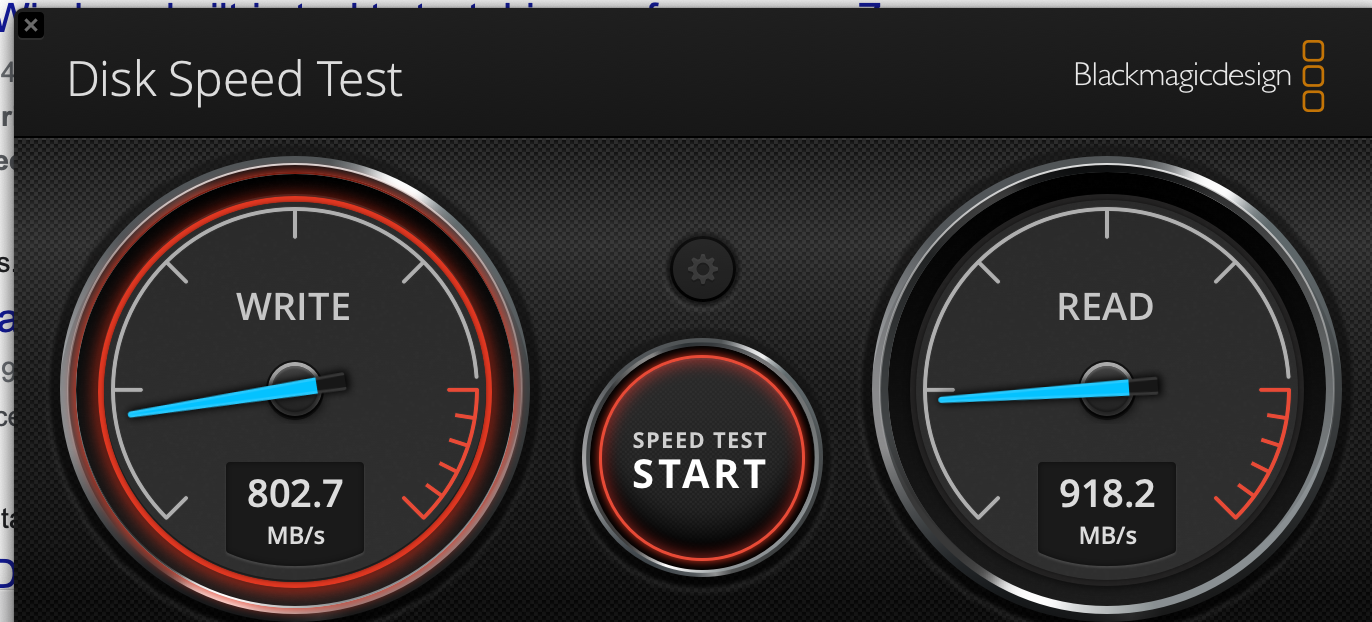
Just checked the SSD drive speed with the BlackMagic app. Read/write average 860-900. Shouldn't that be ok?
Please Log in to join the conversation.
- ronny courtens
-
- Offline
- Moderator
-
Less
More
- Posts: 4455
- Thank you received: 962
23 May 2021 16:58 #114620
by ronny courtens
Replied by ronny courtens on topic Why can't I edit 4k?
I have several Macs but I am testing M1 Macs now and I have ran your footage on a M1 MacBookPro without any issues.
I have also tried one of your clip with a PIP on top and both clips run natively without any dropped frames in Best Quality on the M1 MBP.
This has nothing to do with your external SSD, that speed is great. I have done the same test on an Intel iMac 27" 5K Retina with 32GB RAM and the PIP does not play at all.
One correction I need to make: when testing the multicam on the M1, I had "create optimized media for multicam" enabled in my preferences. So that was a false result. The multicam does not run without dropped frames in native format. But single clips do run smoothly without any transcoding, as do PIPs.
- Ronny
I have also tried one of your clip with a PIP on top and both clips run natively without any dropped frames in Best Quality on the M1 MBP.
This has nothing to do with your external SSD, that speed is great. I have done the same test on an Intel iMac 27" 5K Retina with 32GB RAM and the PIP does not play at all.
One correction I need to make: when testing the multicam on the M1, I had "create optimized media for multicam" enabled in my preferences. So that was a false result. The multicam does not run without dropped frames in native format. But single clips do run smoothly without any transcoding, as do PIPs.
- Ronny
Please Log in to join the conversation.
- Tom Wolsky
-
- Offline
- Moderator
-
23 May 2021 17:01 - 23 May 2021 17:02 #114621
by Tom Wolsky
Replied by Tom Wolsky on topic Why can't I edit 4k?
The problem is not the drive, but the ability of the system to process the HEVC when it's scaled. I find the problem occurs immediately at the transition from the full screen to the overlaid PIPs. If I pause and play again, playback is OK. Again, this is going to depend I think entirely on the system's ability to process the HEVC, which is quite a bit more difficult that H.264. The bit rate doesn't seem exceptionally low. This is also on an M1 MBP.
Last edit: 23 May 2021 17:02 by Tom Wolsky.
Please Log in to join the conversation.
- mortonrick
-
Topic Author
- Offline
- New Member
-
Less
More
- Posts: 12
- Thank you received: 1
23 May 2021 17:05 #114622
by mortonrick
Replied by mortonrick on topic Why can't I edit 4k?
Thanks for the help. I guess I just need to transcode GoPro footage before editing. I have a Canon 80D so don't have 4k in that format to test. I do have Mavic footage tho', so I'll look at that again.
Please Log in to join the conversation.
- mortonrick
-
Topic Author
- Offline
- New Member
-
Less
More
- Posts: 12
- Thank you received: 1
23 May 2021 17:14 #114623
by mortonrick
Replied by mortonrick on topic Why can't I edit 4k?
I can play the 4k/30 .mov files from the Mavic Air 2 with no problem. Even with 2 PIPs, it plays, even tho' the timeline is still showing the little "not rendered yet" dots. Inspector says codec is AVC1. ??
Please Log in to join the conversation.
- Tom Wolsky
-
- Offline
- Moderator
-
23 May 2021 17:22 #114624
by Tom Wolsky
Replied by Tom Wolsky on topic Why can't I edit 4k?
avc1 is H.264.
Please Log in to join the conversation.
- ronny courtens
-
- Offline
- Moderator
-
Less
More
- Posts: 4455
- Thank you received: 962
23 May 2021 17:25 #114625
by ronny courtens
Replied by ronny courtens on topic Why can't I edit 4k?
Hi Rick,
The Hero 9 records HEVC (H.265). That is very different from your Mavic footage, plus the frame rate of your GoPro footage is twice as high.
As Tom says, it all depends on how good your system is at processing HEVC. It looks like your Intel iMac is not really fit for this. So yes, you will need to optimize your footage.
OTOH, the M1 MBP seems to process these files without any issues. This is a recording of one of your clips with two PIPs on top playing smoothly on a 4K60p timeline in FCP without any transcoding or rendering:
- Ronny
The Hero 9 records HEVC (H.265). That is very different from your Mavic footage, plus the frame rate of your GoPro footage is twice as high.
As Tom says, it all depends on how good your system is at processing HEVC. It looks like your Intel iMac is not really fit for this. So yes, you will need to optimize your footage.
OTOH, the M1 MBP seems to process these files without any issues. This is a recording of one of your clips with two PIPs on top playing smoothly on a 4K60p timeline in FCP without any transcoding or rendering:
- Ronny
Please Log in to join the conversation.
- Tom Wolsky
-
- Offline
- Moderator
-
23 May 2021 17:30 #114626
by Tom Wolsky
Replied by Tom Wolsky on topic Why can't I edit 4k?
The M1 MBP processor is faster than any Intel Mac. For instance, the M1 machine can export 10-bit HEVC more twice as fast as the 2019 16" MBP. HEVC is very processor intensive and that's where the integrated M1 RAM and GPU crush any Intel chip.
Please Log in to join the conversation.
