




- Posts: 7
- Thank you received: 0
3 Post Moderation Rule for New Boarders (25 Jan 2021)
New boarders will have their posts moderated - Don't worry if you cannot see your post immediately.
Rendering Bug?
29 Apr 2021 08:07 #114210
by yvesbou
Rendering Bug? was created by yvesbou
Hey everyone!
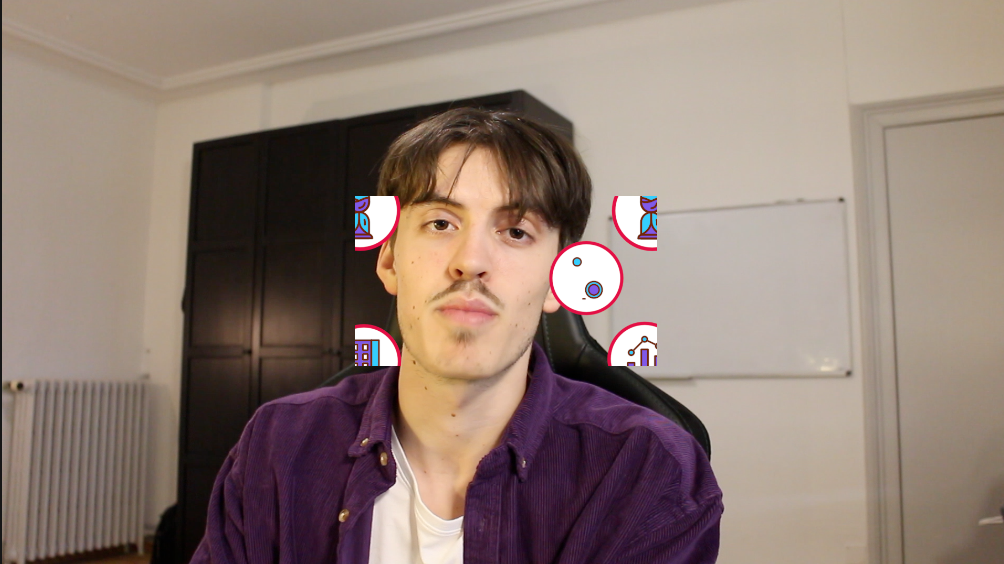
I work on a project where I wanted to add some titles from a package. However they are only visible within a square that is in the middle of the screen. To illustrate that I made a screen shot (placed them at the edge where they become invisible). I tried it with nearly every clip from the time-line and I got the same results.
I found this page ( blog.frame.io/2016/09/13/recognize-fix-common-problems-fcpx/ ) and he suggested that by deleting the render files you can solve the problem of a corrupted time-line (but I am not sure if it that is the problem). I tried it anyway and it didn't help.
Any advice is appreciated!
I work on a project where I wanted to add some titles from a package. However they are only visible within a square that is in the middle of the screen. To illustrate that I made a screen shot (placed them at the edge where they become invisible). I tried it with nearly every clip from the time-line and I got the same results.
I found this page ( blog.frame.io/2016/09/13/recognize-fix-common-problems-fcpx/ ) and he suggested that by deleting the render files you can solve the problem of a corrupted time-line (but I am not sure if it that is the problem). I tried it anyway and it didn't help.
Any advice is appreciated!
Please Log in to join the conversation.


29 Apr 2021 12:19 #114215
by JoeEditor
Replied by JoeEditor on topic Rendering Bug?
What specific title template are you using?
Yes, some templates are created so that the content is restrained to a specific area, I have several that do this. So it's not a problem to be fixed, it's how the template works. You could always enlarge the size via clip adjustments (scale). Or right-click the template in the Browser and open it in Motion to modify it.
Yes, some templates are created so that the content is restrained to a specific area, I have several that do this. So it's not a problem to be fixed, it's how the template works. You could always enlarge the size via clip adjustments (scale). Or right-click the template in the Browser and open it in Motion to modify it.
Please Log in to join the conversation.
29 Apr 2021 12:45 - 29 Apr 2021 12:46 #114217
by yvesbou
Replied by yvesbou on topic Rendering Bug?
How do you mean, which template? It's from this package:
videohive.net/item/fcp-titles-250/19492180
I don't think that is the case here, because it worked fine with my last video.
I don't think that is the case here, because it worked fine with my last video.

Last edit: 29 Apr 2021 12:46 by yvesbou.
Please Log in to join the conversation.
