


- Posts: 18
- Thank you received: 0
3 Post Moderation Rule for New Boarders (25 Jan 2021)
New boarders will have their posts moderated - Don't worry if you cannot see your post immediately.
Really strange Codec problem... maybe.
- timearthur
-
 Topic Author
- Offline
- New Member
-

Less
More
28 Apr 2021 19:30 #114190
by timearthur
Really strange Codec problem... maybe. was created by timearthur
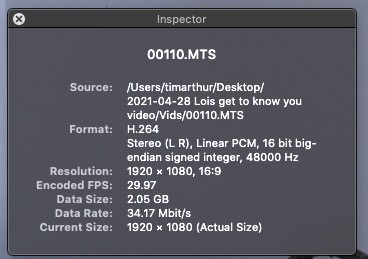
A pro videographer in another state shot footage for me, and sent four .MTS files via Google Drive. Two are from the A-camera and they're fine. Two from the B-cam have fine video but 0dB audio. When I load B into FCPX, I can see the waveform and the audio inspector shows it actively playing, but again, no audio from the same speakers that the A-clips work fine from. Even more strange, the pro videographer verified on his end, he can hear B, fine. So, out of curiosity, I uploaded both Bs to a shared Dropbox folder and guess what, he can hear the audio fine. This tells me that my iMac doesn't have the codec his camera used to render the MTS.... but I'm just guessing. So, attached is a screen grab of the technical info about a B clip, per the QuickTime player.
I've never needed to update a codec on my iMac so if it she culprit here, how is that done?
Thanks so much, I really appreciate it.
Tim
I've never needed to update a codec on my iMac so if it she culprit here, how is that done?
Thanks so much, I really appreciate it.
Tim
Please Log in to join the conversation.
- Tom Wolsky
-

- Offline
- Moderator
-

28 Apr 2021 19:37 #114191
by Tom Wolsky
Replied by Tom Wolsky on topic Really strange Codec problem... maybe.
Looks like it's AVCHD, and that the cameraman opened the bundle and extracted the video stream. This is a really dumb thing to do. He should send you the entire contents of the card so you don't lose any metadata the camera might provide. I would suggest either getting it refed to you, or using EditReady to rewrap the files to QuickTime.
Please Log in to join the conversation.


28 Apr 2021 20:29 #114192
by joema
Replied by joema on topic Really strange Codec problem... maybe.
Like Tom said, you normally want the entire AVCHD package but it's unfortunately common for people to yank the MTS files out. On my iMac Pro running Catalina and Mac Pro Video Formats 2.2.1, I can usually import to FCP and play the MTS files I have. However there are various versions.
If the files were not zipped or otherwise safeguarded, they could have been damaged during upload/download. Zip files have embedded checksum data, so if they unzip/uncompress with no error, they are guaranteed free from damage during transmission.
If the other guy used Resolve's "media management" copy feature to trim the clips, that is very buggy and often will damage the output files. I've seen cases where Resolve Studio 17.1.1 damages the trimmed video but audio plays, or damages the audio yet video plays or totally wrecks the file.
If the files were not zipped or otherwise safeguarded, they could have been damaged during upload/download. Zip files have embedded checksum data, so if they unzip/uncompress with no error, they are guaranteed free from damage during transmission.
If the other guy used Resolve's "media management" copy feature to trim the clips, that is very buggy and often will damage the output files. I've seen cases where Resolve Studio 17.1.1 damages the trimmed video but audio plays, or damages the audio yet video plays or totally wrecks the file.
Please Log in to join the conversation.
- timearthur
-
Topic Author
- Offline
- New Member
-
Less
More
- Posts: 18
- Thank you received: 0
28 Apr 2021 20:36 #114193
by timearthur
Replied by timearthur on topic Really strange Codec problem... maybe.
Sounds like we got lucky with the MTS extraction from the AVCHD from the A-cam, but the B-cam not so much. The videographer is re-rendering to MP4 so I think we will be all set given it's not from the AVCHD library. Thank you both I appreciate it!
Please Log in to join the conversation.

28 Apr 2021 21:44 #114197
by JoeEditor
Replied by JoeEditor on topic Really strange Codec problem... maybe.
See if Handbreak can read that file and make you an H.264 from it.
Please Log in to join the conversation.
- timearthur
-
Topic Author
- Offline
- New Member
-
Less
More
- Posts: 18
- Thank you received: 0
28 Apr 2021 22:20 #114203
by timearthur
Replied by timearthur on topic Really strange Codec problem... maybe.
Ben, I tried that earlier. At any rate, am awaiting a new MP4 build from the remote company I am working with.
Please Log in to join the conversation.
