


- Posts: 10
- Thank you received: 1
3 Post Moderation Rule for New Boarders (25 Jan 2021)
New boarders will have their posts moderated - Don't worry if you cannot see your post immediately.
Creating interlaced h.264 in Compressor
- robkennedy
-
 Topic Author
- Offline
- New Member
-

Less
More
22 Apr 2021 14:00 #114108
by robkennedy
Creating interlaced h.264 in Compressor was created by robkennedy
Hello all,
I'd like to generate an interlaced h.264 file in Compressor, but every option that I can see defaults to progressive (and doesn't let you change it).
I found this article from 2017 which says you should switch to Faster Encode to open up the interlaced option - support.apple.com/en-am/HT205071 . However, this option is not available in the latest version of Compressor (I'm using 4.5.1).
I know that it should be possible to do - even FCP can do it (Share > Master File > H.264 will export as interlaced or progressive depending on the format of your Project).
Any thoughts?
Thanks,
Rob
I'd like to generate an interlaced h.264 file in Compressor, but every option that I can see defaults to progressive (and doesn't let you change it).
I found this article from 2017 which says you should switch to Faster Encode to open up the interlaced option - support.apple.com/en-am/HT205071 . However, this option is not available in the latest version of Compressor (I'm using 4.5.1).
I know that it should be possible to do - even FCP can do it (Share > Master File > H.264 will export as interlaced or progressive depending on the format of your Project).
Any thoughts?
Thanks,
Rob
Please Log in to join the conversation.
- Tom Wolsky
-

- Offline
- Moderator
-

22 Apr 2021 14:21 #114109
by Tom Wolsky
Replied by Tom Wolsky on topic Creating interlaced h.264 in Compressor
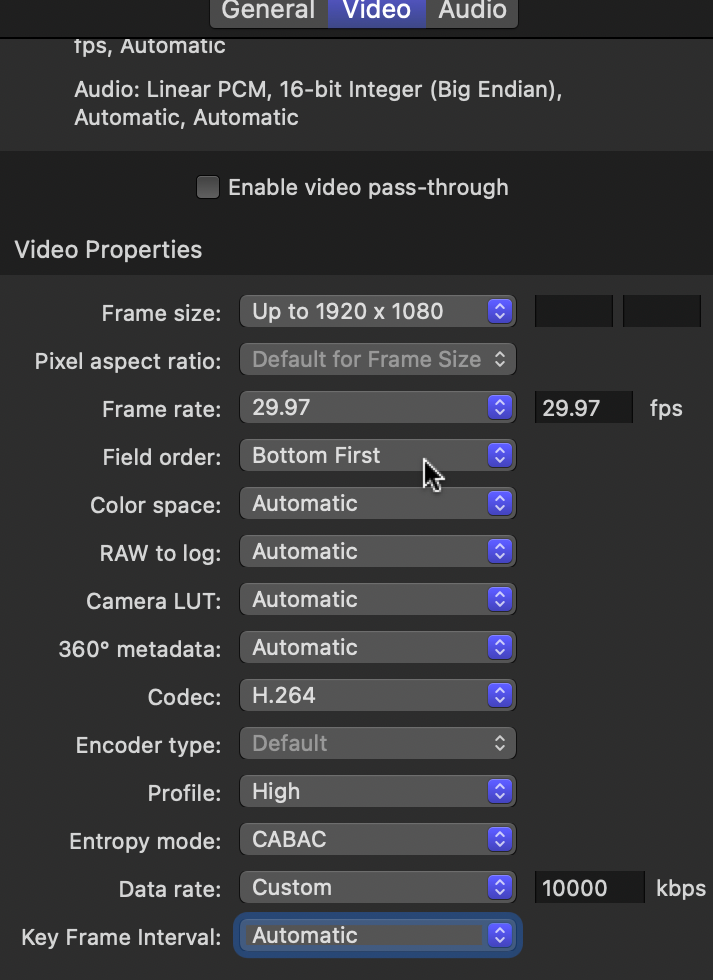
Click the + in the lower left to make a custom preset. Select QuickTime or MPEG-4. Set it up how you like.
Please Log in to join the conversation.
- robkennedy
-
Topic Author
- Offline
- New Member
-
Less
More
- Posts: 10
- Thank you received: 1
22 Apr 2021 15:00 #114110
by robkennedy
Replied by robkennedy on topic Creating interlaced h.264 in Compressor
Hi Tom,
Yep, tried that. As soon as I change the codec to h.264 the field order changes to progressive...
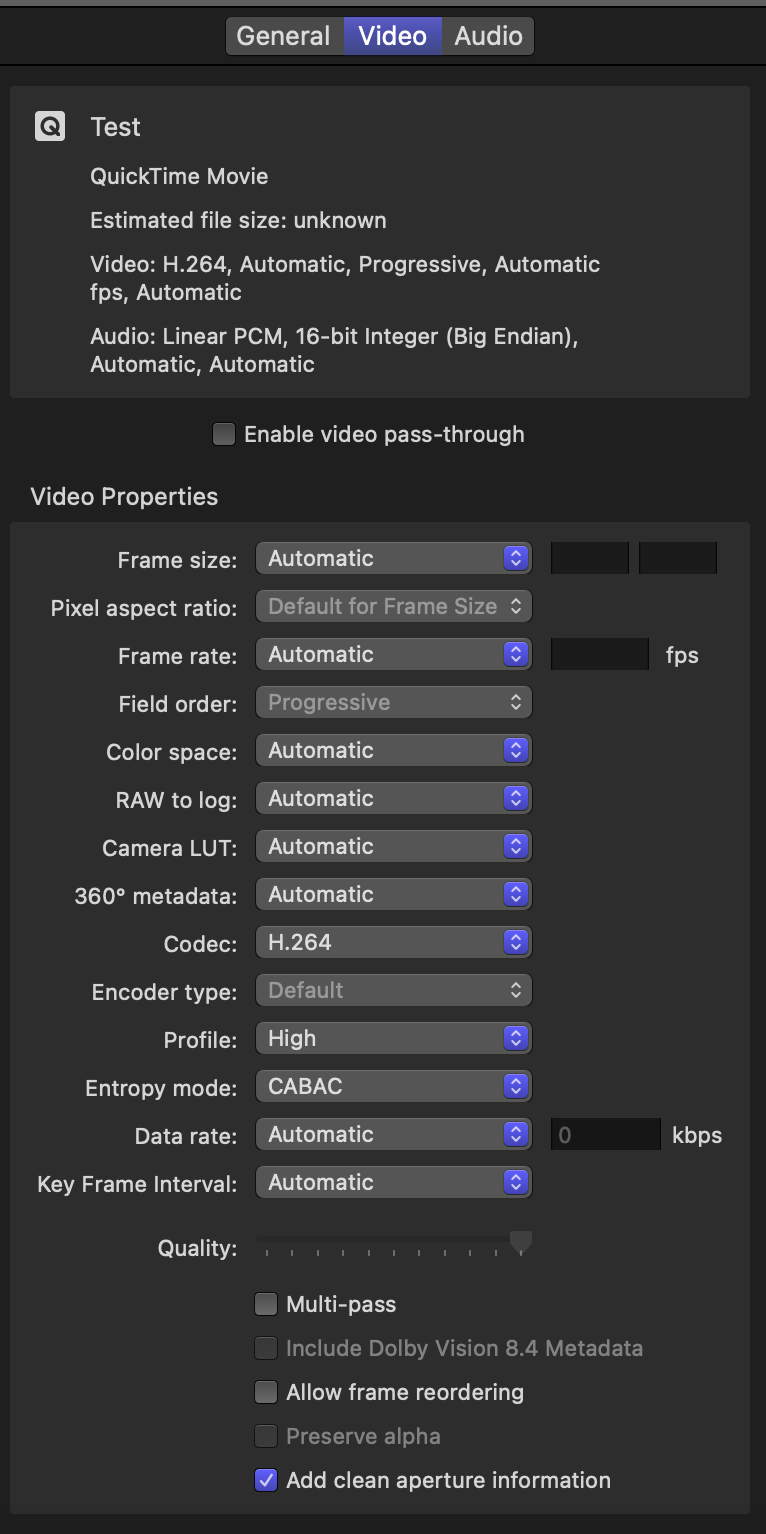
Although I notice from your screenshot that you are specifying a frame rate (29.97). As soon as I specify a frame rate (in my case 25fps) then the field order options are available.
So basically you can't create a template for any frame rate (ie leaving it in Automatic), you have to specify in order to change the field order.
How annoying! Ideally I'd want to use this as a template to keep the original frame rate and field order as the original by using Automatic, but for now I'll specify a rate and see how it goes.
Thanks for the quick answer though - much appreciated!
Rob
Yep, tried that. As soon as I change the codec to h.264 the field order changes to progressive...
Although I notice from your screenshot that you are specifying a frame rate (29.97). As soon as I specify a frame rate (in my case 25fps) then the field order options are available.
So basically you can't create a template for any frame rate (ie leaving it in Automatic), you have to specify in order to change the field order.
How annoying! Ideally I'd want to use this as a template to keep the original frame rate and field order as the original by using Automatic, but for now I'll specify a rate and see how it goes.
Thanks for the quick answer though - much appreciated!
Rob
Please Log in to join the conversation.
- Tom Wolsky
-
- Offline
- Moderator
-
22 Apr 2021 15:23 #114111
by Tom Wolsky
Replied by Tom Wolsky on topic Creating interlaced h.264 in Compressor
Yes, you have to specify the frame rate. You can leave it as a preset and then change, it should you have some other frame rate of rate. You can't have it on automatic because you can't have higher frame rates as interlaced.
Please Log in to join the conversation.
- robkennedy
-
Topic Author
- Offline
- New Member
-
Less
More
- Posts: 10
- Thank you received: 1
22 Apr 2021 15:42 #114112
by robkennedy
Replied by robkennedy on topic Creating interlaced h.264 in Compressor
Understood - thanks Tom
Please Log in to join the conversation.
- Steve McGarrigle
-

- Offline
- Premium Member
-

23 Apr 2021 16:36 - 23 Apr 2021 16:40 #114124
by Steve McGarrigle
Replied by Steve McGarrigle on topic Creating interlaced h.264 in Compressor
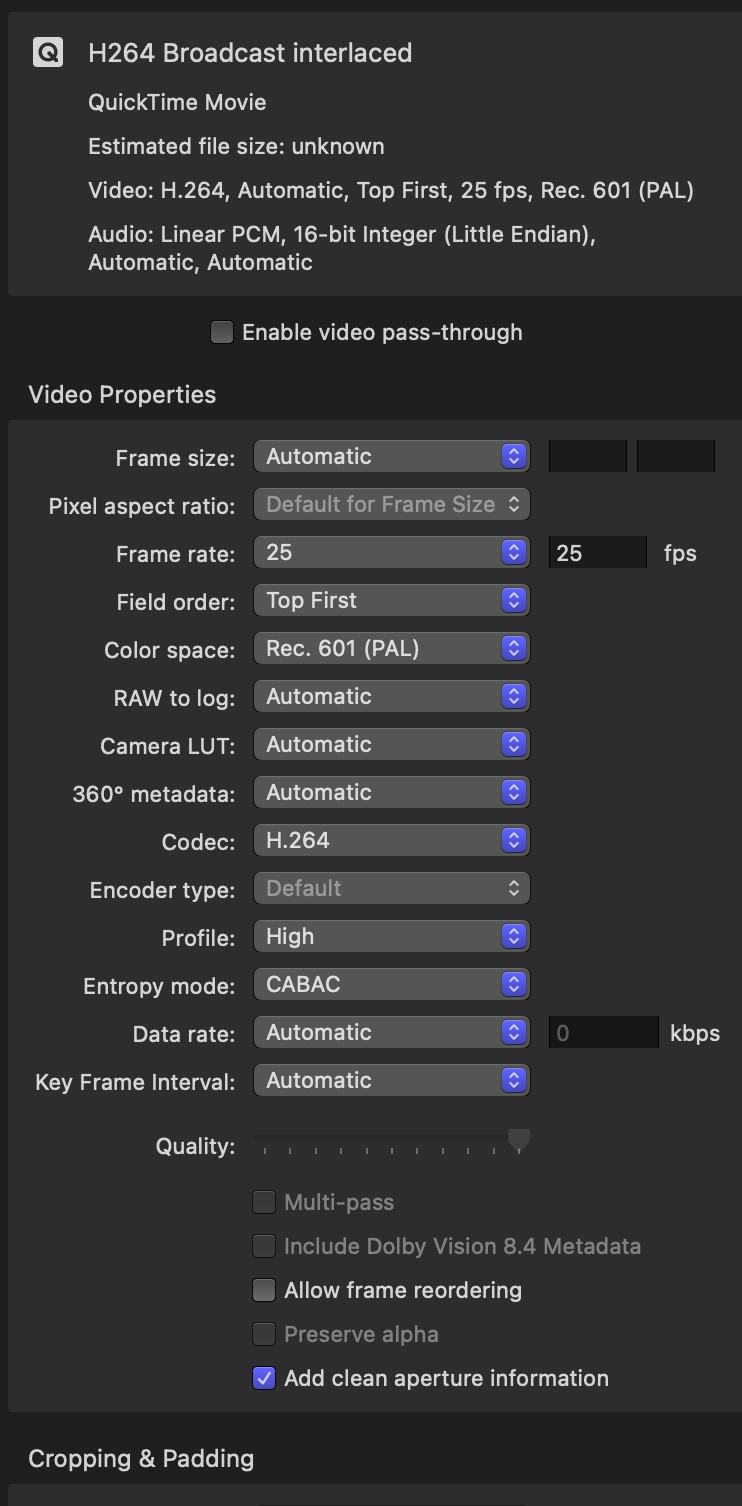
I've used this setup successfully. Upper field first for broadcast and pretty much everything except 'DV'. ( I'd be surprised if anyone was using DV this days. ) It's pretty annoying that interlaced video is still around, but that's TV for you!
Last edit: 23 Apr 2021 16:40 by Steve McGarrigle.
Please Log in to join the conversation.
- robkennedy
-
Topic Author
- Offline
- New Member
-
Less
More
- Posts: 10
- Thank you received: 1
23 Apr 2021 16:39 #114125
by robkennedy
Replied by robkennedy on topic Creating interlaced h.264 in Compressor
Thanks Steve - I hate fields too - wish we'd gone 50p when we went HD
Please Log in to join the conversation.
- Steve McGarrigle
-
- Offline
- Premium Member
-
23 Apr 2021 16:45 - 23 Apr 2021 16:48 #114126
by Steve McGarrigle
Replied by Steve McGarrigle on topic Creating interlaced h.264 in Compressor
Hope you got it all sorted - I remember a lot of faffing around with the same issues when I made that preset. I was tempted to do it in Media Encoder but I can usually resolve most issues within the three hours it takes for Media Encoder to open. Lol!
Last edit: 23 Apr 2021 16:48 by Steve McGarrigle.
Please Log in to join the conversation.
- robkennedy
-
Topic Author
- Offline
- New Member
-
Less
More
- Posts: 10
- Thank you received: 1
23 Apr 2021 17:25 #114128
by robkennedy
Replied by robkennedy on topic Creating interlaced h.264 in Compressor
I'm getting there - interlaced/progressive is working for me now, but I'm faffing about with audio. I'd like to get stereo and multiple mono's to work depending on source - Audio passthrough works a treat but at a size cost.
Work in progress!
Work in progress!
Please Log in to join the conversation.
