




- Posts: 3
- Thank you received: 0
3 Post Moderation Rule for New Boarders (25 Jan 2021)
New boarders will have their posts moderated - Don't worry if you cannot see your post immediately.
Multicam stacking and storylines. Best workflow?
14 Apr 2021 02:53 #113947
by Tash
Multicam stacking and storylines. Best workflow? was created by Tash
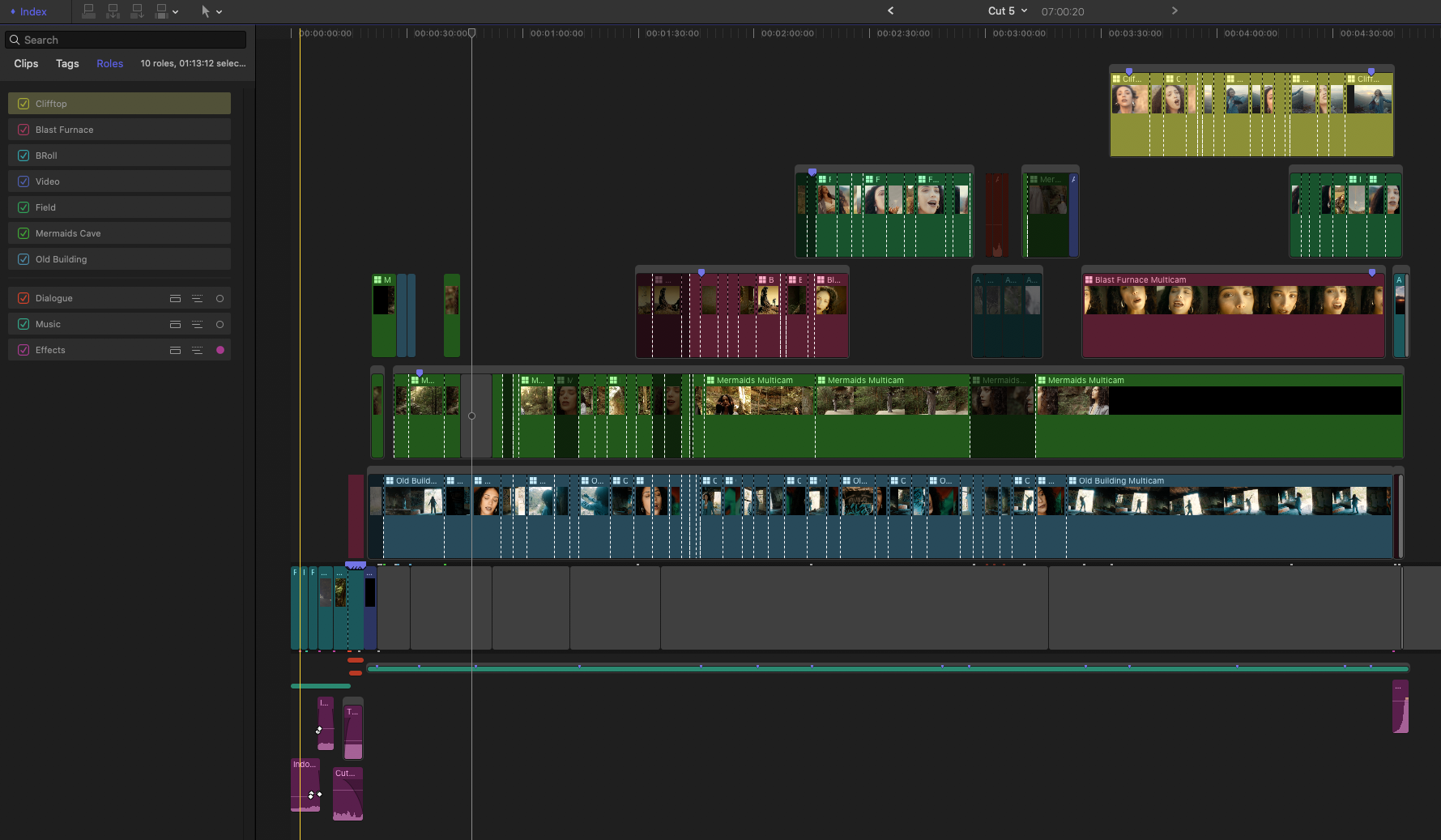
Hi, I am currently editing a music video and have a timeline that is getting out of hand very quick (see attached screenshot) so I was hoping for some advice. I have 5 different locations with 10-15 angles in each location, so I have made multicam clips of each location all synced and stacked in storylines. I am not sure if there is any advantage using storylines but it helps me keep things 'contained'! Would this be the best way to work for this sort of edit? When cutting to a different location I was thinking I could lift clips from the storyline and delete them. The real mess begins when I start to add B-Roll. Maybe that should be in it's own storyline too? I'd appreciate any advice. Thanks
Please Log in to join the conversation.


15 Apr 2021 02:06 #113979
by JoeEditor
Replied by JoeEditor on topic Multicam stacking and storylines. Best workflow?
I don't see anything wrong with that you're doing. Seems to be working just fine. Only thing I'd do different is put the music in the primary storyline. The music in a "music video" is the spinal column of your story, nothing about it changes, everything else is built around it. I never understood why folks don't put the music track in the primary storyline for a music video. I saw someone yesterday in an online seminar say they'd not do it, but never explained why not. I don't get putting Gap clips in the primary storyline, when the music is the very foundation of the video. Other than that, I think you have things well under control.
Please Log in to join the conversation.
15 Apr 2021 03:06 #113980
by Tash
Replied by Tash on topic Multicam stacking and storylines. Best workflow?
Thanks for your reply Ben. Yes, I am not sure why I haven't put the music in the primary storyline as that makes sense! It'is probably because I've never edited a music video before so I did that out of habit.
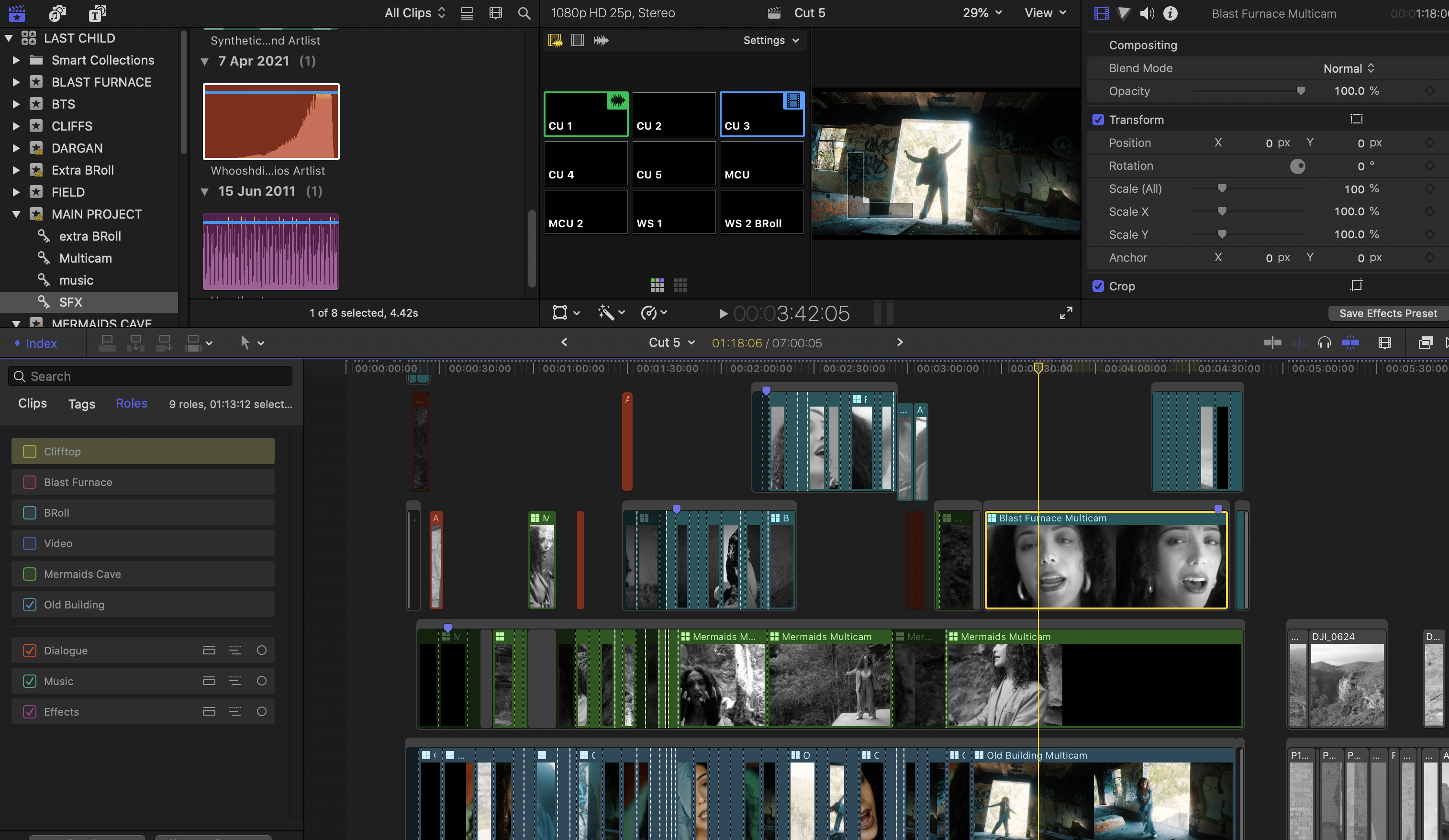
The only issue with the storylines is if I just want to work on a particular one and view it in the angle editor, I uncheck all the other video tracks Roles and my angle editor comes up with black (see screenshot). I do see the blue outline of it switching. Strange. It's a big project but I am working with proxies so playback should be ok. Anyway, to get around this I have to manually select the clips in the storylines above and disable them. It would be nice to have a 'solo' function like the audio roles. I have also tried clip soloing the particular multicam I want to work on and everything goes grey except the selected multicam but it still shows other storylines above. Which made me wonder if working with storylines in this scenario was the best way to go about things.
The only issue with the storylines is if I just want to work on a particular one and view it in the angle editor, I uncheck all the other video tracks Roles and my angle editor comes up with black (see screenshot). I do see the blue outline of it switching. Strange. It's a big project but I am working with proxies so playback should be ok. Anyway, to get around this I have to manually select the clips in the storylines above and disable them. It would be nice to have a 'solo' function like the audio roles. I have also tried clip soloing the particular multicam I want to work on and everything goes grey except the selected multicam but it still shows other storylines above. Which made me wonder if working with storylines in this scenario was the best way to go about things.
Please Log in to join the conversation.
17 Apr 2021 19:28 #114031
by JoeEditor
Replied by JoeEditor on topic Multicam stacking and storylines. Best workflow?
I'd not have stacks like that. I'd have one storyline above the primary storyline (which would have the music track). I'd simply go along, select the range of a multicam clip in the Browser, the range that goes in that part of the music video. Place that into the connected storyline, edit it. I'd not stack multicames like that. Totally delete the sections of multicam clips not being used. Get rid of all the garbage, focus on only what's necessary. That many multicam clips will tax the hell out of any system.
Please Log in to join the conversation.
18 Apr 2021 01:30 #114034
by Tash
Replied by Tash on topic Multicam stacking and storylines. Best workflow?
Yes, I think that is the way to go. Too much clutter is both hard on the system and hard to make good editing decisions! Thanks for taking the time to reply.
Please Log in to join the conversation.
