



- Posts: 1
- Thank you received: 0
3 Post Moderation Rule for New Boarders (25 Jan 2021)
New boarders will have their posts moderated - Don't worry if you cannot see your post immediately.
ISSUE: Sound effects reducing/effecting background music volumes...
29 Mar 2021 12:44 - 29 Mar 2021 15:09 #113740
by zegeli
I am facing a really strange issue. When I add SFX or have broll clips with sounds like barks, drops etc, the background music on my time line loses volume.
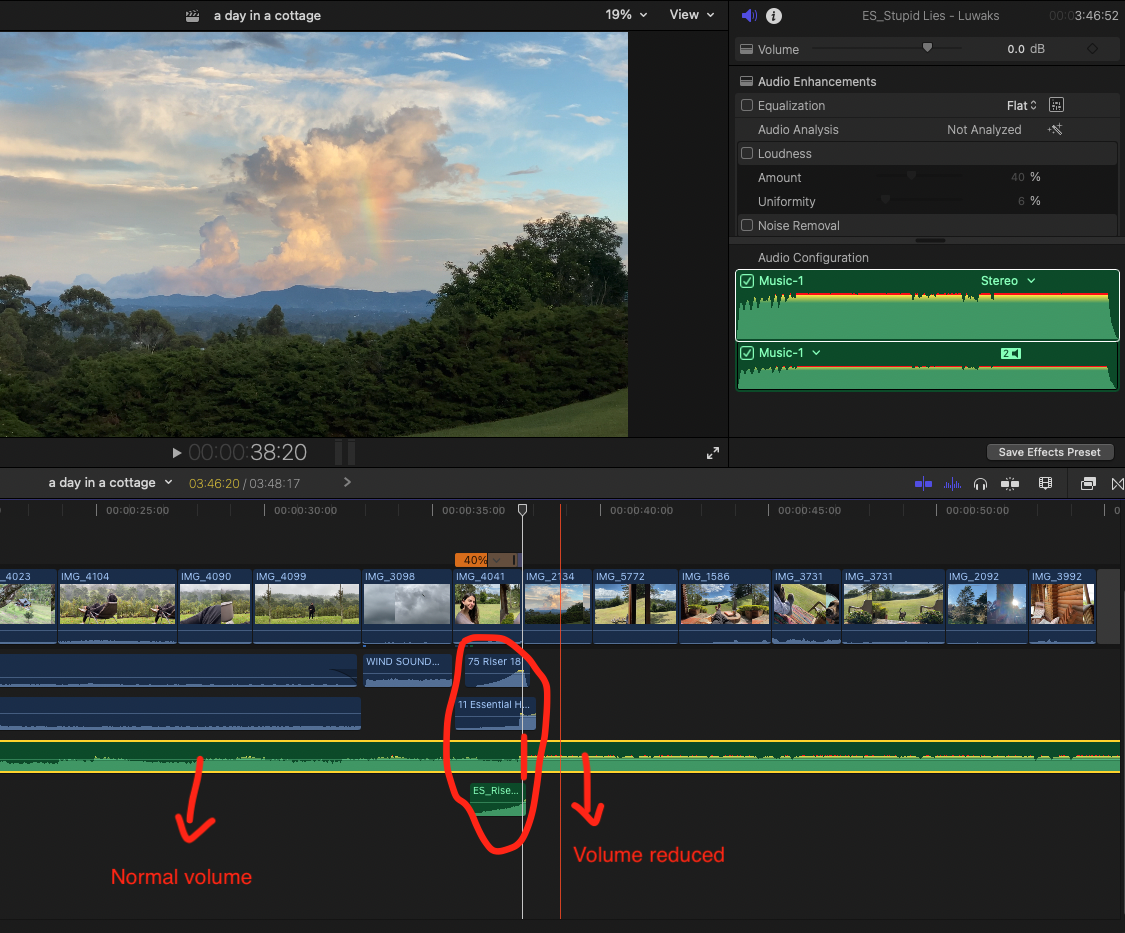
Let me try to explain with the image below. (Screenshot)
If I disable the SFXs on that screenshot below (riser + riser + hit), the background music continues flawlessly. But when I enable those three SFXs, background music immediately looses volume right after that point. The music volume actually never changes on settings. Meaning Volume level is 0.0 dB all around. BUT volume reduces noticeably after the SFX when you are listening. As soon as I disable or delete the SFX volume comes back. So this is not something I can fix from the settings. Seemingly there is no volume change on FCPX audio dashboard. I just cannot make sense of it. Seems like sound effects, or loud video clip sounds effect the background music and reduces volume automatically.
NOTE: here is the screenshot link, also attached as a file,
ibb.co/gdXq7dP
I also have a clip where there is a dog barking. The sound of that dog bark also has the same effect. I have to disable the dog bark to prevent the background music sounds to lower automatically.
Any idea what is going on here? Started to face this issue a lot... Sound effects like barks, hits, drops, risers seems to trigger this. I never have this issue with flat, none peaking sound effects...
On another note I think the more sound effects I pile on a timeline the more dramatic volume drop is. In that screenshot I have 3 SFX piled on top of each other. And all three separately lowers the volume.
Why would SFX or sharp sounds effect background music? Any ideas how I can prevent this from happening? Right now the only way to maintain a stable background music volume is to disable certain SFXs. Birds, wind sound effects, atmospheric effects never triggers this issue....
Please help!! I Googled but cannot seem to find anything. Dont know if this is something common. Thanks,
Let me try to explain with the image below. (Screenshot)
If I disable the SFXs on that screenshot below (riser + riser + hit), the background music continues flawlessly. But when I enable those three SFXs, background music immediately looses volume right after that point. The music volume actually never changes on settings. Meaning Volume level is 0.0 dB all around. BUT volume reduces noticeably after the SFX when you are listening. As soon as I disable or delete the SFX volume comes back. So this is not something I can fix from the settings. Seemingly there is no volume change on FCPX audio dashboard. I just cannot make sense of it. Seems like sound effects, or loud video clip sounds effect the background music and reduces volume automatically.
NOTE: here is the screenshot link, also attached as a file,
ibb.co/gdXq7dP
I also have a clip where there is a dog barking. The sound of that dog bark also has the same effect. I have to disable the dog bark to prevent the background music sounds to lower automatically.
Any idea what is going on here? Started to face this issue a lot... Sound effects like barks, hits, drops, risers seems to trigger this. I never have this issue with flat, none peaking sound effects...
On another note I think the more sound effects I pile on a timeline the more dramatic volume drop is. In that screenshot I have 3 SFX piled on top of each other. And all three separately lowers the volume.
Why would SFX or sharp sounds effect background music? Any ideas how I can prevent this from happening? Right now the only way to maintain a stable background music volume is to disable certain SFXs. Birds, wind sound effects, atmospheric effects never triggers this issue....
Please help!! I Googled but cannot seem to find anything. Dont know if this is something common. Thanks,
Last edit: 29 Mar 2021 15:09 by zegeli.
Please Log in to join the conversation.
- Pflipsen Films
-

- Offline
- New Member
-

Less
More
- Posts: 1
- Thank you received: 0
29 Jul 2022 16:31 #121630
by Pflipsen Films
Replied by Pflipsen Films on topic ISSUE: Sound effects reducing/effecting background music volumes...
I have the same issue it's so frustrating right now. Let me know if you find a solution please!!!!
Please Log in to join the conversation.
