


3 Post Moderation Rule for New Boarders (25 Jan 2021)
New boarders will have their posts moderated - Don't worry if you cannot see your post immediately.
synchronizing 100p footage


24 Mar 2021 14:07 #113636
by foxytom
synchronizing 100p footage was created by foxytom
Hello all,
long time no post.
I working with some 4k 100p footage shot on an a7s3 and the talent was using a radio mic recorded on a separate unsynced device.
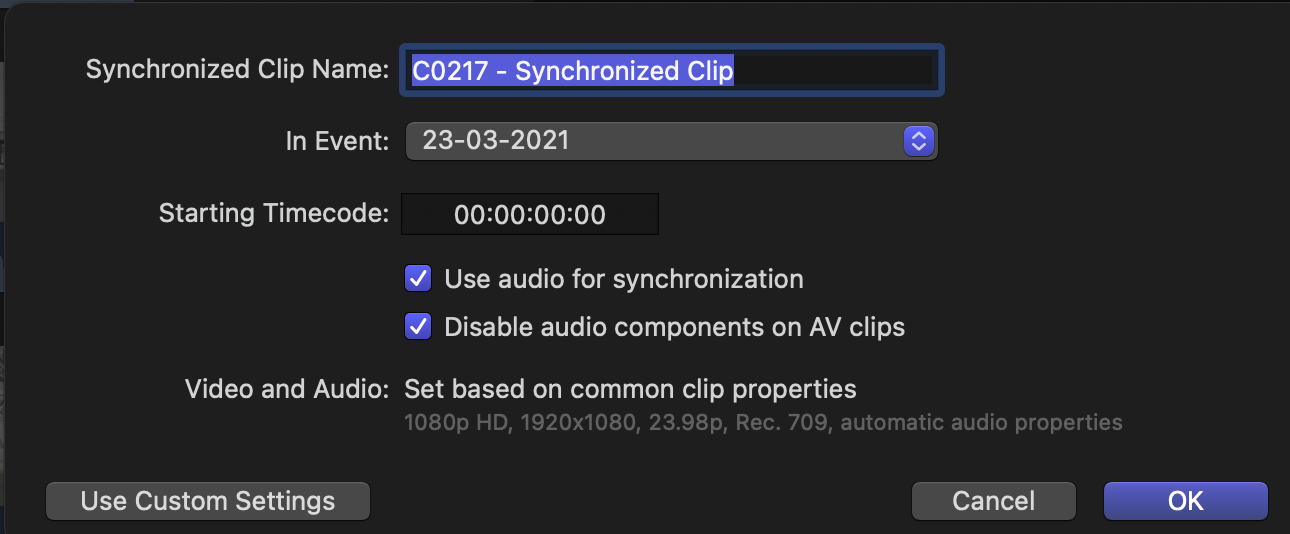
When using the synchronise clips command the "automatic settings" want to conform the new clip to 23.98fps (I am in Europe) at 1080p(???). It says "based on common clip properties". No clip has those properties I can change this manually but the maximum frame rate I can then select is 60fps.
The vast majority of the footage will not require more than 25fps for the final result but on occasion I want to use motion control and thus sometime will need that 100fps.
Is there something that I am missing?
long time no post.
I working with some 4k 100p footage shot on an a7s3 and the talent was using a radio mic recorded on a separate unsynced device.
When using the synchronise clips command the "automatic settings" want to conform the new clip to 23.98fps (I am in Europe) at 1080p(???). It says "based on common clip properties". No clip has those properties I can change this manually but the maximum frame rate I can then select is 60fps.
The vast majority of the footage will not require more than 25fps for the final result but on occasion I want to use motion control and thus sometime will need that 100fps.
Is there something that I am missing?
Please Log in to join the conversation.


24 Mar 2021 18:52 #113646
by JoeEditor
Replied by JoeEditor on topic synchronizing 100p footage
Why would you make a Timeline that's 100fps?
Please Log in to join the conversation.
24 Mar 2021 22:23 #113650
by foxytom
Replied by foxytom on topic synchronizing 100p footage
I don't really. I'm just concerned that the newly rendered synchronized clip/compound clip will lose all the frames in between.
Please Log in to join the conversation.
- Tom Wolsky
-

- Offline
- Moderator
-

24 Mar 2021 22:29 #113651
by Tom Wolsky
Replied by Tom Wolsky on topic synchronizing 100p footage
It will. The sync clip will toss out frames to create the sync clip frame rate. Normally high frame rate video is shot to create slomo in a standard frame rate project. When you do that the audio will have to be adjusted or the pitch will change. Normally you don't sync audio to high frame rate media.
Please Log in to join the conversation.
25 Mar 2021 00:05 #113653
by foxytom
Replied by foxytom on topic synchronizing 100p footage
Makes sense. My bad. I think I got a little starry eyed about the fact that the camera could shoot 4k 100p.
The annoying thing is that each time I sync clips it resets to this random default of 1080p @ 23.98. If I can at least get it to default to 4k @ 50p that would work for most of what I need.
The other issue I have is that the camera rushes themselves show they are 60p at the top of the inspector whilst acknowledging the camera footage is 100p in the metadata. Why is it not conforming to 50p? Or how can I change that?
The annoying thing is that each time I sync clips it resets to this random default of 1080p @ 23.98. If I can at least get it to default to 4k @ 50p that would work for most of what I need.
The other issue I have is that the camera rushes themselves show they are 60p at the top of the inspector whilst acknowledging the camera footage is 100p in the metadata. Why is it not conforming to 50p? Or how can I change that?
Please Log in to join the conversation.
- Tom Wolsky
-
- Offline
- Moderator
-
25 Mar 2021 00:14 - 25 Mar 2021 00:17 #113654
by Tom Wolsky
Replied by Tom Wolsky on topic synchronizing 100p footage
When you sync the clips in the sync clip dialog in the lower left click Use Custom Settings.
Select 50
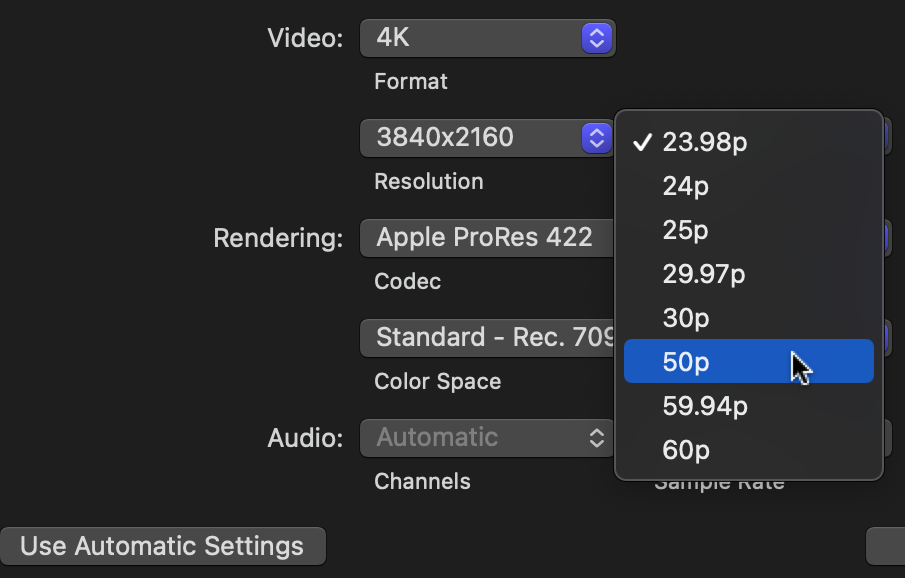
Select 50
Last edit: 25 Mar 2021 00:17 by Tom Wolsky.
Please Log in to join the conversation.
25 Mar 2021 00:40 #113655
by foxytom
Replied by foxytom on topic synchronizing 100p footage
Thanks Tom for your help.
I see where one can do that. It's just that I have to select 4k and 50p EVERY TIME. There appears to be no way to change the the initial setting (not the actual default?) from 1080p@23.98 to whatever one is working in.
I see where one can do that. It's just that I have to select 4k and 50p EVERY TIME. There appears to be no way to change the the initial setting (not the actual default?) from 1080p@23.98 to whatever one is working in.
Please Log in to join the conversation.
