


- Posts: 86
- Thank you received: 1
3 Post Moderation Rule for New Boarders (25 Jan 2021)
New boarders will have their posts moderated - Don't worry if you cannot see your post immediately.
What does this line indicate
- ETdroneHome
-
 Topic Author
- Offline
- Premium Member
-

Less
More
22 Mar 2021 03:51 - 22 Mar 2021 10:03 #113560
by ETdroneHome
What does this line indicate was created by ETdroneHome
I can not find an explanation of the white dashed line in this clip.
Can someone explain this?
Thanks in advance.
Rich
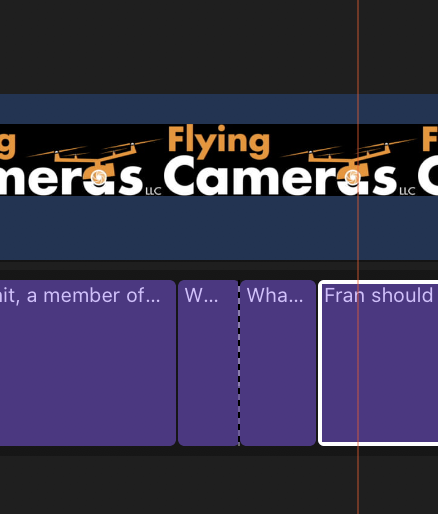
Can someone explain this?
Thanks in advance.
Rich
Last edit: 22 Mar 2021 10:03 by peteramwiggins.
Please Log in to join the conversation.


22 Mar 2021 04:37 - 22 Mar 2021 04:38 #113561
by dgwvideo
Creating history....one edit at a time !
Replied by dgwvideo on topic What does this line indicate
That indicates a "through edit" which was made by blading the clip. You can select that point with the trim tool and move left or right to change the position of the cut within that clip. To remove it, select both sides of the clip and choose TRIM - JOIN CLIPS.
I believe the dashed line used to be black in earlier versions of FCP.
Here is more specific info from the manual:
support.apple.com/guide/final-cut-pro/cu...9/10.5.1/mac/10.15.6
I believe the dashed line used to be black in earlier versions of FCP.
Here is more specific info from the manual:
support.apple.com/guide/final-cut-pro/cu...9/10.5.1/mac/10.15.6
Creating history....one edit at a time !
Last edit: 22 Mar 2021 04:38 by dgwvideo. Reason: typos
Please Log in to join the conversation.
- Tom Wolsky
-

- Offline
- Moderator
-

22 Mar 2021 07:14 #113562
by Tom Wolsky
Replied by Tom Wolsky on topic What does this line indicate
You can also the edit and press the delete key to remove.
Please Log in to join the conversation.
22 Mar 2021 14:25 #113571
by dgwvideo
Creating history....one edit at a time !
Replied by dgwvideo on topic What does this line indicate
Yes, just be sure it is only the edit point selected (dashed line) and not either of the adjacent clips, or you will delete the clip itself.
Creating history....one edit at a time !
Please Log in to join the conversation.
