


- Posts: 3
- Thank you received: 0
3 Post Moderation Rule for New Boarders (25 Jan 2021)
New boarders will have their posts moderated - Don't worry if you cannot see your post immediately.
Final Cut Pro X project not opening, greyed out and crashes FCPX
- DelianMode
-
 Topic Author
- Offline
- New Member
-

Less
More
21 Mar 2021 05:57 #113540
by DelianMode
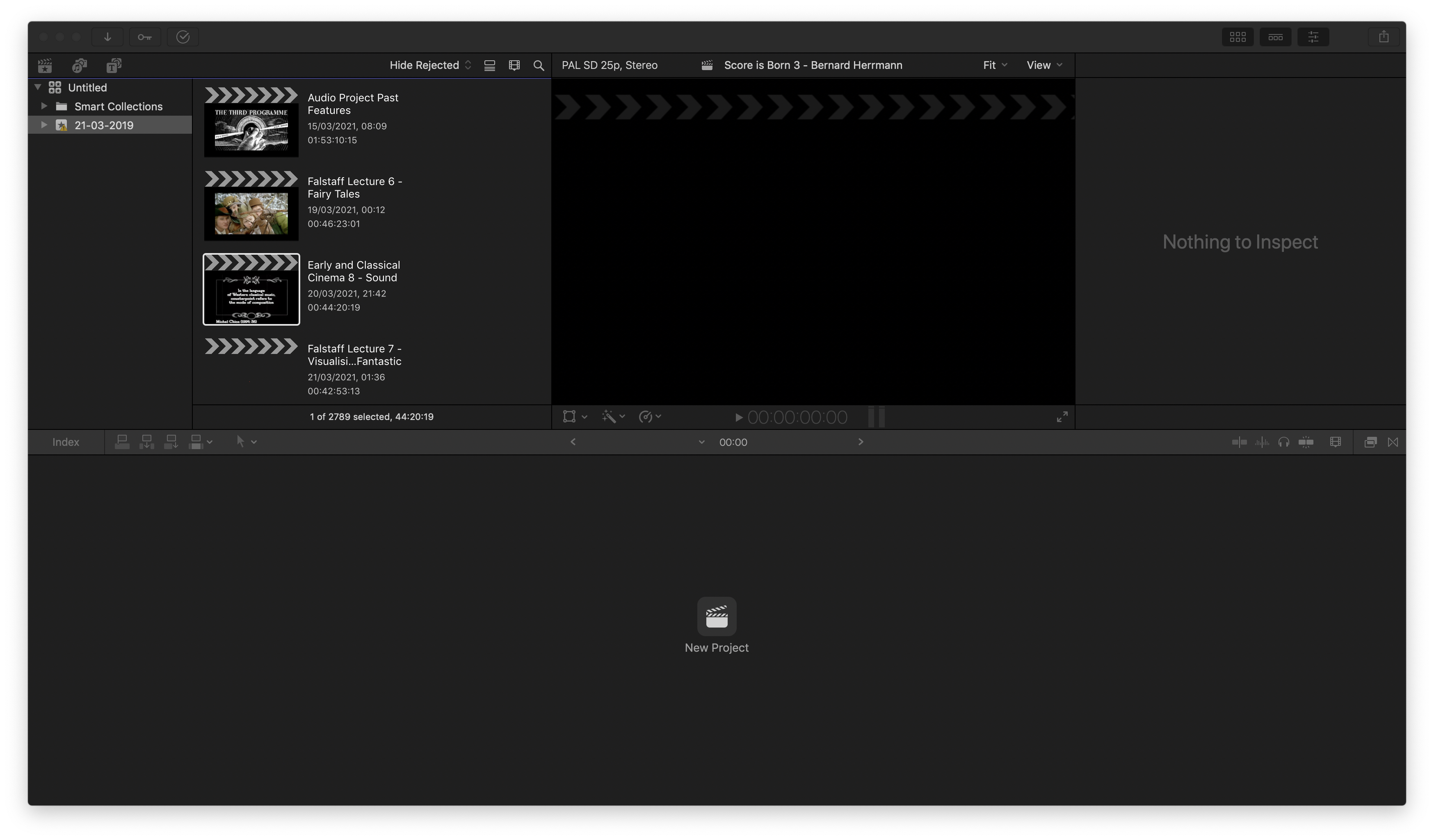
Hallo,Just joined and would really appreciate any advice on a Final Cut Pro X project problem.I'm running FCPX 10.4.10 on a MacBook Pro running Mojave 10.14.16 with about 400GB available storage space (having deleted project render files earlier in the week).I've been working on a new project in FCPX over the last three days with the project coming in at just over 42 minutes long.The project was nearing completion (it's for a class I'm teaching in the coming week, which is why I'd be really grateful for any help!) and I'd just added some video media to the timeline earlier tonight when the trackpad on my MacBook Pro stopped responding and the MacBook crashed to black before rebooting.When I tried to reopen Final Cut Pro, the app wouldn't open.After trying various routes, I managed to open FCPX but the project I'd been working on won't open and the thumbnail for the project in the libraries sidebar is blanked out - although it still lists the metadata for the project (time of the last edition of the project - 21/3/2021, 01:36 and its current duration - 00:42:53).You can see the blanked out project thumbnail in the attached image.All my other projects can still be opened and shared - and the media for the project that is crashing can still be viewed in the event library.Whenever I try to open the problematic project, FCPX crashes - and FCPX also crashes whenever I try to delete the render files for the project or export XML for the project.I've tried restarting the MacBook and deleting preferences for FCPX but am still getting the same results with the project - it seems as if whenever I try to do anything with it FCPX crashes.Any advice on how to access the project again (or repairing it) would be massively appreciated - I was ahead of schedule on the project but the prospect of having to start again fills me with dread!All very best,David
Please Log in to join the conversation.


22 Mar 2021 12:35 #113567
by JoeEditor
Replied by JoeEditor on topic Final Cut Pro X project not opening, greyed out and crashes FCPX
Try launching from a backup copy. They can be found in your Movies folder, "Final Cut Backups".
As for having 400 GB of free space, that's not much, and means very little without knowing 1) what is the total capacity of the drive, 2) is this the system drive or an external drive?
As for having 400 GB of free space, that's not much, and means very little without knowing 1) what is the total capacity of the drive, 2) is this the system drive or an external drive?
Please Log in to join the conversation.

22 Mar 2021 14:19 #113570
by dgwvideo
Creating history....one edit at a time !
Replied by dgwvideo on topic Final Cut Pro X project not opening, greyed out and crashes FCPX
As Ben said, the issue could be the system drive does not have sufficient capacity. 15% to 20% of the drive should be free. If you don't have this, try copying your library from an external drive that has the recommended amount of free space on it and attempt to open it from there. The black thumbnail for the project may not necessarily be a problem as FCP randomly chooses a thumbnail (usually from an event clip) and once your project does open and you begin working it will most likely populate with an image. If your project cannot be restored using a backup as mentioned, try using Digital Rebellion's Pro Maintenance Tools project repair app. I believe there is still a free trial and this usually solves corrupt project issues.
Creating history....one edit at a time !
Please Log in to join the conversation.
- DelianMode
-
Topic Author
- Offline
- New Member
-
Less
More
- Posts: 3
- Thank you received: 0
25 Mar 2021 17:37 #113671
by DelianMode
Replied by DelianMode on topic Final Cut Pro X project not opening, greyed out and crashes FCPX
Thanks so much Ben - as you advised, I've been able to access the project via a backup copy but also took the plunge and had reconstructed it before that too (it didn't take as long as I feared as the bulk of the creative work had been done with the time-consuming decisions around selecting and arranging the media files largely made - I was happy to discover that the reconstructed version wasn't that far off from the older backup copy!).
In terms of storage capacity - it's the system drive and the total space is 1TB with about half of that available when the problem occurred. I've purchased an additional external drive to be on the safe side though in the future.
In terms of storage capacity - it's the system drive and the total space is 1TB with about half of that available when the problem occurred. I've purchased an additional external drive to be on the safe side though in the future.
Please Log in to join the conversation.
- DelianMode
-
Topic Author
- Offline
- New Member
-
Less
More
- Posts: 3
- Thank you received: 0
25 Mar 2021 17:43 #113672
by DelianMode
Replied by DelianMode on topic Final Cut Pro X project not opening, greyed out and crashes FCPX
Many thanks for the Digital Rebellion Pro Maintenance Tools Repair App recommendation - I wasn't familiar with it and am really glad to have it in my toolbox now. I'd decided to reconstruct the project but, following your and Ben's advice, have also been able to access the original project via a backup copy and have used the repair app to identify problems with the original project so it was definitely worth getting.
Please Log in to join the conversation.
