


- Posts: 379
- Thank you received: 6
3 Post Moderation Rule for New Boarders (25 Jan 2021)
New boarders will have their posts moderated - Don't worry if you cannot see your post immediately.
RED Footage import
- Marc Lucas
-
 Topic Author
- Offline
- Platinum Member
-

Less
More
19 Mar 2021 11:21 #113490
by Marc Lucas
RED Footage import was created by Marc Lucas
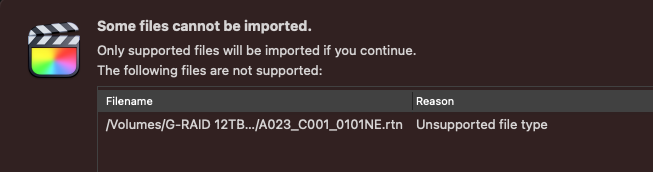
I have just tried to import some RED footage in each folder there is a .mov 2K proxy, the R3D file and the .rtn file.
I am getting the error in the attachment. Is that the meta file and is it a problem not being able to import?
FCPX 10.5.2 M1 Mac Mini
I am getting the error in the attachment. Is that the meta file and is it a problem not being able to import?
FCPX 10.5.2 M1 Mac Mini
Please Log in to join the conversation.
- Tom Wolsky
-

- Offline
- Moderator
-

19 Mar 2021 11:27 #113491
by Tom Wolsky
Replied by Tom Wolsky on topic RED Footage import
That’s correct behavior. Extra file isn’t imported into the library.
Please Log in to join the conversation.
- Marc Lucas
-
Topic Author
- Offline
- Platinum Member
-
Less
More
- Posts: 379
- Thank you received: 6
19 Mar 2021 11:34 #113493
by Marc Lucas
Replied by Marc Lucas on topic RED Footage import
And not needed?
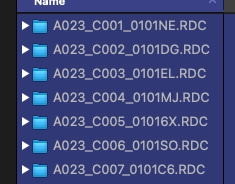
Quickest way to import all the footage would be to select all the individual folders in the import window like this? There are alot so don't want to manually go through everyone.
Quickest way to import all the footage would be to select all the individual folders in the import window like this? There are alot so don't want to manually go through everyone.
Please Log in to join the conversation.
- Marc Lucas
-
Topic Author
- Offline
- Platinum Member
-
Less
More
- Posts: 379
- Thank you received: 6
19 Mar 2021 11:34 - 19 Mar 2021 11:35 #113494
by Marc Lucas
Replied by Marc Lucas on topic RED Footage import
And not needed?
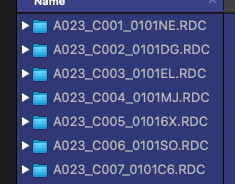
Quickest way to import all the footage would be to select all the individual folders in the import window like this? There are alot so don't want to manually go through everyone.
Quickest way to import all the footage would be to select all the individual folders in the import window like this? There are alot so don't want to manually go through everyone.
Last edit: 19 Mar 2021 11:35 by Marc Lucas.
Please Log in to join the conversation.
- Marc Lucas
-
Topic Author
- Offline
- Platinum Member
-
Less
More
- Posts: 379
- Thank you received: 6
21 Mar 2021 10:32 #113541
by Marc Lucas
Replied by Marc Lucas on topic RED Footage import
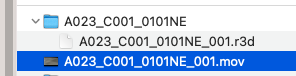
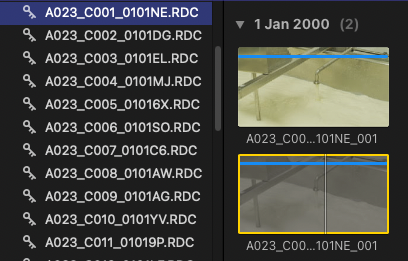
The camera Op recorded a 2k proxy which I've also imported fro the folder.
In FCPX now I have the RED file and the mov proxy. I have put a single clip in the squemce (RED file) and then tried to change FCPX to use Proxies. That didn't work so how do you get the Sequence to update to the proxy file (which is also in the Library because I imported at the same time)
I have tried the relink feature but it doesn't see it.
Would it be just best to create a new set of proxy files from within FCPX?
In FCPX now I have the RED file and the mov proxy. I have put a single clip in the squemce (RED file) and then tried to change FCPX to use Proxies. That didn't work so how do you get the Sequence to update to the proxy file (which is also in the Library because I imported at the same time)
I have tried the relink feature but it doesn't see it.
Would it be just best to create a new set of proxy files from within FCPX?
Please Log in to join the conversation.
- Tom Wolsky
-
- Offline
- Moderator
-
21 Mar 2021 13:02 #113545
by Tom Wolsky
Replied by Tom Wolsky on topic RED Footage import
"I have tried the relink feature but it doesn't see it."
What exactly did you do? Did you try to relink the proxy files? Where are the proxies stored? They have to be external.
What exactly did you do? Did you try to relink the proxy files? Where are the proxies stored? They have to be external.
Please Log in to join the conversation.
- Marc Lucas
-
Topic Author
- Offline
- Platinum Member
-
Less
More
- Posts: 379
- Thank you received: 6
21 Mar 2021 21:15 #113555
by Marc Lucas
Replied by Marc Lucas on topic RED Footage import
The proxies were in the same folder as the R3D files as shown in the screen grabs above.
So in every RDC folder there was the R3D file and the proxy .mov file. When I selected all the RDC files on import FCPX imported them together.
When I tried to switch from R3D file to proxy inside of FCPX it was saying that it couldn't find the proxy file. I wen through the usual relinking process and still wouldn't find them (inside the Library) the only option I got if I remember correctly is that FCPX wanted to over right the the proxy with he R3D file which I didn't want to do because I would lose the proxy file.
I've just deleted all the proxies and found that using 'proxy preferred' works perfectly fine with the R3D footage
So in every RDC folder there was the R3D file and the proxy .mov file. When I selected all the RDC files on import FCPX imported them together.
When I tried to switch from R3D file to proxy inside of FCPX it was saying that it couldn't find the proxy file. I wen through the usual relinking process and still wouldn't find them (inside the Library) the only option I got if I remember correctly is that FCPX wanted to over right the the proxy with he R3D file which I didn't want to do because I would lose the proxy file.
I've just deleted all the proxies and found that using 'proxy preferred' works perfectly fine with the R3D footage
Please Log in to join the conversation.
- Tom Wolsky
-
- Offline
- Moderator
-
21 Mar 2021 21:37 #113557
by Tom Wolsky
Replied by Tom Wolsky on topic RED Footage import
Proxy preferred with no proxies means you're using the original media. FCP only knows there are proxy files if it created them. If they were camera created proxies then they have to be relinked, but you can't relink to files that are inside the library bundle. What is usually done is that the camera files are imported but left in place and not copied into the library bundle. Then the external camera proxies can be relinked and used in FCP.
Please Log in to join the conversation.
- Marc Lucas
-
Topic Author
- Offline
- Platinum Member
-
Less
More
- Posts: 379
- Thank you received: 6
24 Mar 2021 11:01 #113631
by Marc Lucas
Replied by Marc Lucas on topic RED Footage import
This is exactly what I thought and totally understand that workflow.
All sorted now and new proxies created.
I have found though there is a big difference in playback. The R3D 5k files will play back OK on the M1 the playback image isn't the best but as mentioned the proxy preferred setting gives better playback (without actually having any proxies in the Library)
All sorted now and new proxies created.
I have found though there is a big difference in playback. The R3D 5k files will play back OK on the M1 the playback image isn't the best but as mentioned the proxy preferred setting gives better playback (without actually having any proxies in the Library)
Please Log in to join the conversation.
