



- Posts: 4
- Thank you received: 0
3 Post Moderation Rule for New Boarders (25 Jan 2021)
New boarders will have their posts moderated - Don't worry if you cannot see your post immediately.
Spinning beach ball whenever I try to open a project
16 Mar 2021 16:30 #113437
by covalt
Spinning beach ball whenever I try to open a project was created by covalt
Recently I've not been able to open several projects in FCP X. I can select an event from the browser, I can shuttle through the footage, but then when I double-click on the project to open it in the timeline, I get the spinning beach ball. I'll let it "work" for a while (sometimes I've waited 30+ minutes), but it never resolves and I eventually have to force-quit FCP.
I'm on an iMac Pro with 64GB of RAM, running macOS 11.2.3, and FCP X 10.5.2.
This is a fairly recent problem that I'm experiencing with about 7 different projects.
Did my library get corrupt somehow? Can't think of a way around this.
Thanks for any suggestions!
I'm on an iMac Pro with 64GB of RAM, running macOS 11.2.3, and FCP X 10.5.2.
This is a fairly recent problem that I'm experiencing with about 7 different projects.
Did my library get corrupt somehow? Can't think of a way around this.
Thanks for any suggestions!
Please Log in to join the conversation.

17 Mar 2021 11:48 #113447
by JoeEditor
Replied by JoeEditor on topic Spinning beach ball whenever I try to open a project
Delete FCP pref files (launch while holding both Opt and Cmd keys).
Delete all render files for those Libraries (FCP Library Manager is a great app to have).
Verify you have 15%-20% free space on your system drive (doesn't hurt to do the same on all other drives, too).
Delete all render files for those Libraries (FCP Library Manager is a great app to have).
Verify you have 15%-20% free space on your system drive (doesn't hurt to do the same on all other drives, too).
Please Log in to join the conversation.
18 Mar 2021 21:15 #113478
by covalt
Replied by covalt on topic Spinning beach ball whenever I try to open a project
Thanks for your suggestions. FCP Library Manager looks like a great app - I purchased a license so I could use it to clean up 1.2TB of space on my drive.
Sadly, I still have the same problem.
I deleted FCP pref files as you suggested, deleted all render files for all libraries, and can confirm I have 10TB free on my 18TB G-Speed Studio R drive connected via TB2.
I don't have the same issue with my other libraries, but now I can't seem to open a single project in my "2020 Library" without getting the spinning beachball and having to force quit FCP.
Sadly, I still have the same problem.
I deleted FCP pref files as you suggested, deleted all render files for all libraries, and can confirm I have 10TB free on my 18TB G-Speed Studio R drive connected via TB2.
I don't have the same issue with my other libraries, but now I can't seem to open a single project in my "2020 Library" without getting the spinning beachball and having to force quit FCP.
Please Log in to join the conversation.
- Carsten Orlt
-

- Offline
- Platinum Member
-

Less
More
- Posts: 422
- Thank you received: 82
18 Mar 2021 22:06 #113479
by Carsten Orlt
Replied by Carsten Orlt on topic Spinning beach ball whenever I try to open a project
Any plugins you specifically used in this/these project(s)? And NOT used in the project you can open?
It's almost the only thing I can think of. If you have a plugin that needs an update or is no longer compatible it could crash FCP while opening the project.
If you can find and remove a problem causing plugin/fx FCP should load the project and show missing icons for clips that have the plugin/fx applied that is not on the system. You can then go through and remove/replace them.
It's almost the only thing I can think of. If you have a plugin that needs an update or is no longer compatible it could crash FCP while opening the project.
If you can find and remove a problem causing plugin/fx FCP should load the project and show missing icons for clips that have the plugin/fx applied that is not on the system. You can then go through and remove/replace them.
Please Log in to join the conversation.
19 Mar 2021 20:27 #113518
by covalt
Replied by covalt on topic Spinning beach ball whenever I try to open a project
Ah man you nailed it! I tested projects that I knew were using no plugins and those opened fine; it was the ones that I used Magic Bullet Colorista that were creating the spinning beachball.
I opened up Red Giant Application Manager and updated Colorista V to 5.0.4 and then relaunched FCP X.
Finally, all those projects that were using Colorista opened up and I'm able to work in them again.
Thanks so much for the suggestion!
I opened up Red Giant Application Manager and updated Colorista V to 5.0.4 and then relaunched FCP X.
Finally, all those projects that were using Colorista opened up and I'm able to work in them again.
Thanks so much for the suggestion!
Please Log in to join the conversation.
- Carsten Orlt
-
- Offline
- Platinum Member
-
Less
More
- Posts: 422
- Thank you received: 82
19 Mar 2021 22:13 #113519
by Carsten Orlt
Replied by Carsten Orlt on topic Spinning beach ball whenever I try to open a project
Good one! Happy it was solvable.
Please Log in to join the conversation.
- mountainmanjoe
-

- Offline
- New Member
-

Less
More
- Posts: 5
- Thank you received: 0
26 Sep 2023 06:28 #127280
by mountainmanjoe
Replied by mountainmanjoe on topic Spinning beach ball whenever I try to open a project
I am having the same problem with FCP. Some projects (which I haven't touched in a while) are opening, and some are not. There's a strong likelihood that it's because I had plugins which are no longer installed. The problem is that I have no idea what they were. Is there any way to find out what plugins are necessary to open these projects? And if it's not possible to determine the plugins, or if it's not possible to install them, is there any way to open my projects? Are they lost forever? Thanks.
Please Log in to join the conversation.

26 Sep 2023 11:37 - 26 Sep 2023 11:48 #127284
by DaveM
There used to be an application called "X-Library Check" that would list all fonts and third-party templates (plugins, etc.) used in a Library. But, it's no longer available.
Another option, though a bit tedious, might be to export an XML of a Project/timeline, then open the XML (which may be inside a container file, depending on the version used) and search for "<effect" (without the quotes). The free version of BBEdit does this search easily (as will most good text editors). You should be able to determine which resources were used...
Replied by DaveM on topic Spinning beach ball whenever I try to open a project
I am having the same problem with FCP. Some projects (which I haven't touched in a while) are opening, and some are not. There's a strong likelihood that it's because I had plugins which are no longer installed. The problem is that I have no idea what they were. Is there any way to find out what plugins are necessary to open these projects? And if it's not possible to determine the plugins, or if it's not possible to install them, is there any way to open my projects? Are they lost forever? Thanks.
There used to be an application called "X-Library Check" that would list all fonts and third-party templates (plugins, etc.) used in a Library. But, it's no longer available.
Another option, though a bit tedious, might be to export an XML of a Project/timeline, then open the XML (which may be inside a container file, depending on the version used) and search for "<effect" (without the quotes). The free version of BBEdit does this search easily (as will most good text editors). You should be able to determine which resources were used...
Last edit: 26 Sep 2023 11:48 by DaveM.
Please Log in to join the conversation.
- mountainmanjoe
-
- Offline
- New Member
-
Less
More
- Posts: 5
- Thank you received: 0
27 Sep 2023 01:19 - 27 Sep 2023 03:45 #127292
by mountainmanjoe
Replied by mountainmanjoe on topic Spinning beach ball whenever I try to open a project
Thank you for the suggestion. I opened the project XML, but I don't know what to make of these effect tags.
Some sound like they could built-in effects, but I can't be sure:
<effect id="r12" name="iMovie Color Effect" uid="FFConsumerColorEffect"/>
<effect id="r6" name="Audio Crossfade" uid="FFAudioTransition"/>
but what are these?
<effect id="r5" name="Fade To Color" uid="FxPlug:F779C565-486D-4633-8035-0374B4DB8F5C"/>
<effect id="r13" name="Simple" uid="FxPlug:D1486D23-5E52-449A-B5ED-CB3E80650041"/>
<effect id="r23" name="Cross Dissolve" uid="FxPlug:4731E73A-8DAC-4113-9A30-AE85B1761...
<effect id="r24" name="Grey Scale" uid=".../Generators.localized/Solids.localized/Grey Scale.localized/Grey Scale.motn"/>
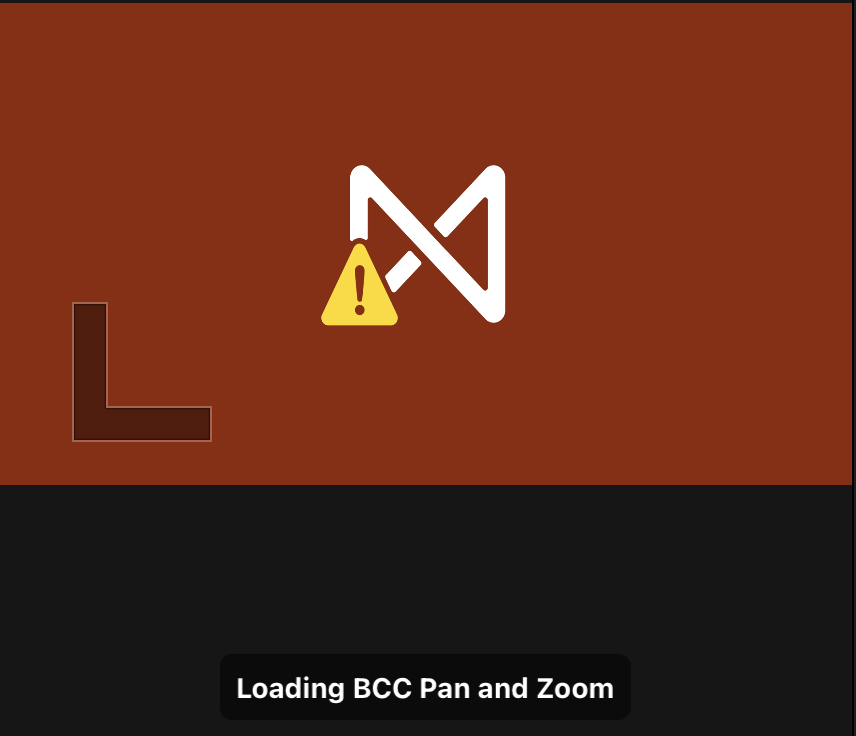
I managed to stumble on a trick. If I rt-click the project and choose Duplicate, then the original project thumbnail shows up and it magically starts opening again (you can delete the dupe). However, ALL titles and transitions are broken. Including basic FCP ones. You just get a placeholder like this:
Basic built-in titles have been reset to "Name", "Description"

The project info pane gives some information
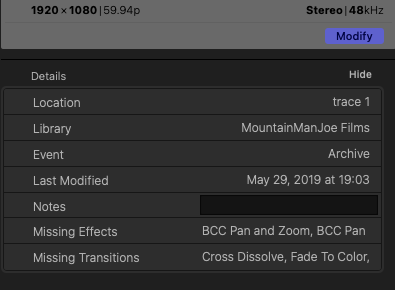
How can cross-dissolve be missing? Isn't that a built-in transition?
This trick seems to be temporary. When I tried opening projects again the next day I was getting spinning beachballs again, and I had to
duplicate again. Overall FCP behaves very unstably and crashes often.
This is all quite disappointing. My FCP projects are not as portable and future-compatible as I thought. If I can't rely on being able to open my projects a few years from now, then I'm not sure this software is for me.
Some sound like they could built-in effects, but I can't be sure:
<effect id="r12" name="iMovie Color Effect" uid="FFConsumerColorEffect"/>
<effect id="r6" name="Audio Crossfade" uid="FFAudioTransition"/>
but what are these?
<effect id="r5" name="Fade To Color" uid="FxPlug:F779C565-486D-4633-8035-0374B4DB8F5C"/>
<effect id="r13" name="Simple" uid="FxPlug:D1486D23-5E52-449A-B5ED-CB3E80650041"/>
<effect id="r23" name="Cross Dissolve" uid="FxPlug:4731E73A-8DAC-4113-9A30-AE85B1761...
<effect id="r24" name="Grey Scale" uid=".../Generators.localized/Solids.localized/Grey Scale.localized/Grey Scale.motn"/>
I managed to stumble on a trick. If I rt-click the project and choose Duplicate, then the original project thumbnail shows up and it magically starts opening again (you can delete the dupe). However, ALL titles and transitions are broken. Including basic FCP ones. You just get a placeholder like this:
Basic built-in titles have been reset to "Name", "Description"
The project info pane gives some information
How can cross-dissolve be missing? Isn't that a built-in transition?
This trick seems to be temporary. When I tried opening projects again the next day I was getting spinning beachballs again, and I had to
duplicate again. Overall FCP behaves very unstably and crashes often.
This is all quite disappointing. My FCP projects are not as portable and future-compatible as I thought. If I can't rely on being able to open my projects a few years from now, then I'm not sure this software is for me.
Last edit: 27 Sep 2023 03:45 by mountainmanjoe.
Please Log in to join the conversation.
27 Sep 2023 04:00 - 27 Sep 2023 04:07 #127293
by DaveM
Replied by DaveM on topic Spinning beach ball whenever I try to open a project
@mountainmanjoe, some effects appear to be those coming from iMovie (where you would have imported a project from iMovie into FCP). The effects with "BCC" appear to be BorisFX templates/plugins, not built-in ones. You'd need to provide a full XML file for a more thorough analysis, which is likely beyond the basic help/advice provided here (it would take some work to do)...
You shouldn't expect long-term compatibility with any NLE application. NLE makers change the Library/Project structure, bundled plugins and templates, etc. over time. A good workflow step when you stop working on a project is to export an XML of the complete Library, and optionally export an XML of any Project/timeline you deem important. You're actually lucky if you can import an older XML and get things to load, except for some templates or plugins.
Another part of the difficulty is the updates to FCP and various plugins and templates, in order to support Apple Silicon CPUs, which have necessitated updating/changing templates and plugins. Newer versions may not be compatible with an older version you may have used previously, especially if you worked on an Intel Mac before and now are using an M-series Mac.
You could try to find a consultant who can scan your XML files and give you a report on various effects used, so that it might be easier to "fix" issues (it can be a tedious, manual process). There used to be a free tool that could do an analysis, but the guy who provided the application has dropped off the map without any notice (that tool worked on a Library bundle file, ".fcpbundle").
You may find that exporting an XML of a Project/timeline and re-importing it into a new Event (or Library) may avoid crashes, but I'm not sure (the process may provide a bit of "cleaning" during re-import).
You shouldn't expect long-term compatibility with any NLE application. NLE makers change the Library/Project structure, bundled plugins and templates, etc. over time. A good workflow step when you stop working on a project is to export an XML of the complete Library, and optionally export an XML of any Project/timeline you deem important. You're actually lucky if you can import an older XML and get things to load, except for some templates or plugins.
Another part of the difficulty is the updates to FCP and various plugins and templates, in order to support Apple Silicon CPUs, which have necessitated updating/changing templates and plugins. Newer versions may not be compatible with an older version you may have used previously, especially if you worked on an Intel Mac before and now are using an M-series Mac.
You could try to find a consultant who can scan your XML files and give you a report on various effects used, so that it might be easier to "fix" issues (it can be a tedious, manual process). There used to be a free tool that could do an analysis, but the guy who provided the application has dropped off the map without any notice (that tool worked on a Library bundle file, ".fcpbundle").
You may find that exporting an XML of a Project/timeline and re-importing it into a new Event (or Library) may avoid crashes, but I'm not sure (the process may provide a bit of "cleaning" during re-import).
Last edit: 27 Sep 2023 04:07 by DaveM.
Please Log in to join the conversation.
- mountainmanjoe
-
- Offline
- New Member
-
Less
More
- Posts: 5
- Thank you received: 0
27 Sep 2023 06:04 #127294
by mountainmanjoe
Replied by mountainmanjoe on topic Spinning beach ball whenever I try to open a project
I'll give that a try. But the simple fact that FCP becomes unstable tells me the software is half-baked. Opening few year old projects (sometimes on new machines) is a fairly ordinary thing to ask of it, and I think it should handle it more gracefully. If XML code is needed to make projects more compatible, then it should should just do it automatically. (actually if you inspect .fcpevent files, there is embedded XML). It's short-sighted design. I understand that things need to change with technology, but attention needs to be given to users opening older files. We're only talking about 2-3 years here. That's nothing. This is something that pushy Apple has always struggled with. Never was crazy about the FCP UI anyway. I downloaded DaVinci to try and see how I like it.
Please Log in to join the conversation.

27 Sep 2023 11:44 #127296
by joema
All NLE software can sometimes become unstable. If you search the Resolve forums, you'll see that crashes, hangs and corrupt data are not unknown. Due to the performance-critical nature of NLE software and the variability and poorly-documented nature of some codecs, this happens.
I've often opened FCP libraries and projects that are several years old, and it normally works. If a plugin is missing, the project usually opens and shows a missing plugin.
Actually the .fcpevent files are SQLite databases. Internally they contain several SQL tables which hold all the edits, clip metadata and media references. SQLite uses write-ahead transactional logging, so this makes it less likely a crash will wipe out your edits.
You can normally open older FCP libraries and projects without problems. There might be some edge cases where an old plugin is no longer supported, but normally it just shows a missing plugin.
The issue of archival access is not unique to NLEs. In the IT industry, it is called "Digital Obsolescence". E.g, I had some old email files which became unsupported. I had to use a variety of third-party tools to convert those through a succession of formats to regain access to them. Due to evolving software and file standards, this is a common problem.
Resolve Studio is a great product and I use it every day, along with FCP. They both have strengths and weaknesses. However Resolve is very complex -- the user's manual is 4,100 pages. The UI does not use screen real estate as efficiently as FCP (esp. on a laptop) so it's better if you have dual monitors. It makes very heavy demands on memory and the GPU, so it's best to have a machine with lots of memory and the fastest GPU you can afford.
The free version of Resolve is increasingly somewhat handicapped, so it's best to use the paid Resolve Studio version.
Replied by joema on topic Spinning beach ball whenever I try to open a project
... the simple fact that FCP becomes unstable tells me the software is half-baked...
All NLE software can sometimes become unstable. If you search the Resolve forums, you'll see that crashes, hangs and corrupt data are not unknown. Due to the performance-critical nature of NLE software and the variability and poorly-documented nature of some codecs, this happens.
...Opening few year old projects (sometimes on new machines) is a fairly ordinary thing to ask of it, and I think it should handle it more gracefully...
I've often opened FCP libraries and projects that are several years old, and it normally works. If a plugin is missing, the project usually opens and shows a missing plugin.
...if you inspect .fcpevent files, there is embedded XML)....
Actually the .fcpevent files are SQLite databases. Internally they contain several SQL tables which hold all the edits, clip metadata and media references. SQLite uses write-ahead transactional logging, so this makes it less likely a crash will wipe out your edits.
... I understand that things need to change with technology, but attention needs to be given to users opening older files. We're only talking about 2-3 years here...
You can normally open older FCP libraries and projects without problems. There might be some edge cases where an old plugin is no longer supported, but normally it just shows a missing plugin.
The issue of archival access is not unique to NLEs. In the IT industry, it is called "Digital Obsolescence". E.g, I had some old email files which became unsupported. I had to use a variety of third-party tools to convert those through a succession of formats to regain access to them. Due to evolving software and file standards, this is a common problem.
...I downloaded DaVinci to try and see how I like it...
Resolve Studio is a great product and I use it every day, along with FCP. They both have strengths and weaknesses. However Resolve is very complex -- the user's manual is 4,100 pages. The UI does not use screen real estate as efficiently as FCP (esp. on a laptop) so it's better if you have dual monitors. It makes very heavy demands on memory and the GPU, so it's best to have a machine with lots of memory and the fastest GPU you can afford.
The free version of Resolve is increasingly somewhat handicapped, so it's best to use the paid Resolve Studio version.
Please Log in to join the conversation.
27 Sep 2023 12:54 - 27 Sep 2023 13:03 #127298
by DaveM
We don't know which version of FCP you're running, or macOS, and the type of HW, so offering advice is a bit hit-and-miss. I was trying to offer some ways to work around your situation, but we don't really know what's causing your issue. You could have some older, problematic plugins that are causing problems, or a "corrupt" setup (something more akin to "user error").
As Joe mentioned, in most cases you should be able to open older Libraries and their Projects/timelines. With more complex or longer Projects/timelines, it can take several minutes to open a Project sometimes. If your setup, available drives, etc. have changed or been renamed, that can further complicate FCP's ability to open a Project. Missing media, plugins, etc. can cause delays, too. As a "pro" user of FCP, there are things you need to be aware of and manage, in order for things to work well. Missing media and plugins, as Joe said, may delay loading/opening Projects, but it should work. You should then be able to click on the respective clips/objects and get some idea (as you have done) about what is missing via the Inspector.
If you used or tested some plugins previously, especially if on a different computer or setup, and now open a Library file, it's on you to know what you did previously. Plugins and templates are separate from a Library ('project") file.
The method of making XML backups is for safety, as all SW has bugs and things can go wrong. I may not have explained it well for you, not knowing your relative level of knowledge or experience with computers, "pro" NLE applications, etc. Making XML copies of things is a way to try to preserve a Library or individual Projects/timelines so that they are accessible down the road, or in situations where the Library bundle file isn't working.
Getting proper training on how to use FCP, or any NLE, would include media management, Library management, etc. Equipped with that knowledge and experience, you'd be able to plan and deal with various contingencies. But, you have to assume personal responsibility for some things.
Apple doesn't do its users any favors in regards to robust support of older Library files, and other things. As Joe alluded, this isn't unusual. Try opening a 20+ year-old Microsoft Word file in Word and you will have trouble. FCP may actually require a bit less personal management than other NLEs, but it still does to some extent. Newer users often hit walls, or productivity speed bumps, as they move to more involved or larger projects, if they haven't had enough training or taken the time to read the manual, etc.
Replied by DaveM on topic Spinning beach ball whenever I try to open a project
I'll give that a try. But the simple fact that FCP becomes unstable tells me the software is half-baked. Opening few year old projects (sometimes on new machines) is a fairly ordinary thing to ask of it, and I think it should handle it more gracefully. If XML code is needed to make projects more compatible, then it should should just do it automatically. (actually if you inspect .fcpevent files, there is embedded XML). It's short-sighted design. I understand that things need to change with technology, but attention needs to be given to users opening older files. We're only talking about 2-3 years here. That's nothing. This is something that pushy Apple has always struggled with. Never was crazy about the FCP UI anyway. I downloaded DaVinci to try and see how I like it.
We don't know which version of FCP you're running, or macOS, and the type of HW, so offering advice is a bit hit-and-miss. I was trying to offer some ways to work around your situation, but we don't really know what's causing your issue. You could have some older, problematic plugins that are causing problems, or a "corrupt" setup (something more akin to "user error").
As Joe mentioned, in most cases you should be able to open older Libraries and their Projects/timelines. With more complex or longer Projects/timelines, it can take several minutes to open a Project sometimes. If your setup, available drives, etc. have changed or been renamed, that can further complicate FCP's ability to open a Project. Missing media, plugins, etc. can cause delays, too. As a "pro" user of FCP, there are things you need to be aware of and manage, in order for things to work well. Missing media and plugins, as Joe said, may delay loading/opening Projects, but it should work. You should then be able to click on the respective clips/objects and get some idea (as you have done) about what is missing via the Inspector.
If you used or tested some plugins previously, especially if on a different computer or setup, and now open a Library file, it's on you to know what you did previously. Plugins and templates are separate from a Library ('project") file.
The method of making XML backups is for safety, as all SW has bugs and things can go wrong. I may not have explained it well for you, not knowing your relative level of knowledge or experience with computers, "pro" NLE applications, etc. Making XML copies of things is a way to try to preserve a Library or individual Projects/timelines so that they are accessible down the road, or in situations where the Library bundle file isn't working.
Getting proper training on how to use FCP, or any NLE, would include media management, Library management, etc. Equipped with that knowledge and experience, you'd be able to plan and deal with various contingencies. But, you have to assume personal responsibility for some things.
Apple doesn't do its users any favors in regards to robust support of older Library files, and other things. As Joe alluded, this isn't unusual. Try opening a 20+ year-old Microsoft Word file in Word and you will have trouble. FCP may actually require a bit less personal management than other NLEs, but it still does to some extent. Newer users often hit walls, or productivity speed bumps, as they move to more involved or larger projects, if they haven't had enough training or taken the time to read the manual, etc.
Last edit: 27 Sep 2023 13:03 by DaveM.
Please Log in to join the conversation.
- mountainmanjoe
-
- Offline
- New Member
-
Less
More
- Posts: 5
- Thank you received: 0
29 Sep 2023 00:31 #127313
by mountainmanjoe
My point was that if XML is needed for "safety" as Dave mentioned, then it should already be done. Either embedded (it's just text so it's technically possible) or as a sidecar file.
Just making short flicks with a few plugins, and moved to a new machine.
Replied by mountainmanjoe on topic Spinning beach ball whenever I try to open a project
Yeah I saw that they're SQL dbs. But I saw XML tags embedded in the files too.Actually the .fcpevent files are SQLite databases.
My point was that if XML is needed for "safety" as Dave mentioned, then it should already be done. Either embedded (it's just text so it's technically possible) or as a sidecar file.
Like I tried to explain, mine is a very run-of-the-mill case. I'm not doing anything revolutionary here.There might be some edge cases
Just making short flicks with a few plugins, and moved to a new machine.
This is not "archival" I'm not opening anything from the 90's here. They're just couple of year old files! Maybe one or two minor FCP updates of difference. These projects were still opening on my old machine at the start of the year.The issue of archival access is not unique
M2 Max MBP with external monitor. I think that should do it.so it's better if you have dual monitors. It makes very heavy demands
I'm not making feature films here. Just amateur use. What does FCP do that it can't?The free version of Resolve is increasingly somewhat handicapped, so it's best to use the paid Resolve Studio version.
Please Log in to join the conversation.
- mountainmanjoe
-
- Offline
- New Member
-
Less
More
- Posts: 5
- Thank you received: 0
29 Sep 2023 00:54 - 29 Sep 2023 00:56 #127314
by mountainmanjoe
current machine is this year's MBP. Moving from a 2019 intel MBP.
But I doubt it. The files worked fine earlier this year. My libraries are configured to be self contained. All files are "in-library"
So tell me does the current FCP not do cross dissolves? Is that an plugin transition?
Again, this is not "user error" as you keep implying. This is "inadequate programming".
Replied by mountainmanjoe on topic Spinning beach ball whenever I try to open a project
I keep it updated of course, so the latest version.We don't know which version of FCP you're running, or macOS, and the type of HW
current machine is this year's MBP. Moving from a 2019 intel MBP.
yes as the screenshots I posted show, there are missing plugins. They weren't THAT old.You could have some older, problematic plugins
I have a pretty strong computer background. Usually I know when I make an error. If I did make one, then it's invisible to me. And if a proficient person like me can screw things up this badly, then a non-technical artistic type is absolutely DOOMED with this software.something more akin to "user error"
But I doubt it. The files worked fine earlier this year. My libraries are configured to be self contained. All files are "in-library"
How? Why would my setup and drives matter? Everything it needs is in the library. Why does it care what's outside of it?If your setup, available drives, etc. have changed or been renamed, that can further complicate FCP's ability to open a Project.
Media is all there.Missing media, plugins, etc. can cause delays, too.
So tell me does the current FCP not do cross dissolves? Is that an plugin transition?
I used migration assistant to bring everything over. I was expecting it to just work. Sue me.you have to assume personal responsibility for some things.
I have actually, and it went a lot better that this did. I'm not a Microsoft fan , but the one thing they do that puts Apple to shame is backwards compatibility. Try to run 30 year Mac program now.Try opening a 20+ year-old Microsoft Word file in Word and you will have trouble.
Believe me, I'm not an ignorant user. That's not the issue. I do more research than the average person. I don't see how reading manuals would have helped me predict that this program would crash trying to open my projects.if they haven't had enough training or taken the time to read the manual, etc.
Again, this is not "user error" as you keep implying. This is "inadequate programming".
Last edit: 29 Sep 2023 00:56 by mountainmanjoe.
Please Log in to join the conversation.
29 Sep 2023 01:15 - 29 Sep 2023 01:37 #127315
by DaveM
A useful bit of info, thanks... You didn't initially mention that you moved to a new machine. You just said that you hadn't opened the Library in some time (and weren't specific about that, either). So, our initial advice was geared towards preventing total loss of your data and was based on a lack of details.
FYI, after FCP 10.6.5, some plugins were eliminated by Apple. Also, everything that was installed on your older machine isn't going to automatically appear on your new machine. Plugins, templates, etc. are not part of the FCP application itself. These things are stored at various locations, such as your Movies folder, and other system-level places. It is your responsibility to know this and to take the necessary steps to migrate things when moving to a new, or simply another computer.
The above explains why things may be taking extra time to load/open. The Library and its contents are trying to access things as they were situated on your old machine.
And, as I may have mentioned before, when FCP encounters changes to configurations, or when projects get larger or more complex, it can take several minutes for Libraries or Projects/timelines to open. If you stop this process before it completes, you can possibly corrupt things.
So, moving to a new machine changes the "environment" for FCP, especially with regards to plugins and templates (as well as recent updates to FCP itself). It is up to you to learn how this all works, rather than blaming FCP for not being somehow sentient, or aware that you've moved a Library bundle file to a new computer and possibly a newer version of FCP. That's all on you as the "pro" user. If it frustrates you, start over from scratch. Nothing you've described is likely a problem with FCP itself...
Cheers.
P.S. - As far as the XML goes, I mentioned it primarily as a way to make a backup of your FCP Library and Projects/timelines that is a bit more independent of changes to FCP (and as a troubleshooting step to prevent permanent loss of data).
Periodic exports to XML are a safety feature in the rare event that something happens to the Library file. It's just a way of preventing total loss of data if disaster strikes. Sometimes, when people are having trouble with a specific Project, exporting an XML is a way of preventing the total loss of data. Since you didn't provide a detailed description of your issue, or because we can't actually see your system in operation, these suggestions or comments may or may not apply to your specific current situation.
As such, these suggestions or comments were not intended to suggest that problems with FCP are frequent or common. For casual/beginner use, these things may be nice, but they aren't critical as they would be for a higher-end production, where insurance requires certain specified processes and several backups kept at various stages, in order to prevent delays, reshoots, etc.
P.P.S. - FYI, it is possible to store some plugins/templates within the Library itself (not the default setting in FCP), which makes it easier when moving Libraries to other machines, or for creating more robust archives. You could search for "transfer Libraries" or something similar to find some videos or articles that explain how this works. This is part of the larger topic of media management, something which you need to learn to flourish when using any NLE, not just FCP. Ripple Training has a course on media management and some of their YT videos are quite informative.
Replied by DaveM on topic Spinning beach ball whenever I try to open a project
This is not "archival" I'm not opening anything from the 90's here. They're just couple of year old files! Maybe one or two minor FCP updates of difference. These projects were still opening on my old machine at the start of the year.
A useful bit of info, thanks... You didn't initially mention that you moved to a new machine. You just said that you hadn't opened the Library in some time (and weren't specific about that, either). So, our initial advice was geared towards preventing total loss of your data and was based on a lack of details.
FYI, after FCP 10.6.5, some plugins were eliminated by Apple. Also, everything that was installed on your older machine isn't going to automatically appear on your new machine. Plugins, templates, etc. are not part of the FCP application itself. These things are stored at various locations, such as your Movies folder, and other system-level places. It is your responsibility to know this and to take the necessary steps to migrate things when moving to a new, or simply another computer.
The above explains why things may be taking extra time to load/open. The Library and its contents are trying to access things as they were situated on your old machine.
And, as I may have mentioned before, when FCP encounters changes to configurations, or when projects get larger or more complex, it can take several minutes for Libraries or Projects/timelines to open. If you stop this process before it completes, you can possibly corrupt things.
So, moving to a new machine changes the "environment" for FCP, especially with regards to plugins and templates (as well as recent updates to FCP itself). It is up to you to learn how this all works, rather than blaming FCP for not being somehow sentient, or aware that you've moved a Library bundle file to a new computer and possibly a newer version of FCP. That's all on you as the "pro" user. If it frustrates you, start over from scratch. Nothing you've described is likely a problem with FCP itself...
Cheers.
P.S. - As far as the XML goes, I mentioned it primarily as a way to make a backup of your FCP Library and Projects/timelines that is a bit more independent of changes to FCP (and as a troubleshooting step to prevent permanent loss of data).
Periodic exports to XML are a safety feature in the rare event that something happens to the Library file. It's just a way of preventing total loss of data if disaster strikes. Sometimes, when people are having trouble with a specific Project, exporting an XML is a way of preventing the total loss of data. Since you didn't provide a detailed description of your issue, or because we can't actually see your system in operation, these suggestions or comments may or may not apply to your specific current situation.
As such, these suggestions or comments were not intended to suggest that problems with FCP are frequent or common. For casual/beginner use, these things may be nice, but they aren't critical as they would be for a higher-end production, where insurance requires certain specified processes and several backups kept at various stages, in order to prevent delays, reshoots, etc.
P.P.S. - FYI, it is possible to store some plugins/templates within the Library itself (not the default setting in FCP), which makes it easier when moving Libraries to other machines, or for creating more robust archives. You could search for "transfer Libraries" or something similar to find some videos or articles that explain how this works. This is part of the larger topic of media management, something which you need to learn to flourish when using any NLE, not just FCP. Ripple Training has a course on media management and some of their YT videos are quite informative.
Last edit: 29 Sep 2023 01:37 by DaveM.
Please Log in to join the conversation.
29 Sep 2023 01:38 #127316
by joema
FxFactory has plugins called "Cross Dissolve" and "Fade to Color". If any of your effects before the migration were from FxFactory, you will probably need to install the FxFactory app on the new machine and validate your account. Apple migration assistant just moves your files -- it does not automatically handle your third-party effects and accounts.
Likewise, if you had third-party effects from BCC, those will need to be validated on your new machine. Each plugin vendor has their own procedures and rules for deactivating plugins from an old machine and installing and activating them on a new machine. It can be quite frustrating, which is why I use as few plugins as possible.
If the prior machine was an Intel Mac, it's possible some of those plugins were Intel-only, not Universal binaries. They will definitely not run properly on an Apple Silicon Mac.
You basically need to take a careful survey of all FCP plugins on the previous machine and verify with each plugin vendor the support status and latest version if used on Apple Silicon running the latest MacOS version.
If any of your software on the old machine used MacOS kernel extensions, they will not run on the new Apple Silicon machine. The replacement for those is the system extension framework, and each vendor which had a kernel extension has had several years to migrate their code to the new system extension framework. However that is not done automatically by just copying over your files.
Make sure that FCP on your new machine has full disk access. That is in System Settings>Privacy & Security, enable it for FCP (if not already enabled).
All your media and FCP libraries should be on drives formatted either Mac OS Extended Journaled or APFS, not ExFAT.
Replied by joema on topic Spinning beach ball whenever I try to open a project
So tell me does the current FCP not do cross dissolves? Is that an plugin transition?...
FxFactory has plugins called "Cross Dissolve" and "Fade to Color". If any of your effects before the migration were from FxFactory, you will probably need to install the FxFactory app on the new machine and validate your account. Apple migration assistant just moves your files -- it does not automatically handle your third-party effects and accounts.
Likewise, if you had third-party effects from BCC, those will need to be validated on your new machine. Each plugin vendor has their own procedures and rules for deactivating plugins from an old machine and installing and activating them on a new machine. It can be quite frustrating, which is why I use as few plugins as possible.
If the prior machine was an Intel Mac, it's possible some of those plugins were Intel-only, not Universal binaries. They will definitely not run properly on an Apple Silicon Mac.
You basically need to take a careful survey of all FCP plugins on the previous machine and verify with each plugin vendor the support status and latest version if used on Apple Silicon running the latest MacOS version.
If any of your software on the old machine used MacOS kernel extensions, they will not run on the new Apple Silicon machine. The replacement for those is the system extension framework, and each vendor which had a kernel extension has had several years to migrate their code to the new system extension framework. However that is not done automatically by just copying over your files.
Make sure that FCP on your new machine has full disk access. That is in System Settings>Privacy & Security, enable it for FCP (if not already enabled).
All your media and FCP libraries should be on drives formatted either Mac OS Extended Journaled or APFS, not ExFAT.
Please Log in to join the conversation.
29 Sep 2023 15:05 - 29 Sep 2023 15:24 #127320
by joema
Replied by joema on topic Spinning beach ball whenever I try to open a project
Clarification on my prior post: FxFactory has components used in their photo montage plugin called "Face to Color and "Cross Dissolve". This does not mean that's the cause of the similarly-named FCP built-in plugins showing as missing in your project.
However, any third-party plugins, titles and effects you used on the previous machine will *each* likely need to be evaluated, updated and re-authenticated on the new machine.
For plugin vendors that have their own management tool like FxFactory, that does much of the work for you. For other licensed plugins, you'll need to handle those on a case by case basis. Migration Assistant doesn't do any of that.
If you migrated from an Intel Mac to an Apple Silicon Mac, that is a major change. Intel Macs generally used plugins written with the FxPlug 3 framework. In general, those will not run on an Apple Silicon Mac, which requires plugins written using FxPlug 4. That is intended to improve reliability by running the plugins "out of process" instead of within the FCP address space.
Because of the nature of the Apple Silicon change, I'd suggest you not migrate or copy over major apps like FCP, but rather re-install them from scratch. The re-installed app should be able to run your previous libraries (assuming they have not been damaged in the meantime).
Re-installing FCP should automatically re-install the built-in plugins, titles and templates.
If third-party plugins, titles and templates were copied over by Migration Assistant, I suggest you remove those and reinstall them individually. Some plugins such as Core Melt have a deinstaller, but they also have a stand-alone command-line deinstallation tool if the first one fails: support.coremelt.com/hc/en-gb/articles/2...ove-CoreMelt-plugins
To transfer BorisFX plugins to a new machine, there is a procedure on their web site: borisfx.com/faq/95526913-transferring-bo...tall%20the%20product .
Ideally you want to remove and install plugins "gracefully" by whatever method each plugin vendor recommends. However, here is a tutorial about how to do it manually. If done on your previous machine, this same procedure can help identify which plugins you had. On the new machine it can help fully remove them prior to reinstallation.
Jenn Jager, "How to Remove Plugins from Final Cut":
However, any third-party plugins, titles and effects you used on the previous machine will *each* likely need to be evaluated, updated and re-authenticated on the new machine.
For plugin vendors that have their own management tool like FxFactory, that does much of the work for you. For other licensed plugins, you'll need to handle those on a case by case basis. Migration Assistant doesn't do any of that.
If you migrated from an Intel Mac to an Apple Silicon Mac, that is a major change. Intel Macs generally used plugins written with the FxPlug 3 framework. In general, those will not run on an Apple Silicon Mac, which requires plugins written using FxPlug 4. That is intended to improve reliability by running the plugins "out of process" instead of within the FCP address space.
Because of the nature of the Apple Silicon change, I'd suggest you not migrate or copy over major apps like FCP, but rather re-install them from scratch. The re-installed app should be able to run your previous libraries (assuming they have not been damaged in the meantime).
Re-installing FCP should automatically re-install the built-in plugins, titles and templates.
If third-party plugins, titles and templates were copied over by Migration Assistant, I suggest you remove those and reinstall them individually. Some plugins such as Core Melt have a deinstaller, but they also have a stand-alone command-line deinstallation tool if the first one fails: support.coremelt.com/hc/en-gb/articles/2...ove-CoreMelt-plugins
To transfer BorisFX plugins to a new machine, there is a procedure on their web site: borisfx.com/faq/95526913-transferring-bo...tall%20the%20product .
Ideally you want to remove and install plugins "gracefully" by whatever method each plugin vendor recommends. However, here is a tutorial about how to do it manually. If done on your previous machine, this same procedure can help identify which plugins you had. On the new machine it can help fully remove them prior to reinstallation.
Jenn Jager, "How to Remove Plugins from Final Cut":
Last edit: 29 Sep 2023 15:24 by joema.
Please Log in to join the conversation.
