




- Posts: 7
- Thank you received: 0
3 Post Moderation Rule for New Boarders (25 Jan 2021)
New boarders will have their posts moderated - Don't worry if you cannot see your post immediately.
Newbie Questions
06 Mar 2021 14:56 - 08 Mar 2021 22:03 #113136
by yvesbou
Newbie Questions was created by yvesbou
I realized that although I downloaded the openers and transitions and so on. I couldn't use them within fcpX. I googled and many times it just repeated the things I knew from a tutorial I was following along. However I then found a video that showed all the mistakes you can make and I found one.
Okay step by step...
1. I downloaded fcpX trial version
2. I found the plug ins on mixkit.co
3. I made sure that my folders in Motion Templates have the ending .localized as well as the Motion Templates folder
4. I downloaded some of the mixkit plug ins and placed them in folders where I thought they belong to. I stumbled across a youtube tutorial that said it's important to place the right plug-ins into the right folder otherwise they won't appear within fcpX.
5. This are the plug-ins I tried to load:
6. mixkit.co/free-final-cut-pro-templates/c...stortion-glitch-668/
* which I thought to be a transition but if I place it in the folder of Transition, neither the empty Transition folder nor the plug-in is visible
7. https://mixkit.co/free-final-cut-pro-templates/broadcaster-style-lower-third-670/
8. which I placed into the lower thirds folder but again neither the empty lower thirds folder nor the plug-in is visible
9. same for this: mixkit.co/free-final-cut-pro-templates/c...ame-lower-third-719/
10. https://mixkit.co/free-final-cut-pro-templates/light-leak-motion-opener-728/ or mixkit.co/free-final-cut-pro-templates/c...l-glitch-opener-726/
11. does fcpX support an "Opener" folder?
12. https://mixkit.co/free-final-cut-pro-templates/pixel-grid-glitch-promo-730/
13. does fcpX support an "Promotion" folder?
I just wanted to see if I can work with the free stuff so that I now what I should be considering buying. And not just buying stuff from which I really have no clue.
Conclusion:Even though I have multiple folders like "Transitions", "Titles", "Generators" etc. the only two folders that appear within fcpX are "Titles" and "Generators". mixkit.co/free-final-cut-pro-templates/shape-glitch-reveal-655/ is the only plug in I could see in fcpX after downloading and placing in the folder.Thank you very much for your help!
Best wishes
yvesbou
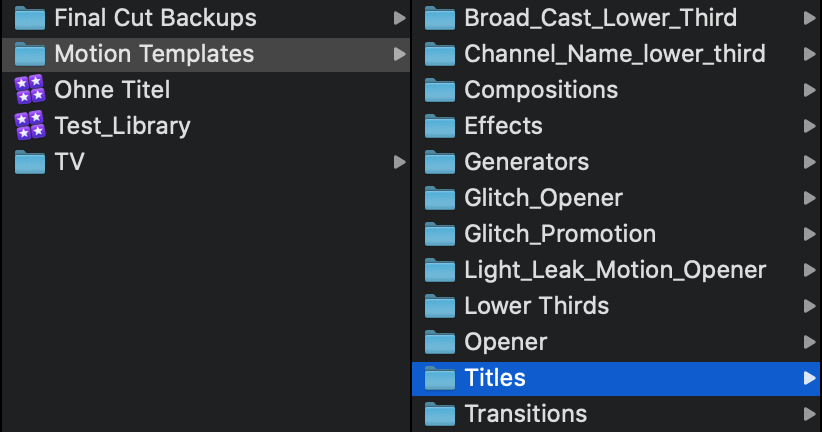
Okay step by step...
1. I downloaded fcpX trial version
2. I found the plug ins on mixkit.co
3. I made sure that my folders in Motion Templates have the ending .localized as well as the Motion Templates folder
4. I downloaded some of the mixkit plug ins and placed them in folders where I thought they belong to. I stumbled across a youtube tutorial that said it's important to place the right plug-ins into the right folder otherwise they won't appear within fcpX.
5. This are the plug-ins I tried to load:
6. mixkit.co/free-final-cut-pro-templates/c...stortion-glitch-668/
* which I thought to be a transition but if I place it in the folder of Transition, neither the empty Transition folder nor the plug-in is visible
7. https://mixkit.co/free-final-cut-pro-templates/broadcaster-style-lower-third-670/
8. which I placed into the lower thirds folder but again neither the empty lower thirds folder nor the plug-in is visible
9. same for this: mixkit.co/free-final-cut-pro-templates/c...ame-lower-third-719/
10. https://mixkit.co/free-final-cut-pro-templates/light-leak-motion-opener-728/ or mixkit.co/free-final-cut-pro-templates/c...l-glitch-opener-726/
11. does fcpX support an "Opener" folder?
12. https://mixkit.co/free-final-cut-pro-templates/pixel-grid-glitch-promo-730/
13. does fcpX support an "Promotion" folder?
I just wanted to see if I can work with the free stuff so that I now what I should be considering buying. And not just buying stuff from which I really have no clue.
Conclusion:Even though I have multiple folders like "Transitions", "Titles", "Generators" etc. the only two folders that appear within fcpX are "Titles" and "Generators". mixkit.co/free-final-cut-pro-templates/shape-glitch-reveal-655/ is the only plug in I could see in fcpX after downloading and placing in the folder.Thank you very much for your help!
Best wishes
yvesbou
Last edit: 08 Mar 2021 22:03 by peteramwiggins.
Please Log in to join the conversation.
- Tom Wolsky
-

- Offline
- Moderator
-

06 Mar 2021 16:10 #113145
by Tom Wolsky
Replied by Tom Wolsky on topic Newbie Questions
Please post Screen shots of your Motion Templates folder in column View so we can see what you’re doing. Dud you .localized the Titles and Transitions folders?
Please Log in to join the conversation.
06 Mar 2021 20:21 #113149
by yvesbou
Replied by yvesbou on topic Newbie Questions
yes I added .localized ...
Please Log in to join the conversation.
- Tom Wolsky
-
- Offline
- Moderator
-
06 Mar 2021 20:31 #113150
by Tom Wolsky
Replied by Tom Wolsky on topic Newbie Questions
Please post the screenshots. If they look correct, then you'd have to contact the developer, but the category should show up at least in the Transitions browser of FCP.
Please Log in to join the conversation.


06 Mar 2021 22:01 #113152
by jamesroy
Replied by jamesroy on topic Newbie Questions
How do I unsubscribe from all these topics?
Please Log in to join the conversation.


07 Mar 2021 00:11 #113154
by JoeEditor
Replied by JoeEditor on topic Newbie Questions
"...the only two folders that appear within fcpX are "Titles" and "Generators"
You do know that Effects and Transitions are in the bottom right of the GUI, not the same location as Titles and Generators, yes?
You do know that Effects and Transitions are in the bottom right of the GUI, not the same location as Titles and Generators, yes?
Please Log in to join the conversation.
08 Mar 2021 19:46 #113213
by yvesbou
Replied by yvesbou on topic Newbie Questions
I added them to the initial post
Please Log in to join the conversation.
08 Mar 2021 19:49 #113214
by yvesbou
Replied by yvesbou on topic Newbie Questions
I don't know anything, which folders does one need to store the different plug-ins?
Please Log in to join the conversation.
- Tom Wolsky
-
- Offline
- Moderator
-
08 Mar 2021 20:05 - 08 Mar 2021 22:03 #113215
by Tom Wolsky
Replied by Tom Wolsky on topic Newbie Questions
Motion Templates should only contain Effects, Titles, Generators, and Transitions. Those folders should be localized as well. The other items that are in Motion Templates folder should be moved to out of there to their appropriate location. Inside each of the folders in Motion Templates can create category folders. The plugins need to be in category folders, they can't be on their own. You can either use the exiting FCP categories or create your own category names. The actual plugin you got goes into the category folder. That's the normal way. Other developers might do things differently and might structure their folders differently. Check the exact method they give for installation. That said some developers tell users to do stupid things.

Last edit: 08 Mar 2021 22:03 by peteramwiggins.
Please Log in to join the conversation.
11 Mar 2021 20:56 - 11 Mar 2021 20:58 #113327
by yvesbou
Replied by yvesbou on topic Newbie Questions
Thanks for your explanations.
So I delete Compositions -> since nothing in there
A few questions remain though.
To which folder do lower thirds belong to?
What do you think.. to which folder do "opener" and "promotion" belong to?
So I delete Compositions -> since nothing in there
A few questions remain though.
To which folder do lower thirds belong to?
What do you think.. to which folder do "opener" and "promotion" belong to?
Last edit: 11 Mar 2021 20:58 by yvesbou.
Please Log in to join the conversation.
- Tom Wolsky
-
- Offline
- Moderator
-
11 Mar 2021 21:04 #113328
by Tom Wolsky
Replied by Tom Wolsky on topic Newbie Questions
Lower thirds are titles. Look inside the folder and see what the Motion project extension is. Effects are .moef. Generators are .motn. Titles are .moti. Transitions are .motr.
Please Log in to join the conversation.
