


- Posts: 3
- Thank you received: 0
3 Post Moderation Rule for New Boarders (25 Jan 2021)
New boarders will have their posts moderated - Don't worry if you cannot see your post immediately.
Lost built in Keyer, Colour tools and transitions on 10.4.10
- HairyDalek
-
 Topic Author
- Offline
- New Member
-

Less
More
16 Feb 2021 11:54 #112713
by HairyDalek
Hi all,
hew here - I’m a part-time FCP user. Right now, I’m on 10,4.10 on Mac OS X 10.14.6 (I have a few 32-bit apps that I don’t want to lose, and I’ve not yet had the time to virtualise this machine so I can move on to Catalina).
So, I am a bit behind the curve. What has happened is that some effects, colour tools and transitions have vanished. This includes Keyer (green screen), fade to colour and the colour correction tools. So projects that use them have red blocks where the missing effects have been used. They were all there in previous versions of the app (and, as noted above, I use FCPX occasionally, so the upgrade may have happened a while back but I’ve only recently needed to use the app).
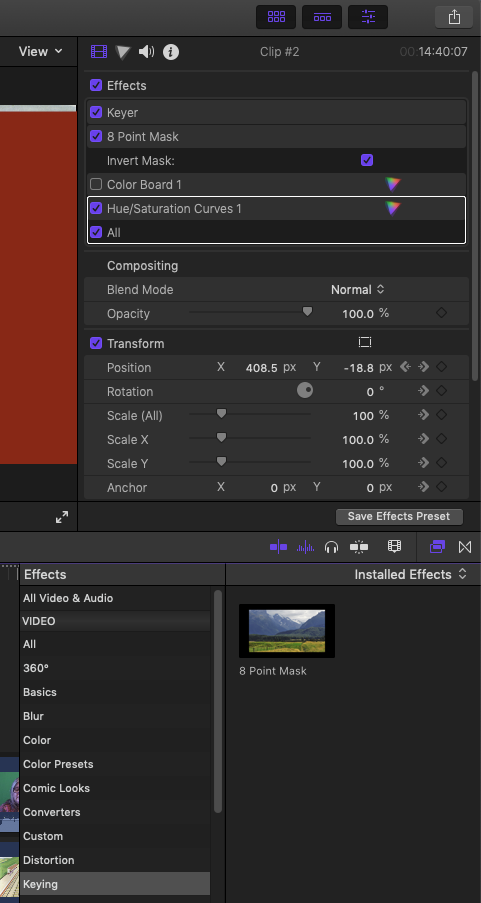
I’ve tried restarting the app, restarting my Mac. I’ve also tried deleting permissions, and have re-downloaded and installed FCPX from the app store. No luck. There is the odd occasion where they do appear, but the next time I open FCPX, they’ve gone. I thought it may be down to libraries (I have one on my local drive, and one on an external USB drive - tried unloading each by turn to see what happens), bit I am not sure that’s it.
I have also run DiskUtilities to check the HD, and it checks out. I’ve even booted to Single User Mode and run FSCK on the drive, again, no issues. I do this every few weeks anyway, just for good measure.
I have also read that Google Chrome may be a problem, so I’ve uninstalled that (and removed the scurf it leaves behind), but no change.
The next thing is to delete the app from my HD, reboot and re-install. Anyone here got any other suggestions that may help?
hew here - I’m a part-time FCP user. Right now, I’m on 10,4.10 on Mac OS X 10.14.6 (I have a few 32-bit apps that I don’t want to lose, and I’ve not yet had the time to virtualise this machine so I can move on to Catalina).
So, I am a bit behind the curve. What has happened is that some effects, colour tools and transitions have vanished. This includes Keyer (green screen), fade to colour and the colour correction tools. So projects that use them have red blocks where the missing effects have been used. They were all there in previous versions of the app (and, as noted above, I use FCPX occasionally, so the upgrade may have happened a while back but I’ve only recently needed to use the app).
I’ve tried restarting the app, restarting my Mac. I’ve also tried deleting permissions, and have re-downloaded and installed FCPX from the app store. No luck. There is the odd occasion where they do appear, but the next time I open FCPX, they’ve gone. I thought it may be down to libraries (I have one on my local drive, and one on an external USB drive - tried unloading each by turn to see what happens), bit I am not sure that’s it.
I have also run DiskUtilities to check the HD, and it checks out. I’ve even booted to Single User Mode and run FSCK on the drive, again, no issues. I do this every few weeks anyway, just for good measure.
I have also read that Google Chrome may be a problem, so I’ve uninstalled that (and removed the scurf it leaves behind), but no change.
The next thing is to delete the app from my HD, reboot and re-install. Anyone here got any other suggestions that may help?
Please Log in to join the conversation.
- Tom Wolsky
-

- Offline
- Moderator
-

16 Feb 2021 12:12 #112714
by Tom Wolsky
Replied by Tom Wolsky on topic Lost built in Keyer, Colour tools and transitions on 10.4.10
Reinstall the application from a backup if you have one, or the App Store.
Please Log in to join the conversation.


16 Feb 2021 19:57 #112722
by jamesroy
Replied by jamesroy on topic unsubscribe me
I can't find the unsubscribe button
Please Log in to join the conversation.
- Carsten Orlt
-

- Offline
- Platinum Member
-

Less
More
- Posts: 422
- Thank you received: 82
16 Feb 2021 21:47 #112724
by Carsten Orlt
Replied by Carsten Orlt on topic Lost built in Keyer, Colour tools and transitions on 10.4.10
One other thing crossed my mind, and it’s only a wild guess as your screenshot doesn't show the bottom of your fcp interface, do you have a search term entered in the search field below the effects? Sorry if that is that is a stupid question but it happened to me a few times where an effect wasn't showing until I noticed that I didn’t clear the search field from an earlier search.
other than that a reinstall is your best bet.
other than that a reinstall is your best bet.
Please Log in to join the conversation.
- HairyDalek
-
Topic Author
- Offline
- New Member
-
Less
More
- Posts: 3
- Thank you received: 0
17 Feb 2021 10:55 #112739
by HairyDalek
This has caught me before, but not this time. The effects are missing from the project - any clip they are used on are blanked out with the red warning pane. So while they are listed in the project effects pane, there are no settings displayed. They are also missing from the Installed Effects palette.
Replied by HairyDalek on topic Lost built in Keyer, Colour tools and transitions on 10.4.10
That was next on my list, and the problem remains. Rebooted the Mac, and then restarted FCPX holding down command+option to delete preferences.Tom Wolsky wrote: Reinstall the application from a backup if you have one, or the App Store.
[url=https://www.fcp.co/profile/2731-carsten-orlt]Carsten Orlt[/url] wrote: One other thing crossed my mind, and it’s only a wild guess as your screenshot doesn't show the bottom of your fcp interface, do you have a search term entered in the search field below the effects? Sorry if that is that is a stupid question but it happened to me a few times where an effect wasn't showing until I noticed that I didn’t clear the search field from an earlier search.
other than that a reinstall is your best bet.
This has caught me before, but not this time. The effects are missing from the project - any clip they are used on are blanked out with the red warning pane. So while they are listed in the project effects pane, there are no settings displayed. They are also missing from the Installed Effects palette.
Please Log in to join the conversation.
- Tom Wolsky
-
- Offline
- Moderator
-
17 Feb 2021 11:39 #112740
by Tom Wolsky
Replied by Tom Wolsky on topic Lost built in Keyer, Colour tools and transitions on 10.4.10
Moved the application to the trash and redownload it from the App Store. Your backup was likely already corrupted.
Please Log in to join the conversation.
- HairyDalek
-
Topic Author
- Offline
- New Member
-
Less
More
- Posts: 3
- Thank you received: 0
23 Mar 2021 12:54 #113587
by HairyDalek
Replied by HairyDalek on topic Lost built in Keyer, Colour tools and transitions on 10.4.10
OK, long time since the last post. Again, thanks to all who have replied. I *think* I have found out the reason for these effects vanishing - or if not a reson, a work around to get them back.
I generally have two libraries - one on the local drive, and one on a secondary drive connected via USB. This is handy if I want to work on stuff on my laptop. When both libraries are loaded, they appear in the order:
Video (that’s the USB Drive)
Macintosh HD
Now, when the Video library is present at application start, the effects I mentioned are missing - Keyer & Luma Keyer. If I close that Library in FCP, quit and restart the application, those effects return. I can then reload the “Video” library and all is good. Sometimes, the effects still do not show up, but a restart of the app seems to bring them back.
It’s really odd - and it took a bit of experimenting and repeating the issue to find a solution - even if it’s not the best.
So, I am not wondering if the order that the libraries are initially loaded in FCP is a cause. If I quit the app with both libraries loaded, on restarting the app, the order is this:
Video
Macintosh HD
When things work, the order is:
Macintosh HD
Video
So I am now wondering if there is a way to force the local library to be loaded first when the app starts, because I have a feeling that this is the problem.
Hopefully this will help anyone else who is having similar problems.
I generally have two libraries - one on the local drive, and one on a secondary drive connected via USB. This is handy if I want to work on stuff on my laptop. When both libraries are loaded, they appear in the order:
Video (that’s the USB Drive)
Macintosh HD
Now, when the Video library is present at application start, the effects I mentioned are missing - Keyer & Luma Keyer. If I close that Library in FCP, quit and restart the application, those effects return. I can then reload the “Video” library and all is good. Sometimes, the effects still do not show up, but a restart of the app seems to bring them back.
It’s really odd - and it took a bit of experimenting and repeating the issue to find a solution - even if it’s not the best.
So, I am not wondering if the order that the libraries are initially loaded in FCP is a cause. If I quit the app with both libraries loaded, on restarting the app, the order is this:
Video
Macintosh HD
When things work, the order is:
Macintosh HD
Video
So I am now wondering if there is a way to force the local library to be loaded first when the app starts, because I have a feeling that this is the problem.
Hopefully this will help anyone else who is having similar problems.
Please Log in to join the conversation.
- Tom Wolsky
-
- Offline
- Moderator
-
23 Mar 2021 16:18 #113590
by Tom Wolsky
Replied by Tom Wolsky on topic Lost built in Keyer, Colour tools and transitions on 10.4.10
Just double click the library you want to open to launch the application.
Do you have Chrome installed? If so you should uninstall it.
Do you have Chrome installed? If so you should uninstall it.
Please Log in to join the conversation.

23 Mar 2021 16:56 #113592
by JoeEditor
Replied by JoeEditor on topic Lost built in Keyer, Colour tools and transitions on 10.4.10
Also, is your browser set to show "Installed Effects" or just those copied into the Library itself? Top left of the effects browser, what's the location set to?
Please Log in to join the conversation.
