




- Posts: 34
- Thank you received: 3
3 Post Moderation Rule for New Boarders (25 Jan 2021)
New boarders will have their posts moderated - Don't worry if you cannot see your post immediately.
Anamorphic: aspect ratio „off“ – team still shooting – pro advice?
14 Feb 2021 11:08 - 14 Feb 2021 22:56 #112689
by Nico_D
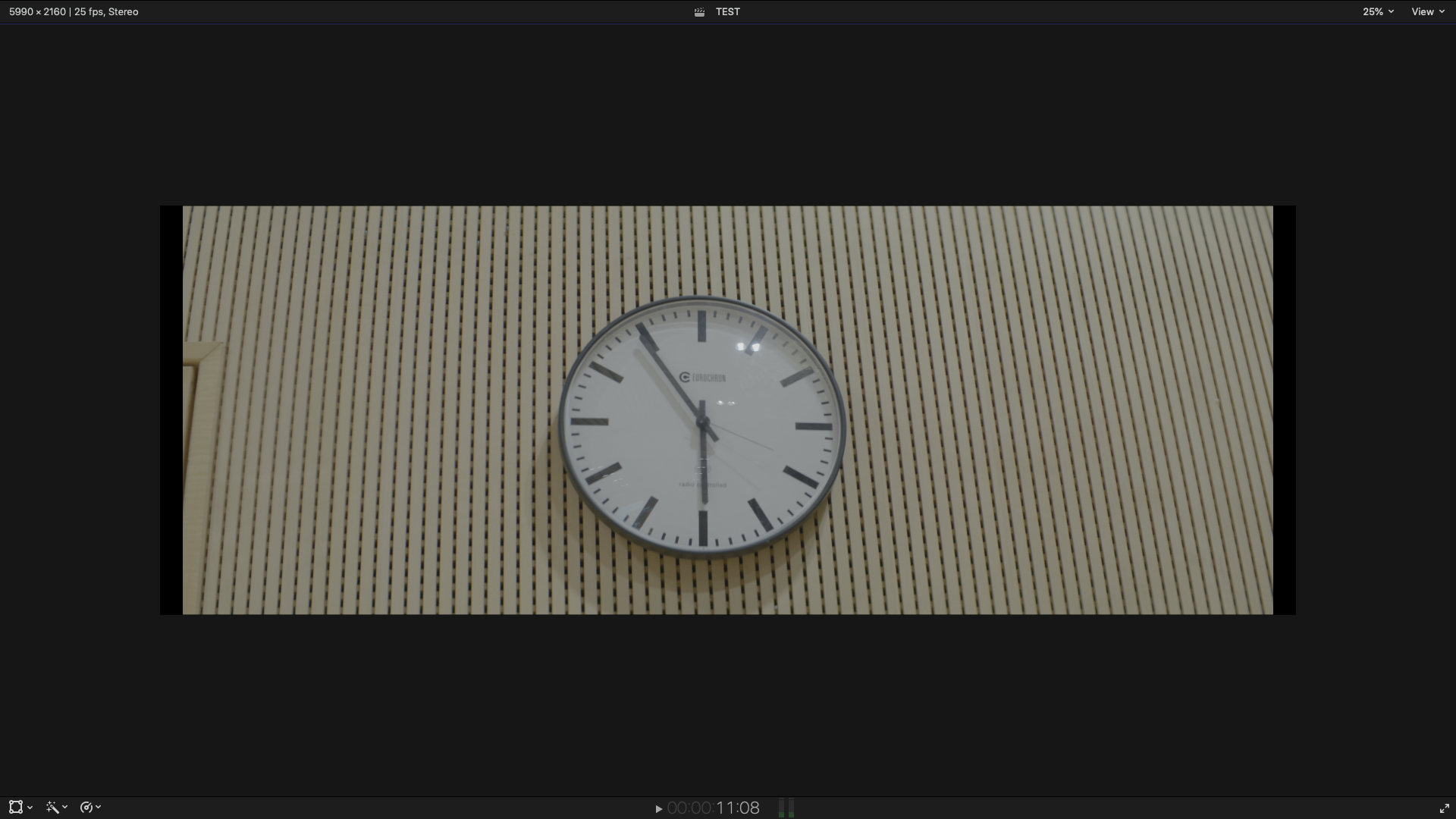
Hi everyone,I am working with anamorphic footage for the first time, and I can't find out how to adjust respectively find the 100% correct aspect ratio. The footage is shot with Anamorphic Hawk Vlite 2x Lenses on a Lumix S1H (in 3328x2496 squeezed to 2048x858).Generally, having the aspect ratio of 2,4:1 should be easy, but it isn't. When I set up a project timeline with that ratio and throw in a clip, there is still a fair amount of black bars (see screenshots). Anyone with experience in this? Can this be because of the camera? Am I missing something? What would you suggest? The team is still shooting, they just began. The film shall go somewhere „big“, and I also don't know if we can just go a few pixels and do „our own“ aspect ratio.
Thanks tons!

Thanks tons!
Last edit: 14 Feb 2021 22:56 by peteramwiggins.
Please Log in to join the conversation.
- Tom Wolsky
-

- Offline
- Moderator
-

14 Feb 2021 11:37 #112690
by Tom Wolsky
Replied by Tom Wolsky on topic Anamorphic: aspect ratio „off“ – team still shooting – pro advice?
Would it be possible to upload one of your clips somewhere like Dropbox or WeTransfer.? Thanks.
Please Log in to join the conversation.
14 Feb 2021 13:36 #112691
by Nico_D
Replied by Nico_D on topic Anamorphic: aspect ratio „off“ – team still shooting – pro advice?
Please Log in to join the conversation.

14 Feb 2021 15:47 #112692
by dgwvideo
Creating history....one edit at a time !
Replied by dgwvideo on topic Anamorphic: aspect ratio „off“ – team still shooting – pro advice?
We shoot 2.4:1 frequently with Blackmagic cameras. Set the project up using custom setting and create the exact frame size that your camera shoots. In the video inspector, after you drop your clip in the timeline, select spatial conform and set it to none. This should eliminate any black borders and export exactly to your 2.4:1 aspect. Setting to Fit should give the same result as long as your camera clip is the exact frame size as your custom project.
Creating history....one edit at a time !
Please Log in to join the conversation.
- funwithstuff
-

- Offline
- Senior Member
-

Less
More
- Posts: 64
- Thank you received: 19
14 Feb 2021 23:21 - 15 Feb 2021 02:22 #112693
by funwithstuff
Replied by funwithstuff on topic Anamorphic: aspect ratio „off“ – team still shooting – pro advice?
Looks like the Ninja recording the file has done some unwanted conversion, adding black bars to the sides to fit into a standard UHD resolution. Can you get hold of the camera original files? That could avoid problems down the line, even if you have to optimise them or make proxies in FCP.
If you have to use these Ninja files, change the Scale X (only) to 179% and you'll be OK. You can do this on each clip, or on an adjustment layer above everything. (The original files, if you can get them, will need similar treatment, but won't have black bars.)
EDIT: I should clarify that the Scale X of 179% converts the file posted to crop off the black edges and fit within the stated timeline size of 2048x858, tested on my system here. I'm not sure that is the correct size to use (I'd go larger rather than smaller) and I'd also try to use camera originals if possible, which will have a different resolution entirely.
If you have to use these Ninja files, change the Scale X (only) to 179% and you'll be OK. You can do this on each clip, or on an adjustment layer above everything. (The original files, if you can get them, will need similar treatment, but won't have black bars.)
EDIT: I should clarify that the Scale X of 179% converts the file posted to crop off the black edges and fit within the stated timeline size of 2048x858, tested on my system here. I'm not sure that is the correct size to use (I'd go larger rather than smaller) and I'd also try to use camera originals if possible, which will have a different resolution entirely.
Last edit: 15 Feb 2021 02:22 by funwithstuff. Reason: clarification
Please Log in to join the conversation.
- Tom Wolsky
-
- Offline
- Moderator
-
14 Feb 2021 23:48 #112695
by Tom Wolsky
Replied by Tom Wolsky on topic Anamorphic: aspect ratio „off“ – team still shooting – pro advice?
What's the project resolution supposed to be?
Please Log in to join the conversation.
- Oliver Peters
-

- Offline
- Platinum Member
-

Less
More
- Posts: 335
- Thank you received: 62
15 Feb 2021 01:59 #112696
by Oliver Peters
Replied by Oliver Peters on topic Anamorphic: aspect ratio „off“ – team still shooting – pro advice?
Are you saying that the squeezed file size is 3328 x 2496? The lens is applying a 2x squeeze. So the corrected (unsqueezed) image would be 6656 x 2496. This has to fit into the 2048 x 858 composition. You'll need to correct aspect ratio and then match top and bottom. This will crop some of the left and right side if done correctly. Set your spatial conform to none and adjust X and Y scale values independently of each other.
Please Log in to join the conversation.
- Oliver Peters
-
- Offline
- Platinum Member
-
Less
More
- Posts: 335
- Thank you received: 62
15 Feb 2021 02:16 - 15 Feb 2021 02:26 #112697
by Oliver Peters
Replied by Oliver Peters on topic Anamorphic: aspect ratio „off“ – team still shooting – pro advice?
I downloaded your clip. Set spatial to none and y-scale to 50%. Some left and right will be cropped. This is normal. I'm not sure why the pillarbox black bars, but I suspect the Ninja wants to record this as a 16 x 9 frame, so the lens is squeezing that within the frame.
PS: The squeeze may not be a true 2x, so you may need to adjust x-scale by eye. To my eye, the clock looked circular with an x-scale value of 90%. Shoot a chart to set an exact value.
PS: The squeeze may not be a true 2x, so you may need to adjust x-scale by eye. To my eye, the clock looked circular with an x-scale value of 90%. Shoot a chart to set an exact value.
Last edit: 15 Feb 2021 02:26 by Oliver Peters.
Please Log in to join the conversation.
15 Feb 2021 09:49 - 15 Feb 2021 09:52 #112700
by Nico_D
Replied by Nico_D on topic Anamorphic: aspect ratio „off“ – team still shooting – pro advice?
Thanks everyone!
I set up the spatial to none, that was the crucial checkbox. Now, no further adjustments in scaling necessary.
Plus: Now I have been rebriefed by the DOP/producers that the image will be cropped by some pixels on the left and right side – they knew and just forgot so say.
Thanks again and have a good week all!
I set up the spatial to none, that was the crucial checkbox. Now, no further adjustments in scaling necessary.
Plus: Now I have been rebriefed by the DOP/producers that the image will be cropped by some pixels on the left and right side – they knew and just forgot so say.
Thanks again and have a good week all!
Last edit: 15 Feb 2021 09:52 by Nico_D.
Please Log in to join the conversation.
