


- Posts: 103
- Thank you received: 2
3 Post Moderation Rule for New Boarders (25 Jan 2021)
New boarders will have their posts moderated - Don't worry if you cannot see your post immediately.
blurry footage out of 4k
10 Feb 2021 15:45 #112609
by Brinky
blurry footage out of 4k was created by Brinky
Hi,
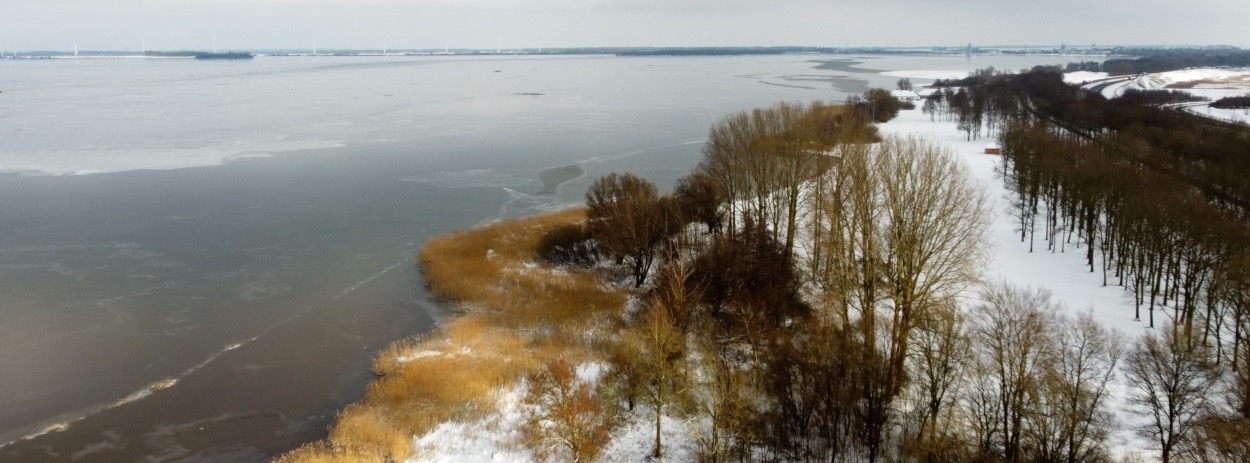
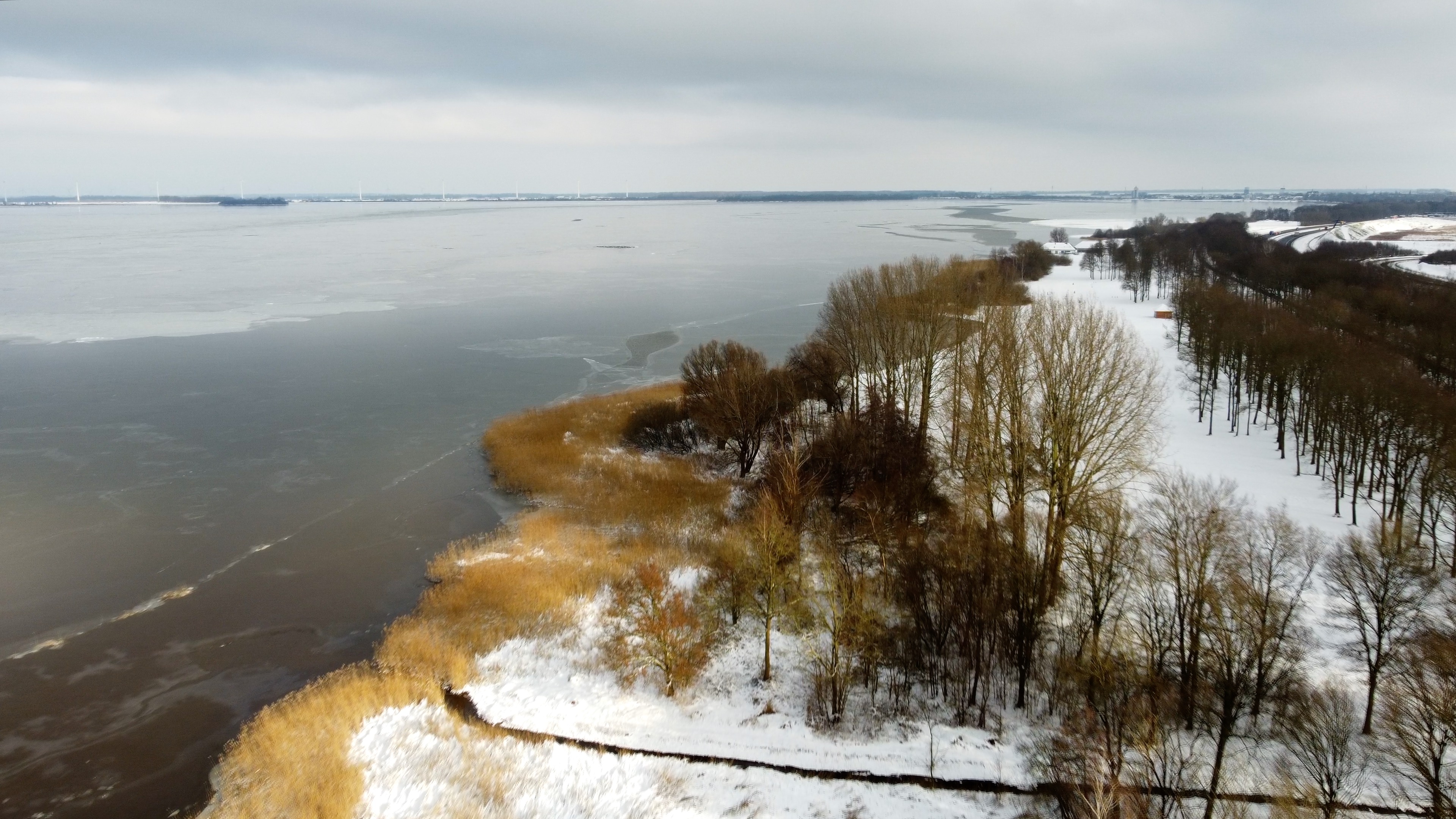
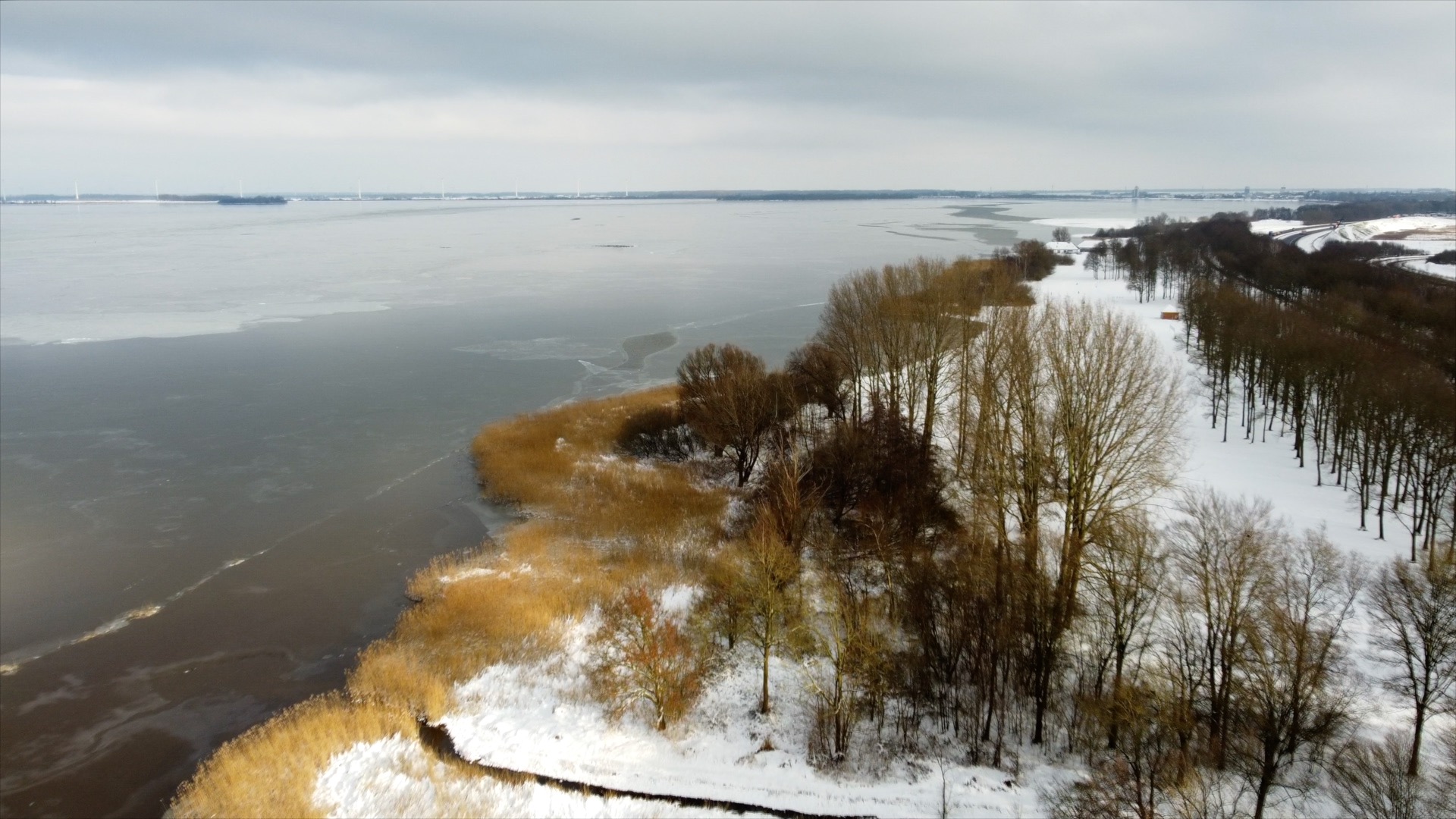
I've read some discussions using 4k footage in HD timelines would decrease the video quality. I've never noticed this shooting with a GH5. But a dji mini 2 gives me blurry video when down sizing to HD or for a Facebook cover video. I've tried everything. Settings high. Exported proress HD, imported back again. Spatial conform to none. But still the downgraded footage looks blurry. See the still outputs. Any ideas?
I've read some discussions using 4k footage in HD timelines would decrease the video quality. I've never noticed this shooting with a GH5. But a dji mini 2 gives me blurry video when down sizing to HD or for a Facebook cover video. I've tried everything. Settings high. Exported proress HD, imported back again. Spatial conform to none. But still the downgraded footage looks blurry. See the still outputs. Any ideas?
Please Log in to join the conversation.
- Tom Wolsky
-

- Offline
- Moderator
-

10 Feb 2021 15:52 #112610
by Tom Wolsky
Replied by Tom Wolsky on topic blurry footage out of 4k
Not quite sure what you're showing. The first image is not HD and looks soft.
Please Log in to join the conversation.
10 Feb 2021 15:56 #112611
by Brinky
Replied by Brinky on topic blurry footage out of 4k
The first image is 1250 X 463 for a Facebook front video. And yes it's not sharp. Don't know how to fix this.
Please Log in to join the conversation.


10 Feb 2021 18:15 #112625
by joema
Blurry relative to what? Any 4k material when downscaled to 1080p will have less resolution, whether you do that with FCP, Resolve, Premiere or whatever.
Are you saying FCP alone is somehow excessively degrading the image sharpness, beyond what is expected for a normal 4k>1080p downscale?
If you sequentially downscale again from 1080p output to 1250 x 463, yet another rescale and decode/encode cycle is required. Each step is expected to degrade the image a bit, the question is how much would be abnormal.
I just did a brief test using HEVC UHD 4k/23.98 from a Phantom 4 Pro, exported from a 4k timeline at 1080p H264 vs exported from a 1080p timeline at 1080p H264. Obviously the 1080p export will be lower resolution and "blurrier" IF displayed at the same image size than the original 4k material.
The 1080p export from the 1080p timeline was very slightly lower res than a 1080p export from a 4k timeline, but it was a tiny difference. I doubt anyone on a mobile device could discern that difference.
I then did a similar test with 4k ProRes 422 material from a DJI Inspire 2, exported from a 4k FCP timeline to 1080p H264 vs from a 1080p FCP timeline to 1080p H264. In this case I could not see a difference.
It may be certain compressed acquisition codecs are more susceptible to generational losses when scaling and re-encoding.
This was on FCP 10.5.1 on an iMac Pro running Catalina 10.15.7, and Apple Pro Video Formats 2.2.0.
Replied by joema on topic blurry footage out of 4k
Brinky wrote: ..never noticed this shooting with a GH5...a dji mini 2 gives me blurry video when down sizing to HD or for a Facebook cover video...See the still outputs. Any ideas?
Blurry relative to what? Any 4k material when downscaled to 1080p will have less resolution, whether you do that with FCP, Resolve, Premiere or whatever.
Are you saying FCP alone is somehow excessively degrading the image sharpness, beyond what is expected for a normal 4k>1080p downscale?
If you sequentially downscale again from 1080p output to 1250 x 463, yet another rescale and decode/encode cycle is required. Each step is expected to degrade the image a bit, the question is how much would be abnormal.
I just did a brief test using HEVC UHD 4k/23.98 from a Phantom 4 Pro, exported from a 4k timeline at 1080p H264 vs exported from a 1080p timeline at 1080p H264. Obviously the 1080p export will be lower resolution and "blurrier" IF displayed at the same image size than the original 4k material.
The 1080p export from the 1080p timeline was very slightly lower res than a 1080p export from a 4k timeline, but it was a tiny difference. I doubt anyone on a mobile device could discern that difference.
I then did a similar test with 4k ProRes 422 material from a DJI Inspire 2, exported from a 4k FCP timeline to 1080p H264 vs from a 1080p FCP timeline to 1080p H264. In this case I could not see a difference.
It may be certain compressed acquisition codecs are more susceptible to generational losses when scaling and re-encoding.
This was on FCP 10.5.1 on an iMac Pro running Catalina 10.15.7, and Apple Pro Video Formats 2.2.0.
Please Log in to join the conversation.
10 Feb 2021 18:27 - 10 Feb 2021 18:28 #112626
by Brinky
Replied by Brinky on topic blurry footage out of 4k
Blurry as can be seen in the still exports. I noticed indeed that when I changed a 1080p project into a 1250X463 the image quality was decreasing a lot. As can be seen in the examples. This also happened in Resolve. I'm also on Catalina 2020 iMac. 3,8 Ati 16gb. Latest system, FCP and pro formats.
Last edit: 10 Feb 2021 18:28 by Brinky.
Please Log in to join the conversation.
10 Feb 2021 19:04 #112627
by joema
If it happens in Resolve it is unlikely an FCP issue; but thanks for mentioning that. We will still try to help in terms of general advice but there's likely no procedural or technical FCP fix available.
It's expected that 4k will be "blurry" if downsized to 1080p and if an object is viewed at the same physical image size. IOW a tree spanning 1cm on screen from a 4k image is also 1cm on screen from a 1080p image.
You can take a 3840 x 2160 .jpg still image in Photoshop, downscale it to 1920 x 1080, export to jpg and then view both images in Mac Preview so objects are scaled to the same size, and the 1920 x 1080 object will be blurry relative to the 3840 x 2160 object.
There are many possible scaling algorithms and Photoshop exposes some of those to the user, whereas NLEs may not. However I think Resolve Studio has a feature called "Super Scale" but I've never used it and don't know if it works for 4k>1080p downscaling.
But in general any downscaled image will be "blurrier". It might be possible using some 3rd-party scaling tool to reduce this somewhat. You can also just try adding a little sharpening in FCP.
Replied by joema on topic blurry footage out of 4k
Brinky wrote: Blurry as can be seen in the still exports....This also happened in Resolve...
If it happens in Resolve it is unlikely an FCP issue; but thanks for mentioning that. We will still try to help in terms of general advice but there's likely no procedural or technical FCP fix available.
It's expected that 4k will be "blurry" if downsized to 1080p and if an object is viewed at the same physical image size. IOW a tree spanning 1cm on screen from a 4k image is also 1cm on screen from a 1080p image.
You can take a 3840 x 2160 .jpg still image in Photoshop, downscale it to 1920 x 1080, export to jpg and then view both images in Mac Preview so objects are scaled to the same size, and the 1920 x 1080 object will be blurry relative to the 3840 x 2160 object.
There are many possible scaling algorithms and Photoshop exposes some of those to the user, whereas NLEs may not. However I think Resolve Studio has a feature called "Super Scale" but I've never used it and don't know if it works for 4k>1080p downscaling.
But in general any downscaled image will be "blurrier". It might be possible using some 3rd-party scaling tool to reduce this somewhat. You can also just try adding a little sharpening in FCP.
Please Log in to join the conversation.
10 Feb 2021 19:14 #112628
by Brinky
Replied by Brinky on topic blurry footage out of 4k
Ok thanks, just to understand this. When shooting 4k and watch this on a HD monitor will give blurrier video then when the footage was shot in HD?
I always thought 4k is a great way to shoot video for HD projects cause of the possibility to zoom ore reposition.
I always thought 4k is a great way to shoot video for HD projects cause of the possibility to zoom ore reposition.
Please Log in to join the conversation.

10 Feb 2021 22:35 #112633
by JoeEditor
Replied by JoeEditor on topic blurry footage out of 4k
I shoot 4K and edit 1080 all the time with no degradation in image quality.
Please Log in to join the conversation.
10 Feb 2021 22:52 - 10 Feb 2021 22:59 #112635
by joema
If you take the 4k and HD images you uploaded, then AirDrop those to an iPad and view in landscape mode at full screen, there is virtually no difference in visual resolution. Obviously if you zoom into each one there is more resolution in the underlying 4k image. That is because you are magnifying the HD image beyond 1:1 pixel resolution of the underlying HD image. With the 4k image there is more data than can be expressed on the iPad when viewed non-magnified and full screen, so zooming into the 4k image reveals that detail.
Simply downscaling 4k to 1080p HD will not generally hurt apparent resolution if viewed on a physically modest 1080p screen as the image was as originally composed (IOW no zoom or crop). But it depends on what you are comparing that viewing scenario to. There is a ratio of screen size, resolution and viewing distance where the greater 4k visual resolution may be manifest: www.rgb.com/display-size-resolution-and-ideal-viewing-distance
Yes 4k allows zooming 2:1 into an HD image without losing resolution. But if you export 4k as 1080p, then crop and zoom into *that*, you already destroyed the extra resolution by doing a 1080p export. That is the case with Photoshop or FCP.
Replied by joema on topic blurry footage out of 4k
Brinky wrote: Ok thanks, just to understand this. When shooting 4k and watch this on a HD monitor will give blurrier video then when the footage was shot in HD?
I always thought 4k is a great way to shoot video for HD projects cause of the possibility to zoom ore reposition.
If you take the 4k and HD images you uploaded, then AirDrop those to an iPad and view in landscape mode at full screen, there is virtually no difference in visual resolution. Obviously if you zoom into each one there is more resolution in the underlying 4k image. That is because you are magnifying the HD image beyond 1:1 pixel resolution of the underlying HD image. With the 4k image there is more data than can be expressed on the iPad when viewed non-magnified and full screen, so zooming into the 4k image reveals that detail.
Simply downscaling 4k to 1080p HD will not generally hurt apparent resolution if viewed on a physically modest 1080p screen as the image was as originally composed (IOW no zoom or crop). But it depends on what you are comparing that viewing scenario to. There is a ratio of screen size, resolution and viewing distance where the greater 4k visual resolution may be manifest: www.rgb.com/display-size-resolution-and-ideal-viewing-distance
Yes 4k allows zooming 2:1 into an HD image without losing resolution. But if you export 4k as 1080p, then crop and zoom into *that*, you already destroyed the extra resolution by doing a 1080p export. That is the case with Photoshop or FCP.
Last edit: 10 Feb 2021 22:59 by joema.
Please Log in to join the conversation.
11 Feb 2021 17:04 - 11 Feb 2021 17:06 #112650
by joema
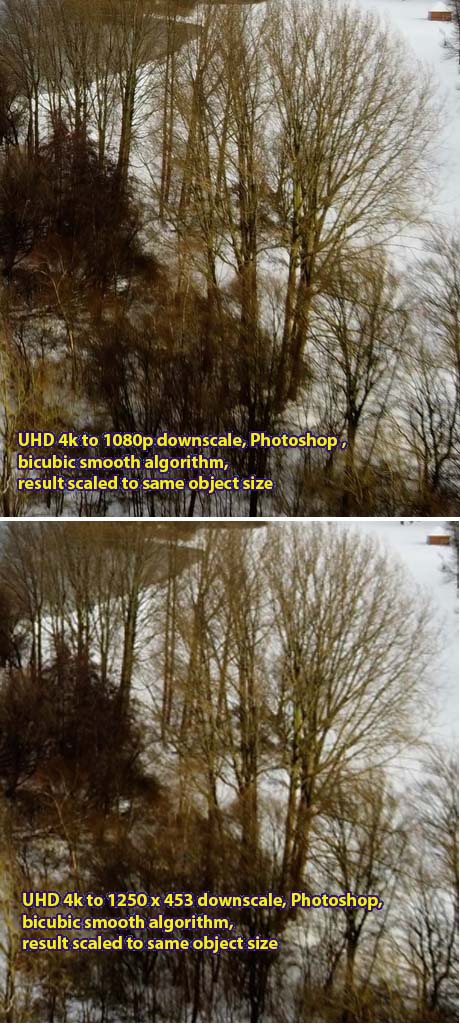
OK I investigated this more and I think the problem is NOT downscaling to HD. It is downscaling to the odd resolution of 1250 x 463 (which is lower resolution than 1080p), then expecting the result when upscaled to the same object size (IOW same size tree on playback) will have the same visible resolution vs 1080p. See attached Photoshop downsample test.
Replied by joema on topic blurry footage out of 4k
Brinky wrote: ...a dji mini 2 gives me blurry video when down sizing to HD or for a Facebook cover video...
OK I investigated this more and I think the problem is NOT downscaling to HD. It is downscaling to the odd resolution of 1250 x 463 (which is lower resolution than 1080p), then expecting the result when upscaled to the same object size (IOW same size tree on playback) will have the same visible resolution vs 1080p. See attached Photoshop downsample test.
Last edit: 11 Feb 2021 17:06 by joema.
Please Log in to join the conversation.
