




- Posts: 2
- Thank you received: 0
3 Post Moderation Rule for New Boarders (25 Jan 2021)
New boarders will have their posts moderated - Don't worry if you cannot see your post immediately.
Audio leakage in transition
29 Jan 2021 00:21 #112404
by fredvig
Audio leakage in transition was created by fredvig
Hey all,
FCP newbie with a little problem.
I'm shooting a music tutorial and am using a clip with synchronized audio (from cam and a WAV from Logic audio). There's a couple of "Um's and "So"s that I'd like to get rid of. I cut them out and tried to add a cross-dissolve transition so it wasn't an abrupt cut, but in every instance, I am hearing a phantom "so" or "um"leaking out. Anyone out there familiar with this issue?
Kind of making me a little crazy. . .
Thanks in advance,
Fred
FCP newbie with a little problem.
I'm shooting a music tutorial and am using a clip with synchronized audio (from cam and a WAV from Logic audio). There's a couple of "Um's and "So"s that I'd like to get rid of. I cut them out and tried to add a cross-dissolve transition so it wasn't an abrupt cut, but in every instance, I am hearing a phantom "so" or "um"leaking out. Anyone out there familiar with this issue?
Kind of making me a little crazy. . .
Thanks in advance,
Fred
Please Log in to join the conversation.


29 Jan 2021 06:44 #112408
by dgwvideo
Creating history....one edit at a time !
Replied by dgwvideo on topic Audio leakage in transition
The phantom is sounding because there is not enough of a handle after or before the cut. The default dissolve transition is 1 second so 1/2 sec each side of the clips it is applied to have to be silent. If you cannot trim further back before your cut to provide a longer handle on the clip try to shorten the transition duration to something like 20 or even 10 frames.
Creating history....one edit at a time !
Please Log in to join the conversation.
29 Jan 2021 10:10 #112409
by fredvig
Replied by fredvig on topic Audio leakage in transition
That makes total sense. Thanks!
Please Log in to join the conversation.

29 Jan 2021 12:56 #112419
by JoeEditor
Replied by JoeEditor on topic Audio leakage in transition
Try using the Flow transition instead. It was created specifically for this.
Please Log in to join the conversation.

30 Jan 2021 05:21 - 01 Feb 2021 10:31 #112433
by jolipoli
A lot of videos I edit will have edits for such, um, what do you call those ums? ::grin:: I usually end up doing a secondary click on the video and "detach audio" from it. I can remove the segment of the audio and do a video transition for the video if needed, though I often just do a jump cut to a different video source.
I learned this as I often use a secondary audio recording and it gets placed under the video, but I do sometimes get footage that has audio built in and replicate the secondary audio recording FCP environment by detaching the audio.
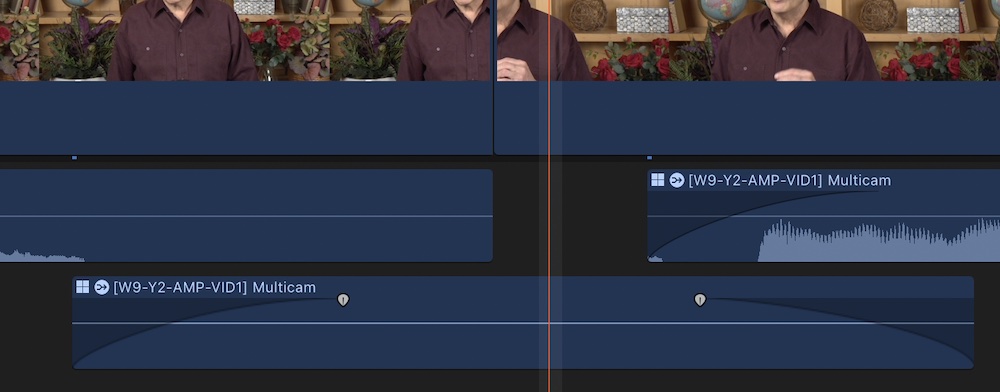
One other trick with that is to get a short clip of "room tone" to place under any gaps in the audio to prevent pops or overlaps that occur when the splice is near a word or sound. Usually the room is quiet enough not to notice there is no audio when at a splice point, but I feel more complete at placing a -60dB clip under the edit even if I can't actually hear it.
Replied by jolipoli on topic Audio leakage in transition
fredvig wrote: ...I am hearing a phantom "so" or "um"leaking out. Anyone out there familiar with this issue?
Kind of making me a little crazy. . .
Fred
A lot of videos I edit will have edits for such, um, what do you call those ums? ::grin:: I usually end up doing a secondary click on the video and "detach audio" from it. I can remove the segment of the audio and do a video transition for the video if needed, though I often just do a jump cut to a different video source.
I learned this as I often use a secondary audio recording and it gets placed under the video, but I do sometimes get footage that has audio built in and replicate the secondary audio recording FCP environment by detaching the audio.
One other trick with that is to get a short clip of "room tone" to place under any gaps in the audio to prevent pops or overlaps that occur when the splice is near a word or sound. Usually the room is quiet enough not to notice there is no audio when at a splice point, but I feel more complete at placing a -60dB clip under the edit even if I can't actually hear it.
Last edit: 01 Feb 2021 10:31 by peteramwiggins. Reason: add image of project with the extra, almost silent audio clip
Please Log in to join the conversation.
30 Jan 2021 06:39 #112434
by JoeEditor
Replied by JoeEditor on topic Audio leakage in transition
For those I use the Range tool, select that section of audio, pull it down, automatic keyframes. No jump cuts.
Room tone is essential to have on hand for audio editing, it's the first day of audio engineering 101. If you don't have room tone, you're screwed.
Room tone is essential to have on hand for audio editing, it's the first day of audio engineering 101. If you don't have room tone, you're screwed.
Please Log in to join the conversation.
