


- Posts: 481
- Thank you received: 99
3 Post Moderation Rule for New Boarders (25 Jan 2021)
New boarders will have their posts moderated - Don't worry if you cannot see your post immediately.
Anchoring or Sliding Keyframes in Effect?
20 Jan 2021 17:50 - 20 Jan 2021 17:54 #112221
by VTC
Anchoring or Sliding Keyframes in Effect? was created by VTC
There a way to keep keyframes at the head or tail of an effect to remain there no matter what the duration it's stretched to?
Have effect A with 3 parameters. Effect B is identical but mirrors A. What I need is the effect having both set of parameters that stay with their respected outermost ends. A is no problem because it's at the head. The problem on B is the keyframes remain at their set points mandating each parameter being untwirled and then slid to the end.
I use this effect to mark a continuous running shoot where the camera position changes. Currently I paste A at the beginning of camera relocation, paste tail of B at the end of camera movement then have to stretch either A or B to meet. What I'm looking to do is a single PASTE then stretch the one effect to cover the entirety of what I need obscured and not have to open the 3 parameters and slide 3 sets of keyframes. This helps mapping out where inserts are needed on review cuts.

Have effect A with 3 parameters. Effect B is identical but mirrors A. What I need is the effect having both set of parameters that stay with their respected outermost ends. A is no problem because it's at the head. The problem on B is the keyframes remain at their set points mandating each parameter being untwirled and then slid to the end.
I use this effect to mark a continuous running shoot where the camera position changes. Currently I paste A at the beginning of camera relocation, paste tail of B at the end of camera movement then have to stretch either A or B to meet. What I'm looking to do is a single PASTE then stretch the one effect to cover the entirety of what I need obscured and not have to open the 3 parameters and slide 3 sets of keyframes. This helps mapping out where inserts are needed on review cuts.
Last edit: 20 Jan 2021 17:54 by VTC.
Please Log in to join the conversation.

20 Jan 2021 19:09 #112222
by JoeEditor
Replied by JoeEditor on topic Anchoring or Sliding Keyframes in Effect?
Paste Attributes does this.
Please Log in to join the conversation.
21 Jan 2021 00:11 - 21 Jan 2021 00:15 #112225
by VTC
Replied by VTC on topic Anchoring or Sliding Keyframes in Effect?
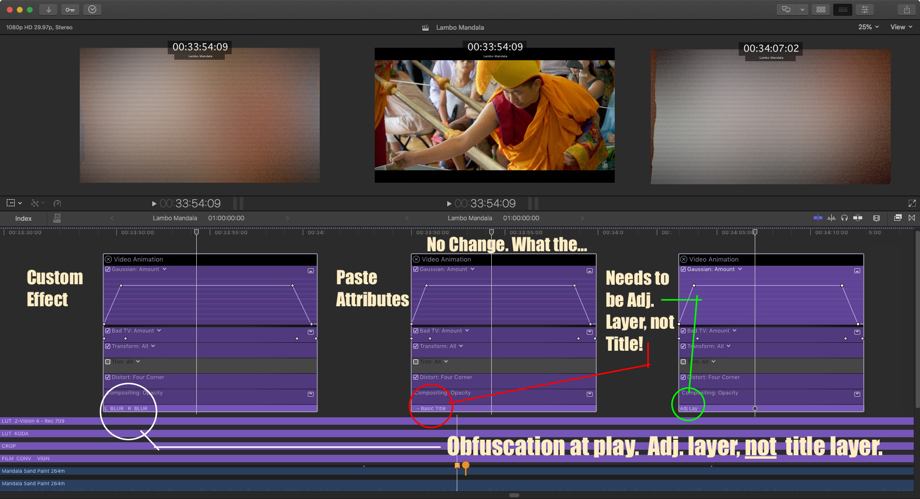
Oh, if it were that simple. In a way, it is... Tried that approach before but it never would take for some reason. Same PASTE ATTRIBUTES suggested meant I was doing something wrong, and I was due to a technicality.
Created the effect on an adjustment layer which displays the same color as a title. Renamed the effect thereby hiding the fact it wasn't really a title at all. That caused confusion when the keyframes showed they were pasted correctly no matter the duration of the effect but any video below it wasn't affected.

Created the effect on an adjustment layer which displays the same color as a title. Renamed the effect thereby hiding the fact it wasn't really a title at all. That caused confusion when the keyframes showed they were pasted correctly no matter the duration of the effect but any video below it wasn't affected.
Last edit: 21 Jan 2021 00:15 by VTC.
Please Log in to join the conversation.
21 Jan 2021 03:52 - 21 Jan 2021 03:53 #112231
by JoeEditor
Replied by JoeEditor on topic Anchoring or Sliding Keyframes in Effect?
What parameter exactly are you keyframing? I can see those images that well, my eyes are not 20 years old anymore. If you can make it an effect template in Motion, that will conform to the clip's length. And I've always had success with Paste Attributes. But it could depend on the specific parameter, which is why I asked about that.

Last edit: 21 Jan 2021 03:53 by JoeEditor.
Please Log in to join the conversation.
