


- Posts: 786
- Thank you received: 21
3 Post Moderation Rule for New Boarders (25 Jan 2021)
New boarders will have their posts moderated - Don't worry if you cannot see your post immediately.
Keyword amnesia...
- Jonathan Levin
-
 Topic Author
- Offline
- Platinum Member
-

Less
More
15 Jan 2021 21:48 #112115
by Jonathan Levin
Keyword amnesia... was created by Jonathan Levin
Hi everyone and happy new year.
Using latest FCP 10.5.1.
It has been a while since I have done any keywording and I seemed to have lost my mind.
First I think I did things backwards from what I have found on internet searches, some results directed me to this Forum too!
I have 6 ~10 minutes clips that I imported and placed in a folder called Video in the Browser.
I then created six projects and placed one of my 6 clips in each of the Project. My intention was to do a rough cut and get rid of stuff and the ability to zoom the timeline was helpful in this.
I came across a few edits, short clips in the timeline, that I wanted to Keyword. I then selected that clip in the Timeline (Project) and did a "Reveal in Browser". thinking I would be able to keyword that selection. I thought I used to be able to drag the selection over from the clip browser over the actual keyword, and then that selection would appear when I clicked on that keyword at another time.
I doesn't seem to work that way.
I then thought through the the INDEX>Video, I might be able to keyword the clip I wanted that way. No go.
I've looked at how I used to keyword things in previous projects, but I must have done a rough edit BEFORE adding them to a timeline. I'm thinking I may have used the Clip> Open Clip command and then done my rough edit.
Any ideas? Did Keywording change slightly in the last two updates or so?
Thanks.
Jonathan
Using latest FCP 10.5.1.
It has been a while since I have done any keywording and I seemed to have lost my mind.
First I think I did things backwards from what I have found on internet searches, some results directed me to this Forum too!
I have 6 ~10 minutes clips that I imported and placed in a folder called Video in the Browser.
I then created six projects and placed one of my 6 clips in each of the Project. My intention was to do a rough cut and get rid of stuff and the ability to zoom the timeline was helpful in this.
I came across a few edits, short clips in the timeline, that I wanted to Keyword. I then selected that clip in the Timeline (Project) and did a "Reveal in Browser". thinking I would be able to keyword that selection. I thought I used to be able to drag the selection over from the clip browser over the actual keyword, and then that selection would appear when I clicked on that keyword at another time.
I doesn't seem to work that way.
I then thought through the the INDEX>Video, I might be able to keyword the clip I wanted that way. No go.
I've looked at how I used to keyword things in previous projects, but I must have done a rough edit BEFORE adding them to a timeline. I'm thinking I may have used the Clip> Open Clip command and then done my rough edit.
Any ideas? Did Keywording change slightly in the last two updates or so?
Thanks.
Jonathan
Please Log in to join the conversation.
- Tom Wolsky
-

- Offline
- Moderator
-

15 Jan 2021 22:04 #112116
by Tom Wolsky
Replied by Tom Wolsky on topic Keyword amnesia...
" I thought I used to be able to drag the selection over from the clip browser over the actual keyword,"
Let me see if I have this right, you're first creating a selection in the browser clip by using Shift-F in the timeline. You're then dragging the selection from the browser filmstrip to the keyword collection in the event and dropping it. If I'm understand correctly, that still works. That creates a keyword on that section in the browser clip. It does nothing for the clip in the timeline, unless you replace it with the keyworded section of the browser clip.
Let me see if I have this right, you're first creating a selection in the browser clip by using Shift-F in the timeline. You're then dragging the selection from the browser filmstrip to the keyword collection in the event and dropping it. If I'm understand correctly, that still works. That creates a keyword on that section in the browser clip. It does nothing for the clip in the timeline, unless you replace it with the keyworded section of the browser clip.
Please Log in to join the conversation.

16 Jan 2021 00:54 #112117
by Albo
Replied by Albo on topic Keyword amnesia...
I have been doing that all day.
Yes simply dragging the clip from the browser unto the keyword collection will add that keyword to the clip.
Yes simply dragging the clip from the browser unto the keyword collection will add that keyword to the clip.
Please Log in to join the conversation.
- Jonathan Levin
-
Topic Author
- Offline
- Platinum Member
-
Less
More
- Posts: 786
- Thank you received: 21
16 Jan 2021 17:36 #112134
by Jonathan Levin
Replied by Jonathan Levin on topic Keyword amnesia...
Thanks guys.
To clarify, I select an edited portion (one clip) from the Project timeline, right click on that and go to Reveal inBrowser. This then highlights in yellow the selection in the Browser window. Sometimes hard to see on longer “takes” unless you expand. That selection in the browser is what I want to keyword.
This has got to be something I’m doing wrong. This is a personal project so I can test different things.
To clarify, I select an edited portion (one clip) from the Project timeline, right click on that and go to Reveal inBrowser. This then highlights in yellow the selection in the Browser window. Sometimes hard to see on longer “takes” unless you expand. That selection in the browser is what I want to keyword.
This has got to be something I’m doing wrong. This is a personal project so I can test different things.
Please Log in to join the conversation.
16 Jan 2021 18:43 #112135
by Albo
Replied by Albo on topic Keyword amnesia...
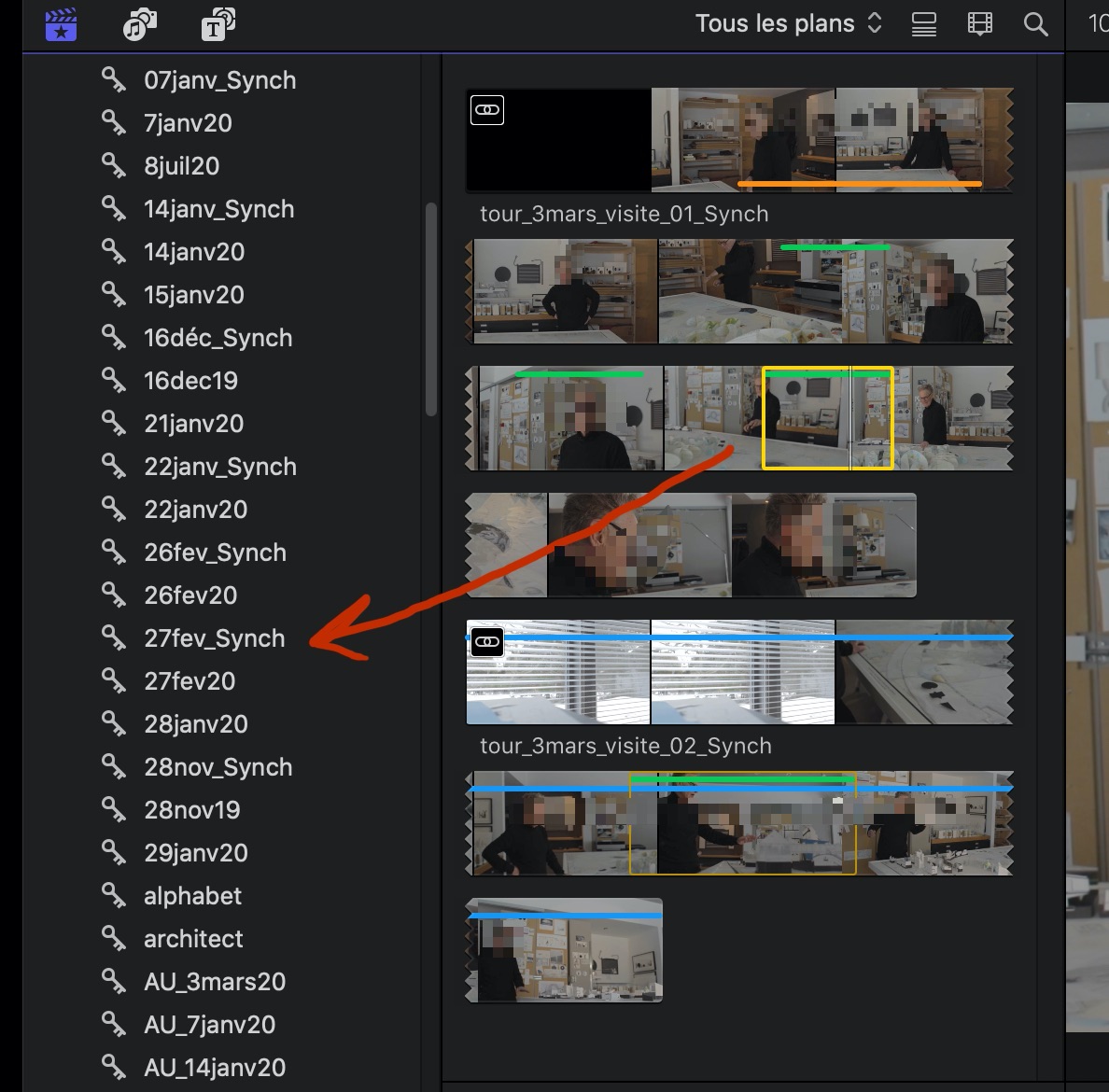
You can either select the clip directly in the browser or, as you said, reveal the clip and then drag it.
Please Log in to join the conversation.
- Jonathan Levin
-
Topic Author
- Offline
- Platinum Member
-
Less
More
- Posts: 786
- Thank you received: 21
22 Jan 2021 18:12 #112270
by Jonathan Levin
Replied by Jonathan Levin on topic Keyword amnesia...
OK. As I thought, user dumbness/error. I revisited a few of my older video projects to review what and how I did my keyword prior to my current video. What i found was that most of the keywords I created were based on Imports where a keyword was created using folder name. For example I would create an Event called Photos, and I would import "Bills Photos, Marys Photos" etc. This would then create a keyword in that Event for each of those "folder" of images. If I click on Keyword Marys Photos, the Browser view would just display only those photos. Same with other Keywords. If I select the Phots event, that shows all the images of all imported images. This is fine.
I did not find in any of my Projects where I Keyworded a clip from the actual Project Timeline. This is a good time to get my Keyword chops together.
Thanks for your help.
Jonathan
I did not find in any of my Projects where I Keyworded a clip from the actual Project Timeline. This is a good time to get my Keyword chops together.
Thanks for your help.
Jonathan
Please Log in to join the conversation.
