




- Posts: 8
- Thank you received: 3
3 Post Moderation Rule for New Boarders (25 Jan 2021)
New boarders will have their posts moderated - Don't worry if you cannot see your post immediately.
Share Current Frame ignores the background image
23 Dec 2020 19:40 #111689
by thewitt
Share Current Frame ignores the background image was created by thewitt
I have an occasional problem with Share Current Frame not picking up the entire frame.
My primary storyline has a greenscreen image on it, properly rendered.
Underneath this I have a background image.
When I Share Current Frame - everything looks fine in the Viewer, and in the image shown in the dialog, but the resulting image on disk is missing the background - that is the background is just white.
When I've had this problem in the past I thought it was just focus, and so I would make sure that I selected the clips correctly and share again, but I have a project now where no matter what I do I cannot get the background to actually end up in the image on disk.
Any suggestions?
My primary storyline has a greenscreen image on it, properly rendered.
Underneath this I have a background image.
When I Share Current Frame - everything looks fine in the Viewer, and in the image shown in the dialog, but the resulting image on disk is missing the background - that is the background is just white.
When I've had this problem in the past I thought it was just focus, and so I would make sure that I selected the clips correctly and share again, but I have a project now where no matter what I do I cannot get the background to actually end up in the image on disk.
Any suggestions?
Please Log in to join the conversation.
- Tom Wolsky
-

- Offline
- Moderator
-

23 Dec 2020 19:50 #111690
by Tom Wolsky
Replied by Tom Wolsky on topic Share Current Frame ignores the background image
Are these the current OS and FCP versions?
Please Log in to join the conversation.
23 Dec 2020 20:04 #111691
by thewitt
Replied by thewitt on topic Share Current Frame ignores the background image
MaxOS 10.14.6
FCP 10.4.10
FCP 10.4.10
Please Log in to join the conversation.
- Carsten Orlt
-

- Offline
- Platinum Member
-

Less
More
- Posts: 422
- Thank you received: 82
23 Dec 2020 23:20 #111692
by Carsten Orlt
Replied by Carsten Orlt on topic Share Current Frame ignores the background image
I never had the problem so not sure whether it's a bug or something else. These questions come to mind to trouble shoot:
Are you exporting to JPEG or PNG or..? And have you tried to export to a diff format from your normal one?
Also could you post a screenshot of your timeline as I'm not a hundred percent sure I understand exactly what you're describing.
Are you exporting to JPEG or PNG or..? And have you tried to export to a diff format from your normal one?
Also could you post a screenshot of your timeline as I'm not a hundred percent sure I understand exactly what you're describing.
Please Log in to join the conversation.
24 Dec 2020 00:13 #111693
by thewitt
Replied by thewitt on topic Share Current Frame ignores the background image
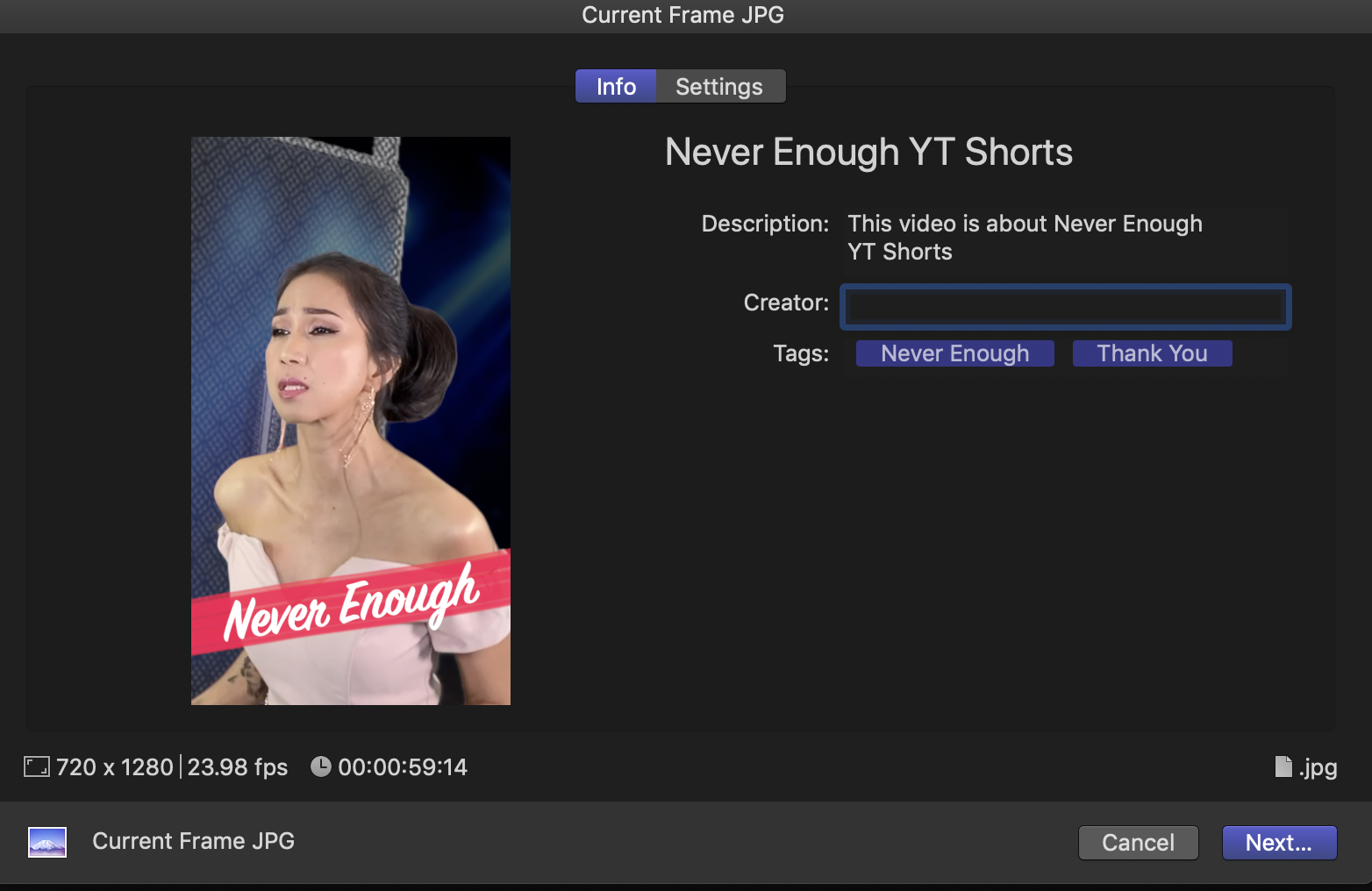
I've tried all the different image modes with no difference. I do this every week - we create 2 music videos a week - to create the thumbs for the videos and this is the first time it has behaved this way. My process is the same every time, though the stack in the timeline can get more complex with some videos. This one has a compound as a background that includes a video and a background (the large screen singer) and then another background behind that on the timeline. The main singer is at the top of the timeline and the background with the second singer below that, followed by the blue background.
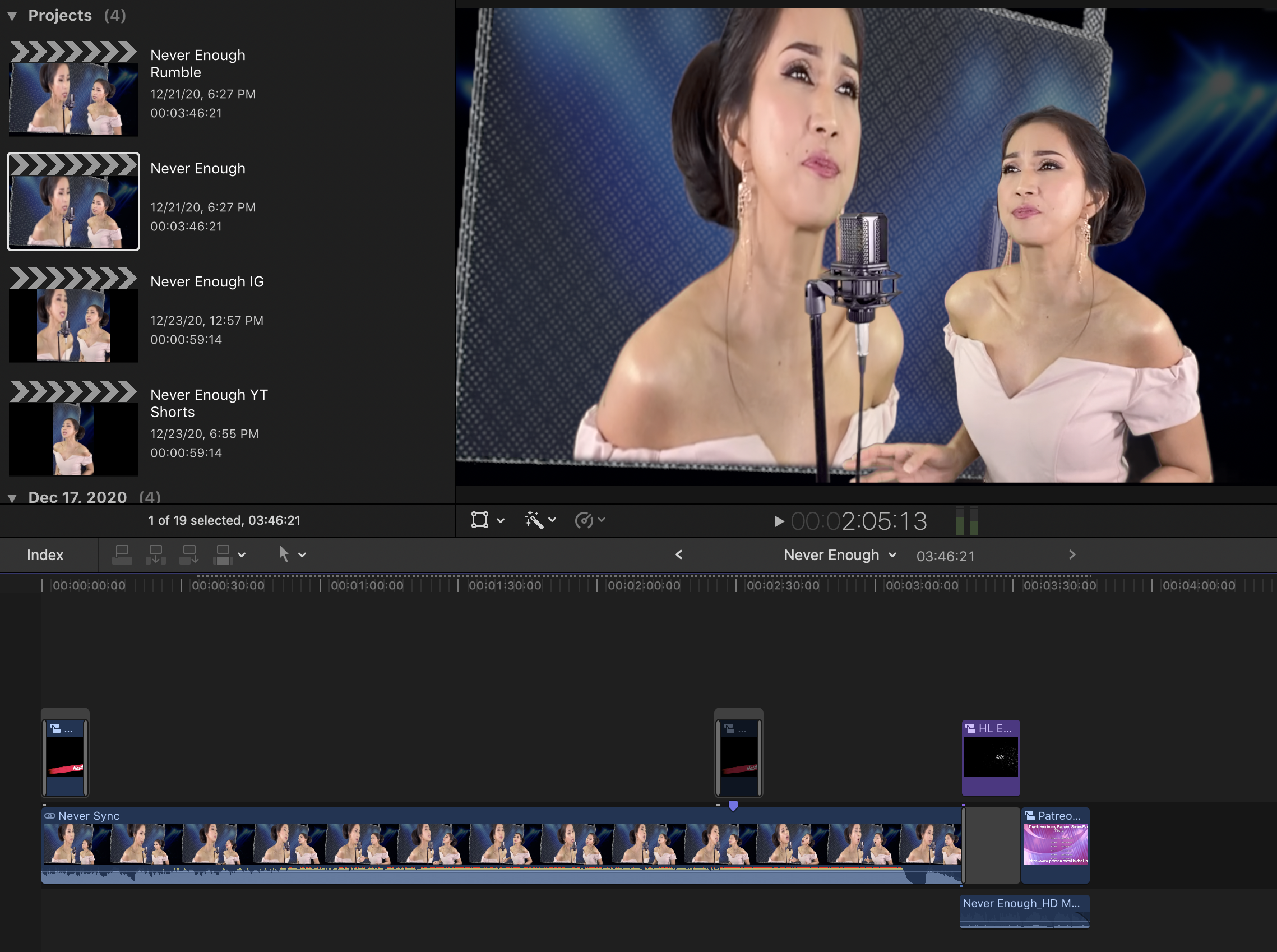
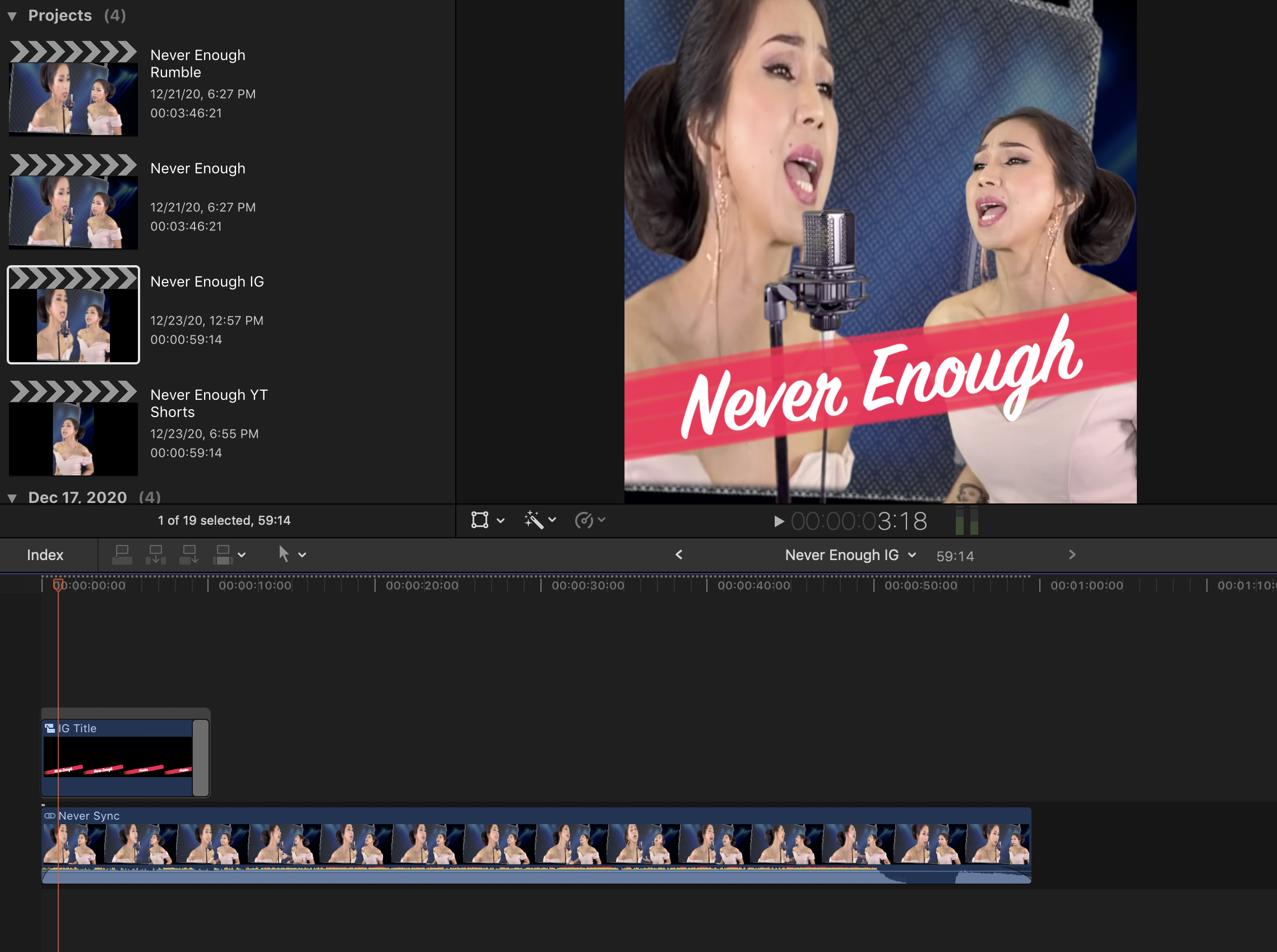
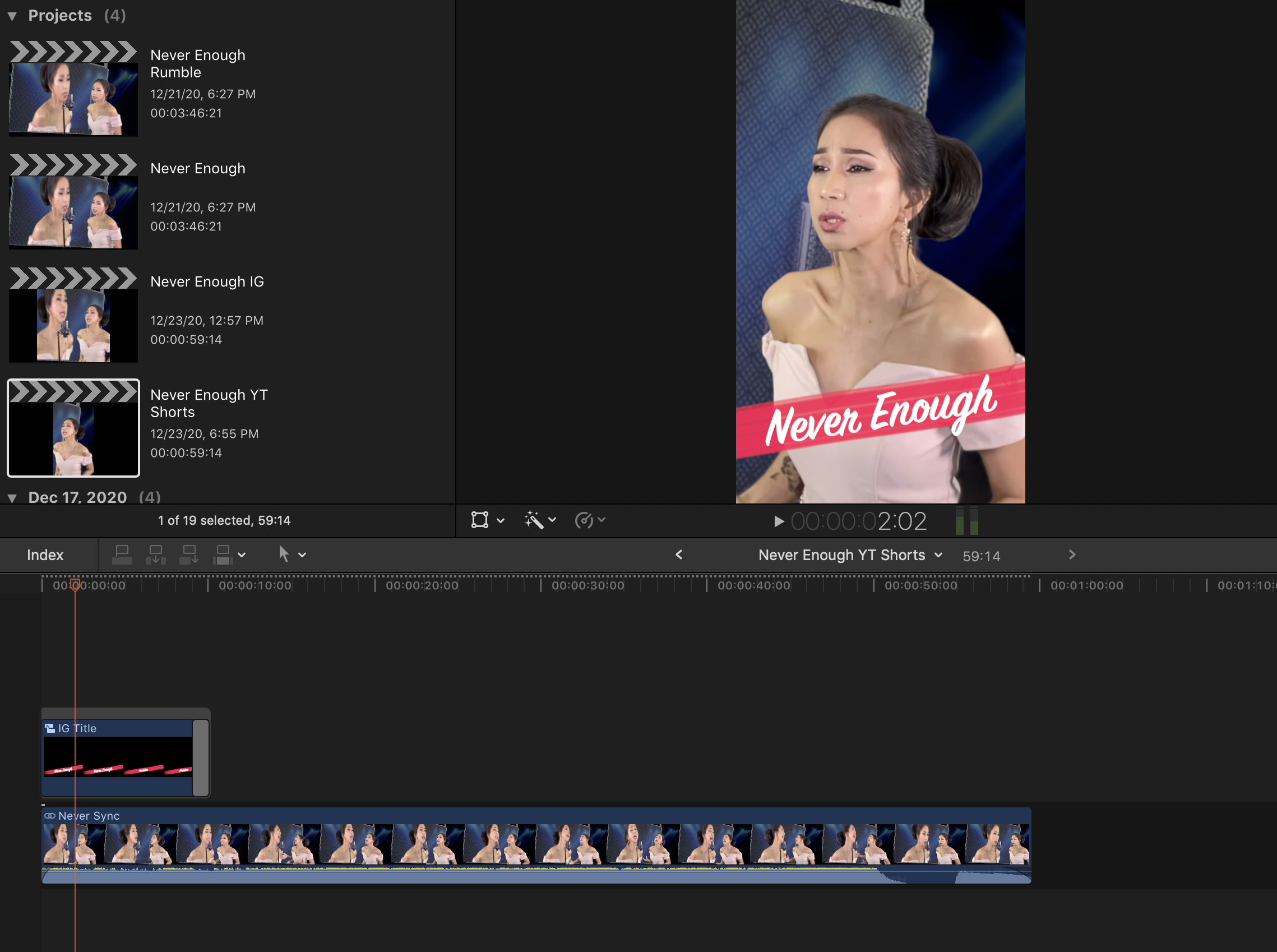
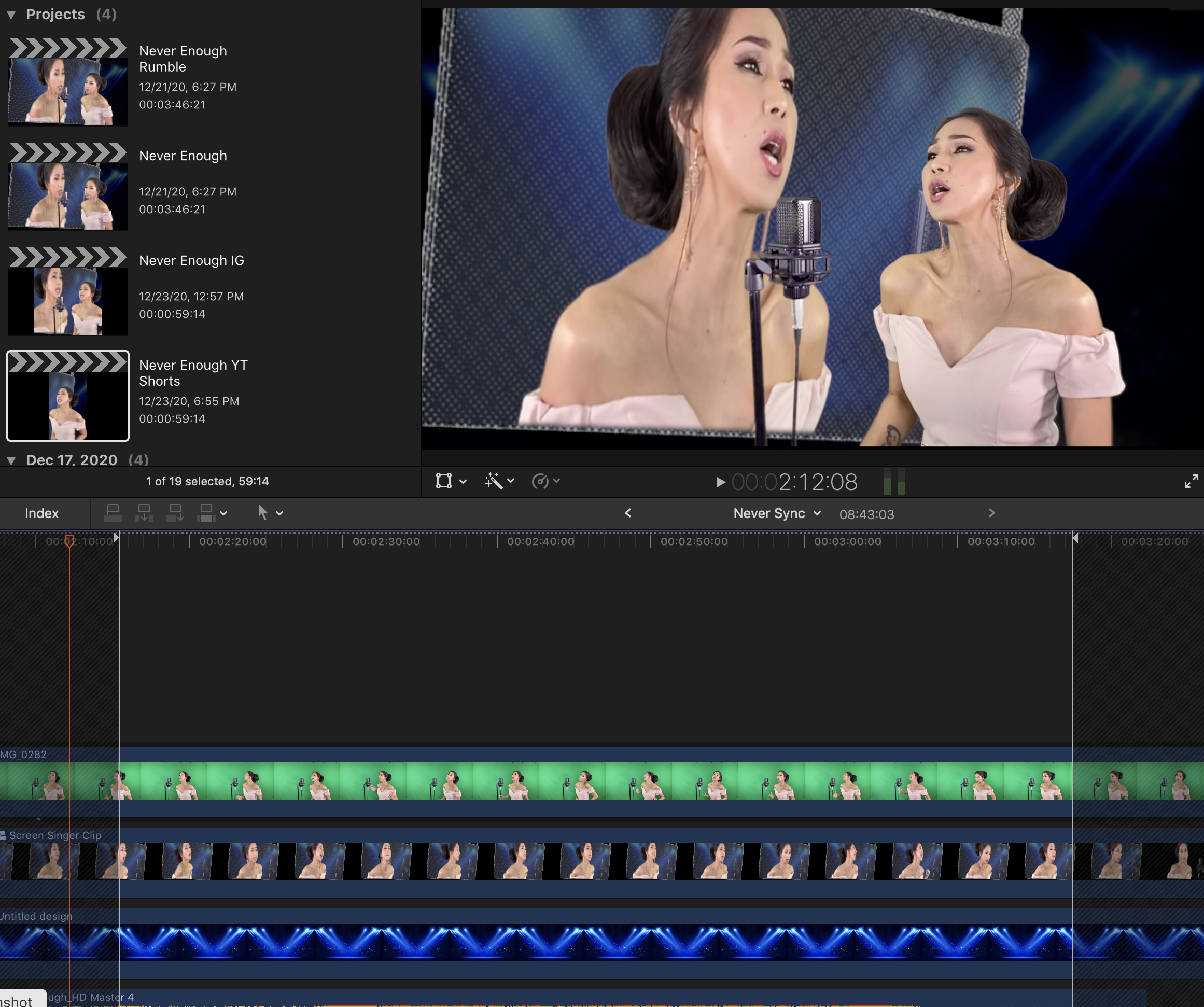

Full Project: This is the first, full screen video.
IG Version: I Duplicate the project as a Square and create an IG version of the video
YT Shorts Version: I Duplicate the IG Version as a Vertical and make a YouTube Shorts format version
YT Shorts Expanded: is the full view of the timeline - other than the sizes this is the same in all versions
Share Current Frame: is the preview as I'm sharing the current frame for a thumb
N2: This is the actual thumb. Note that the blue background is missing - that part is now all white.
Full Project: This is the first, full screen video.
IG Version: I Duplicate the project as a Square and create an IG version of the video
YT Shorts Version: I Duplicate the IG Version as a Vertical and make a YouTube Shorts format version
YT Shorts Expanded: is the full view of the timeline - other than the sizes this is the same in all versions
Share Current Frame: is the preview as I'm sharing the current frame for a thumb
N2: This is the actual thumb. Note that the blue background is missing - that part is now all white.
Please Log in to join the conversation.
- Carsten Orlt
-
- Offline
- Platinum Member
-
Less
More
- Posts: 422
- Thank you received: 82
24 Dec 2020 00:27 #111694
by Carsten Orlt
Replied by Carsten Orlt on topic Share Current Frame ignores the background image
Looks all straight forward and you said it never happened before so I doubt this a real bug but maybe something got corrupted.
2 things I would test: place a diff image instead of the stage lights into the BG and try to export (to see if there is something wrong with the BG image of the stage lights),
or
create an empty timeline with the specs you want (vertical etc) and then copy only the clips from your previous timeline you need for your image export (to see if your project got corrupted)
2 things I would test: place a diff image instead of the stage lights into the BG and try to export (to see if there is something wrong with the BG image of the stage lights),
or
create an empty timeline with the specs you want (vertical etc) and then copy only the clips from your previous timeline you need for your image export (to see if your project got corrupted)
Please Log in to join the conversation.
- Carsten Orlt
-
- Offline
- Platinum Member
-
Less
More
- Posts: 422
- Thank you received: 82
24 Dec 2020 00:35 #111695
by Carsten Orlt
Replied by Carsten Orlt on topic Share Current Frame ignores the background image
PS I just saw that you're using a sync clip container for your BG comp. Have you tried to combine the 3 shots by syncing the singer only with the compound of the singer on screen and then create a new compound of that sync clip with the stage lights?
Or better only use compound clips and no sync clip even though you have to manually sync the 2 singer versions? (to exclude the option that sync clips behave differently when all is combined.
It's all a game of eliminating possibilities to either find a solution or to be sure it is still potentially a bug.
Or better only use compound clips and no sync clip even though you have to manually sync the 2 singer versions? (to exclude the option that sync clips behave differently when all is combined.
It's all a game of eliminating possibilities to either find a solution or to be sure it is still potentially a bug.
Please Log in to join the conversation.
24 Dec 2020 14:44 #111700
by thewitt
Replied by thewitt on topic Share Current Frame ignores the background image
OK, I have it working now - but I don't have any idea why just this vertical format broke.
The stage lighting background had an opacity of only 10%. Since the default black background was bleeding through (no background), this darkened the display just the right amount.
Keeping in mind this worked on the full HD video AND the Square video and I was able to save a single frame from each of those, for some reason this did NOT work for the vertical format video.
As soon as I put a black generator background behind the blue stage lights, everything worked fine. Nothing changed visibly in the video, but the single frame now printed with the correct background.
Thanks for your troubleshooting advice. It helped me to get to this solution - though I would call this a bug anyway since it only breaks in the vertical format. I created a new vertical test from the original HD video with exactly the same characteristics.
The stage lighting background had an opacity of only 10%. Since the default black background was bleeding through (no background), this darkened the display just the right amount.
Keeping in mind this worked on the full HD video AND the Square video and I was able to save a single frame from each of those, for some reason this did NOT work for the vertical format video.
As soon as I put a black generator background behind the blue stage lights, everything worked fine. Nothing changed visibly in the video, but the single frame now printed with the correct background.
Thanks for your troubleshooting advice. It helped me to get to this solution - though I would call this a bug anyway since it only breaks in the vertical format. I created a new vertical test from the original HD video with exactly the same characteristics.
Please Log in to join the conversation.

24 Dec 2020 15:11 #111701
by JoeEditor
Replied by JoeEditor on topic Share Current Frame ignores the background image
First thing I would have done is delete render files, looks to me typical of corrupt render files. I've had this issue a few times before, and that fixed it for me. Delete renders, relaunch the app.
Please Log in to join the conversation.
24 Dec 2020 15:25 #111704
by thewitt
Replied by thewitt on topic Share Current Frame ignores the background image
Tried this. Did nothing. I've had corrupt render files before but never ones that just became invisible in the share current image.Ben Balser wrote: First thing I would have done is delete render files, looks to me typical of corrupt render files. I've had this issue a few times before, and that fixed it for me. Delete renders, relaunch the app.
Please Log in to join the conversation.
- Carsten Orlt
-
- Offline
- Platinum Member
-
Less
More
- Posts: 422
- Thank you received: 82
25 Dec 2020 20:48 #111726
by Carsten Orlt
Replied by Carsten Orlt on topic Share Current Frame ignores the background image
Aha the stagelights being at 10% is actually the key here as your problem is actually a bug which I can reproduce and submitted to Apple:
This only happens when exporting stills not movies:When you set the most bottom layer in a multi layer timeline (no matter if that background clip is below, in or above the primary storyline) to any value below 100% opacity, FCP always uses WHITE as background, regardless which Player background is set in the preferences.
This only happens when exporting stills not movies:When you set the most bottom layer in a multi layer timeline (no matter if that background clip is below, in or above the primary storyline) to any value below 100% opacity, FCP always uses WHITE as background, regardless which Player background is set in the preferences.
Please Log in to join the conversation.
