


- Posts: 32
- Thank you received: 1
3 Post Moderation Rule for New Boarders (25 Jan 2021)
New boarders will have their posts moderated - Don't worry if you cannot see your post immediately.
FCPX Only Using ~20% of Processor Power - 50TB of Footage to Proxy
- Standpoint Media
-
 Topic Author
- Offline
- Junior Member
-

Less
More
23 Dec 2020 12:44 - 23 Dec 2020 18:00 #111683
by Standpoint Media
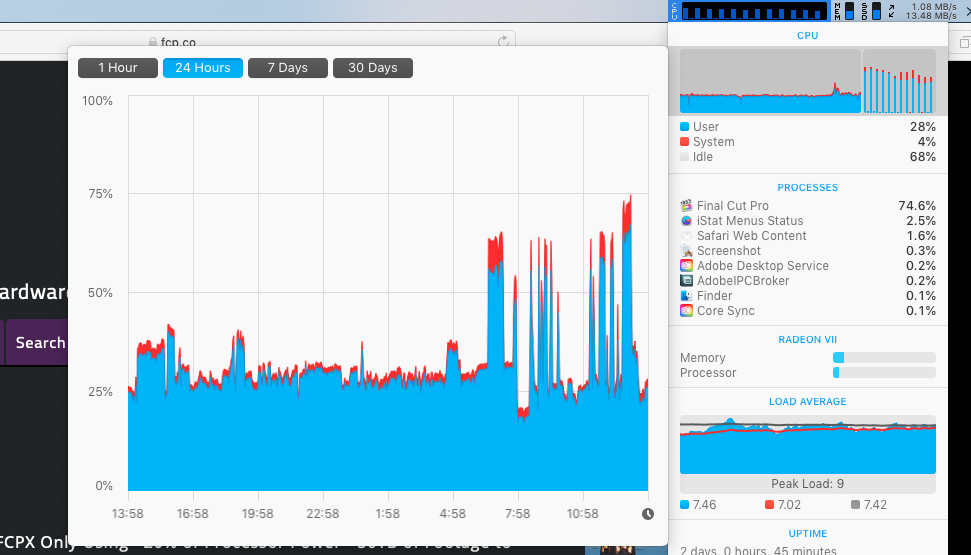
Hi All, as part of moving our entire workflow to PostLab we're proxy encoding our entire archives of ~50TB. The main issue of crashing has been fixed in another forum post (thanks!). The other issue we're having is that no matter what I do, FCPX seems to normally only use a fraction of the available processor power - usually around 20%. I'm running FCPX 10.4.10 on a 2018 MBP and a Mac Pro 5,1 12-core Xeon and getting no where fast. See attached CPU usage over 24hrs graph.
I've tried to move to Handbrake to transcode (which doesn't using ~100% of processor power and you can set it to use VIdeoToolKit / T2 on the MBP but the files it generates won't relink. - likely cause there is no PCM passthrough built in.
I've also tried using EditReady 2 - which creates comparable files that can be relinked but is no faster than FCPX.
Our archives are on a QNAP NAS - just incase that was a bottleneck I connected the MBP to a 8xRAID OWC ThunderBay 8 copy of the archive so one machine was using the QNAP and the other was using the OWC - still no improvement.
Does anyone have any insight into this. Surely it would make sense for apple to use codecs that T2 would help with? Why does FCPX not use all the power at its disposal?
Any insight deeply appreciated.
I've tried to move to Handbrake to transcode (which doesn't using ~100% of processor power and you can set it to use VIdeoToolKit / T2 on the MBP but the files it generates won't relink. - likely cause there is no PCM passthrough built in.
I've also tried using EditReady 2 - which creates comparable files that can be relinked but is no faster than FCPX.
Our archives are on a QNAP NAS - just incase that was a bottleneck I connected the MBP to a 8xRAID OWC ThunderBay 8 copy of the archive so one machine was using the QNAP and the other was using the OWC - still no improvement.
Does anyone have any insight into this. Surely it would make sense for apple to use codecs that T2 would help with? Why does FCPX not use all the power at its disposal?
Any insight deeply appreciated.
Last edit: 23 Dec 2020 18:00 by peteramwiggins.
Please Log in to join the conversation.


23 Dec 2020 14:17 #111684
by JoeEditor
Replied by JoeEditor on topic FCPX Only Using ~20% of Processor Power - 50TB of Footage to Proxy
You need to also monitor GPU usage. Not every process can us 100 percent of every core in your GPU, that's not how processing works. A process will use as much as it is able to. What you see is normal, that's the nature of computing. Some CPUs have built-in H.264 encoding which may not show up as CPU usage. Encoding I think uses GPU mostly, right guys? You can't make computers process faster than they just do.
What Mac model and year, specs, and what versions of FCP and macOS, and what are you encoding from and to?
What Mac model and year, specs, and what versions of FCP and macOS, and what are you encoding from and to?
Please Log in to join the conversation.

23 Dec 2020 15:56 - 23 Dec 2020 15:58 #111685
by joema
I somehow missed what the resolution was. Could you please post the solution in that original thread to help people in the future? Continuous FCPX crashing on Proxy Encoding... losing the will to live!
Hardware-accelerated decode/encode is not done by the CPU, nor by the GPU but by a dedicated special hardware block. This is true whether the method is Quick Sync, or T2 or a GPU-hosted method like AMD's UVD/VCE. If GPU-hosted, it is not using any of the traditional GPU functions, not using OpenCL or Metal, not using shader or texture units.
In general video transcode acceleration is not "instrumented" and cannot be detected or reported by Activity Monitor or other tools. You simply have to infer it's working by observation of the other graphs and timed performance of the transcode task. E.g, if you export a video clip (without effects) to H264 from a Mac Pro 5,1 which has no hardware acceleration and it takes 10 minutes, then export that same clip from a 2018 MacBook Pro and it takes 3 minutes, no matter what the MBP CPU/GPU graphs show, it is using hardware acceleration.
A good example of how higher CPU/GPU numbers are not better: if you export a clip (without effects) to 8-bit HEVC on your 2018 MPB, the CPU & GPU are typically not very high. It is using hardware-accelerated encode, there's simply nothing else for the CPU & GPU to do -- they are waiting on the hardware encoder.
If you then export that to 10-bit HEVC on the same machine, the CPU graphs will be pegged but it will take 30x longer. Hardware acceleration for 10-bit HEVC is not yet supported by FCP on that machine, so it uses only CPU. Despite the "comforting" maxed-out CPU graph, it takes a lot longer. Which would you rather have, a faster export or a slower export with higher CPU graphs?
The reason I said "without effects" is Fx processing can interfere with measuring decode or encode performance. Once you achieve the fastest transcode performance, then you can do it with effects. If you are transcoding camera material to proxies it doesn't matter, as it doesn't have any Fx on it.
If your proxy codec is H264, the MBP will probably encode that faster than the Mac Pro 5,1. If your proxy codec is ProRes Proxy, the MP might be faster. However the camera codec will also play a role, since if H264 or HEVC it must be decoded.
If your export codec is H264 and import is H264 or HEVC, it might be faster to get an M1 Mac Mini for that.
Replied by joema on topic FCPX Only Using ~20% of Processor Power - 50TB of Footage to Proxy
Standpoint Media wrote: ...The main issue of crashing has been fixed in another forum post (thanks!).
I somehow missed what the resolution was. Could you please post the solution in that original thread to help people in the future? Continuous FCPX crashing on Proxy Encoding... losing the will to live!
Standpoint Media wrote: ...The other issue we're having is that no matter what I do, FCPX seems to normally only use a fraction of the available processor power - usually around 20%. I'm running FCPX 10.4.10 on a 2018 MBP and a Mac Pro 5,1 12-core Xeon and getting no where fast. See attached CPU usage over 24hrs graph....Does anyone have any insight into this. Surely it would make sense for apple to use codecs that T2 would help with? Why does FCPX not use all the power at its disposal?...
Hardware-accelerated decode/encode is not done by the CPU, nor by the GPU but by a dedicated special hardware block. This is true whether the method is Quick Sync, or T2 or a GPU-hosted method like AMD's UVD/VCE. If GPU-hosted, it is not using any of the traditional GPU functions, not using OpenCL or Metal, not using shader or texture units.
In general video transcode acceleration is not "instrumented" and cannot be detected or reported by Activity Monitor or other tools. You simply have to infer it's working by observation of the other graphs and timed performance of the transcode task. E.g, if you export a video clip (without effects) to H264 from a Mac Pro 5,1 which has no hardware acceleration and it takes 10 minutes, then export that same clip from a 2018 MacBook Pro and it takes 3 minutes, no matter what the MBP CPU/GPU graphs show, it is using hardware acceleration.
A good example of how higher CPU/GPU numbers are not better: if you export a clip (without effects) to 8-bit HEVC on your 2018 MPB, the CPU & GPU are typically not very high. It is using hardware-accelerated encode, there's simply nothing else for the CPU & GPU to do -- they are waiting on the hardware encoder.
If you then export that to 10-bit HEVC on the same machine, the CPU graphs will be pegged but it will take 30x longer. Hardware acceleration for 10-bit HEVC is not yet supported by FCP on that machine, so it uses only CPU. Despite the "comforting" maxed-out CPU graph, it takes a lot longer. Which would you rather have, a faster export or a slower export with higher CPU graphs?
The reason I said "without effects" is Fx processing can interfere with measuring decode or encode performance. Once you achieve the fastest transcode performance, then you can do it with effects. If you are transcoding camera material to proxies it doesn't matter, as it doesn't have any Fx on it.
If your proxy codec is H264, the MBP will probably encode that faster than the Mac Pro 5,1. If your proxy codec is ProRes Proxy, the MP might be faster. However the camera codec will also play a role, since if H264 or HEVC it must be decoded.
If your export codec is H264 and import is H264 or HEVC, it might be faster to get an M1 Mac Mini for that.
Last edit: 23 Dec 2020 15:58 by joema.
Please Log in to join the conversation.
- cutterrettuc
-

- Offline
- New Member
-

Less
More
- Posts: 1
- Thank you received: 0
02 Feb 2021 13:49 #112466
by cutterrettuc
Replied by cutterrettuc on topic FCPX Only Using ~20% of Processor Power - 50TB of Footage to Proxy
HI. Not sure if it helps but I also was searching for why fcpx only uses about 20% gpu.
In fact, transcoding the same file with iskysoft media converter uses about 80% gpu and exporting teh same file (also H264) uses only 20%.
Is there a "hidden" task (which is not visible in my activity monitor) that is happening ? If not, the only 20% is used and this is still strange for me.
Any ideas or sth that I do not take into account ?
Thank you.
In fact, transcoding the same file with iskysoft media converter uses about 80% gpu and exporting teh same file (also H264) uses only 20%.
Is there a "hidden" task (which is not visible in my activity monitor) that is happening ? If not, the only 20% is used and this is still strange for me.
Any ideas or sth that I do not take into account ?
Thank you.
Please Log in to join the conversation.
02 Feb 2021 16:14 #112467
by joema
Does iSkySoft transcode the same H264 clip faster at the same quality level than the current version of FCP on the same Mac? If iSkySoft is no faster or visual quality is less (tested on the same Mac), then it doesn't matter what % of GPU it's using.
E.g, import that clip to FCP, do not put it on a timeline and do not add any effects to it -- that would disturb the encoding performance test. Simply select the imported clip in the Event Browser, then do File>Share>Master File>Settings, Format: Computer, Video Codec: H.264 Faster Encode, Resolution: (whatever the original resolution is, but must be the same for iSkySoft), then export. Time this with a stopwatch.
After that on the same Mac, use iSkySoft to transcode the same clip to H264 at the same resolution. Time that with a stopwatch. How long does each one take?
Also please state the year, model and config of the Mac, and what version of MacOS and FCP it's running. If it is running an older version than FCP 10.4.8, there were significant performance improvements in that version and afterward.
Replied by joema on topic FCPX Only Using ~20% of Processor Power - 50TB of Footage to Proxy
cutterrettuc wrote: ...transcoding the same file with iskysoft media converter uses about 80% gpu and exporting teh same file (also H264) uses only 20%.... the only 20% is used and this is still strange for me.
Any ideas....
Does iSkySoft transcode the same H264 clip faster at the same quality level than the current version of FCP on the same Mac? If iSkySoft is no faster or visual quality is less (tested on the same Mac), then it doesn't matter what % of GPU it's using.
E.g, import that clip to FCP, do not put it on a timeline and do not add any effects to it -- that would disturb the encoding performance test. Simply select the imported clip in the Event Browser, then do File>Share>Master File>Settings, Format: Computer, Video Codec: H.264 Faster Encode, Resolution: (whatever the original resolution is, but must be the same for iSkySoft), then export. Time this with a stopwatch.
After that on the same Mac, use iSkySoft to transcode the same clip to H264 at the same resolution. Time that with a stopwatch. How long does each one take?
Also please state the year, model and config of the Mac, and what version of MacOS and FCP it's running. If it is running an older version than FCP 10.4.8, there were significant performance improvements in that version and afterward.
Please Log in to join the conversation.
