



- Posts: 4
- Thank you received: 0
3 Post Moderation Rule for New Boarders (25 Jan 2021)
New boarders will have their posts moderated - Don't worry if you cannot see your post immediately.
How do I blur a face?
20 Dec 2020 19:43 #111638
by Pulphea
How do I blur a face? was created by Pulphea
Hi. I am going crazy. I created a shape, and then I added the blur effect into the shape. It doesn’t work. I have to choose a colour! I don’t want a colour! I just want the area to be blurred. Also, I can’t change the parameters of the blur! Where are they?
Please Log in to join the conversation.
- Tom Wolsky
-

- Offline
- Moderator
-

20 Dec 2020 20:02 #111639
by Tom Wolsky
Replied by Tom Wolsky on topic How do I blur a face?
Apply the Blur effect to the clip. The effect can be masked with a shape mask at the top of the effect controls.
Please Log in to join the conversation.
20 Dec 2020 20:18 #111641
by Pulphea
Replied by Pulphea on topic How do I blur a face?
Oh! So, first I apply the blur to the whole clip? An then try to mask the effect off?
Please Log in to join the conversation.
- Tom Wolsky
-
- Offline
- Moderator
-
20 Dec 2020 20:35 #111642
by Tom Wolsky
Replied by Tom Wolsky on topic How do I blur a face?
That’s the simplest way.
Please Log in to join the conversation.
20 Dec 2020 20:41 #111643
by Pulphea
Replied by Pulphea on topic How do I blur a face?
Does FCP provide motion tracking on the blur?
Please Log in to join the conversation.
- Tom Wolsky
-
- Offline
- Moderator
-
20 Dec 2020 20:45 #111644
by Tom Wolsky
Replied by Tom Wolsky on topic How do I blur a face?
There is no automated motion tracking. You can manually keyframe the effect, or there are third party plugins like TrackX from CoreMelt.
Please Log in to join the conversation.
- funwithstuff
-

- Offline
- Senior Member
-

Less
More
- Posts: 64
- Thank you received: 19
21 Dec 2020 00:57 #111645
by funwithstuff
Replied by funwithstuff on topic How do I blur a face?
I should probably add that tracked blurring is in SliceX not TrackX. TrackX is good for screen replacements, and DriveX is for 3D and callouts, but SliceX is for affecting an area of your shot (blur, color, etc.).
Please Log in to join the conversation.
21 Dec 2020 16:36 #111649
by Pulphea
Replied by Pulphea on topic How do I blur a face?
I need more help. No masking occures. What blend mode should I choose in Compositing? There is no differrence whatever I choose!
There is also a view parameter with 2 options. Original or composite. In composite everything outside the mask is black. In original nothing happens.
I have added both the blur and the mask to the clip.
There is also a view parameter with 2 options. Original or composite. In composite everything outside the mask is black. In original nothing happens.
I have added both the blur and the mask to the clip.
Please Log in to join the conversation.

21 Dec 2020 21:16 - 21 Dec 2020 22:18 #111651
by high5ths
Replied by high5ths on topic How do I blur a face?
Last edit: 21 Dec 2020 22:18 by peteramwiggins.
Please Log in to join the conversation.
- funwithstuff
-
- Offline
- Senior Member
-
Less
More
- Posts: 64
- Thank you received: 19
21 Dec 2020 23:50 - 22 Dec 2020 00:44 #111654
by funwithstuff
Replied by funwithstuff on topic How do I blur a face?
Let's step back, I don't think you need to mess with Composite modes. If the video above helps, great. Otherwise, there are a few ways to do this.
1. Add a Blur effect, add a Shape Mask to the blur to limit the area of effect, then animate the position of the shape mask to cover the face as it moves.
2. Use a plug-in like SliceX to blur the face, then automatically track the position of the mask.
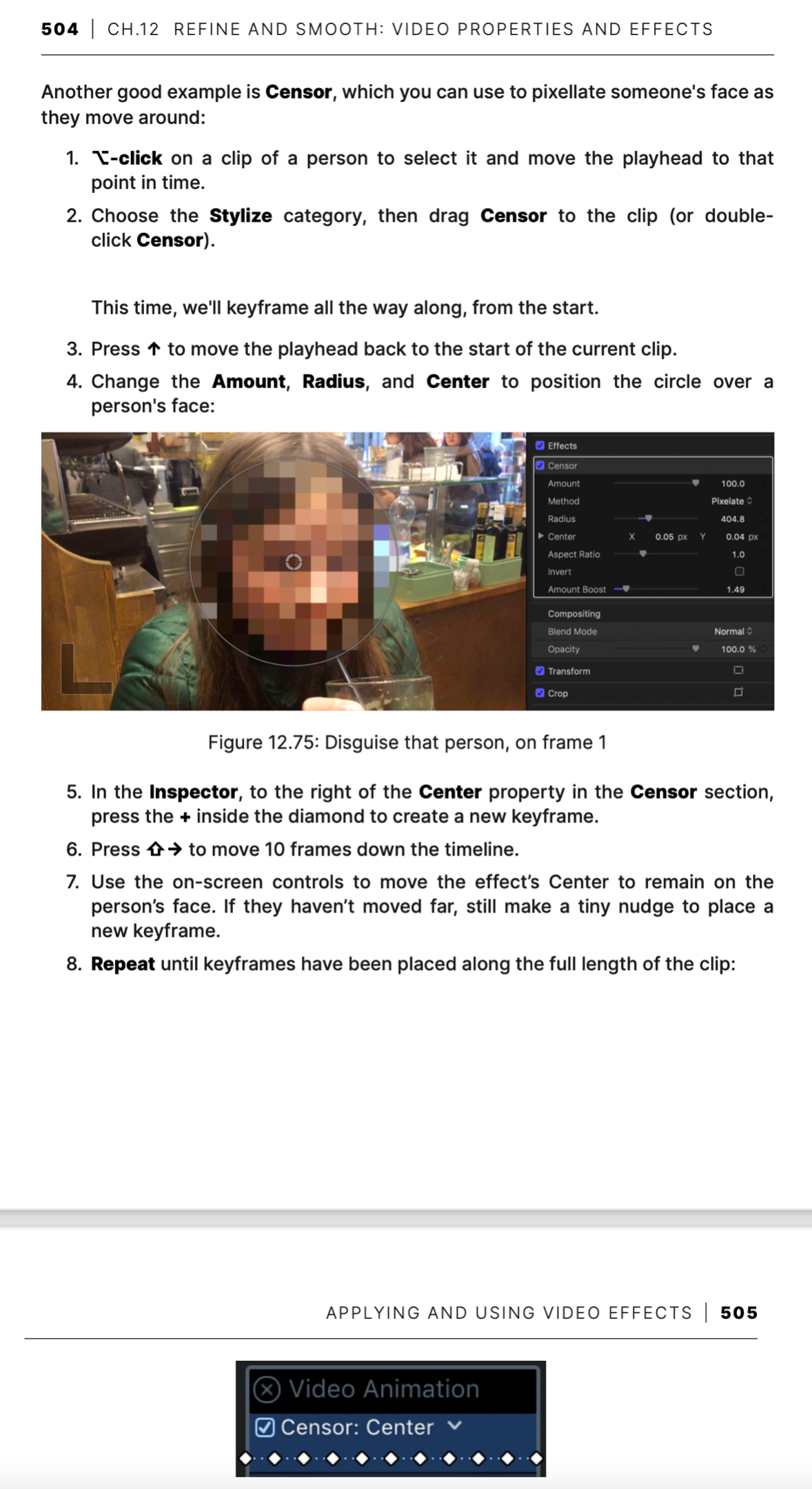
3. Use an effect like Censor (which can blur or pixelate) and then animate the center of the effect. This last method is shown in my book (fcpefficientediting.com) and the relevant page is attached.
1. Add a Blur effect, add a Shape Mask to the blur to limit the area of effect, then animate the position of the shape mask to cover the face as it moves.
2. Use a plug-in like SliceX to blur the face, then automatically track the position of the mask.
3. Use an effect like Censor (which can blur or pixelate) and then animate the center of the effect. This last method is shown in my book (fcpefficientediting.com) and the relevant page is attached.
Last edit: 22 Dec 2020 00:44 by peteramwiggins.
Please Log in to join the conversation.
