


- Posts: 8
- Thank you received: 0
3 Post Moderation Rule for New Boarders (25 Jan 2021)
New boarders will have their posts moderated - Don't worry if you cannot see your post immediately.
Final Cut failing to move the clips to a particular event
- im_jerry87
-
 Topic Author
- Offline
- New Member
-

Less
More
11 Dec 2020 08:02 - 11 Dec 2020 10:47 #111416
by im_jerry87
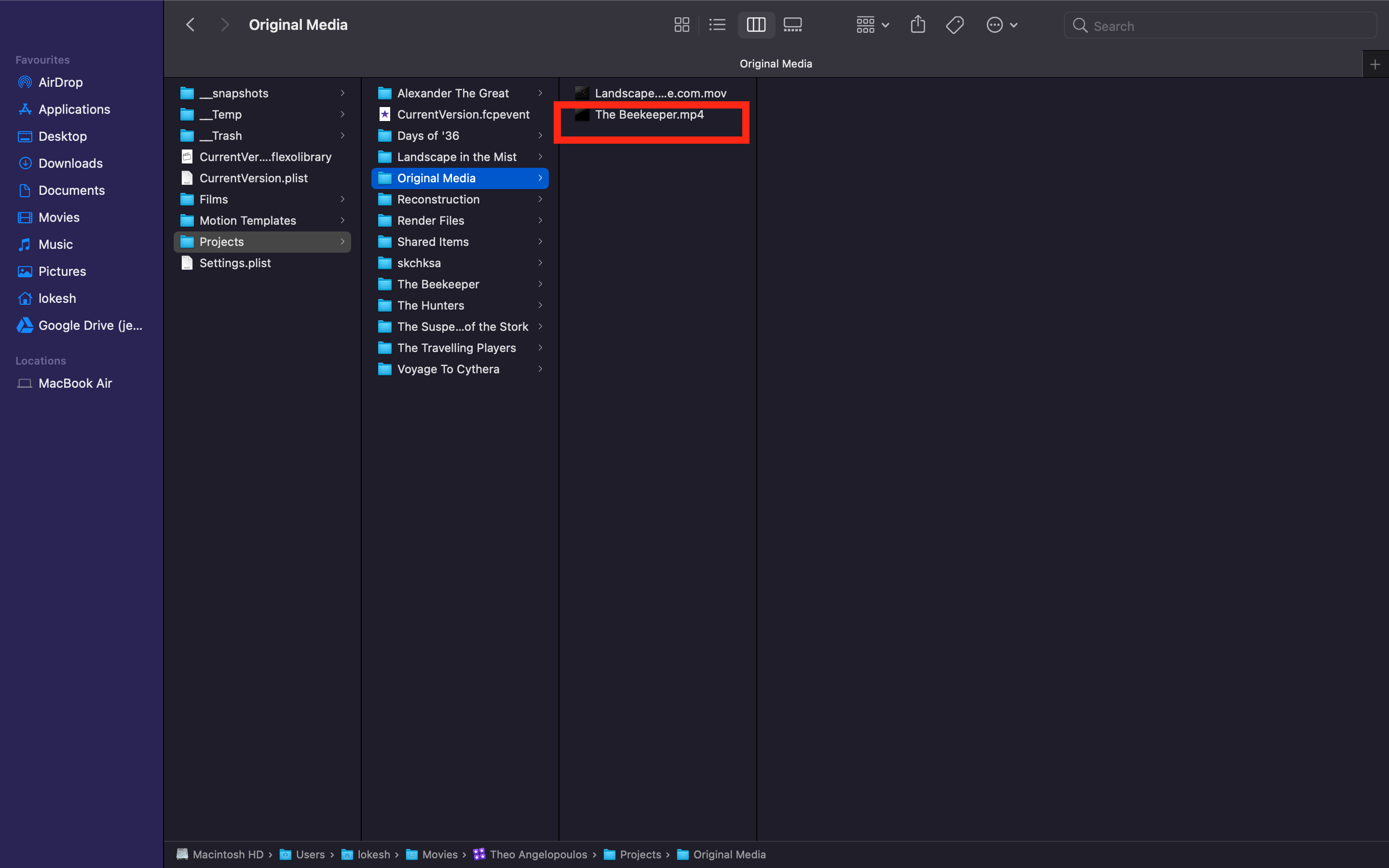
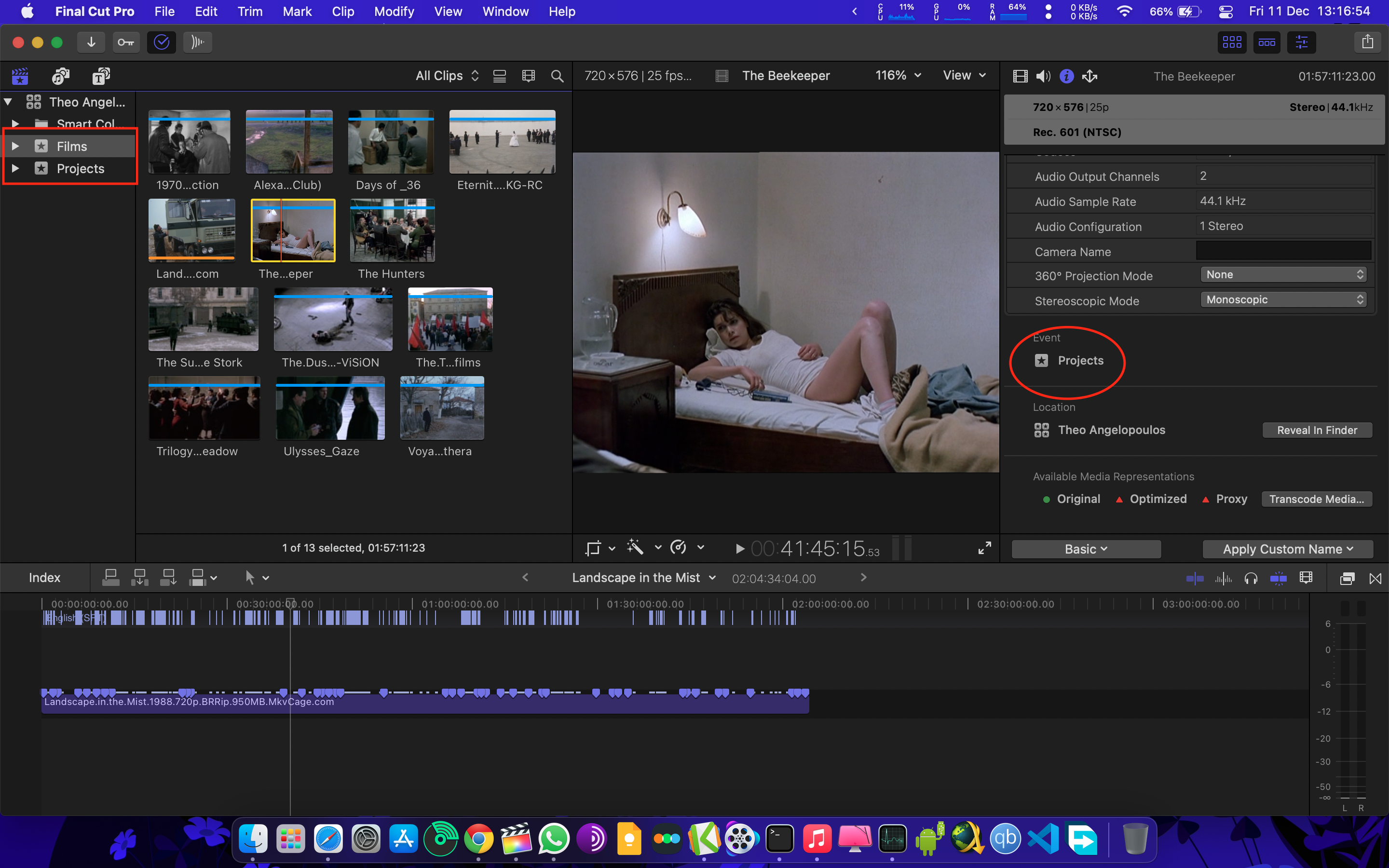
So, there are two events namely Projects and Films. I moved a clip from Projects event to Films event and it seemed like the clip got moved, it there in Films but the problem is it didn't actually move 'cause I opened the Inspector for the clip and it says it's in Projects event and it turns out it's indeed never moved the clip to Films event (I checked by opening the Library contents in the finder). I have attached the images below to give some context of what's my problem is. Any help?
Last edit: 11 Dec 2020 10:47 by peteramwiggins.
Please Log in to join the conversation.
- Tom Wolsky
-

- Offline
- Moderator
-

11 Dec 2020 12:45 #111424
by Tom Wolsky
Replied by Tom Wolsky on topic Final Cut failing to move the clips to a particular event
The clip isn't in both events is it? What OS and FCP version are you using?
Please Log in to join the conversation.
- im_jerry87
-
Topic Author
- Offline
- New Member
-
Less
More
- Posts: 8
- Thank you received: 0
11 Dec 2020 13:08 #111425
by im_jerry87
Replied by im_jerry87 on topic Final Cut failing to move the clips to a particular event
No, the clip is just in one event (the event to which I wanted the clip to move). I'm running FCPX 10.4.9 in Mac OS 11.0.1. Thank You.
Please Log in to join the conversation.
- Tom Wolsky
-
- Offline
- Moderator
-
11 Dec 2020 14:31 #111427
by Tom Wolsky
Replied by Tom Wolsky on topic Final Cut failing to move the clips to a particular event
I can't reproduce the problem in the current version. If the media is stored inside the library bundle it moves fr me from one folder to the other.
Please Log in to join the conversation.


11 Dec 2020 15:53 - 11 Dec 2020 16:09 #111429
by joema
Replied by joema on topic Final Cut failing to move the clips to a particular event
This is an interesting behavior I never noticed before. It is not new to 10.5 but also happens on 10.4.6, the oldest version I can test. For each of the below there are three location specifiers:
(1) In the FCP UI, in what event does the clip or project appear in the sidebar.
(2) In the FCP UI, in what event does Inspector report the clip or project.
(3) In Finder, in what event folder inside the library does the clip or project appear.
If a clip not used in a project is moved using FCP to another event, it appears in that event, Inspector shows the new event location, and within the library the clip or its symlink is physically moved.
If that clip is used in a project, then it's moved using FCP to another event, it appears in the event, but Inspector shows it in the original event. Within the library, the clip or its symlink also stays in the original event.
If only the project containing the clip is moved to a new event, within FCP only the project appears in the event. Inspector shows the clip in the original event. Within the library the clip or its symlink stays in the original event.
If first the clip then later the project is moved to a new event, Inspector shows the clip in the original event until the project arrives in the new event, then Inspector shows the clip in the new event. Within the library the file or its symlink also mirrors those locations. If later the clip is moved to yet another event, Inspector shows the previous event, likewise Finder shows the clip in the previous event folder on disk.
This is understandably confusing, especially if we view events as a folder which corresponds exactly to on-disk structures. However if we view events as an abstract label (like Gmail labels), what happens on disk is less meaningful. In the next version of FCP, the internal database structure could change, totally eliminating on-disk event folders, yet the UI could remain the same.
However it seems inconsistent for the clip's event in the sidebar to be different than the clip's event in the Inspector. If FCP development wants to put files in non-obvious on-disk locations within the library, or totally eliminate on-disk event folders, that is their prerogative. However IMO the event shown within the FCP UI for a clip should always be consistent between the sidebar and Inspector. Inspector's event location of a clip should also not change simply because of moving a project between events.
I have only tested this on APFS, it might behave differently on HFS+, ExFAT or a NAS.
(1) In the FCP UI, in what event does the clip or project appear in the sidebar.
(2) In the FCP UI, in what event does Inspector report the clip or project.
(3) In Finder, in what event folder inside the library does the clip or project appear.
If a clip not used in a project is moved using FCP to another event, it appears in that event, Inspector shows the new event location, and within the library the clip or its symlink is physically moved.
If that clip is used in a project, then it's moved using FCP to another event, it appears in the event, but Inspector shows it in the original event. Within the library, the clip or its symlink also stays in the original event.
If only the project containing the clip is moved to a new event, within FCP only the project appears in the event. Inspector shows the clip in the original event. Within the library the clip or its symlink stays in the original event.
If first the clip then later the project is moved to a new event, Inspector shows the clip in the original event until the project arrives in the new event, then Inspector shows the clip in the new event. Within the library the file or its symlink also mirrors those locations. If later the clip is moved to yet another event, Inspector shows the previous event, likewise Finder shows the clip in the previous event folder on disk.
This is understandably confusing, especially if we view events as a folder which corresponds exactly to on-disk structures. However if we view events as an abstract label (like Gmail labels), what happens on disk is less meaningful. In the next version of FCP, the internal database structure could change, totally eliminating on-disk event folders, yet the UI could remain the same.
However it seems inconsistent for the clip's event in the sidebar to be different than the clip's event in the Inspector. If FCP development wants to put files in non-obvious on-disk locations within the library, or totally eliminate on-disk event folders, that is their prerogative. However IMO the event shown within the FCP UI for a clip should always be consistent between the sidebar and Inspector. Inspector's event location of a clip should also not change simply because of moving a project between events.
I have only tested this on APFS, it might behave differently on HFS+, ExFAT or a NAS.
Last edit: 11 Dec 2020 16:09 by joema.
Please Log in to join the conversation.
- im_jerry87
-
Topic Author
- Offline
- New Member
-
Less
More
- Posts: 8
- Thank you received: 0
11 Dec 2020 16:27 #111431
by im_jerry87
Replied by im_jerry87 on topic Final Cut failing to move the clips to a particular event
I was absolutely going mad trying to figure out the reason for this strange behavior but now I kinda get it. I tried reproducing various 'moving clips/projects between events' scenarios and the results turned to exactly as you have mentioned.
Absolutely, couldn't agree more. Thank You for your time, really appreciate it.
joema wrote:
IMO the event shown within the FCP UI for a clip should always be consistent between the sidebar and Inspector. The Inspector's event location of a clip should also not change simply because of moving a project between events.
Absolutely, couldn't agree more. Thank You for your time, really appreciate it.
Please Log in to join the conversation.
