


- Posts: 6
- Thank you received: 0
3 Post Moderation Rule for New Boarders (25 Jan 2021)
New boarders will have their posts moderated - Don't worry if you cannot see your post immediately.
Audio pops and clicks since updating to Big Sur
- SpiderKenny
-
 Topic Author
- Offline
- New Member
-

Less
More
07 Dec 2020 09:59 - 07 Dec 2020 10:02 #111288
by SpiderKenny
Audio pops and clicks since updating to Big Sur was created by SpiderKenny
I have some simpe HD Video sources, which play perfectly in QuickTime Player, and VLC etc etc
But when I import them into FCPX on Big Sur the audio acquires pops and clicks.
I have confirmed that this is only an issue in FCP by doing some basic trims on a 10 second clip in FCPX, Premier Pro and VLC. - and only FCPX adds noise to the audio.
The noise is present both when playing from the timeline, and when exported via compressor, and when 'shared' directly from within FCPX.
I have reported this via Feedback Assistant to Apple.
I have uploaded some sample files to my server.
The original is here (no pops or clicks): wphost.spider-e.com/non-wp/KM_Original.mp4
As exported from FCP using the "share" option: wphost.spider-e.com/non-wp/KM_FCP_SHARE.mp4
And as exported from FCP using compressor: wphost.spider-e.com/non-wp/KM_COMPRESSOR.m4v
Has anyone lese noticed this since updating to BS and FCPX 10.5 (380212)
But when I import them into FCPX on Big Sur the audio acquires pops and clicks.
I have confirmed that this is only an issue in FCP by doing some basic trims on a 10 second clip in FCPX, Premier Pro and VLC. - and only FCPX adds noise to the audio.
The noise is present both when playing from the timeline, and when exported via compressor, and when 'shared' directly from within FCPX.
I have reported this via Feedback Assistant to Apple.
I have uploaded some sample files to my server.
The original is here (no pops or clicks): wphost.spider-e.com/non-wp/KM_Original.mp4
As exported from FCP using the "share" option: wphost.spider-e.com/non-wp/KM_FCP_SHARE.mp4
And as exported from FCP using compressor: wphost.spider-e.com/non-wp/KM_COMPRESSOR.m4v
Has anyone lese noticed this since updating to BS and FCPX 10.5 (380212)
Last edit: 07 Dec 2020 10:02 by SpiderKenny. Reason: Reformatted the links.
Please Log in to join the conversation.
- ronny courtens
-

- Offline
- Moderator
-

Less
More
- Posts: 4455
- Thank you received: 962
07 Dec 2020 10:55 #111290
by ronny courtens
Replied by ronny courtens on topic Audio pops and clicks since updating to Big Sur
Hi Kenny,
I can confirm this issue. The original file plays fine in any player and any other NLE. Imported in FCP 10.5 running Big Sur, the audio has distinct clicks on both channels. This happens with the clip in the browser and on the timeline. The audio is 48KHz, optimizing the file to ProRes doesn't make any difference.
We will wait for other confirmations, but it certainly is a reproducible issue and I will file a bug report.
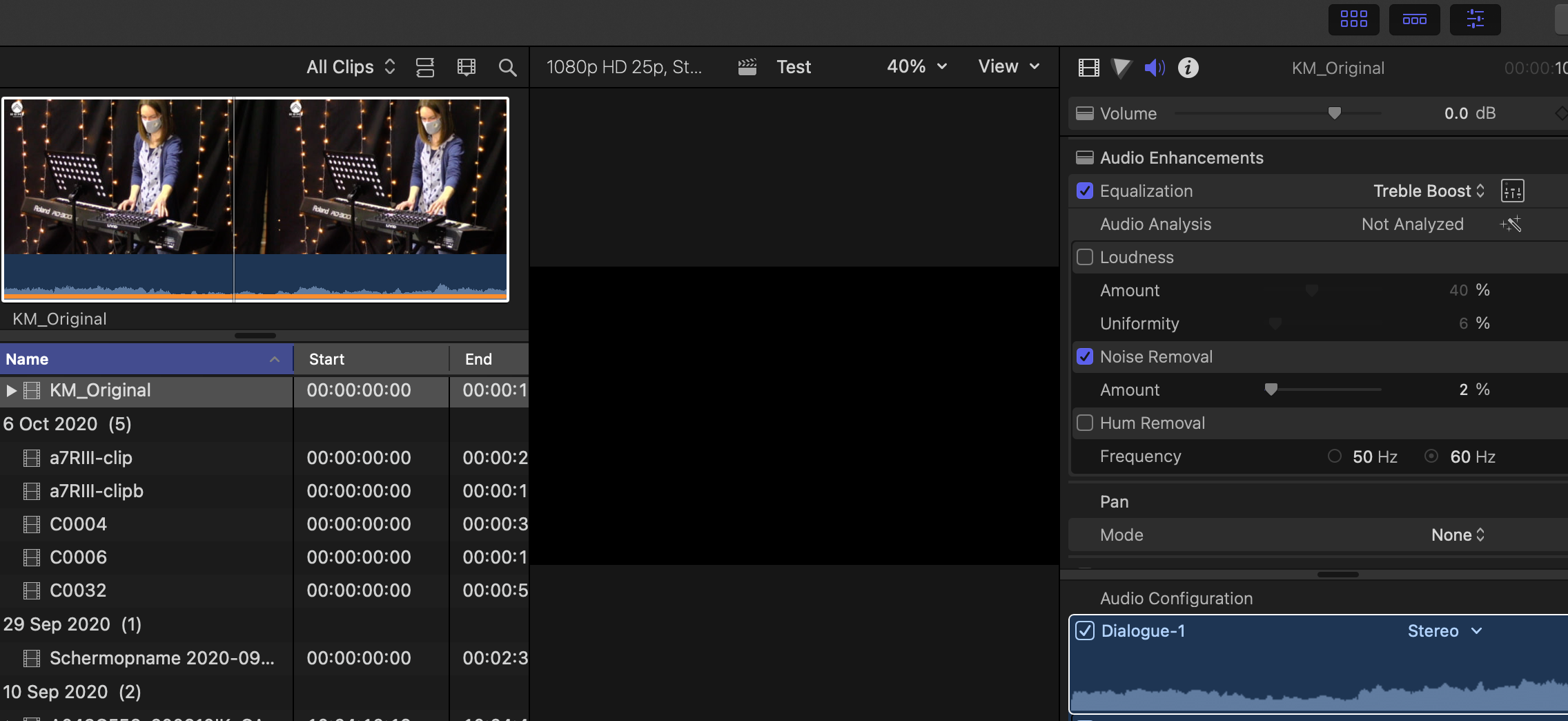
In the meantime, here's a way to work around this. Select all the problematic clips in the browser, then in the Inspector > audio tab set Noise Removal to 2% to get rid of the clicks. Finally, set Equalization to "Treble Boost" to compensate for the slight high-frequency loss caused by Noise Removal. These corrections will travel with the clips once you add them to the timeline.
- Ronny
I can confirm this issue. The original file plays fine in any player and any other NLE. Imported in FCP 10.5 running Big Sur, the audio has distinct clicks on both channels. This happens with the clip in the browser and on the timeline. The audio is 48KHz, optimizing the file to ProRes doesn't make any difference.
We will wait for other confirmations, but it certainly is a reproducible issue and I will file a bug report.
In the meantime, here's a way to work around this. Select all the problematic clips in the browser, then in the Inspector > audio tab set Noise Removal to 2% to get rid of the clicks. Finally, set Equalization to "Treble Boost" to compensate for the slight high-frequency loss caused by Noise Removal. These corrections will travel with the clips once you add them to the timeline.
- Ronny
Please Log in to join the conversation.
- SpiderKenny
-
Topic Author
- Offline
- New Member
-
Less
More
- Posts: 6
- Thank you received: 0
07 Dec 2020 10:59 #111291
by SpiderKenny
Replied by SpiderKenny on topic Audio pops and clicks since updating to Big Sur
Thank you for taking the time to look at this issue.
And, wow! Thanks for taking even more time to come up with a work around. I am humbled - thanks!
And, wow! Thanks for taking even more time to come up with a work around. I am humbled - thanks!
Please Log in to join the conversation.
- ronny courtens
-
- Offline
- Moderator
-
Less
More
- Posts: 4455
- Thank you received: 962
07 Dec 2020 11:04 #111292
by ronny courtens
Replied by ronny courtens on topic Audio pops and clicks since updating to Big Sur
My pleasure, Kenny. And thank you for reporting this issue.
- Ronny
- Ronny
Please Log in to join the conversation.
- ronny courtens
-
- Offline
- Moderator
-
Less
More
- Posts: 4455
- Thank you received: 962
07 Dec 2020 13:55 #111301
by ronny courtens
Replied by ronny courtens on topic Audio pops and clicks since updating to Big Sur
I have an update on this issue. It does not appear running FCP 10.5 with the Big Sur 10.1 Developer Beta 2. This makes me confident that the issue should be resolved with the next update of Big Sur.
- Ronny
- Ronny
Please Log in to join the conversation.
- SpiderKenny
-
Topic Author
- Offline
- New Member
-
Less
More
- Posts: 6
- Thank you received: 0
07 Dec 2020 13:59 #111302
by SpiderKenny
That's interesting... I'll look forward to getting the update when it's ready.
Replied by SpiderKenny on topic Audio pops and clicks since updating to Big Sur
Thnk you once again!ronny courtens wrote: I have an update on this issue. It does not appear running FCP 10.5 with the Big Sur 10.1 Developer Beta 2. This makes me confident that the issue should be resolved with the next update of Big Sur.
- Ronny
That's interesting... I'll look forward to getting the update when it's ready.
Please Log in to join the conversation.
