


- Posts: 34
- Thank you received: 0
3 Post Moderation Rule for New Boarders (25 Jan 2021)
New boarders will have their posts moderated - Don't worry if you cannot see your post immediately.
Beginner Question - Saving my Edited Events in the StoryLine
01 Dec 2020 23:46 #111155
by SFA2013
I am doing something wrong in creating and saving edited videos. I like help with identifying the missing step. I create a project then an event within that project. I import a video into the event. Starting a with a blank storyline, I send my unedited video to the storyline where I edit it. Once done, I usually share a master file, then use handbrake to convert that to an .mp4.
I thought that Final Cut Pro saved my updated event, the content of the storyline automatically. But I find if I click on a past event, I only have the original video I imported, I've lost the edited video that was in the storyline. To date, I've been getting mad at myself and just getting by with the shared master file or .mp4. But, I've resolved to confront my mistake head on and ask for help (here). What am I doing wrong?
I thought that Final Cut Pro saved my updated event, the content of the storyline automatically. But I find if I click on a past event, I only have the original video I imported, I've lost the edited video that was in the storyline. To date, I've been getting mad at myself and just getting by with the shared master file or .mp4. But, I've resolved to confront my mistake head on and ask for help (here). What am I doing wrong?
Please Log in to join the conversation.


02 Dec 2020 04:55 #111157
by Larrie
Replied by Larrie on topic Beginner Question - Saving my Edited Events in the StoryLine
First let’s clarify some terminology. I believe that what you are calling “project” is actually a Library. Inside the Library you create as many Events as you need. Original footage is imported into Events.
Now the fun part and maybe where you are having problems. You need to create a Project timeline from the File Menu inside the Library. You can have multiple Projects in one Library
View the original media and select In and Out points for the section of the media you want to use. Drag the selected media into the timeline. Repeat this process as many times as needed. Once you have the video the way you want it share the master file.
Hope this helps.
Now the fun part and maybe where you are having problems. You need to create a Project timeline from the File Menu inside the Library. You can have multiple Projects in one Library
View the original media and select In and Out points for the section of the media you want to use. Drag the selected media into the timeline. Repeat this process as many times as needed. Once you have the video the way you want it share the master file.
Hope this helps.
Please Log in to join the conversation.


02 Dec 2020 05:21 - 02 Dec 2020 05:24 #111158
by dgwvideo
Creating history....one edit at a time !
Replied by dgwvideo on topic Beginner Question - Saving my Edited Events in the StoryLine
To offer a bit more insight.... Start by creating a Library. Next, create an event. Then import your footage into the event. Your project(s) live within your event(s) and are your actual timelines when you double click them. I think based on your comments that you are expecting to find an edited video in the event (which is not correct). Your unedited videos are imported into your event. When you create a project in that event and double click on it, it will open in the project timeline where you make your edits. To see past edited videos, double click your project(s). Think of projects as your timelines.
Creating history....one edit at a time !
Last edit: 02 Dec 2020 05:24 by dgwvideo. Reason: typos
Please Log in to join the conversation.
02 Dec 2020 22:41 - 02 Dec 2020 22:45 #111186
by SFA2013
Replied by SFA2013 on topic Beginner Question - Saving my Edited Events in the StoryLine
Thank you for trying to help me. I can see that I am confusing project and event. You'll see that I do have a library. In the attached screenshot, I sent the clip in the second pane from the left, by the contents of my library to the storyline and edited it. I've shared it and created my mp4 video.
It looks to me like the edits are only in the storyline. They are not in the project in my event. That is the problem I am trying to solve. If I delete what is in the storyline, my work has gone. If I move to a different event and project within it, my work is gone.
The attachment didn't work so here is the hosted image:

It looks to me like the edits are only in the storyline. They are not in the project in my event. That is the problem I am trying to solve. If I delete what is in the storyline, my work has gone. If I move to a different event and project within it, my work is gone.
The attachment didn't work so here is the hosted image:
Last edit: 02 Dec 2020 22:45 by SFA2013. Reason: Wouldn't accept screenshot as an attachment.
Please Log in to join the conversation.
- Tom Wolsky
-

- Offline
- Moderator
-

02 Dec 2020 22:53 #111187
by Tom Wolsky
Replied by Tom Wolsky on topic Beginner Question - Saving my Edited Events in the StoryLine
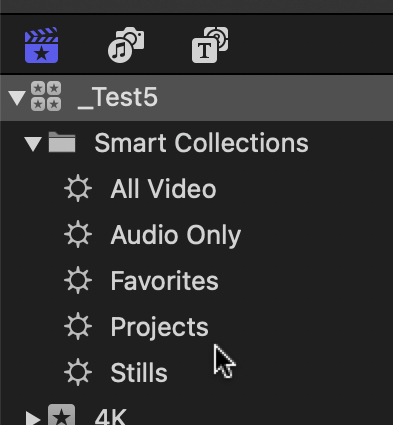
Scroll up to the top of the sidebar on the left. You'll see the library icon. Open the Smart Collection folder underneath it and select the Projects smart collection. See what's in there.
Please Log in to join the conversation.
02 Dec 2020 23:03 #111188
by SFA2013
Replied by SFA2013 on topic Beginner Question - Saving my Edited Events in the StoryLine
Thank you! In that folder my project shows the finished product versus the clip I started with. I now know how to check on my work and find it again.
Tom Wolsky wrote: Scroll up to the top of the sidebar on the left. You'll see the library icon. Open the Smart Collection folder underneath it and select the Projects smart collection. See what's in there.
Please Log in to join the conversation.
