




- Posts: 22
- Thank you received: 1
3 Post Moderation Rule for New Boarders (25 Jan 2021)
New boarders will have their posts moderated - Don't worry if you cannot see your post immediately.
How to put video scopes to the right of viewer?
27 Nov 2020 10:14 - 27 Nov 2020 10:15 #111073
by Vinc26
How to put video scopes to the right of viewer? was created by Vinc26
Hi, Yes, the question is very simple. Once in vertical mode, how to put the video scopes to the right of viewer?

Vincent
Vincent
Last edit: 27 Nov 2020 10:15 by Vinc26.
Please Log in to join the conversation.


27 Nov 2020 16:42 #111076
by JoeEditor
Replied by JoeEditor on topic How to put video scopes to the right of viewer?
What do you mean by Verticle Mode?
You can't move the Scopes, they are where they are.
You can't move the Scopes, they are where they are.
Please Log in to join the conversation.
27 Nov 2020 19:27 #111080
by Vinc26
Replied by Vinc26 on topic How to put video scopes to the right of viewer?
This option (joined)
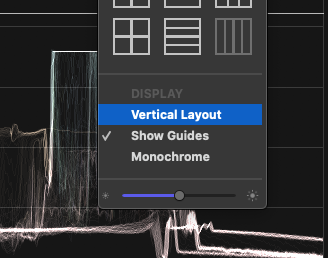
(joined)
Please Log in to join the conversation.
27 Nov 2020 20:11 #111082
by JoeEditor
Replied by JoeEditor on topic How to put video scopes to the right of viewer?
Ah, I see, in the scopes setup, right.
OK, so once you get into vertical mode, and it does what it says, stacks your scopes vertically, on top of each other.
If you want the scopes to the side of the viewer, that would be the default horizontal mode.
And in horizontal mode, you can’t move the scopes to the right of the viewer. Scopes on left, Viewer on right, that’s it, can’t swap them. Not that I’ve ever found it to matter.
OK, so once you get into vertical mode, and it does what it says, stacks your scopes vertically, on top of each other.
If you want the scopes to the side of the viewer, that would be the default horizontal mode.
And in horizontal mode, you can’t move the scopes to the right of the viewer. Scopes on left, Viewer on right, that’s it, can’t swap them. Not that I’ve ever found it to matter.
Please Log in to join the conversation.
28 Nov 2020 06:20 #111092
by Vinc26
Replied by Vinc26 on topic How to put video scopes to the right of viewer?
Thanks you. I'm trying to put the scopes on the right because I have a very large second monitor (an OLED TV). And that given the location that this monitor has in my office, I would prefer to have my viewer on the left. But not possible.
Please Log in to join the conversation.
28 Nov 2020 15:46 #111099
by JoeEditor
Replied by JoeEditor on topic How to put video scopes to the right of viewer?
Ah, two monitors, that’s different, sort of…
FCP in the Window menu, under Secondary Display, allows you to put the Browser, Viewer, or Timeline on a second monitor. But that’s about it. Put your Viewer on the secondary monitor, then place it to the right of your system monitor, perhaps?
FCP in the Window menu, under Secondary Display, allows you to put the Browser, Viewer, or Timeline on a second monitor. But that’s about it. Put your Viewer on the secondary monitor, then place it to the right of your system monitor, perhaps?
Please Log in to join the conversation.
