


- Posts: 3
- Thank you received: 0
3 Post Moderation Rule for New Boarders (25 Jan 2021)
New boarders will have their posts moderated - Don't worry if you cannot see your post immediately.
File that won't go away
05 Nov 2020 03:43 #110719
by pdgood
File that won't go away was created by pdgood
I've entered a sound file into the timeline that I can't get rid of. For some reason when I delete it, it deletes everything above it - which is all the video.
I know I did something wrong, but not sure what. At first I just tried to ignore it by turning the volume down and entering another sound file below it. That actually works, except now I need to add content at the very beginning of video and whenever I try to move everything, it just springs back into the original location. I'm assuming that has something to do with the bad sound file, if not, then I have two problems
I've attached a file which shows there are small dots behind the bad sound file. I'm guessing they indicate something, but I'm not sure what.
Any help would be greatly appreciated.
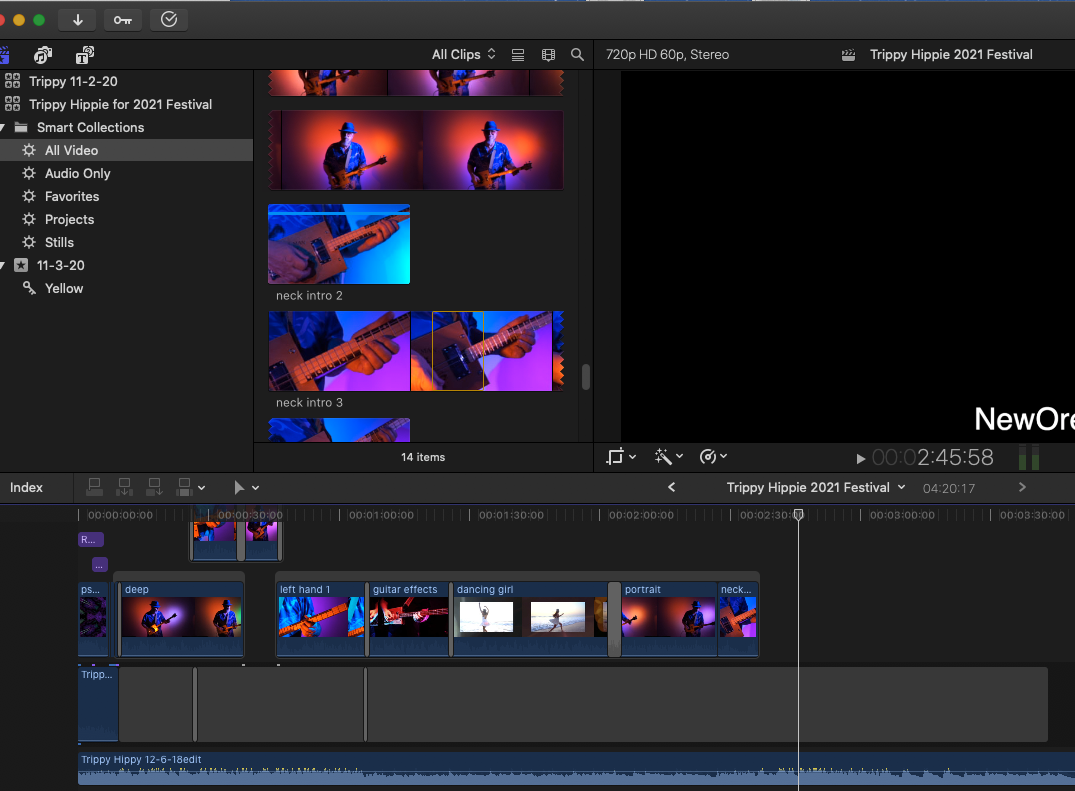
I know I did something wrong, but not sure what. At first I just tried to ignore it by turning the volume down and entering another sound file below it. That actually works, except now I need to add content at the very beginning of video and whenever I try to move everything, it just springs back into the original location. I'm assuming that has something to do with the bad sound file, if not, then I have two problems
I've attached a file which shows there are small dots behind the bad sound file. I'm guessing they indicate something, but I'm not sure what.
Any help would be greatly appreciated.
Please Log in to join the conversation.


05 Nov 2020 13:13 #110723
by JoeEditor
Replied by JoeEditor on topic File that won't go away
You need to learn to do Replace and/or Insert edits.
support.apple.com/guide/final-cut-pro/re...clips-ver4e2fcf0/mac
support.apple.com/guide/final-cut-pro/in...clips-ver4e2eff6/mac
The dots I'm not sure of. Are you referring to the connection stems on the Primary Storyline clip?
support.apple.com/guide/final-cut-pro/re...clips-ver4e2fcf0/mac
support.apple.com/guide/final-cut-pro/in...clips-ver4e2eff6/mac
The dots I'm not sure of. Are you referring to the connection stems on the Primary Storyline clip?
Please Log in to join the conversation.
05 Nov 2020 14:28 #110725
by pdgood
Replied by pdgood on topic File that won't go away
I guess those could be connection stems - I'm not familiar with that term. I'll see if I can search for that term.
Please Log in to join the conversation.
05 Nov 2020 18:54 #110727
by pdgood
Replied by pdgood on topic File that won't go away
Yes, the solution turned out to be simple. I was trying to move the existing clips first which wasn't necessary. Simply putting in the new clip moved "everything" which was what I wanted. I was afraid inserting would only move the other items on the timeline but it also caused sound and text to move as well which in this case was desired.
Please Log in to join the conversation.
05 Nov 2020 23:39 #110729
by JoeEditor
Replied by JoeEditor on topic File that won't go away
Clips outside of the Primary Storyline must all be connected to something inside of the Primary Storyline. When you move something in the Primary Storyline, everything connected to it moves with it.
You can change a Connected Clip's connection point by holding Opt and Alt while clicking on the clip somewhere. The connection stem is moved to that spot on the clip, and connects to whatever is directly below/above in the Primary Storyline.
You can override the magnetic timeline (connection stems) behavior by holding the Tilde key ~ while performing a edit.
You can change a Connected Clip's connection point by holding Opt and Alt while clicking on the clip somewhere. The connection stem is moved to that spot on the clip, and connects to whatever is directly below/above in the Primary Storyline.
You can override the magnetic timeline (connection stems) behavior by holding the Tilde key ~ while performing a edit.
Please Log in to join the conversation.
