


- Posts: 145
- Thank you received: 1
3 Post Moderation Rule for New Boarders (25 Jan 2021)
New boarders will have their posts moderated - Don't worry if you cannot see your post immediately.
opening fcpx files after update
18 Oct 2020 13:18 #110526
by owenpga
opening fcpx files after update was created by owenpga
I'm running fcpx 10.4.6 on mac pro and the newer version 10.4.10 on new laptop.
Noticing that when i open files it asked me to update the files.
Once these files are updated is there anyway in the future to be able to work on those files from my older version of fcpx? I'd like to be able to work the the files from both computers. The old version won't update due to my 2012 sytem.
Noticing that when i open files it asked me to update the files.
Once these files are updated is there anyway in the future to be able to work on those files from my older version of fcpx? I'd like to be able to work the the files from both computers. The old version won't update due to my 2012 sytem.
Please Log in to join the conversation.
- Tom Wolsky
-

- Offline
- Moderator
-

18 Oct 2020 13:23 #110527
by Tom Wolsky
Replied by Tom Wolsky on topic opening fcpx files after update
Can you update the Mac Pro to 10.4.10? It's clumsy in FCP to move between non-compatible versions, You can export an XML of your project in 4.10 and open that in the older version. No problem going the other way, You share a transport library and open the older project in the new version. The real problem comes up if you use features in 10.4.10 that aren't in 10.4.6 or if you use plugins that don't share between versions. It's best, if you can, to keep the systems on the same version.
Please Log in to join the conversation.
18 Oct 2020 13:38 #110528
by owenpga
Replied by owenpga on topic opening fcpx files after update
Thanks Tom
my 2012 can't update to catalina so i can't update the fcpx software. just to see how that would work, is it easy to export an xml ?
my 2012 can't update to catalina so i can't update the fcpx software. just to see how that would work, is it easy to export an xml ?
Please Log in to join the conversation.


18 Oct 2020 13:46 #110529
by joema
You don't need Catalina, only Mojave. You might need an updated GPU, which depending on your current one might be a good idea anyway.
eshop.macsales.com/blog/46029-make-your-...-with-a-gpu-upgrade/
Replied by joema on topic opening fcpx files after update
owenpga wrote: ...my 2012 can't update to catalina so i can't update the fcpx software. just to see how that would work, is it easy to export an xml ?
You don't need Catalina, only Mojave. You might need an updated GPU, which depending on your current one might be a good idea anyway.
eshop.macsales.com/blog/46029-make-your-...-with-a-gpu-upgrade/
Please Log in to join the conversation.
18 Oct 2020 14:05 #110530
by owenpga
Replied by owenpga on topic opening fcpx files after update
yes your right. i remember it needed to run mojave in order to update fcpx. i was thinking catalina as thats what on the new mbp
this is my current system. can you tell me if this can upgrade to your suggested gpu? i'm guessing its not that hard to install?
thanks

this is my current system. can you tell me if this can upgrade to your suggested gpu? i'm guessing its not that hard to install?
thanks
Please Log in to join the conversation.
18 Oct 2020 18:24 #110531
by joema
Replied by joema on topic opening fcpx files after update
Unfortunately I'm not experienced with upgrading legacy Mac Pros. I think some other people on this forum have done it a lot, so maybe they could comment.
There are definitely advantages to taking the required steps to upgrade. The FCPX versions after 10.4.6 were greatly improved with Metal.
A major issue on all Mac Pros before 2019 is they have no built-in hardware acceleration for Long GOP formats like H264 or HEVC. The new AMD GPUs have that built in. The Radeon Pro 5700 XT has AMD's new VCN acceleration logic. VCN is the successor to UVD/VCE. It's a confusing area since there are several separate acceleration hardware blocks: Intel's Quick Sync, Apple's T2 and AMD's UVD/VCE (and now VCN).
Just because the hardware block is present doesn't mean that FCPX will use it. The app layer (FCPX) calls the VideoToolBox framework, which in turn calls the OS and hardware.
So you have two main issues (1) What is the minimal GPU and procedure to upgrade a 2012 Mac Pro to run Mojave and FCPX 10.4.10, and (2) Is there any way this could also enable use of hardware-accelerated video decode/encode, and if so what is the required GPU hardware and procedure.
One method is getting an AMD Radeon RX580. But if the newer-generation XT5700 enables hardware-accelerated video transcoding on a Mac Pro, that is a consideration.
There are definitely advantages to taking the required steps to upgrade. The FCPX versions after 10.4.6 were greatly improved with Metal.
A major issue on all Mac Pros before 2019 is they have no built-in hardware acceleration for Long GOP formats like H264 or HEVC. The new AMD GPUs have that built in. The Radeon Pro 5700 XT has AMD's new VCN acceleration logic. VCN is the successor to UVD/VCE. It's a confusing area since there are several separate acceleration hardware blocks: Intel's Quick Sync, Apple's T2 and AMD's UVD/VCE (and now VCN).
Just because the hardware block is present doesn't mean that FCPX will use it. The app layer (FCPX) calls the VideoToolBox framework, which in turn calls the OS and hardware.
So you have two main issues (1) What is the minimal GPU and procedure to upgrade a 2012 Mac Pro to run Mojave and FCPX 10.4.10, and (2) Is there any way this could also enable use of hardware-accelerated video decode/encode, and if so what is the required GPU hardware and procedure.
One method is getting an AMD Radeon RX580. But if the newer-generation XT5700 enables hardware-accelerated video transcoding on a Mac Pro, that is a consideration.
Please Log in to join the conversation.
19 Oct 2020 00:02 - 19 Oct 2020 00:04 #110534
by owenpga
Replied by owenpga on topic opening fcpx files after update
Thanks for the response. You are way ahead of me with what you know about computers.  I'm a novice with fcpx but starting to do more with it for my golf business.. I just purchased the GPU from the link you originally sent me. I just notice this Sapphire Radeon on amazon which appears to be similar?? although the price is certainly cheaper. The reviews say this works with the 2012 with no issues. Are these apples to apples or is one better than the other?
Thanks for your time. It sounds like this thing could makes my computer a bit zippier?

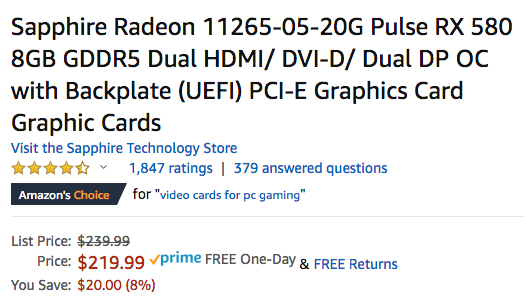
www.amazon.com/Sapphire-11265-05-20G-Bac...03064824&sr=8-2&th=1
I'm a novice with fcpx but starting to do more with it for my golf business.. I just purchased the GPU from the link you originally sent me. I just notice this Sapphire Radeon on amazon which appears to be similar?? although the price is certainly cheaper. The reviews say this works with the 2012 with no issues. Are these apples to apples or is one better than the other?Thanks for your time. It sounds like this thing could makes my computer a bit zippier?
www.amazon.com/Sapphire-11265-05-20G-Bac...03064824&sr=8-2&th=1
Last edit: 19 Oct 2020 00:04 by owenpga.
Please Log in to join the conversation.

19 Oct 2020 02:15 #110535
by dgwvideo
Creating history....one edit at a time !
Replied by dgwvideo on topic opening fcpx files after update
We upgraded a mid 2010 12 core machine (5.1) to Mojave a while back using the Mac Edition Sapphire 7950 with 3GB vram. The Radeon RX580 with 8GB vram will be much more effective, especially with your 2012 version Mac Pro. With the Mac Edition card the usual Apple boot screen appears, as does full functionality with accessing startup commands. The RX580 will bypass the Apple startup screen and wont allow access to those same startup commands, but otherwise should work fine.
Creating history....one edit at a time !
Please Log in to join the conversation.
