


- Posts: 54
- Thank you received: 0
3 Post Moderation Rule for New Boarders (25 Jan 2021)
New boarders will have their posts moderated - Don't worry if you cannot see your post immediately.
Separate Multi-stereo audio files possible?
- Domscillator
-
 Topic Author
- Offline
- Senior Member
-

Less
More
29 Sep 2020 08:03 #110286
by Domscillator
Separate Multi-stereo audio files possible? was created by Domscillator
Hi everyone,
I have been looking for a solution to the issue I am about to describe for a long time but I am unable to find one.
I know it must be possible to do this in FCPX so I hope someone knows the way.
Sometimes, I am recording footage (especially screen captures) that contain multiple audio files in them (e.g. Microphone and music in separate channels).
When I import the footage in FCPX I can detach the audio if I want to- good.
I can also expand the audio so that final cut can show me the separate channels: great
What I am unable to do is detach the audio files from each other. Most of the times, music needs to be edited in a separate way to say the dialogue (different crossfades, cuts etc).
How can I separate the audio files in FCPX?
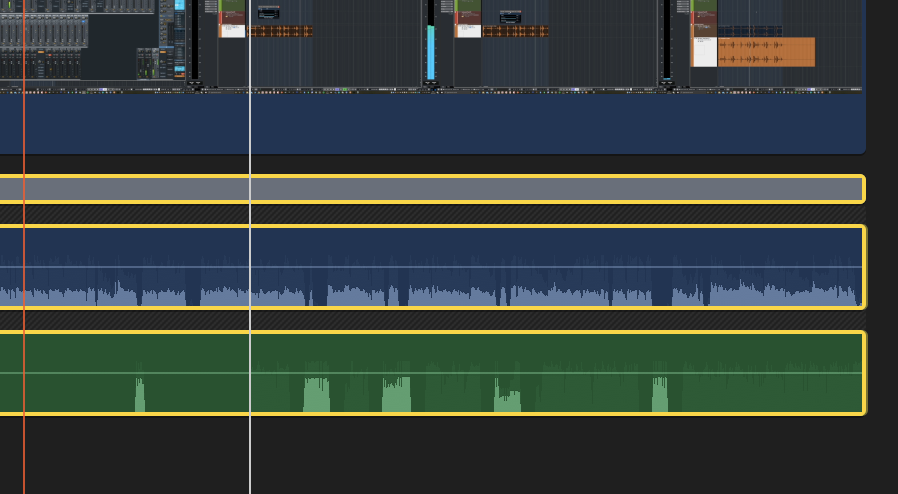
Here's a snapshot of how the linked audio files look like:
Any ideas would be appreciated.
many thanks!
I have been looking for a solution to the issue I am about to describe for a long time but I am unable to find one.
I know it must be possible to do this in FCPX so I hope someone knows the way.
Sometimes, I am recording footage (especially screen captures) that contain multiple audio files in them (e.g. Microphone and music in separate channels).
When I import the footage in FCPX I can detach the audio if I want to- good.
I can also expand the audio so that final cut can show me the separate channels: great
What I am unable to do is detach the audio files from each other. Most of the times, music needs to be edited in a separate way to say the dialogue (different crossfades, cuts etc).
How can I separate the audio files in FCPX?
Here's a snapshot of how the linked audio files look like:
Any ideas would be appreciated.
many thanks!
Please Log in to join the conversation.
- Domscillator
-
Topic Author
- Offline
- Senior Member
-
Less
More
- Posts: 54
- Thank you received: 0
29 Sep 2020 08:18 #110287
by Domscillator
Replied by Domscillator on topic Separate Multi-stereo audio files possible?
I actually finally found the answer to my own problem!
The solution is to expand the audio components, detach from the video and then select the multi-audio clip and hit CMD+SHIFT+G (Break Apart Items)
I hope this helps someone
The solution is to expand the audio components, detach from the video and then select the multi-audio clip and hit CMD+SHIFT+G (Break Apart Items)
I hope this helps someone
Please Log in to join the conversation.


29 Sep 2020 21:10 #110291
by JoeEditor
Replied by JoeEditor on topic Separate Multi-stereo audio files possible?
You can also separate and mute in the Inspector.
Please Log in to join the conversation.
- Domscillator
-
Topic Author
- Offline
- Senior Member
-
Less
More
- Posts: 54
- Thank you received: 0
01 Oct 2020 14:45 #110314
by Domscillator
Replied by Domscillator on topic Separate Multi-stereo audio files possible?
Interesting! Can you elaborate on how to do this by any chance?
Please Log in to join the conversation.
01 Oct 2020 23:53 #110315
by JoeEditor
Replied by JoeEditor on topic Separate Multi-stereo audio files possible?
Please Log in to join the conversation.
- Domscillator
-
Topic Author
- Offline
- Senior Member
-
Less
More
- Posts: 54
- Thank you received: 0
07 Oct 2020 08:26 #110382
by Domscillator
Replied by Domscillator on topic Separate Multi-stereo audio files possible?
Thanks! Yes, that all works but until you separate (Cmd-Shift-G) nothing works. The separation was the thing I was missing 
Please Log in to join the conversation.
