


- Posts: 1
- Thank you received: 0
3 Post Moderation Rule for New Boarders (25 Jan 2021)
New boarders will have their posts moderated - Don't worry if you cannot see your post immediately.
Data Range vs Legal Range of External ProRes Recordings in FCPX
23 Sep 2020 22:15 #110200
by stephanwb
Last January, Alister Chapman made a post (
www.xdcam-user.com/2020/01/why-does-s-lo...l-recorder/#comments
) on how editing programs will handle Sony internal S-log2 o S-log3 recordings differently external recordings (prores Atomos, etc...).
The reason is that linear editing programs will read the meta data on the internal recordings and know that it's DATA RANGE that needs to be interpreted. On external recorded footage, that metadata doesn't exist and so they interpret the prores footage as LEGAL RANGE, which -- as Chapman says -- " This results in the recording levels being transposed into incorrect levels for processing. So when you add a LUT it will look wrong, perhaps with very dark shadows or very bright over exposed looking highlights. It can also limit how much you can grade the footage."
How does FCPX handle this and how can we make sure that FCPX sees it as DATA RANGE?
Thank you!
The reason is that linear editing programs will read the meta data on the internal recordings and know that it's DATA RANGE that needs to be interpreted. On external recorded footage, that metadata doesn't exist and so they interpret the prores footage as LEGAL RANGE, which -- as Chapman says -- " This results in the recording levels being transposed into incorrect levels for processing. So when you add a LUT it will look wrong, perhaps with very dark shadows or very bright over exposed looking highlights. It can also limit how much you can grade the footage."
How does FCPX handle this and how can we make sure that FCPX sees it as DATA RANGE?
Thank you!
Please Log in to join the conversation.
- CBlakeston
-

- Offline
- Elite Member
-

Less
More
- Posts: 175
- Thank you received: 5
05 Jan 2022 03:09 #118234
by CBlakeston
Replied by CBlakeston on topic Data Range vs Legal Range of External ProRes Recordings in FCPX
I’ve run into this myself recently. In a recent atomos uodate you can now set it to legalise recording so final cut will interpret the data range correctly.
Please Log in to join the conversation.


05 Jan 2022 16:41 - 05 Jan 2022 16:45 #118241
by joema
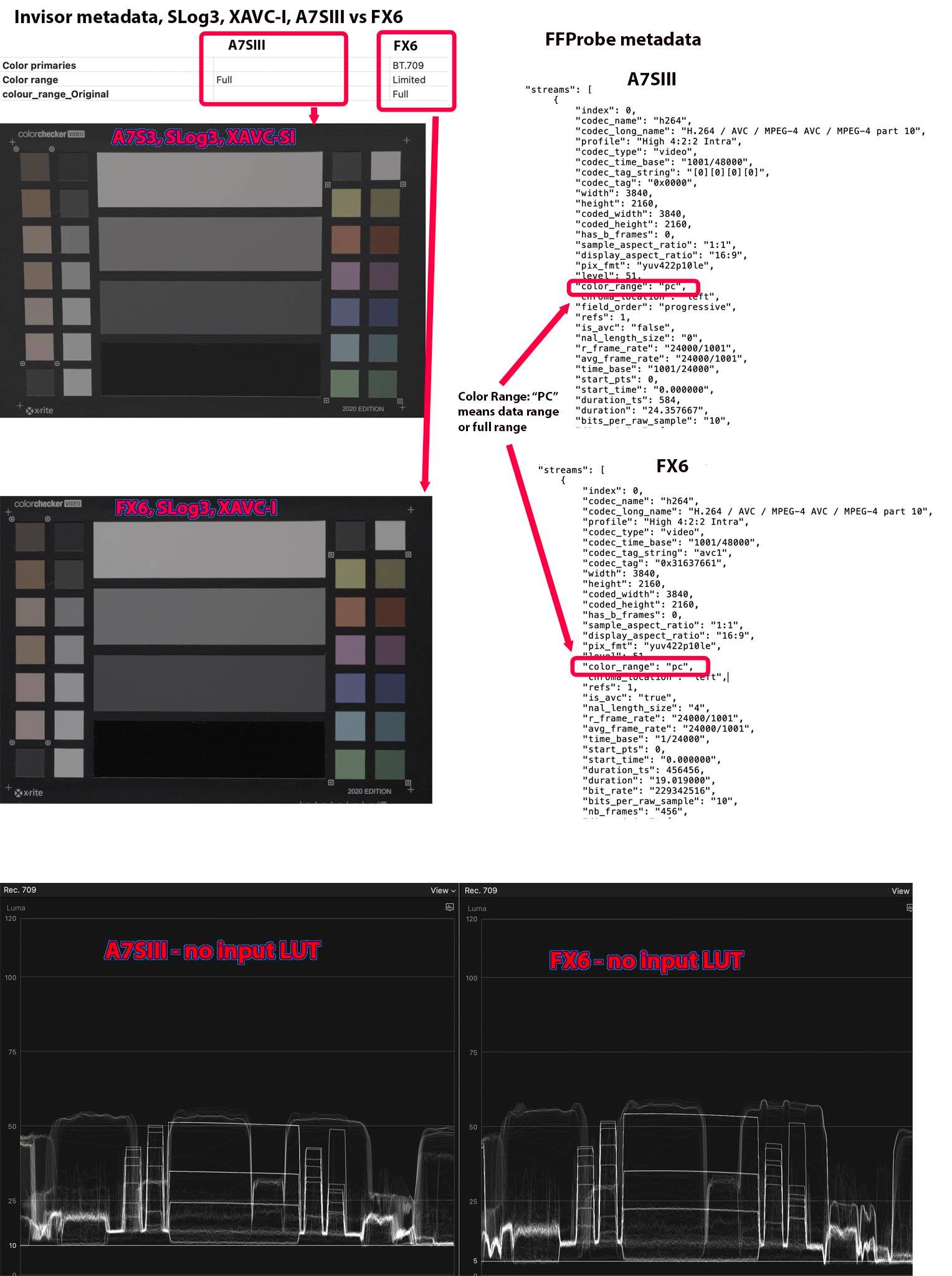
This is a complex and confusing area which I am still investigating. To illustrate, when our FX6 cameras are connected to the Shogun 7 recording ProRes 422, and the input on the Shogun 7 is set to SLog3/SGamut3.cine, the resultant file will be interpreted as legal range in FCP. However I think Sony specifies SLog3 is data range.
If an A7SIII is connected to the Ninja V recording ProRes 422 (with input also set to SLog3/SGamut3.cine), the resultant file will be interpreted as data range in FCP.
If either FX6 or A7SIII are recording ProRes RAW, that is yet another issue. Ideally after FCP imports the RAW video and converts to SLog3 (with no camera LUT) you'd want the luma waveform to match XAVC-I SLog3 without a camera LUT. My recollection is it does not match but after applying the FCP built-in SLog3 camera LUT it does match.
If the FX6 in-camera XAVC-I MXF file metadata is viewed in Sony's Catalyst Browse software, it is denoted "full scaled code", aka data range.
The inconsistent terminology is also confusing. Full range = full levels = data range = full scaled code = PC = full swing.
Legal range = limited range = video range = video levels = studio swing
This behavior also overlaps with a separate but similar-looking issue, sometimes called the "Quicktime gamma shift" problem. That by itself is very complex and confusing. Here is a 12-page discussion of it on the Blackmagic forums: forum.blackmagicdesign.com/viewtopic.php?f=21&t=101253
Attached is a graphic from a previous investigation I did.
Replied by joema on topic Data Range vs Legal Range of External ProRes Recordings in FCPX
...Alister Chapman...how editing programs will handle Sony internal S-log2 o S-log3 recordings differently external recordings (prores Atomos, etc...).... linear editing programs will read the meta data on the internal recordings and know that it's DATA RANGE that needs to be interpreted. On external recorded footage, that metadata doesn't exist and so they interpret the prores footage as LEGAL RANGE...
This is a complex and confusing area which I am still investigating. To illustrate, when our FX6 cameras are connected to the Shogun 7 recording ProRes 422, and the input on the Shogun 7 is set to SLog3/SGamut3.cine, the resultant file will be interpreted as legal range in FCP. However I think Sony specifies SLog3 is data range.
If an A7SIII is connected to the Ninja V recording ProRes 422 (with input also set to SLog3/SGamut3.cine), the resultant file will be interpreted as data range in FCP.
If either FX6 or A7SIII are recording ProRes RAW, that is yet another issue. Ideally after FCP imports the RAW video and converts to SLog3 (with no camera LUT) you'd want the luma waveform to match XAVC-I SLog3 without a camera LUT. My recollection is it does not match but after applying the FCP built-in SLog3 camera LUT it does match.
If the FX6 in-camera XAVC-I MXF file metadata is viewed in Sony's Catalyst Browse software, it is denoted "full scaled code", aka data range.
The inconsistent terminology is also confusing. Full range = full levels = data range = full scaled code = PC = full swing.
Legal range = limited range = video range = video levels = studio swing
This behavior also overlaps with a separate but similar-looking issue, sometimes called the "Quicktime gamma shift" problem. That by itself is very complex and confusing. Here is a 12-page discussion of it on the Blackmagic forums: forum.blackmagicdesign.com/viewtopic.php?f=21&t=101253
Attached is a graphic from a previous investigation I did.
Last edit: 05 Jan 2022 16:45 by joema.
Please Log in to join the conversation.
- CBlakeston
-
- Offline
- Elite Member
-
Less
More
- Posts: 175
- Thank you received: 5
05 Jan 2022 19:57 #118245
by CBlakeston
Replied by CBlakeston on topic Data Range vs Legal Range of External ProRes Recordings in FCPX
It does seem very complicated with many variables involved. Ideally I guess Apple would want to add an ‘interpret range’ function to FCP like on Davinci.
For many it seems recording to an Atomos with the legalise option checked should record the data in a way FCP interpreted correctly.
This is a long post with lots of details in it on various configurations.
rodrigopolo.com/2021/11/17/eos-r5-atomos...s-and-how-to-set-up/
For many it seems recording to an Atomos with the legalise option checked should record the data in a way FCP interpreted correctly.
This is a long post with lots of details in it on various configurations.
rodrigopolo.com/2021/11/17/eos-r5-atomos...s-and-how-to-set-up/
Please Log in to join the conversation.

05 Jan 2022 23:08 #118247
by VTC
Replied by VTC on topic Data Range vs Legal Range of External ProRes Recordings in FCPX
Updated my Ninja firmware and discovered all sorts of capabilities that are either new or ones I overlooked previously. (Suppose had I bothered ro read the release notes it might not have come as such a surprise.)
Please Log in to join the conversation.
