


- Posts: 1
- Thank you received: 0
3 Post Moderation Rule for New Boarders (25 Jan 2021)
New boarders will have their posts moderated - Don't worry if you cannot see your post immediately.
Cannot load library from external disk - always empty
22 Sep 2020 15:40 #110177
by wb221
Cannot load library from external disk - always empty was created by wb221
Hello,
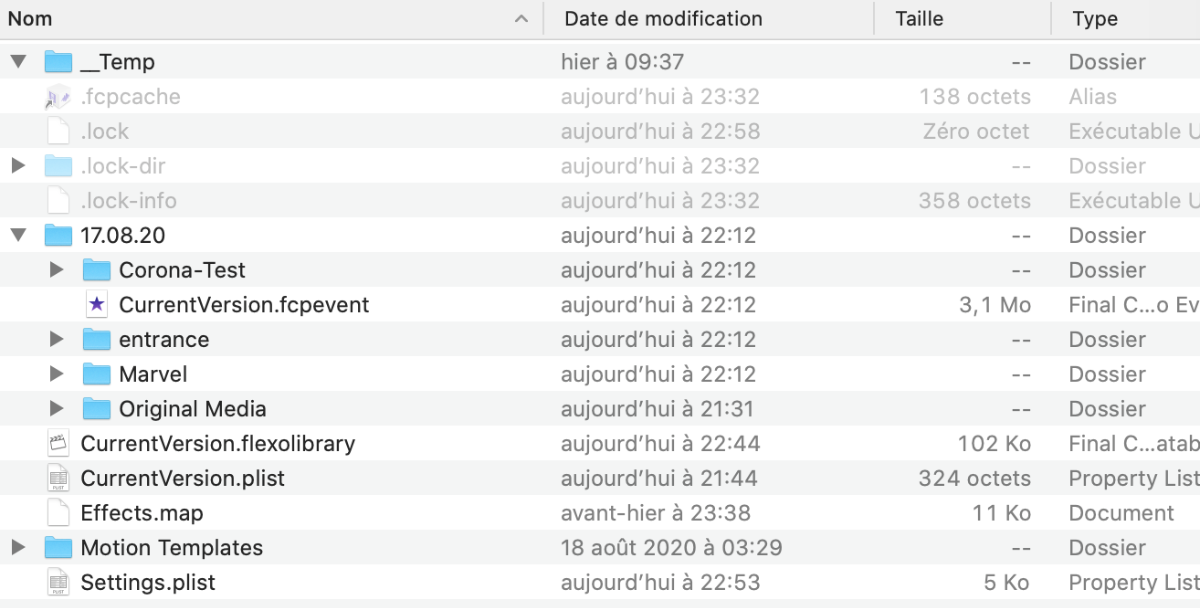
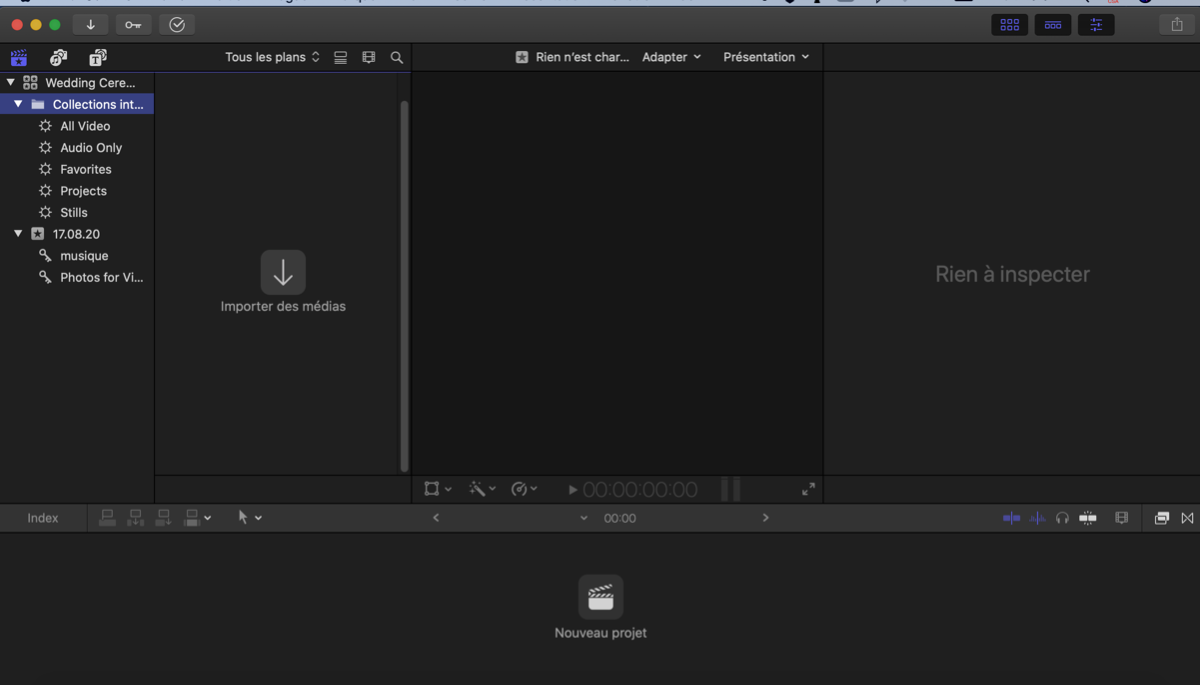
I work always on my eternal hard disk to cut the videos, however, I can no longer read my library after the disk has been ejected once. The files are well located on the disk, I've still got 12G of the package, while when opening with FCPX, there is no media at all. Please can anybody help me? Thanks a lot
I work always on my eternal hard disk to cut the videos, however, I can no longer read my library after the disk has been ejected once. The files are well located on the disk, I've still got 12G of the package, while when opening with FCPX, there is no media at all. Please can anybody help me? Thanks a lot
Please Log in to join the conversation.
- Tom Wolsky
-

- Offline
- Moderator
-

23 Sep 2020 05:04 #110187
by Tom Wolsky
Replied by Tom Wolsky on topic Cannot load library from external disk - always empty
Select the event not the smart collection folder. Try popping an FCP backup.
Please Log in to join the conversation.


23 Sep 2020 12:43 #110192
by joema
Replied by joema on topic Cannot load library from external disk - always empty
As a contingency, copy all FCPX auto-backups to external media. By default those are in /Movies/Final Cut Backups.
Then run Disk Utility First Aid on your external drive. Observe to see it runs without errors. The disk format of all drives holding FCPX media and libraries should be HFS+ (Mac OS Extended Journaled), or APFS, not ExFAT, NTFS or anything else.
If your library is on your system drive, make sure you have at least 20% free space on that drive.
As Tom said, try opening a backup library. You can do that within FCPX or by navigating to the above-listed backup libraries in Finder and double-clicking on them.
If you are on Catalina, make sure FCPX has full disk access. Go to System Preferences>Security & Privacy>Privacy, unlock it, scroll down to "Full Disk Access" and make sure FCPX is enabled for that.
If you select an event, it should either show existing clips or red "missing media" clips. You showed a screen cap inside your library, however it was at the top level, not within the event. Inside the event within the Original Media folder should be symbolic links to each media file contained on your external drive. Are those symbolic links present?
Note those symlinks will only be present in the original library, not the backup libraries. Apparently the backups store only "inode" locators for the external media files, then after loading the backup library in FCPX the symlinks are regenerated. For that to work the external drive must be on line, and have the same volume name as before.
Then run Disk Utility First Aid on your external drive. Observe to see it runs without errors. The disk format of all drives holding FCPX media and libraries should be HFS+ (Mac OS Extended Journaled), or APFS, not ExFAT, NTFS or anything else.
If your library is on your system drive, make sure you have at least 20% free space on that drive.
As Tom said, try opening a backup library. You can do that within FCPX or by navigating to the above-listed backup libraries in Finder and double-clicking on them.
If you are on Catalina, make sure FCPX has full disk access. Go to System Preferences>Security & Privacy>Privacy, unlock it, scroll down to "Full Disk Access" and make sure FCPX is enabled for that.
If you select an event, it should either show existing clips or red "missing media" clips. You showed a screen cap inside your library, however it was at the top level, not within the event. Inside the event within the Original Media folder should be symbolic links to each media file contained on your external drive. Are those symbolic links present?
Note those symlinks will only be present in the original library, not the backup libraries. Apparently the backups store only "inode" locators for the external media files, then after loading the backup library in FCPX the symlinks are regenerated. For that to work the external drive must be on line, and have the same volume name as before.
Please Log in to join the conversation.
