


- Posts: 3
- Thank you received: 0
3 Post Moderation Rule for New Boarders (25 Jan 2021)
New boarders will have their posts moderated - Don't worry if you cannot see your post immediately.
Need to mask time stamp seen on a screen
19 Sep 2020 14:51 #110133
by sarin_4u
Need to mask time stamp seen on a screen was created by sarin_4u
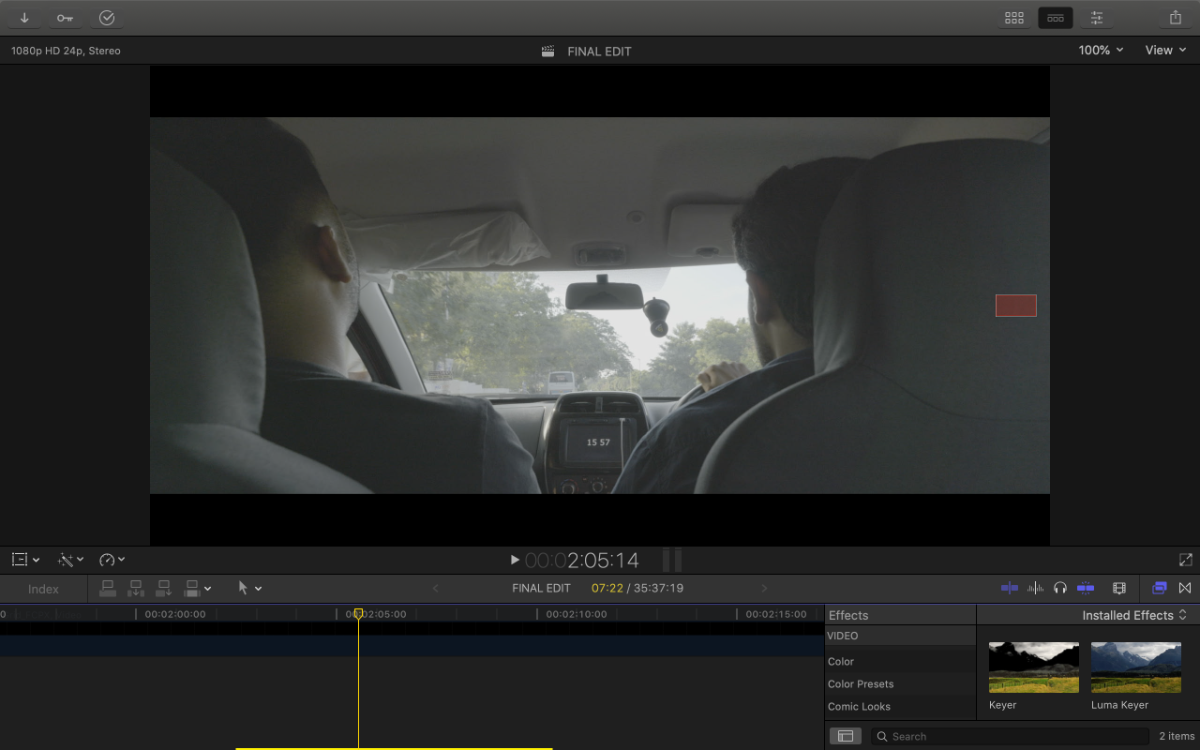
As seen in the attached screenshot, the stupid screen in the car shows the time and I need to mask/hide that without making it very obvious. What I want to achieve is make the screen look blank as if it was off.
This might be very basic, but am struggling to figure the right tool to fix it.
Would really appreciate if someone can suggest how do this. If there is a thread which already covers this, kindly point me to that.
Thanks in advance.
This might be very basic, but am struggling to figure the right tool to fix it.
Would really appreciate if someone can suggest how do this. If there is a thread which already covers this, kindly point me to that.
Thanks in advance.
Please Log in to join the conversation.


20 Sep 2020 12:35 #110137
by JoeEditor
Replied by JoeEditor on topic Need to mask time stamp seen on a screen
"Screen Replacement" is that that is called, and you want TrackX from Coremelt.
coremelt.com/products/trackx-powered-by-mocha
coremelt.com/products/trackx-powered-by-mocha
Please Log in to join the conversation.

20 Sep 2020 18:19 #110143
by VTC
Replied by VTC on topic Need to mask time stamp seen on a screen
Before I'd throw $100 at it consider duplicating the video, cropping into a flat area of the panel, shifting the 'blank' overlay vertically, them match any displaced motion of the underlying shot.
The beauty here it's a consistent color surrounding the LED and with some careful blending being as it's so small it should go unnoticed. You'd pick up on it because you know where to look for but in a busy frame with other things vying for the viewers attention nobody else would catch it. Either that or place a bogus logo atop it.
The beauty here it's a consistent color surrounding the LED and with some careful blending being as it's so small it should go unnoticed. You'd pick up on it because you know where to look for but in a busy frame with other things vying for the viewers attention nobody else would catch it. Either that or place a bogus logo atop it.
Please Log in to join the conversation.
20 Sep 2020 23:39 #110147
by JoeEditor
Replied by JoeEditor on topic Need to mask time stamp seen on a screen
Being in a moving car, I assume there is camera movement in the image that needs to be tracked.
Please Log in to join the conversation.

21 Sep 2020 21:10 #110160
by dgwvideo
Creating history....one edit at a time !
Replied by dgwvideo on topic Need to mask time stamp seen on a screen
If going the Coremelt route, I'd use the SliceX object remover over the screen replacement. The image to be replaced is small and you could easily use the offset from beneath the image (replacing text with blank screen). This also provides the option to track if needed. The full screen replacement could be tricky because there is a cord coming down across the screen toward the right, so the full screen is not unobstructed, If the scene has little movement affecting the position of the screen, then VTC's method would be quickest.
Creating history....one edit at a time !
Please Log in to join the conversation.
21 Sep 2020 22:49 #110162
by JoeEditor
Replied by JoeEditor on topic Need to mask time stamp seen on a screen
Cord is white as white can be against that almost black background, easy to mask out with an HSL or Luma keyer, using a cloned copy above the original. Movement would be kept in tact.
Please Log in to join the conversation.
22 Sep 2020 03:52 - 22 Sep 2020 03:53 #110164
by dgwvideo
Creating history....one edit at a time !
Replied by dgwvideo on topic Need to mask time stamp seen on a screen
Sure, that can be done, but that's another step. And, if the passengers arm moves during the shot the white cord will be more or less prominent in the image, requiring tweaking the mask at those points. I still think the object remover in SliceX is the best approach....just my opinion.FCPX.guru wrote: Cord is white as white can be against that almost black background, easy to mask out with an HSL or Luma keyer, using a cloned copy above the original. Movement would be kept in tact.
Creating history....one edit at a time !
Last edit: 22 Sep 2020 03:53 by dgwvideo.
Please Log in to join the conversation.
22 Sep 2020 12:46 #110170
by JoeEditor
Replied by JoeEditor on topic Need to mask time stamp seen on a screen
HSL or luma masks are dynamic and don't need tweaking, thus if an arm passes in front, no, you don't need to touch a thing. And it's a step that takes 2 minutes. A fraction of what the rest of the process will take.
Please Log in to join the conversation.
22 Sep 2020 16:34 #110178
by sarin_4u
Replied by sarin_4u on topic Need to mask time stamp seen on a screen
Thank you.
Please Log in to join the conversation.
22 Sep 2020 16:36 #110179
by sarin_4u
Replied by sarin_4u on topic Need to mask time stamp seen on a screen
That's correct. And what's worse is, there are few scenes where the actors are moving their hands across the screen, I tried adding a mask but now when the actor moves their hand, the mask is now visible. I guess, I will have to this frame by frame for those scanarios.
Please Log in to join the conversation.
