


3 Post Moderation Rule for New Boarders (25 Jan 2021)
New boarders will have their posts moderated - Don't worry if you cannot see your post immediately.
Bouncing project Error -41562
- Starfox
-
 Topic Author
- Offline
- Senior Member
-

- Music, Djing, Music production, fitness. ◄◄ rewind ► play ▌▌pause ■ Stop ►► fast forward
Less
More
16 Sep 2020 10:19 #110050
by Starfox
Bouncing project Error -41562 was created by Starfox
Hey guys,
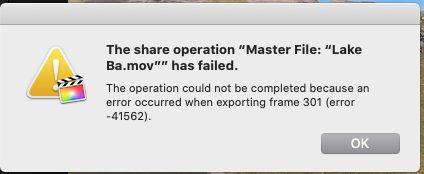
I recorded some drone footage and I am trying to make a video out of it and bounce it, but It's failing with the below error
''The operation could not be completed because an error occurred when exporting frame 301 (error -41562)''
Any ideas? I have deleted rendered files, started a new project, converted the original video to a different format to try again but the same issue every time. It's odd.
I recorded some drone footage and I am trying to make a video out of it and bounce it, but It's failing with the below error
''The operation could not be completed because an error occurred when exporting frame 301 (error -41562)''
Any ideas? I have deleted rendered files, started a new project, converted the original video to a different format to try again but the same issue every time. It's odd.
Please Log in to join the conversation.
- Tom Wolsky
-

- Offline
- Moderator
-

16 Sep 2020 10:39 #110053
by Tom Wolsky
Replied by Tom Wolsky on topic Bouncing project Error -41562
In General FCP preferences change the display to show frames. Check what happens at the frame number. There may be a corrupt file. You might try optimizing the media.
Please Log in to join the conversation.
16 Sep 2020 11:27 #110055
by Starfox
Replied by Starfox on topic Bouncing project Error -41562
How do I check what happens at the frame number? I am not sure what you mean. And how exactly do i optimize the media 
Please Log in to join the conversation.
- Tom Wolsky
-
- Offline
- Moderator
-
16 Sep 2020 11:51 #110056
by Tom Wolsky
Replied by Tom Wolsky on topic Bouncing project Error -41562
By changing the display from timeline to frames you can go to the exact frame number cited in the error message. Replace the shot. There may be other error. To optimize the media select the clips in the browser that are used in the project, right click on one, and choose Transcode media. Check Optimize.
Please Log in to join the conversation.
16 Sep 2020 13:01 #110062
by Starfox
Replied by Starfox on topic Bouncing project Error -41562
Thanks for the tips. I right-clicked in the browser on the clip causing the issue and used the option 'analyze and fix' and it bounced straight away,
Please Log in to join the conversation.
- Tom Wolsky
-
- Offline
- Moderator
-
16 Sep 2020 13:09 #110063
by Tom Wolsky
Replied by Tom Wolsky on topic Bouncing project Error -41562
Bounced?
Please Log in to join the conversation.


16 Sep 2020 14:38 #110064
by joema
That option is to analyze and fix color or audio, not a corrupt file.
The error you encountered can be caused by a corrupt render file, a damaged source file, by damaged library metadata for that source clip or by bugs and incompatibilities in 3rd-party plugins.
In FCPX preferences, disable background rendering, then do File>Delete Generated Library Files>Delete Render Files>All. Then reboot entire machine, launch FCPX, open project, select all clips in timeline with CMD+A, render them with CTRL+R, and do not use machine while that runs.
If it completes without error, skim through the timeline and evaluate performance and behavior. If it runs OK, try to export the project using these settings: File>Share>Master File>Settings, Format: Computer, Video Codec: H.264 Faster Encode, Resolution: 1920 x 1080.
If at any point those steps cause errors, state the specifics.
If errors happen, make a snapshot copy of the timeline, open that, select all clips with CMD+A, then remove all effects with Edit>Remove Effects. See if you can navigate the timeline minus effects and export it using the above preset. If that works, repeat above procedure but remove effects from 1/2 the timeline, then the other 1/2, then 1/4, as needed to narrow down where the problematic effects are.
Replied by joema on topic Bouncing project Error -41562
Starfox wrote: Thanks for the tips. I right-clicked in the browser on the clip causing the issue and used the option 'analyze and fix' and it bounced straight away,
That option is to analyze and fix color or audio, not a corrupt file.
The error you encountered can be caused by a corrupt render file, a damaged source file, by damaged library metadata for that source clip or by bugs and incompatibilities in 3rd-party plugins.
In FCPX preferences, disable background rendering, then do File>Delete Generated Library Files>Delete Render Files>All. Then reboot entire machine, launch FCPX, open project, select all clips in timeline with CMD+A, render them with CTRL+R, and do not use machine while that runs.
If it completes without error, skim through the timeline and evaluate performance and behavior. If it runs OK, try to export the project using these settings: File>Share>Master File>Settings, Format: Computer, Video Codec: H.264 Faster Encode, Resolution: 1920 x 1080.
If at any point those steps cause errors, state the specifics.
If errors happen, make a snapshot copy of the timeline, open that, select all clips with CMD+A, then remove all effects with Edit>Remove Effects. See if you can navigate the timeline minus effects and export it using the above preset. If that works, repeat above procedure but remove effects from 1/2 the timeline, then the other 1/2, then 1/4, as needed to narrow down where the problematic effects are.
Please Log in to join the conversation.

16 Sep 2020 19:15 #110067
by dgwvideo
Creating history....one edit at a time !
Replied by dgwvideo on topic Bouncing project Error -41562
He means exported. Lots of folks with audio predominant backgrounds seem to refer to exporting as "bouncing" !Tom Wolsky wrote: Bounced?
Creating history....one edit at a time !
Please Log in to join the conversation.
- Tom Wolsky
-
- Offline
- Moderator
-
16 Sep 2020 19:19 #110068
by Tom Wolsky
Replied by Tom Wolsky on topic Bouncing project Error -41562
Ah. Generally bouncing in video is not seen as a good thing.
Please Log in to join the conversation.
