


- Posts: 87
- Thank you received: 3
3 Post Moderation Rule for New Boarders (25 Jan 2021)
New boarders will have their posts moderated - Don't worry if you cannot see your post immediately.
FCP X slows and crashes for no apparent reason
14 Sep 2020 16:03 #110016
by BobKrist
FCP X slows and crashes for no apparent reason was created by BobKrist
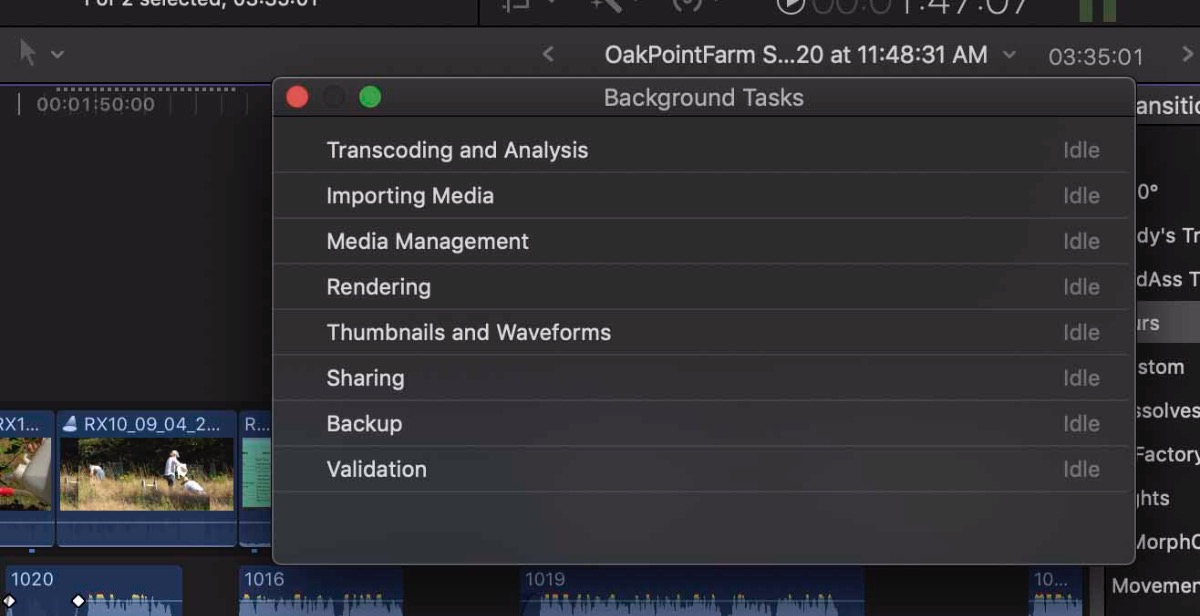
Greetings. I've been running into a problem lately with FCPX going into limbo when it starts to render something...I turned off background rendering and that helped...for a while. But this morning, I opened a project, dropped a blur effect on a clip and the program froze, spinning beachball of death, the computer froze, numerous re-boots did nothing, I trashed the whole project, worked from my last Snapshot of the project...it was working for a while...and then boom, the same thing. I can tell I'm heading for trouble when all of a sudden I see those "unrendered" dots start to appear over clips that have not had them previously. In the attached screenshot, you can see the background task window shows everything idle, but there are those dots above the clip right next to it. I'm running a 2018 13" MBP with 2.7gh i7, 16GB of RAM, still on Mojave but with the latest FCPX. Thanks for any help or suggestions you can provide.
Please Log in to join the conversation.
- Tom Wolsky
-

- Offline
- Moderator
-

14 Sep 2020 16:12 #110018
by Tom Wolsky
Replied by Tom Wolsky on topic FCP X slows and crashes for no apparent reason
If you have background rendering of the task HUD should be idle. You might want to do a test with a clean admin user.
Please Log in to join the conversation.
14 Sep 2020 16:17 #110019
by BobKrist
Replied by BobKrist on topic FCP X slows and crashes for no apparent reason
Thanks Tom, not sure what doing a test with a "clean admin user" entails. . Do you mean signing into my computer as a guest and trying to use FCPX that way?
Please Log in to join the conversation.
- Tom Wolsky
-
- Offline
- Moderator
-
14 Sep 2020 16:35 #110020
by Tom Wolsky
Replied by Tom Wolsky on topic FCP X slows and crashes for no apparent reason
Go to Users in System Preferences and create a new user with the +. Make it an admin user. Log out of the current user and log into the new admin user. Try testing FCP in there.
Please Log in to join the conversation.
14 Sep 2020 16:47 #110022
by BobKrist
Replied by BobKrist on topic FCP X slows and crashes for no apparent reason
Thanks for the explanation. Will do. I appreciate the help.
Please Log in to join the conversation.


15 Sep 2020 11:07 #110036
by joema
Note there's a difference between the entire computer freezing -- IOW beach ball on all apps, vs just on FCPX. If the entire computer freezes or becomes non-responsive that is a system-layer problem, not the fault of FCPX. In that case there's no fix possible within FCPX -- the remedy must be pursued at the system level. E.g, system config, disk free space, kernel extensions, hardware tests, disk drives, etc.
You can examine what kernel extensions you are using by typing this command from a terminal window:
kextstat | grep -v com.apple
Make sure you're not running Chrome or any browser based on Chrome such as Brave. Those mis-use the MacOS VideoToolBox frarmework and can cause unpredictable FCPX hangs and crashes.
If you are using Bluetooth audio such as AirPods, headphones, etc, temporarily discontinue those. In a few cases wireless audio devices have been associated with FCPX hangs.
Before 10.4.9 there were a few narrow hangs which happened with certain HEVC (H.265) media. This seems fixed on 10.4.9, but if you have any HEVC content, try transcoding that to optimized media or proxies.
Make sure you are on the latest version of Apple Pro Video Formats, which is 2.1.2. That is updated in System Preferences>Software Updates. You can check your version by doing About This Mac>System Report>Software>Installations, and scrolling down to "Pro Video Formats". The highest version number should be 2.1.2.
Verify you have at least 20% free space on all hard drives, including the boot drive.
A common cause of hangs/crashes is bugs in 3rd-party plugins. They run within the FCPX address space, have access to all FCPX memory and the smallest bug can crash or hang FCPX. Make sure all your plugins up to date, and you've removed any old plugins you no longer need.
If it still happens, make a snapshot of the timeline, open that snapshot, select about 1/2 the clips and remove effects with Edit>Remove Effects. If that doesn't make any difference, repeat but remove effects on the other 1/2. Admittedly if problem is highly intermittent this could take some time.
If none of the above works, when FCPX is hung, start Activity Monitor (or have it already running), select the FCPX process, press the gear icon and select "Run Spindump". Save that to a file, compress it with Finder and upload it to a share point and I'll look at it.
Replied by joema on topic FCP X slows and crashes for no apparent reason
BobKrist wrote: ... problem lately with FCPX going into limbo when it starts to render something...I turned off background rendering and that helped...for a while. But this morning, I opened a project, dropped a blur effect on a clip and the program froze, spinning beachball of death, the computer froze, numerous re-boots did nothing, I trashed the whole project, worked from my last Snapshot of the project...it was working for a while...and then boom, the same thing...
Note there's a difference between the entire computer freezing -- IOW beach ball on all apps, vs just on FCPX. If the entire computer freezes or becomes non-responsive that is a system-layer problem, not the fault of FCPX. In that case there's no fix possible within FCPX -- the remedy must be pursued at the system level. E.g, system config, disk free space, kernel extensions, hardware tests, disk drives, etc.
You can examine what kernel extensions you are using by typing this command from a terminal window:
kextstat | grep -v com.apple
Make sure you're not running Chrome or any browser based on Chrome such as Brave. Those mis-use the MacOS VideoToolBox frarmework and can cause unpredictable FCPX hangs and crashes.
If you are using Bluetooth audio such as AirPods, headphones, etc, temporarily discontinue those. In a few cases wireless audio devices have been associated with FCPX hangs.
Before 10.4.9 there were a few narrow hangs which happened with certain HEVC (H.265) media. This seems fixed on 10.4.9, but if you have any HEVC content, try transcoding that to optimized media or proxies.
Make sure you are on the latest version of Apple Pro Video Formats, which is 2.1.2. That is updated in System Preferences>Software Updates. You can check your version by doing About This Mac>System Report>Software>Installations, and scrolling down to "Pro Video Formats". The highest version number should be 2.1.2.
Verify you have at least 20% free space on all hard drives, including the boot drive.
A common cause of hangs/crashes is bugs in 3rd-party plugins. They run within the FCPX address space, have access to all FCPX memory and the smallest bug can crash or hang FCPX. Make sure all your plugins up to date, and you've removed any old plugins you no longer need.
If it still happens, make a snapshot of the timeline, open that snapshot, select about 1/2 the clips and remove effects with Edit>Remove Effects. If that doesn't make any difference, repeat but remove effects on the other 1/2. Admittedly if problem is highly intermittent this could take some time.
If none of the above works, when FCPX is hung, start Activity Monitor (or have it already running), select the FCPX process, press the gear icon and select "Run Spindump". Save that to a file, compress it with Finder and upload it to a share point and I'll look at it.
Please Log in to join the conversation.
15 Sep 2020 11:51 #110037
by BobKrist
Replied by BobKrist on topic FCP X slows and crashes for no apparent reason
Thank You!...as mysteriously as it starts, it stopped again...but when it comes back I will try all that again and send the report to you. I really appreciate it. I think it might be some kind of corrupt plug in...there's a lot of "trials" from FX Factory in there that I really hate and yesterday it started when I inadvertently grabbed one of the FX Factory blurs instead of the standard one.
Please Log in to join the conversation.

15 Sep 2020 14:09 #110038
by JoeEditor
Replied by JoeEditor on topic FCP X slows and crashes for no apparent reason
What the fluffing heck is this extension running, where'd it come from?
com.vidyo.driver.VidyoCamera (1.0.0d1)
I've no idea what vidyo is...
com.vidyo.driver.VidyoCamera (1.0.0d1)
I've no idea what vidyo is...
Please Log in to join the conversation.
