


- Posts: 5
- Thank you received: 0
3 Post Moderation Rule for New Boarders (25 Jan 2021)
New boarders will have their posts moderated - Don't worry if you cannot see your post immediately.
10.4.9 censor keyframes bug?
31 Aug 2020 00:14 #109718
by fiksegts
10.4.9 censor keyframes bug? was created by fiksegts
after updating to 10.4.9 when using the Censor effect, adding keyframes to follow the subject, the keyframes must don't work at all, it does not track. I have tried 2 different computers and a fresh FCPX install, anyone else having keyframe issues like this?
I brought back 10.4.8 via time machine and it works fine, but of course I can't open my libraries now...
I brought back 10.4.8 via time machine and it works fine, but of course I can't open my libraries now...
Please Log in to join the conversation.
- Tom Wolsky
-

- Offline
- Moderator
-

31 Aug 2020 07:14 #109730
by Tom Wolsky
Replied by Tom Wolsky on topic 10.4.9 censor keyframes bug?
The Censor effect is broken. You might be able to use it with the inspector controls but the OSC doesn’t work. At least that’s what I’m seeing.
Please Log in to join the conversation.
- Tom Wolsky
-
- Offline
- Moderator
-
31 Aug 2020 07:26 #109731
by Tom Wolsky
Replied by Tom Wolsky on topic 10.4.9 censor keyframes bug?
Please Log in to join the conversation.
31 Aug 2020 17:34 #109748
by fiksegts
Replied by fiksegts on topic 10.4.9 censor keyframes bug?
thanks, I've tried another blur tool and similar things are happening... might be more widespread in FCP...
Please Log in to join the conversation.
- Tom Wolsky
-
- Offline
- Moderator
-
01 Sep 2020 05:46 #109761
by Tom Wolsky
Replied by Tom Wolsky on topic 10.4.9 censor keyframes bug?
Which blue tool? What were you doing? Please share as much information as you can.
Please Log in to join the conversation.
01 Sep 2020 11:39 #109768
by fiksegts
Replied by fiksegts on topic 10.4.9 censor keyframes bug?
I tried Andy's Region Blur, while it was better, the keyframe tracking would still start to miss the tracking points on complicated scenes...
Please Log in to join the conversation.


02 Sep 2020 09:50 - 02 Sep 2020 09:50 #109782
by JoeEditor
Replied by JoeEditor on topic 10.4.9 censor keyframes bug?
I think you may be suffering the default "Smooth" mode of your keyframes. Turn on the Position overlay in the Viewer. You'll see the keyframes and such in the Viewer. Right-click each keyframe point, change from Smooth to Linear.
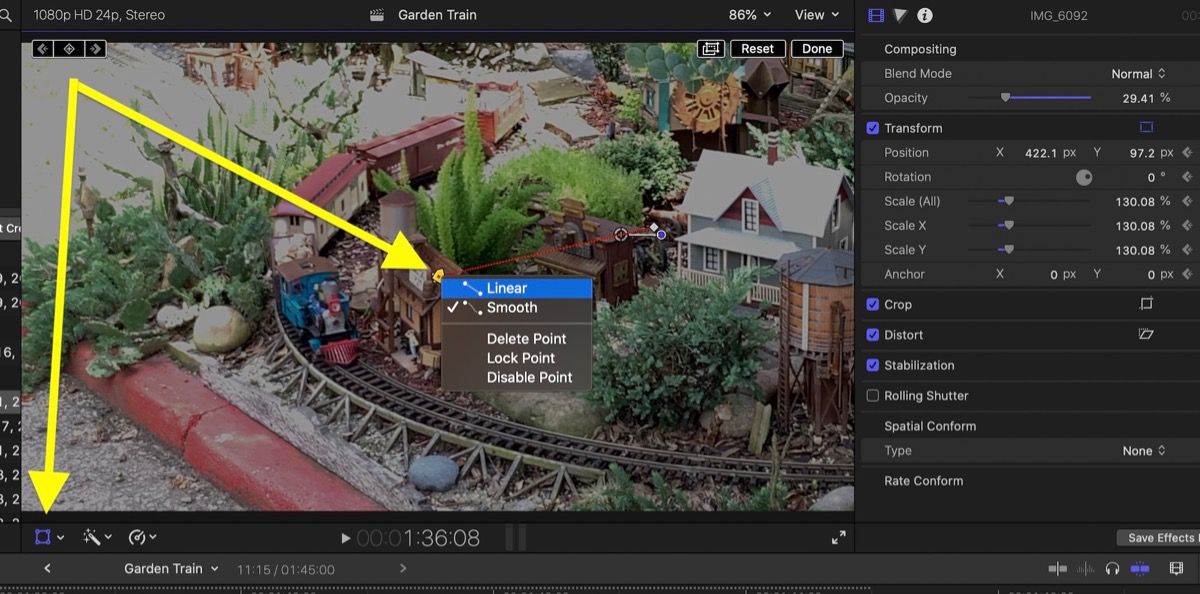
Last edit: 02 Sep 2020 09:50 by JoeEditor.
Please Log in to join the conversation.
- investigativereporter
-

- Offline
- New Member
-

Less
More
- Posts: 3
- Thank you received: 0
02 Sep 2020 16:56 #109797
by investigativereporter
Replied by investigativereporter on topic 10.4.9 censor keyframes bug?
That's not the issue -- I use this effect all the time, and third-party plug-ins with similar functionality (Alex4D Cirlce Blur) and those are just jumping around the screen and not matching the OSD. Meanwhile Censor is not moving at all on the OSD.
Please Log in to join the conversation.
- investigativereporter
-
- Offline
- New Member
-
Less
More
- Posts: 3
- Thank you received: 0
02 Sep 2020 16:59 #109798
by investigativereporter
Replied by investigativereporter on topic 10.4.9 censor keyframes bug?
I just got off the phone with Apple support. They're now aware of the issue, but EVERYONE needs to call to get this fixed ASAP. They need to update it.
In the meantime, you can revert to 10.4.8 but make sure to export the XML from your library first. Then open up the XML from your 10.4.9 library in 10.4.8 and you should be good to go.
I don't have a time machine back up of 10.4.8 so if anyone knows where I can get it, let me know!
This key framing issue is also affecting third-party plug-ins with similar functionality like Alex4D Circle Blur, which moves at first, but then jumps all round the OSD with no way to compensate accurately for the defect.
In the meantime, you can revert to 10.4.8 but make sure to export the XML from your library first. Then open up the XML from your 10.4.9 library in 10.4.8 and you should be good to go.
I don't have a time machine back up of 10.4.8 so if anyone knows where I can get it, let me know!
This key framing issue is also affecting third-party plug-ins with similar functionality like Alex4D Circle Blur, which moves at first, but then jumps all round the OSD with no way to compensate accurately for the defect.
Please Log in to join the conversation.
- investigativereporter
-
- Offline
- New Member
-
Less
More
- Posts: 3
- Thank you received: 0
02 Sep 2020 17:06 #109799
by investigativereporter
Replied by investigativereporter on topic 10.4.9 censor keyframes bug?
WORKAROUND (until they fix it)
I copied the video and pasted it as a connected clip. Then applied the pixelate filter/effect. They applied a circular shape mask. That keyframing is working fine. For now.
I copied the video and pasted it as a connected clip. Then applied the pixelate filter/effect. They applied a circular shape mask. That keyframing is working fine. For now.
Please Log in to join the conversation.
10 Sep 2020 11:47 #109953
by rob.wood
Replied by rob.wood on topic 10.4.9 censor keyframes bug?
There seems to be a bug in ALL On Screen Control (OSC) based effects in FCP X 10.4.9
For example, if you start a keyframe mid shot and move the OSC to create another position keyframe, the second keyframe ALWAYS goes to the first frame of the clip and NOT where you want the keyframe.
If you manually adjust the keyframe parameters in the Inspector you can get it to work but not very easy to do. Furthermore the OSC display does not move with your manual inspector X Y parameters. This is seen in Censor effect, Perspective tile, Kaleidoscope and others.
For example, if you start a keyframe mid shot and move the OSC to create another position keyframe, the second keyframe ALWAYS goes to the first frame of the clip and NOT where you want the keyframe.
If you manually adjust the keyframe parameters in the Inspector you can get it to work but not very easy to do. Furthermore the OSC display does not move with your manual inspector X Y parameters. This is seen in Censor effect, Perspective tile, Kaleidoscope and others.
Please Log in to join the conversation.
11 Sep 2020 03:15 #109970
by fiksegts
Replied by fiksegts on topic 10.4.9 censor keyframes bug?
seems like a pretty serious bug for them not to address quickly....
Please Log in to join the conversation.
