


- Posts: 23
- Thank you received: 0
3 Post Moderation Rule for New Boarders (25 Jan 2021)
New boarders will have their posts moderated - Don't worry if you cannot see your post immediately.
10.4.9 Export Bug
- mgreynolds
-
 Topic Author
- Offline
- Junior Member
-

Less
More
27 Aug 2020 02:47 #109552
by mgreynolds
10.4.9 Export Bug was created by mgreynolds
Is anyone else able to export from inside a Multicam clip? We use this all the time to roundtrip our interview audio. It isn't letting me in 10.4.9.
Please Log in to join the conversation.


27 Aug 2020 12:10 #109570
by joema
If you mean open the multicam clip in the Angle Editor (either from a timeline or the Event Browser) then export, I don't think that was possible on 10.4.8. I just tried it again on 10.4.8 and it's greyed out.
If you mean open the multicam and "back find" to the original clip via SHIFT+F, then export that angle from the Event Browser, that works in 10.4.9.
To export specific audio from the timeline, you'd normally have previously defined roles such as dialog, effects sound, music, etc, then activate only that role in the Timeline Index, then export audio only from the timeline for that role. Then when you get the audio back you import that, assign a new audio subrole with a unique color such as "sweetened dialog", add that to the multicam and enable/disable that role as desired in the Timeline Index.
Larry Jordan shows some of this in this tutorial:
Replied by joema on topic 10.4.9 Export Bug
mgreynolds wrote: Is anyone else able to export from inside a Multicam clip? We use this all the time to roundtrip our interview audio. It isn't letting me in 10.4.9.
If you mean open the multicam clip in the Angle Editor (either from a timeline or the Event Browser) then export, I don't think that was possible on 10.4.8. I just tried it again on 10.4.8 and it's greyed out.
If you mean open the multicam and "back find" to the original clip via SHIFT+F, then export that angle from the Event Browser, that works in 10.4.9.
To export specific audio from the timeline, you'd normally have previously defined roles such as dialog, effects sound, music, etc, then activate only that role in the Timeline Index, then export audio only from the timeline for that role. Then when you get the audio back you import that, assign a new audio subrole with a unique color such as "sweetened dialog", add that to the multicam and enable/disable that role as desired in the Timeline Index.
Larry Jordan shows some of this in this tutorial:
Please Log in to join the conversation.
- mgreynolds
-
Topic Author
- Offline
- Junior Member
-
Less
More
- Posts: 23
- Thank you received: 0
27 Aug 2020 13:31 #109576
by mgreynolds
Replied by mgreynolds on topic 10.4.9 Export Bug
I mean the Angle Editor. I've been able to do it since early versions of FCPX. I even did it earlier yesterday, but then updated in the afternoon and it's gone.
I totally get using roles and I use roles on a regular basis. Roles don't really do what I want in this instance. We use our multicam clips in multiple projects, so I need to be able to roundtrip the audio and update one MC clip so that it ends up across multiple videos.
I totally get using roles and I use roles on a regular basis. Roles don't really do what I want in this instance. We use our multicam clips in multiple projects, so I need to be able to roundtrip the audio and update one MC clip so that it ends up across multiple videos.
Please Log in to join the conversation.
27 Aug 2020 13:54 - 27 Aug 2020 13:57 #109577
by joema
Understood. However to my knowledge this has never worked. I just tested 10.4.6 and 10.4.8, and you cannot export from within a multicam, nor export the multicam from the Event Browser. You can export the audio file and after round tripping can replace or add that to the multicam, and all timelines will inherit that changed multicam. An updated audio file can added in the Angle Editor by clicking on angle name and picking "Add Angle". It can be re-synced within the Angle Editor by clicking on the angle name and picking Sync Selection to Monitoring Angle.
I agree the inability to export multicams from the Event Browser is frustrating. I frequently need to do that, but they must be placed on a timeline then you can export a range drawn with the R tool, but that is cumbersome.
Maybe someone else has a suggestion or comments.
Replied by joema on topic 10.4.9 Export Bug
mgreynolds wrote: I mean the Angle Editor. I've been able to do it since early versions of FCPX. I even did it earlier yesterday, but then updated in the afternoon and it's gone...We use our multicam clips in multiple projects, so I need to be able to roundtrip the audio and update one MC clip so that it ends up across multiple videos.
Understood. However to my knowledge this has never worked. I just tested 10.4.6 and 10.4.8, and you cannot export from within a multicam, nor export the multicam from the Event Browser. You can export the audio file and after round tripping can replace or add that to the multicam, and all timelines will inherit that changed multicam. An updated audio file can added in the Angle Editor by clicking on angle name and picking "Add Angle". It can be re-synced within the Angle Editor by clicking on the angle name and picking Sync Selection to Monitoring Angle.
I agree the inability to export multicams from the Event Browser is frustrating. I frequently need to do that, but they must be placed on a timeline then you can export a range drawn with the R tool, but that is cumbersome.
Maybe someone else has a suggestion or comments.
Last edit: 27 Aug 2020 13:57 by joema.
Please Log in to join the conversation.
- Tom Wolsky
-

- Offline
- Moderator
-

27 Aug 2020 14:59 #109583
by Tom Wolsky
Replied by Tom Wolsky on topic 10.4.9 Export Bug
I tried 4.6 and 4.8 and I was able to export a master file. In 4.9 the Share button is not active. A workaround is to select the clip and make a compound. You can export the compound from the browser. When you're done just break the compound apart and discard it.
Please Log in to join the conversation.
- mgreynolds
-
Topic Author
- Offline
- Junior Member
-
Less
More
- Posts: 23
- Thank you received: 0
27 Aug 2020 17:52 #109591
by mgreynolds
Replied by mgreynolds on topic 10.4.9 Export Bug
Thanks!
Yeah, there are a few workarounds, but it is frustrating to have that workflow broken. We quite literally use it a few times a day.
I submitted through the FCP Feedback form so hopefully it comes back. We are keeping a copy of 10.4.8 around just in case, but we did update some of our libraries. I may just need to find the best workaround and get used to it.
Yeah, there are a few workarounds, but it is frustrating to have that workflow broken. We quite literally use it a few times a day.
I submitted through the FCP Feedback form so hopefully it comes back. We are keeping a copy of 10.4.8 around just in case, but we did update some of our libraries. I may just need to find the best workaround and get used to it.
Please Log in to join the conversation.

27 Aug 2020 21:45 #109597
by JoeEditor
Replied by JoeEditor on topic 10.4.9 Export Bug
If you could export a Mutlicam directly from the Browser, what would that look like?
Please Log in to join the conversation.
- Tom Wolsky
-
- Offline
- Moderator
-
27 Aug 2020 21:55 #109599
by Tom Wolsky
Replied by Tom Wolsky on topic 10.4.9 Export Bug
Can’t export a multicam clip either.
Please Log in to join the conversation.
27 Aug 2020 23:34 #109606
by joema
I think it should look like that same multicam clip (or range) looks if exported from the timeline -- IOW the same behavior as when single cam clips (or ranges) are exported from the Browser vs timeline. Not sure there's a logical reason to not export multicams from the Browser, it's more likely some outgrowth of the underlying software code or object design.
Re the OP point, I'll have to examine that further -- I could not export an opened multicam using either 10.4.6, 10.4.8 or 10.4.9. That was using menus not share button. On my system File>Share is greyed out. That is on Catalina 10.15.6 and Pro Video Formats 2.1.2.
However Tom is right -- you can just create a compound clip in the Browser from the multicam. Export works OK from that.
Replied by joema on topic 10.4.9 Export Bug
FCPX.guru wrote: If you could export a Mutlicam directly from the Browser, what would that look like?
I think it should look like that same multicam clip (or range) looks if exported from the timeline -- IOW the same behavior as when single cam clips (or ranges) are exported from the Browser vs timeline. Not sure there's a logical reason to not export multicams from the Browser, it's more likely some outgrowth of the underlying software code or object design.
Re the OP point, I'll have to examine that further -- I could not export an opened multicam using either 10.4.6, 10.4.8 or 10.4.9. That was using menus not share button. On my system File>Share is greyed out. That is on Catalina 10.15.6 and Pro Video Formats 2.1.2.
However Tom is right -- you can just create a compound clip in the Browser from the multicam. Export works OK from that.
Please Log in to join the conversation.
- Tom Wolsky
-
- Offline
- Moderator
-
27 Aug 2020 23:58 #109607
by Tom Wolsky
Replied by Tom Wolsky on topic 10.4.9 Export Bug
Oddly in 4.9 you can't break apart the compound in the multicam editor once you've created it. Bit of a bummer. Not sure if it was deliberate but break apart worked correctly in previous versions.
Please Log in to join the conversation.
- mgreynolds
-
Topic Author
- Offline
- Junior Member
-
Less
More
- Posts: 23
- Thank you received: 0
28 Aug 2020 01:46 #109608
by mgreynolds
Replied by mgreynolds on topic 10.4.9 Export Bug
@joema, I use the share button on the top-right to export from the Angle Editor.
@Tom Wolsky, I tried the compound method earlier today and it worked well. I ended up just replacing the compound clip within the Angle Editor, so didn’t have to break it back apart. (I know, I could also just replace the clip inside the compound clip. I‘ll try each one and see which way sticks.) I noticed something interesting that you can’t export a compound clip from the timeline, just the browser. I do wish they would just give you the ability to export anywhere, but I’m sure there’s an underlying technical reason why it isn’t possible.
@Tom Wolsky, I tried the compound method earlier today and it worked well. I ended up just replacing the compound clip within the Angle Editor, so didn’t have to break it back apart. (I know, I could also just replace the clip inside the compound clip. I‘ll try each one and see which way sticks.) I noticed something interesting that you can’t export a compound clip from the timeline, just the browser. I do wish they would just give you the ability to export anywhere, but I’m sure there’s an underlying technical reason why it isn’t possible.
Please Log in to join the conversation.
28 Aug 2020 11:47 - 28 Aug 2020 12:17 #109627
by JoeEditor
Replied by JoeEditor on topic 10.4.9 Export Bug
"I noticed something interesting that you can’t export a compound clip from the timeline, just the browser."
I've exported two dozen compound clips from Timelines yesterday just fine.
This is interesting to me, as I've never even thought about exporting the Multicam Clip itself from the Browser. It's just a container with stuff that still needs to be edited, right?
So, I'm trying to understand, what is the purpose of exporting a Multicam Clip from the Browser? Would you only be exporting the active video angle and all audio angles that are activated inside the Angle Editor? And for what purpose? I'm seriously curious about this now.
I've exported two dozen compound clips from Timelines yesterday just fine.
This is interesting to me, as I've never even thought about exporting the Multicam Clip itself from the Browser. It's just a container with stuff that still needs to be edited, right?
So, I'm trying to understand, what is the purpose of exporting a Multicam Clip from the Browser? Would you only be exporting the active video angle and all audio angles that are activated inside the Angle Editor? And for what purpose? I'm seriously curious about this now.
Last edit: 28 Aug 2020 12:17 by JoeEditor.
Please Log in to join the conversation.
28 Aug 2020 15:43 - 28 Aug 2020 15:45 #109637
by JoeEditor
Replied by JoeEditor on topic 10.4.9 Export Bug
UPDATE! Export bug, a major one, holding up deadlines for me!
I exported Compound Clips that were in a Project timeline yesterday, LOTS of them. Selecting as a range, export, etc.
Today, I need to export ranges from INSIDE those Compound Clips for social media animated GIFs (to be posted in sync with the broadcast). Double-click the Compound in the Browser to open it into a Timeline. Doesn't matter if I select a range or have nothing selected, export (Share) options are all grayed out!
Also, I can't just hit i and o for in and out points to ranges, I have to select a Primary Storyline clip first, then use i and o. WTF?
That is a very serious bug! How am I supposed to do this, make a new Project, copy/paste for each export I need? That is needlessly and horribly time-consuming. You'd think someone would have caught this bug before the release, eh?
I exported Compound Clips that were in a Project timeline yesterday, LOTS of them. Selecting as a range, export, etc.
Today, I need to export ranges from INSIDE those Compound Clips for social media animated GIFs (to be posted in sync with the broadcast). Double-click the Compound in the Browser to open it into a Timeline. Doesn't matter if I select a range or have nothing selected, export (Share) options are all grayed out!
Also, I can't just hit i and o for in and out points to ranges, I have to select a Primary Storyline clip first, then use i and o. WTF?
That is a very serious bug! How am I supposed to do this, make a new Project, copy/paste for each export I need? That is needlessly and horribly time-consuming. You'd think someone would have caught this bug before the release, eh?
Last edit: 28 Aug 2020 15:45 by JoeEditor.
Please Log in to join the conversation.
- mgreynolds
-
Topic Author
- Offline
- Junior Member
-
Less
More
- Posts: 23
- Thank you received: 0
28 Aug 2020 16:11 #109638
by mgreynolds
Replied by mgreynolds on topic 10.4.9 Export Bug
That’s one of the issues I was running into. You can still export Compound clips from the Browser. I would assume you can select a range inside the Browser, but I’m honestly not sure. Good luck!
Please Log in to join the conversation.
28 Aug 2020 18:40 #109640
by JoeEditor
Replied by JoeEditor on topic 10.4.9 Export Bug
You can't select a range inside the Browser for a Compound. ugh...
Yeah, I have this "sandbox" project timeline now: In the original timeline I have to make markers, copy-all, go to the sandbox, paste, mark In/Out at my markers, export. WTF?
I also notice that the Skimmer Feedback dialog-box in the Browser (List View) hangs around way, way too long before vanishing, getting in the way of seeing other things.
I've also experienced a degradation in playback ability. Maybe it's just me...
Yeah, I have this "sandbox" project timeline now: In the original timeline I have to make markers, copy-all, go to the sandbox, paste, mark In/Out at my markers, export. WTF?
I also notice that the Skimmer Feedback dialog-box in the Browser (List View) hangs around way, way too long before vanishing, getting in the way of seeing other things.
I've also experienced a degradation in playback ability. Maybe it's just me...
Please Log in to join the conversation.
28 Aug 2020 18:56 - 28 Aug 2020 18:56 #109641
by joema
How about if you mark a range inside the CC, do SHIFT+F to highlight the range in the Browser. If it's a multicam you cannot export that but you can create a new CC on that range and export that.
Replied by joema on topic 10.4.9 Export Bug
FCPX.guru wrote: You can't select a range inside the Browser for a Compound. ugh....
How about if you mark a range inside the CC, do SHIFT+F to highlight the range in the Browser. If it's a multicam you cannot export that but you can create a new CC on that range and export that.
Last edit: 28 Aug 2020 18:56 by joema.
Please Log in to join the conversation.
- walter9981
-
- Offline
- New Member
-

Less
More
- Posts: 1
- Thank you received: 0
29 Aug 2020 09:41 #109663
by walter9981
Replied by walter9981 on topic 10.4.9 Export Bug
Same issue with me here. So annoying. I have to export through the browser
Please Log in to join the conversation.
29 Aug 2020 12:12 #109668
by JoeEditor
Replied by JoeEditor on topic 10.4.9 Export Bug
Then I don’t have my titles & full composite. This is a horrible bug.
Please Log in to join the conversation.
- Tom Wolsky
-
- Offline
- Moderator
-
29 Aug 2020 12:30 #109673
by Tom Wolsky
Replied by Tom Wolsky on topic 10.4.9 Export Bug
Can you show what's happening in the compound and what you're trying to do. I haven't found a compound in the project timeline that I cannot export.
Please Log in to join the conversation.
29 Aug 2020 13:23 - 29 Aug 2020 13:24 #109676
by JoeEditor
Replied by JoeEditor on topic 10.4.9 Export Bug
As you can see, Share is grayed out. Does this on all Compound Clips created before and after the update. Doesn't matter if a range is selected or not, the same behavior.
FCPX 10.4.9
iMac Pro (original)
macOS 10.15.6
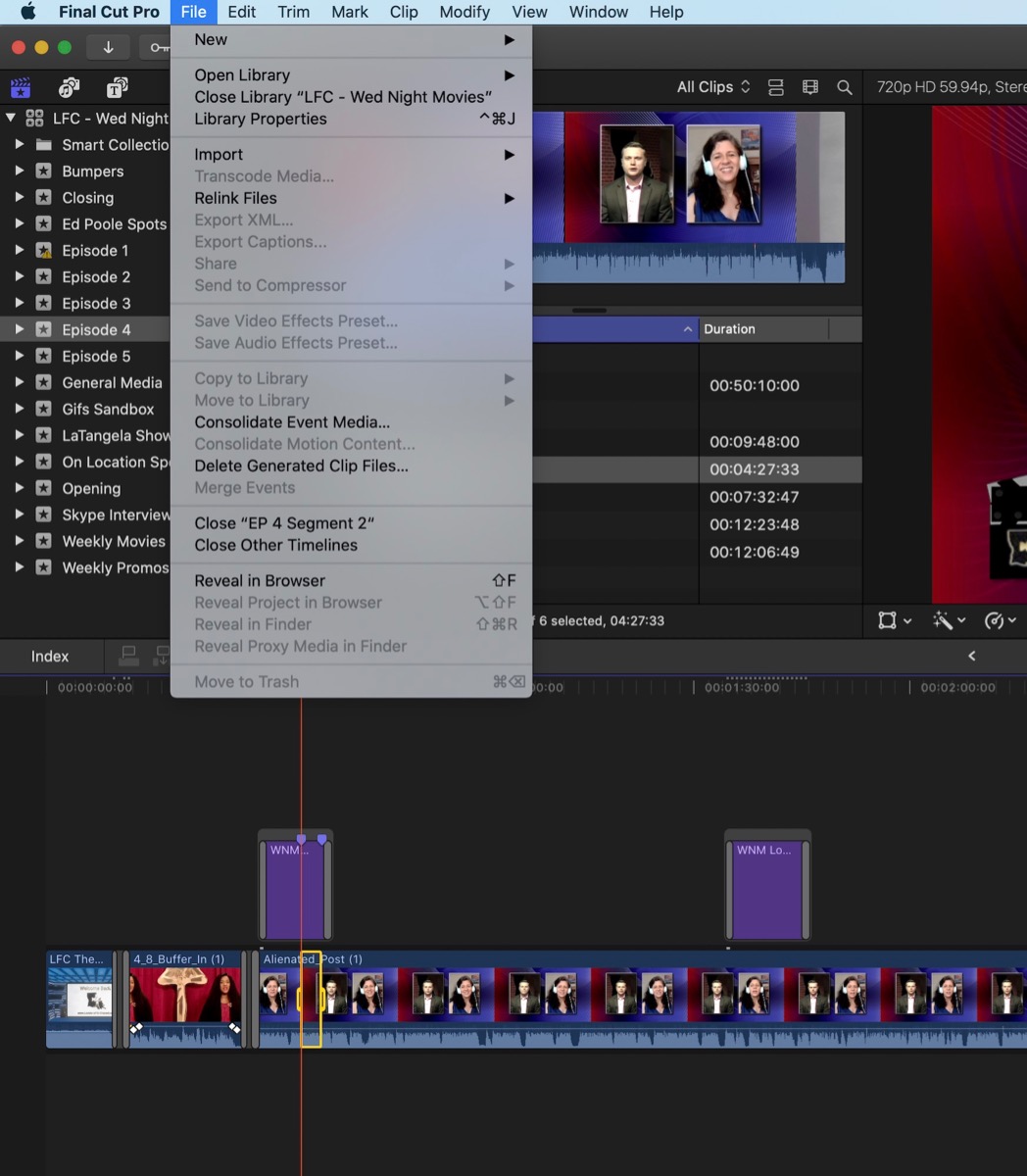
FCPX 10.4.9
iMac Pro (original)
macOS 10.15.6
Last edit: 29 Aug 2020 13:24 by JoeEditor.
Please Log in to join the conversation.
