


- Posts: 3
- Thank you received: 0
3 Post Moderation Rule for New Boarders (25 Jan 2021)
New boarders will have their posts moderated - Don't worry if you cannot see your post immediately.
FCPX using an Early 2009 Mac Pro
23 Aug 2020 12:08 #109484
by MikeA
FCPX using an Early 2009 Mac Pro was created by MikeA
Hi all,
I've been running FCPX 10.4.8 on a Macbook Pro (Early 2013, 16 GB memory, Catelina) using an eGPU with a Radeon Sapphire 8GB, and it renders about as slow as you'd expect.
So I looked around for a better, upgradable solution (on a meagre budget) and lighted upon getting hold of an old Mac Pro. The specs for the one I have are as follows (with the Saphire GPU chucked in):
macOS Sierra
Mac Pro (Early 2009) (ModelIdentifier MacPro5,1)
Processor 3.46 GHz 6-Core Intel Xeon
Memory 32 GB 1333 MHz DDR3
Startup Disk 250GB SSD
Graphics AMD R9 xxx 8192 MB
This will run FCPX 10.4. On my MacPro I also have NeatVideo 5.1, and SliceX/TrackX from CoreMelt.
My questions...
1. It's Early 2009 (which should, I think, be a MacPro4,1) but identifies as MacPro5,1 and is running macOS Sierra... which do I believe if I want to upgrade OS X?
2. It has a 64bit processor. Should I look at Catalina if I upgrade the OS? I know it's blocked as it's officially too old but there are work-arounds.
3. Is it actually worth upgrading the OS at all, as it obviously is stable and runs FCPX 10.4 without a problem (so far)? What are the benefits?
I'd appreciate any help you can give. Many thanks in advance.
I've been running FCPX 10.4.8 on a Macbook Pro (Early 2013, 16 GB memory, Catelina) using an eGPU with a Radeon Sapphire 8GB, and it renders about as slow as you'd expect.
So I looked around for a better, upgradable solution (on a meagre budget) and lighted upon getting hold of an old Mac Pro. The specs for the one I have are as follows (with the Saphire GPU chucked in):
macOS Sierra
Mac Pro (Early 2009) (ModelIdentifier MacPro5,1)
Processor 3.46 GHz 6-Core Intel Xeon
Memory 32 GB 1333 MHz DDR3
Startup Disk 250GB SSD
Graphics AMD R9 xxx 8192 MB
This will run FCPX 10.4. On my MacPro I also have NeatVideo 5.1, and SliceX/TrackX from CoreMelt.
My questions...
1. It's Early 2009 (which should, I think, be a MacPro4,1) but identifies as MacPro5,1 and is running macOS Sierra... which do I believe if I want to upgrade OS X?
2. It has a 64bit processor. Should I look at Catalina if I upgrade the OS? I know it's blocked as it's officially too old but there are work-arounds.
3. Is it actually worth upgrading the OS at all, as it obviously is stable and runs FCPX 10.4 without a problem (so far)? What are the benefits?
I'd appreciate any help you can give. Many thanks in advance.
Please Log in to join the conversation.


24 Aug 2020 09:50 - 24 Aug 2020 11:32 #109496
by joema
Replied by joema on topic FCPX using an Early 2009 Mac Pro
IMO it would be better to get an eBay 2017 iMac 27 for $600-$1,000 with Radeon Pro 580. It has Quick Sync and the CPU (while 4 cores) is "Kaby Lake" and it supports USB 3.0 and Thunderbolt 3. It will run the Metal-optimized version of FCPX which began with 10.4.7. That by itself is worth a significant performance boost on GPU-related items such as effects. You don't want to be stuck on FCPX 10.4.
By contrast the 2009 Mac Pro Xeon is "Nehalem" generation, so the IPC (Instructions Per Cycle) is much less.
Neat Video will be slow on anything, the only issue is how slow. However starting with version 5.2 it uses Metal optimization which can produce 40% improved performance over past versions. That's another concern over getting locked into an older version of hardware or MacOS which might not fully support this or might require significant tinkering to bypass those limits.
My 2017 i7 iMac 27 with Radeon Pro 580 using FCPX 10.4.8 on Catalina 10.15.6 runs the BruceX benchmark in 16.4 sec, not sure how that compares to a 2009 Mac Pro.
Edit/add: My 8-core 2019 MacBook Pro 16 with Radeon Pro 5500M ran BruceX in 15 sec, so it was faster than my 2017 iMac 27. FCPX on the MBP 16 is smoother on certain H264 codecs than my 10-core Vega 64 iMac Pro, maybe due to improved Quick Sync in the "Coffee Lake" CPU.
This is despite the MBP 16 being slower on GeekBench 5 GPU tests than either of my desktop machines. That shows how you can't be guided exclusively by synthetic benchmarks. What counts is how fast the machine runs your actual workload. To my knowledge none of the synthetic benchmarks do a good job of measuring hardware-accelerated video decode/encode performance, and that is also not well reflected in Activity Monitor, iStat Menus or any other performance monitoring tool.
Hardware-accelerated video is so important that GeekBench almost needs another version to measure just that over several codecs. However that is a constantly changing scenario, and an average of several results would not necessarily reflect how your particular app (FCPX, Resolve, Premiere, etc) behaves on a certain platform.
My GeekBench 5.2.3 numbers:
10-core Vega 64 iMac Pro:
Single/Multi-core: 1150/9646
Compute (OpenCL/Metal): 58376/56398
4-core i7 2017 iMac 27:
Single/Multi-core: 1131/4772
Compute (OpenCL/Metal): 37402/43691
8-core 2019 MacBook Pro 16:
Single/Multi-core: 1175/7195
Compute (OpenCL/Metal): 30515/28364
By contrast the 2009 Mac Pro Xeon is "Nehalem" generation, so the IPC (Instructions Per Cycle) is much less.
Neat Video will be slow on anything, the only issue is how slow. However starting with version 5.2 it uses Metal optimization which can produce 40% improved performance over past versions. That's another concern over getting locked into an older version of hardware or MacOS which might not fully support this or might require significant tinkering to bypass those limits.
My 2017 i7 iMac 27 with Radeon Pro 580 using FCPX 10.4.8 on Catalina 10.15.6 runs the BruceX benchmark in 16.4 sec, not sure how that compares to a 2009 Mac Pro.
Edit/add: My 8-core 2019 MacBook Pro 16 with Radeon Pro 5500M ran BruceX in 15 sec, so it was faster than my 2017 iMac 27. FCPX on the MBP 16 is smoother on certain H264 codecs than my 10-core Vega 64 iMac Pro, maybe due to improved Quick Sync in the "Coffee Lake" CPU.
This is despite the MBP 16 being slower on GeekBench 5 GPU tests than either of my desktop machines. That shows how you can't be guided exclusively by synthetic benchmarks. What counts is how fast the machine runs your actual workload. To my knowledge none of the synthetic benchmarks do a good job of measuring hardware-accelerated video decode/encode performance, and that is also not well reflected in Activity Monitor, iStat Menus or any other performance monitoring tool.
Hardware-accelerated video is so important that GeekBench almost needs another version to measure just that over several codecs. However that is a constantly changing scenario, and an average of several results would not necessarily reflect how your particular app (FCPX, Resolve, Premiere, etc) behaves on a certain platform.
My GeekBench 5.2.3 numbers:
10-core Vega 64 iMac Pro:
Single/Multi-core: 1150/9646
Compute (OpenCL/Metal): 58376/56398
4-core i7 2017 iMac 27:
Single/Multi-core: 1131/4772
Compute (OpenCL/Metal): 37402/43691
8-core 2019 MacBook Pro 16:
Single/Multi-core: 1175/7195
Compute (OpenCL/Metal): 30515/28364
Last edit: 24 Aug 2020 11:32 by joema.
Please Log in to join the conversation.

24 Aug 2020 12:52 #109497
by VTC
Replied by VTC on topic FCPX using an Early 2009 Mac Pro
2009 is clearly a Mac Pro 4.1. It registers as a 5.1 due to a firmware hack that allows the system to identify it as the 2010 5.1 model. You buy the unit used? If you didn't apply the firmware hack then the previous owner did. The firmware trick allows using later releases of OSX as well as later versions of FCPX. I know because I have four of these 2009 dinosaurs that now read as 2010 models.
Please Log in to join the conversation.
24 Aug 2020 14:32 #109501
by MikeA
Replied by MikeA on topic FCPX using an Early 2009 Mac Pro
Thanks for the info, guys. Lots to think about. The Mac Pro was cheap (and, yes, preowned) so the budget was a consideration, but so was the idea of expandability in the future. I'm not producing for clients (yet) so this is strictly a hobby machine, and I'm also interested in the project that is "how fast can I make this thing go?".
Joema : I will Geekbench it and see how the numbers come out. Going to be better than the MacBook, though, which I'll use for the audio work I do. But I'm printing off your reply for something to base the next machine on!
VTCmedia : How far did you manage to push your dinosaurs as far as the OS X versions go?
Once again, many thanks.
Joema : I will Geekbench it and see how the numbers come out. Going to be better than the MacBook, though, which I'll use for the audio work I do. But I'm printing off your reply for something to base the next machine on!
VTCmedia : How far did you manage to push your dinosaurs as far as the OS X versions go?
Once again, many thanks.
Please Log in to join the conversation.
25 Aug 2020 12:38 - 25 Aug 2020 12:47 #109511
by VTC
Replied by VTC on topic FCPX using an Early 2009 Mac Pro
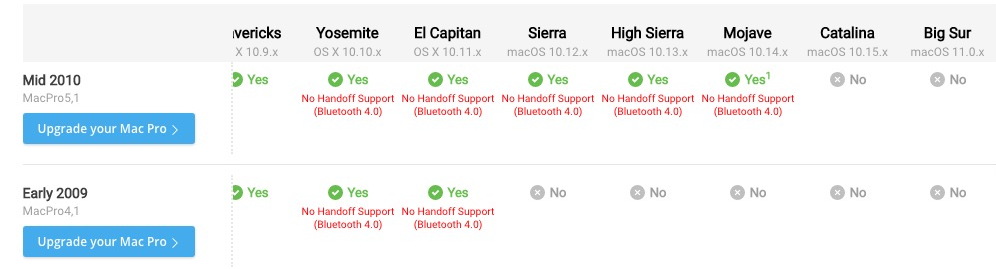
An unmolested 4.1 taps out at El Capitan. The 5.1 taps out at Mojave unless there's another bit of witchery firmware wise that can be applied that I'm unaware of.
Throw in a kick butt video card or two, run multiple displays, and run the OS off an SSD and she'll serve you well. (How anyone edits off a laptop is beyond me. I need acres of screenage.)
Throw in a kick butt video card or two, run multiple displays, and run the OS off an SSD and she'll serve you well. (How anyone edits off a laptop is beyond me. I need acres of screenage.)
Last edit: 25 Aug 2020 12:47 by VTC.
Please Log in to join the conversation.
25 Aug 2020 12:41 - 25 Aug 2020 12:45 #109513
by joema
As I mentioned, GeekBench is a useful tool but it doesn't necessarily reflect FCPX workloads. I suggest you also try BruceX (which is primarily a GPU-oriented FCPX test), also export a fully-rendered test timeline as 1080p and 4k H264 using this procedure:
Disable background rendering in FCPX preferences, then delete all cache files via select library and File>Delete Generated Library Files>Delete Render Files>All.
Then select all timeline clips via CMD+A and render them via CTRL+R. This pre-renders the timeline which allows measuring that phase, plus also separately measuring the export phase. Use this preset: File>Share>Master File>Settings, Format: Computer, Video Codec: H.264 Faster Encode, Resolution 1920 x 1080 or 3840 x 2160.
Also do timed tests on the same 4k H264 and HEVC files for transcoding to proxies and optimized media. That tests the decode side, vs exporting a rendered timeline which tests the encode side.
While the 2009 Mac Pro doesn't have Quick Sync or T2, in theory you can upgrade them with certain AMD GPUs which have AMD's UVD/VCE or the more recent VCN video transcode acceleration. VCN is on the XT 5700.
I don't know the procedure to get FCPX to use that on those machines but I've seen Hackintosh people claim it's possible.
If you use ProRes acquisition such as enabled by Atomos HDMI recorders this is a non-issue since older Mac Pros are fast on ProRes.
Replied by joema on topic FCPX using an Early 2009 Mac Pro
MikeA wrote: ... I will Geekbench it and see how the numbers come out. Going to be better than the MacBook, though, which I'll use for the audio work I do. But I'm printing off your reply for something to base the next machine on....
As I mentioned, GeekBench is a useful tool but it doesn't necessarily reflect FCPX workloads. I suggest you also try BruceX (which is primarily a GPU-oriented FCPX test), also export a fully-rendered test timeline as 1080p and 4k H264 using this procedure:
Disable background rendering in FCPX preferences, then delete all cache files via select library and File>Delete Generated Library Files>Delete Render Files>All.
Then select all timeline clips via CMD+A and render them via CTRL+R. This pre-renders the timeline which allows measuring that phase, plus also separately measuring the export phase. Use this preset: File>Share>Master File>Settings, Format: Computer, Video Codec: H.264 Faster Encode, Resolution 1920 x 1080 or 3840 x 2160.
Also do timed tests on the same 4k H264 and HEVC files for transcoding to proxies and optimized media. That tests the decode side, vs exporting a rendered timeline which tests the encode side.
While the 2009 Mac Pro doesn't have Quick Sync or T2, in theory you can upgrade them with certain AMD GPUs which have AMD's UVD/VCE or the more recent VCN video transcode acceleration. VCN is on the XT 5700.
I don't know the procedure to get FCPX to use that on those machines but I've seen Hackintosh people claim it's possible.
If you use ProRes acquisition such as enabled by Atomos HDMI recorders this is a non-issue since older Mac Pros are fast on ProRes.
Last edit: 25 Aug 2020 12:45 by joema.
Please Log in to join the conversation.
31 Aug 2020 10:59 #109739
by MikeA
Replied by MikeA on topic FCPX using an Early 2009 Mac Pro
Just following up on this, the Mac Pro is now running Mojave with FCPX 10.4.9 without problems. Geekbench results for my Macbook and the Mac Pro are as follows...
MacBook Pro (13-inch Retina Early 2015) running macOS 10.15.6
Intel Core i7-5557U (1 Processor, 2 Cores, 4 Threads, 3.10 GHz)
Memory 16.00 GB 933 MHz DDR3
GPU Intel® Iris (™) Graphics 6100
Single/Multi-core: 864/1879
Compute (OpenCL/Metal): 3724/4894
MacPro5,1 running macOS 10.14.6
Intel Xeon W3690 (1 Processor, 6 Cores, 12 Threads, 3.46GHz)
Memory 32.00 GB 666MHz DDR3
GPU AMD Radeon RX 580
Single/Multi-core: 685/3540
Compute (OpenCL/Metal): 45531/46798
I know these are rough scores and don't reflect what FCPX will actually do, and that the use of the AMD GPU will affect the Compute values massively, but as there's a significant increase in the scores of the MacPro over the Macbook that I am currently using then I'm more than happy.
Thanks again, guys, your help was very much appreciated.
MacBook Pro (13-inch Retina Early 2015) running macOS 10.15.6
Intel Core i7-5557U (1 Processor, 2 Cores, 4 Threads, 3.10 GHz)
Memory 16.00 GB 933 MHz DDR3
GPU Intel® Iris (™) Graphics 6100
Single/Multi-core: 864/1879
Compute (OpenCL/Metal): 3724/4894
MacPro5,1 running macOS 10.14.6
Intel Xeon W3690 (1 Processor, 6 Cores, 12 Threads, 3.46GHz)
Memory 32.00 GB 666MHz DDR3
GPU AMD Radeon RX 580
Single/Multi-core: 685/3540
Compute (OpenCL/Metal): 45531/46798
I know these are rough scores and don't reflect what FCPX will actually do, and that the use of the AMD GPU will affect the Compute values massively, but as there's a significant increase in the scores of the MacPro over the Macbook that I am currently using then I'm more than happy.
Thanks again, guys, your help was very much appreciated.
Please Log in to join the conversation.
