


- Posts: 49
- Thank you received: 0
3 Post Moderation Rule for New Boarders (25 Jan 2021)
New boarders will have their posts moderated - Don't worry if you cannot see your post immediately.
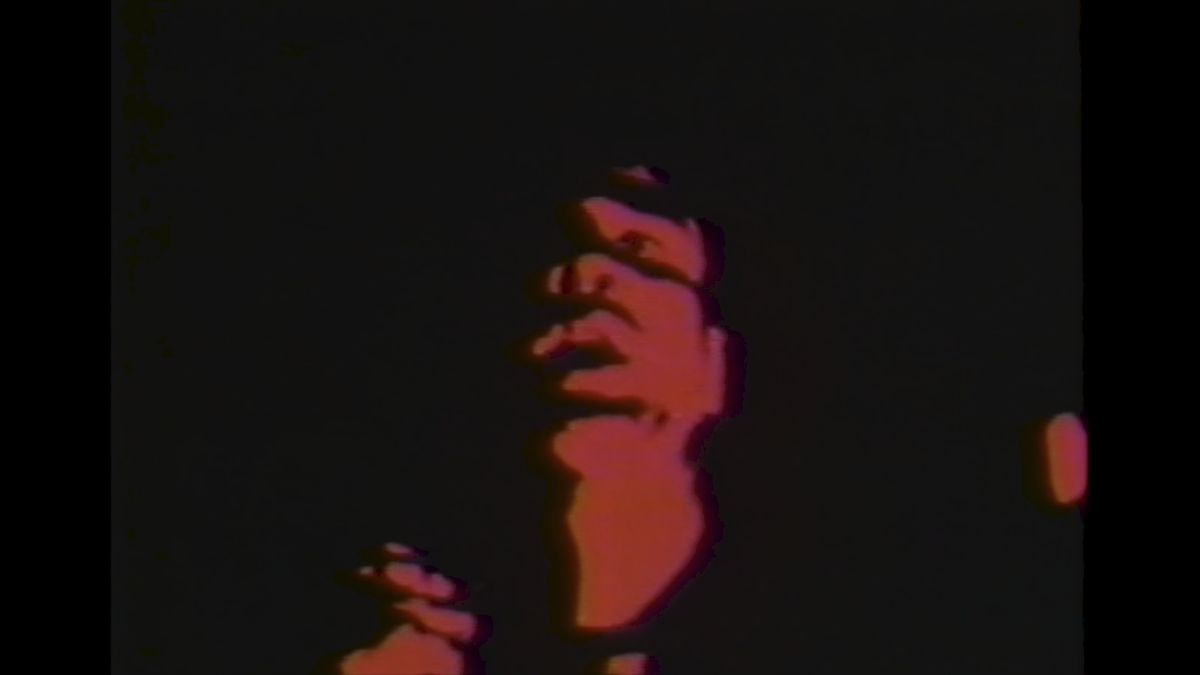
Full on bleach out effect - black and red only.
20 Aug 2020 13:35 #109395
by BeatGirl
Full on bleach out effect - black and red only. was created by BeatGirl
Does anyone know if this is possible? I've tried grading etc but nothing comes close. I guess it's a sort of moving illustration effect? No details, just black and red.
Thanks
Thanks
Please Log in to join the conversation.
- Carsten Orlt
-

- Offline
- Platinum Member
-

Less
More
- Posts: 422
- Thank you received: 82
21 Aug 2020 22:22 #109439
by Carsten Orlt
Replied by Carsten Orlt on topic Full on bleach out effect - black and red only.
Try the Color>Colorize effect.
Set the 'map black' to black and 'map white' to the red you want.
Using the intensity slider you can control how much of your image is affected.
You could also add a 'Contrast' filter before the Colorize filter to reduce the greyscale of the image before the Colirize is applied, which should make the colouring effect even stronger.
Set the 'map black' to black and 'map white' to the red you want.
Using the intensity slider you can control how much of your image is affected.
You could also add a 'Contrast' filter before the Colorize filter to reduce the greyscale of the image before the Colirize is applied, which should make the colouring effect even stronger.
Please Log in to join the conversation.

22 Aug 2020 04:04 #109448
by JoeEditor
Replied by JoeEditor on topic Full on bleach out effect - black and red only.
Posterize then Colorize.
Please Log in to join the conversation.
22 Aug 2020 10:57 #109453
by BeatGirl
Replied by BeatGirl on topic Full on bleach out effect - black and red only.
Closest I have found so far is the Comic Basic filter, Smoothness = 0 / Ink Edges = 0 / Smoothness = 100 / Fill = 0.
Please Log in to join the conversation.
