


- Posts: 2
- Thank you received: 0
3 Post Moderation Rule for New Boarders (25 Jan 2021)
New boarders will have their posts moderated - Don't worry if you cannot see your post immediately.
MOV files seem to import at wrong speed?
- jaredrich93
-
 Topic Author
- Offline
- New Member
-

Less
More
27 Jul 2020 23:43 #108975
by jaredrich93
MOV files seem to import at wrong speed? was created by jaredrich93
I am editing a music video out of several clips that were shot by different people with different devices in various file formats, which all were recorded to sync with the same audio track. Most line up with the audio as expected, however I am having a problem specifically with .MOV files - when I sync the start of the video to the audio, it gets increasingly out of sync as the song progresses, with the video performance ending noticeably later than the recording; i.e. the speed of the entire video clip is slightly slow. Any .MOV files that I try to import into FCP have the exact same problem. All of the video clips I’m using have the same frame rate (29.97).
Has anyone else had this issue? Someone please help!?!
Has anyone else had this issue? Someone please help!?!
Please Log in to join the conversation.
- Tom Wolsky
-

- Offline
- Moderator
-

28 Jul 2020 11:06 #108987
by Tom Wolsky
Replied by Tom Wolsky on topic MOV files seem to import at wrong speed?
What are the audio sample rates of the files? Are the QuickTime files iPhone video?
Please Log in to join the conversation.


28 Jul 2020 14:43 - 28 Jul 2020 14:47 #108988
by JoeEditor
Replied by JoeEditor on topic MOV files seem to import at wrong speed?
"... it gets increasingly out of sync"
This is an issue with the Sample Rate of the audio that was recorded in your video clips. Video frame rate has nothing to do with it. Verify the Sample Rate for all audio in those clips are 48kHz, which is standard video sample rate. Some cameras are capable of 44.1kHz which will drift out of sync if combined with 48kHz audio.
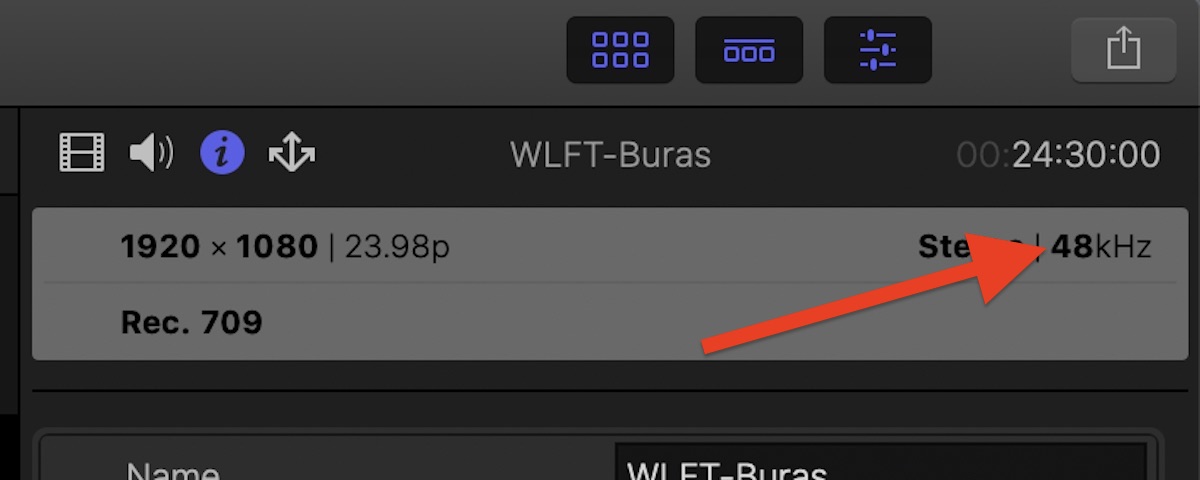
This is an issue with the Sample Rate of the audio that was recorded in your video clips. Video frame rate has nothing to do with it. Verify the Sample Rate for all audio in those clips are 48kHz, which is standard video sample rate. Some cameras are capable of 44.1kHz which will drift out of sync if combined with 48kHz audio.
Last edit: 28 Jul 2020 14:47 by JoeEditor.
Please Log in to join the conversation.
- jaredrich93
-
Topic Author
- Offline
- New Member
-
Less
More
- Posts: 2
- Thank you received: 0
28 Jul 2020 18:12 #108991
by jaredrich93
Yes, I believe they were all shot on iPhones. The sample rates of the out-of-sync files are 44.1 kHz whereas the others are 48 kHz.
Yes the clips that are causing the problem are all 44.1 kHz. However I tried converting those video files to 48 kHz and re-importing them to FCP, yet they are still out of sync!
Replied by jaredrich93 on topic MOV files seem to import at wrong speed?
What are the audio sample rates of the files? Are the QuickTime files iPhone video?
Yes, I believe they were all shot on iPhones. The sample rates of the out-of-sync files are 44.1 kHz whereas the others are 48 kHz.
This is an issue with the Sample Rate of the audio that was recorded in your video clips. Video frame rate has nothing to do with it. Verify the Sample Rate for all audio in those clips are 48kHz, which is standard video sample rate. Some cameras are capable of 44.1kHz which will drift out of sync if combined with 48kHz audio.
Yes the clips that are causing the problem are all 44.1 kHz. However I tried converting those video files to 48 kHz and re-importing them to FCP, yet they are still out of sync!
Please Log in to join the conversation.
