


- Posts: 8
- Thank you received: 0
3 Post Moderation Rule for New Boarders (25 Jan 2021)
New boarders will have their posts moderated - Don't worry if you cannot see your post immediately.
Transcoding/Analyzing stops overnight
Less
More
27 Jul 2020 12:22 #108959
by ptomblin
Transcoding/Analyzing stops overnight was created by ptomblin
It used to be when I loaded a bunch of clips into a project, I'd just leave it overnight and it would finish Analyzing and Transcoding. But it seems that now (where "now" means sometime in the last year) it stopped rendering when I'm not at the computer.
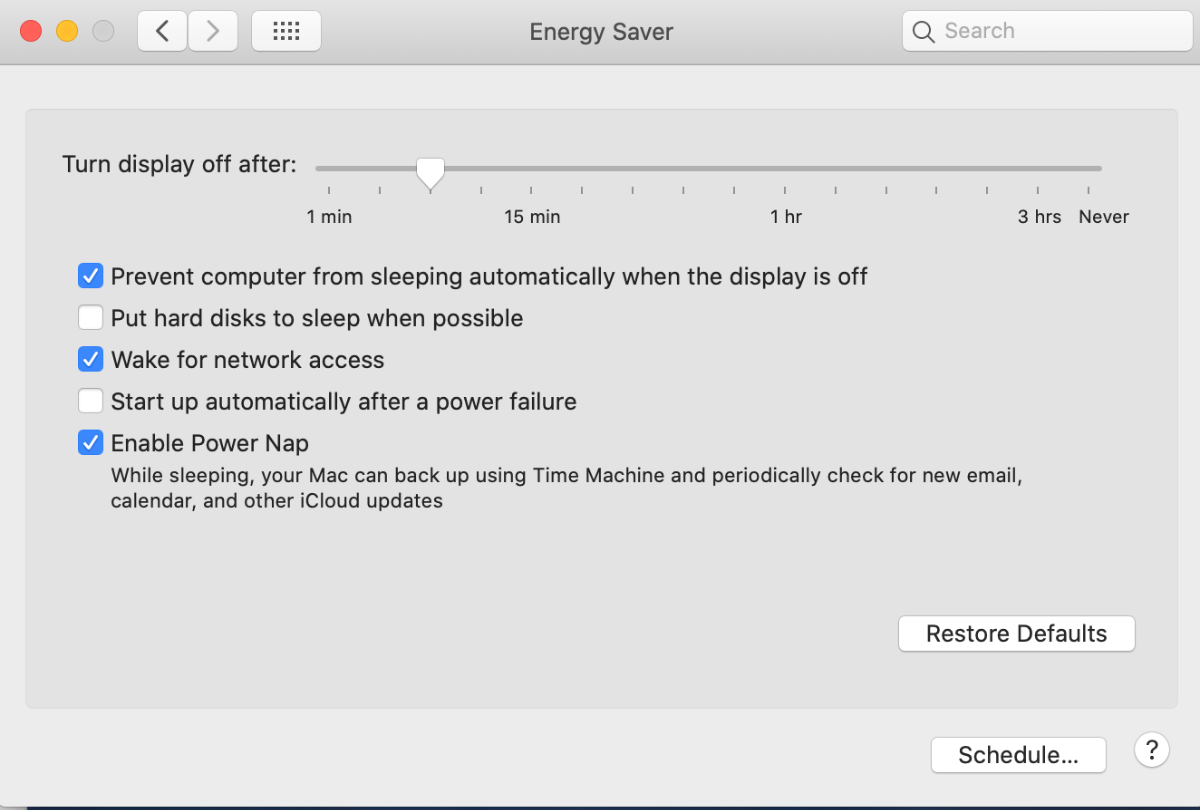
My computer is an iMac 5K from 2017 running Catalina. The Energy Saver settings are "Prevent computer from sleeping automatically" is checked, as is "Wake for Network Access" and "Enable Power Nap".
Any suggestions?
My computer is an iMac 5K from 2017 running Catalina. The Energy Saver settings are "Prevent computer from sleeping automatically" is checked, as is "Wake for Network Access" and "Enable Power Nap".
Any suggestions?
Please Log in to join the conversation.


27 Jul 2020 20:31 #108968
by joema
Replied by joema on topic Transcoding/Analyzing stops overnight
Turn off Enable Power Nap, also turn off screen saver. Make sure there is no timeout whatsoever on screen activity, whether for security, power savings or anything else, including screen auto-lock timeout. Turn down the brightness. Let it run overnight and see if that makes a difference. When you check in the morning, the last window config should still be up.
Despite making those changes, if the transcode seems seems to have halted, open a terminal window and type "last reboot". That will give the MacOS reboot history. If the machine somehow encountered a fault and restarted it will tell you.
Despite making those changes, if the transcode seems seems to have halted, open a terminal window and type "last reboot". That will give the MacOS reboot history. If the machine somehow encountered a fault and restarted it will tell you.
Please Log in to join the conversation.
