


- Posts: 6
- Thank you received: 0
3 Post Moderation Rule for New Boarders (25 Jan 2021)
New boarders will have their posts moderated - Don't worry if you cannot see your post immediately.
Audio Pan - Basic Surround Fix - Doesn't Save on Export :-(
16 Jul 2020 17:34 #108737
by Goodwin
Hello, as a part of my job, I'm working on an interview (- not a full time editor or sound expert.)
Using FCPx to edit a MCC, one of the camera angles seems to have only left-side audio, not in stereo. After much fiddling, I found that the Audio Pan - Basic Surround fixes the balance. However, it will not save upon export - the pan resets to center
I made a screen recording to help explain but I doubt you'll hear the issue without listening to it directly with headphones. counterstrainacademy.wistia.com/medias/xywdddhq6h
Using FCPx to edit a MCC, one of the camera angles seems to have only left-side audio, not in stereo. After much fiddling, I found that the Audio Pan - Basic Surround fixes the balance. However, it will not save upon export - the pan resets to center
I made a screen recording to help explain but I doubt you'll hear the issue without listening to it directly with headphones. counterstrainacademy.wistia.com/medias/xywdddhq6h
Please Log in to join the conversation.


17 Jul 2020 10:38 - 17 Jul 2020 10:39 #108749
by JoeEditor
Replied by JoeEditor on topic Audio Pan - Basic Surround Fix - Doesn't Save on Export :-(
The first problem is you are using surround sound panner in a stereo project, and that won't really help you out, you have to stick with two-channel mixing.
Second, I'm watching the audio meters, and not seeing a major change in anything.
Is the recording done in stereo or mono? I'd go back to the Angle Editor, take that audio channel, change it form Stereo to Dual Mono. Kill off the channel you don't need, pan the one you do. Simple.
Second, I'm watching the audio meters, and not seeing a major change in anything.
Is the recording done in stereo or mono? I'd go back to the Angle Editor, take that audio channel, change it form Stereo to Dual Mono. Kill off the channel you don't need, pan the one you do. Simple.
Last edit: 17 Jul 2020 10:39 by JoeEditor.
Please Log in to join the conversation.
17 Jul 2020 23:54 #108774
by Goodwin
Replied by Goodwin on topic Audio Pan - Basic Surround Fix - Doesn't Save on Export :-(
Thanks for your reply, it's a bit over my head but trying to puzzle it out. I believe it is a stereo project, that's what the settings indicate and it was shot in a fairly basic manner with three cameras:
1) Person 1 with lav mic tied to Camera 2
2) Person 2 with lav mic tied to Camera 1
3) Group View with camera mic
Note that Person 1's mic was mixed up and it was tied to Camera 2 - adds to my confusion :S
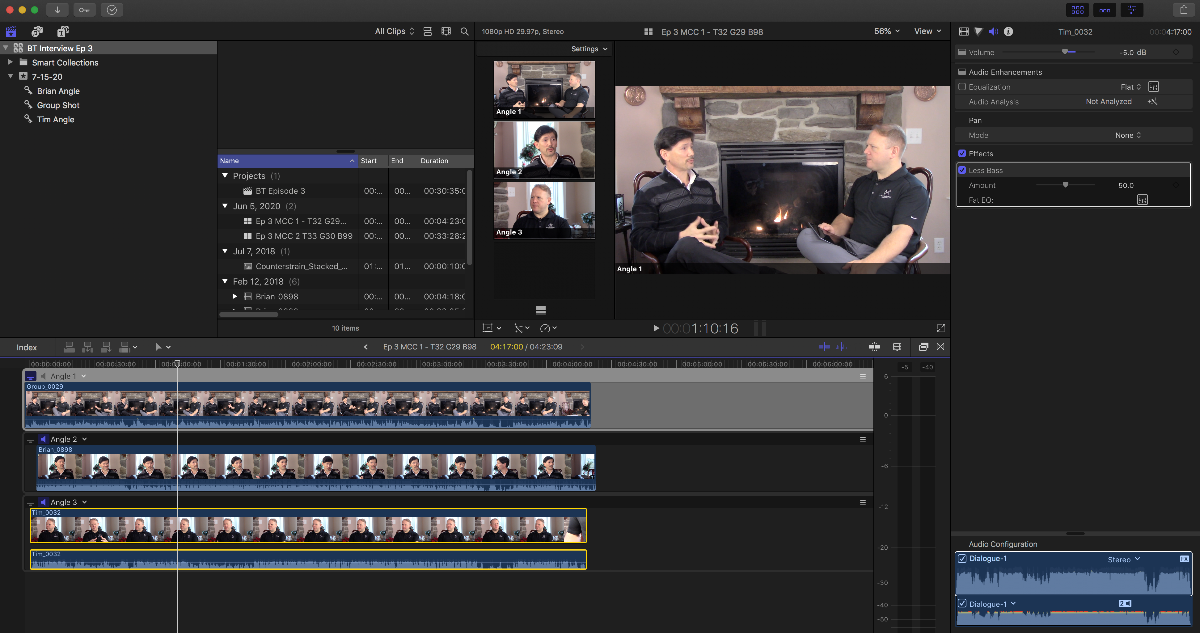
So I'm in the angle editor, the issue is with Angle 3's audio, I detached it to see if I can work with it but do not see a place to change it to Dual Mono - can you help?
Thanks again!
1) Person 1 with lav mic tied to Camera 2
2) Person 2 with lav mic tied to Camera 1
3) Group View with camera mic
Note that Person 1's mic was mixed up and it was tied to Camera 2 - adds to my confusion :S
So I'm in the angle editor, the issue is with Angle 3's audio, I detached it to see if I can work with it but do not see a place to change it to Dual Mono - can you help?
Thanks again!
Please Log in to join the conversation.
18 Jul 2020 01:33 #108777
by JoeEditor
Replied by JoeEditor on topic Audio Pan - Basic Surround Fix - Doesn't Save on Export :-(
Detaching is very unnecessary. In your screenshot, look at the very lower right. Do you see where it is labeled "Stereo" with a downward arrowhead next to the word? That's the menu you want.
support.apple.com/guide/final-cut-pro/co...nels-verc1fab5f6/mac
support.apple.com/guide/final-cut-pro/co...nels-verc1fab5f6/mac
Please Log in to join the conversation.
