


- Posts: 3
- Thank you received: 0
3 Post Moderation Rule for New Boarders (25 Jan 2021)
New boarders will have their posts moderated - Don't worry if you cannot see your post immediately.
Effect on top Storyline only!
22 Jan 2012 17:29 #3336
by Mjay
Effect on top Storyline only! was created by Mjay
Hi,
I've been working with FCP since version 1 and I'm in my trial period with FCPX.
Working with video footage is going great.
But I have this thing I can't figure out.
I added some video on the primary Storyline, added a company logo on the Second Storyline.
The logo has to blur in. The problem is that the blur is also affecting the primary Storyline.
I tried to make a Compound Clip and add the effect to the clip. The primary Story Line is still affected.
I also tried to make an Compound Clip, double click it and add the effect inside the Compound Clip. Now the background goes black and the logo blurs in. The video reappears after the blur effect.
How can I do this simple thing in FCPX??
I've been working with FCP since version 1 and I'm in my trial period with FCPX.
Working with video footage is going great.
But I have this thing I can't figure out.
I added some video on the primary Storyline, added a company logo on the Second Storyline.
The logo has to blur in. The problem is that the blur is also affecting the primary Storyline.
I tried to make a Compound Clip and add the effect to the clip. The primary Story Line is still affected.
I also tried to make an Compound Clip, double click it and add the effect inside the Compound Clip. Now the background goes black and the logo blurs in. The video reappears after the blur effect.
How can I do this simple thing in FCPX??
Please Log in to join the conversation.

22 Jan 2012 18:16 #3338
by tap5a
Replied by tap5a on topic Re: Effect on top Storyline only!
The way transitions work in FCPX is that they always affect everything below so the thing you want to achieve with transparent logo is impossible with transitions as far as I know. You have to add gaussian blur effect to your logo and keyframe it manually.
Please Log in to join the conversation.
22 Jan 2012 18:25 - 22 Jan 2012 18:25 #3339
by Mjay
Replied by Mjay on topic Re: Effect on top Storyline only!
Thank you for your answer, to bad that this doesn't work like it used to.
I did it the way you told me and it works fine. Takes a little bit more time
I did it the way you told me and it works fine. Takes a little bit more time
Last edit: 22 Jan 2012 18:25 by Mjay.
Please Log in to join the conversation.
22 Jan 2012 18:37 #3340
by tap5a
Replied by tap5a on topic Re: Effect on top Storyline only!
Yeah I know. I used transitions a lot also in FCP7 for logos etc.. Of course if you've Motion skills you can build your own effect with premade blur animation and timing sliders.
Please Log in to join the conversation.

22 Jan 2012 20:58 #3346
by BenB
Replied by BenB on topic Re: Effect on top Storyline only!
It's a bug. Most of the time I don't have this issue. But occasionally it happens. I've tested and can't find any consistent variable. Started happening after one of the updates. Should be fixed next update.
In the mean time keyframe a blur filter, then the opacity. Not ideal, but easy and quick to do.
In the mean time keyframe a blur filter, then the opacity. Not ideal, but easy and quick to do.
Please Log in to join the conversation.
- Mikeybouchereau
-

- Offline
- Elite Member
-

Less
More
- Posts: 201
- Thank you received: 81
23 Jan 2012 05:08 #3365
by Mikeybouchereau
Replied by Mikeybouchereau on topic Re: Effect on top Storyline only!
Hey Mjay,
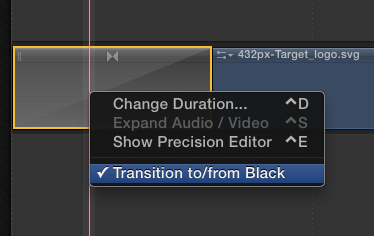
It works in the current version, all you need to do is make the logo into a compound clip, place the transition on your logo (inside the compound clip). Then right click on the transition and turn off "Transition to/from Black", now go back to your project, it now works exactly like it did in final cut pro 7. I used the Gaussian Blur to make sure this worked.
It works in the current version, all you need to do is make the logo into a compound clip, place the transition on your logo (inside the compound clip). Then right click on the transition and turn off "Transition to/from Black", now go back to your project, it now works exactly like it did in final cut pro 7. I used the Gaussian Blur to make sure this worked.
Please Log in to join the conversation.
23 Jan 2012 15:54 #3380
by tap5a
Replied by tap5a on topic Re: Effect on top Storyline only!
Super great tip Mikey! I was totally unaware of this thing even that I almost consider myself FCPX expert 
Big thanks!
Tapio
Big thanks!
Tapio
Please Log in to join the conversation.
