


- Posts: 21
- Thank you received: 0
3 Post Moderation Rule for New Boarders (25 Jan 2021)
New boarders will have their posts moderated - Don't worry if you cannot see your post immediately.
Best SONY FS7 Workflow
- theschnitt.de
-
 Topic Author
- Offline
- Junior Member
-

Less
More
21 Jun 2020 13:55 #108061
by theschnitt.de
Best SONY FS7 Workflow was created by theschnitt.de
Hi peeps,
I was just wondering what different Workflows you have working with FS7 material.
As I often get the FS7 material in 4K and no proxies generated from the set I just import them by dragging in the files from the subfolders of the Camera card/HDD Copy into FPCPX and then generate Proxies whitin FCPX.
Still this way seems kind of dodgy as FCPX would want you to import them into the library in their 4K Versions and rewrap them in .MOV files in the library.
Also when I than edit rather small episodes of a show (typically around 6 minutes) and start applying adjustment layers with color correction and jump cuts etc when I switch to full resolution it gets sluggish. I have a maxed out imac 2019 and with avid, premiere or resolve I never experience any lag working of my SSD.
But FCPX is my weapon of choice, especially for fast small shows, where I dont have the time to view the material fully before starting the edit I would love to know how to speed things up with FS7 4K Material.
I was just wondering what different Workflows you have working with FS7 material.
As I often get the FS7 material in 4K and no proxies generated from the set I just import them by dragging in the files from the subfolders of the Camera card/HDD Copy into FPCPX and then generate Proxies whitin FCPX.
Still this way seems kind of dodgy as FCPX would want you to import them into the library in their 4K Versions and rewrap them in .MOV files in the library.
Also when I than edit rather small episodes of a show (typically around 6 minutes) and start applying adjustment layers with color correction and jump cuts etc when I switch to full resolution it gets sluggish. I have a maxed out imac 2019 and with avid, premiere or resolve I never experience any lag working of my SSD.
But FCPX is my weapon of choice, especially for fast small shows, where I dont have the time to view the material fully before starting the edit I would love to know how to speed things up with FS7 4K Material.
Please Log in to join the conversation.

22 Jun 2020 11:38 #108085
by joema
Replied by joema on topic Best SONY FS7 Workflow
Please Log in to join the conversation.
- JarrodMFay
-

- Offline
- Elite Member
-

Less
More
- Posts: 172
- Thank you received: 34
22 Jun 2020 14:18 #108087
by JarrodMFay
Replied by JarrodMFay on topic Best SONY FS7 Workflow
I have never had sluggishness working with 4K XAVC files (from FS7 or F55). That includes working on a MacBook Pro all the way up to my iMac Pro. And Premiere is a notorious system hog (based on my experience). I think something else is going on here. There may be an underlying issue with your system that is causing the slow down.
Please Log in to join the conversation.
- haysoos123
-
- Offline
- Platinum Member
-

Less
More
- Posts: 402
- Thank you received: 72
23 Jun 2020 18:19 #108134
by haysoos123
You should really be using the import function and letting it wrap to .MOV. Sounds like you're putting media outside the library, so what you need to do is point your library to the folder on the external drive where you want to store the footage and let it import and rewrap to there. Select the library, go to the inspector, and next to 'Storage Locations,' select 'Modify Settings' and point your media folder to your external folders.
In the import window, you have to make sure it's also set to import to this location.
I don't think this will necessarily fix your performance issues, but it does ensure that the clips are spanned and rewrapped properly with the proper metadata.
Replied by haysoos123 on topic Best SONY FS7 Workflow
Franke wrote: As I often get the FS7 material in 4K and no proxies generated from the set I just import them by dragging in the files from the subfolders of the Camera card/HDD Copy into FPCPX and then generate Proxies whitin FCPX.
Still this way seems kind of dodgy as FCPX would want you to import them into the library in their 4K Versions and rewrap them in .MOV files in the library.
You should really be using the import function and letting it wrap to .MOV. Sounds like you're putting media outside the library, so what you need to do is point your library to the folder on the external drive where you want to store the footage and let it import and rewrap to there. Select the library, go to the inspector, and next to 'Storage Locations,' select 'Modify Settings' and point your media folder to your external folders.
In the import window, you have to make sure it's also set to import to this location.
I don't think this will necessarily fix your performance issues, but it does ensure that the clips are spanned and rewrapped properly with the proper metadata.
Please Log in to join the conversation.
23 Jun 2020 23:24 - 23 Jun 2020 23:32 #108136
by joema
That is a tricky area with side effects unique to the exact codec, which is why I asked which one his FS7 was using. I have edited hundreds of hours of Sony 4k XAVC-S material imported by copying the bare .mp4 files to a hard disk and using "leave files in place". That works with no apparent (major) side effects, unlike AVCHD which entails significant performance problems.
The FS7 uses XAVC-L and XAVC-I at various resolutions and frame rates. I don't know if those behave similarly.
You are correct the safest approach is use "copy style" import but that is a hassle. The best approach for any of the tree-like formats is externally re-wrap with EditReady2, *then* import with "leave files in place".
Some time ago I did limited performance testing of both import styles for XAVC-S on FCPX, and it seemed the preferred copy-style import was a little smoother, both both were quite laggy. However my testing wasn't extensive. In general it's a risk to move files out of the tree/bundle and import, esp. using "leave files in place".
I have tested Sony 4k XAVC-S on many different Macs using FCPX, Premiere and Resolve. It is sluggish on my 10-core Vega 64 iMac Pro, a little faster on my top-spec 2019 MacBook Pro 16, and very slow using Premiere (all tested on same Mac hardware). The latest version of Resolve seems faster.
If he is using 4k XAVC-L or XAVC-I it is conceivable it's also sluggish on a top-spec 8-core iMac 27 using FCPX. This is highly variable based on the exact codec, hardware, and version of NLE. For XAVC-S, Panasonic's 4k 10-bit 4:2:2 400 mbps all-intra H264, or the Fuji XT-3 HEVC codec, they are all vastly slower on Premiere than FCPX or Resolve, when tested on an iMac Pro, 2017 iMac 27 or 2019 MacBook Pro 16.
Replied by joema on topic Best SONY FS7 Workflow
haysoos123 wrote: You should really be using the import function and letting it wrap to .MOV...
That is a tricky area with side effects unique to the exact codec, which is why I asked which one his FS7 was using. I have edited hundreds of hours of Sony 4k XAVC-S material imported by copying the bare .mp4 files to a hard disk and using "leave files in place". That works with no apparent (major) side effects, unlike AVCHD which entails significant performance problems.
The FS7 uses XAVC-L and XAVC-I at various resolutions and frame rates. I don't know if those behave similarly.
You are correct the safest approach is use "copy style" import but that is a hassle. The best approach for any of the tree-like formats is externally re-wrap with EditReady2, *then* import with "leave files in place".
Some time ago I did limited performance testing of both import styles for XAVC-S on FCPX, and it seemed the preferred copy-style import was a little smoother, both both were quite laggy. However my testing wasn't extensive. In general it's a risk to move files out of the tree/bundle and import, esp. using "leave files in place".
I have tested Sony 4k XAVC-S on many different Macs using FCPX, Premiere and Resolve. It is sluggish on my 10-core Vega 64 iMac Pro, a little faster on my top-spec 2019 MacBook Pro 16, and very slow using Premiere (all tested on same Mac hardware). The latest version of Resolve seems faster.
If he is using 4k XAVC-L or XAVC-I it is conceivable it's also sluggish on a top-spec 8-core iMac 27 using FCPX. This is highly variable based on the exact codec, hardware, and version of NLE. For XAVC-S, Panasonic's 4k 10-bit 4:2:2 400 mbps all-intra H264, or the Fuji XT-3 HEVC codec, they are all vastly slower on Premiere than FCPX or Resolve, when tested on an iMac Pro, 2017 iMac 27 or 2019 MacBook Pro 16.
Last edit: 23 Jun 2020 23:32 by joema.
Please Log in to join the conversation.
- theschnitt.de
-
Topic Author
- Offline
- Junior Member
-
Less
More
- Posts: 21
- Thank you received: 0
24 Jun 2020 09:16 #108150
by theschnitt.de
Replied by theschnitt.de on topic Best SONY FS7 Workflow
Final cut says this (see attachment)
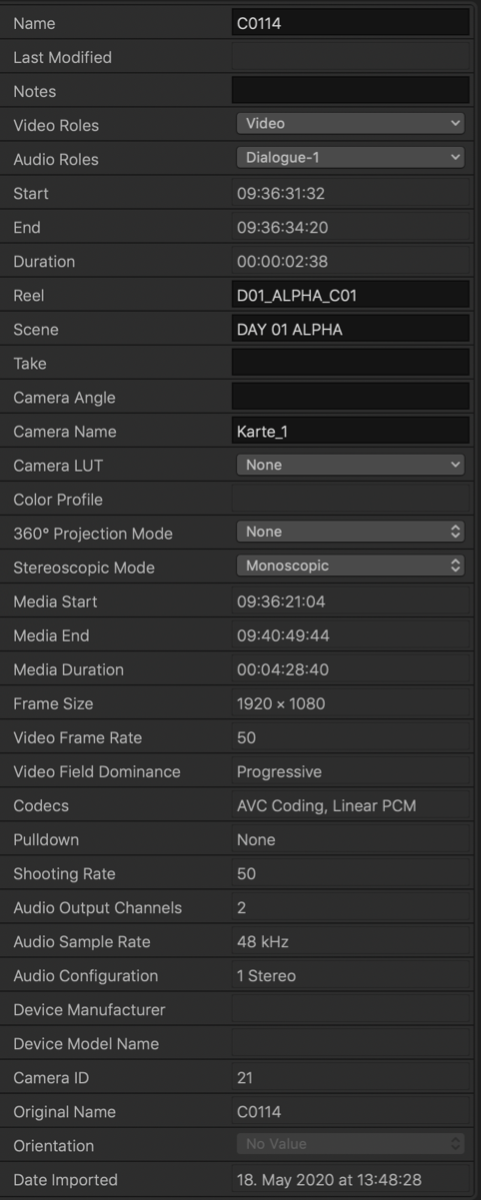
and vlc this
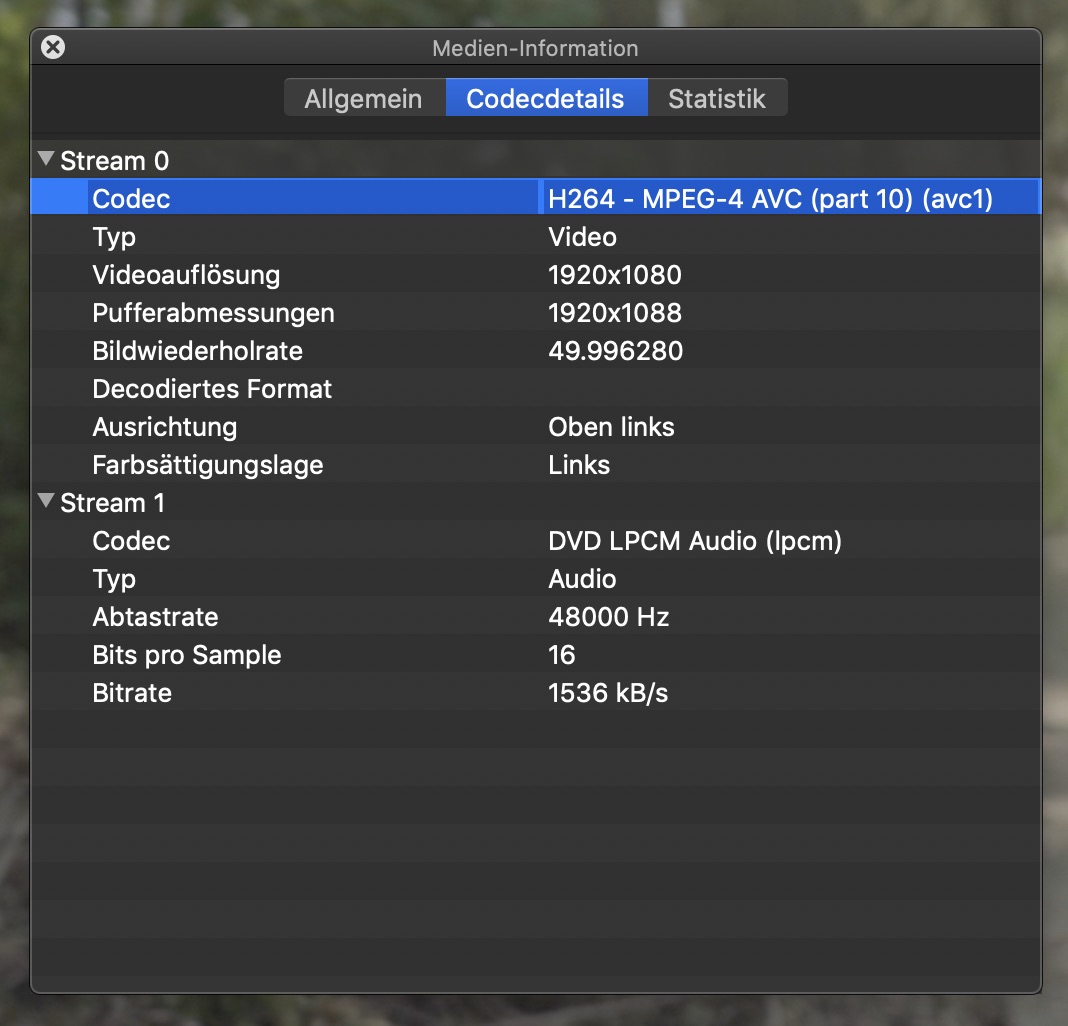
and vlc this
Please Log in to join the conversation.
- theschnitt.de
-
Topic Author
- Offline
- Junior Member
-
Less
More
- Posts: 21
- Thank you received: 0
24 Jun 2020 09:22 #108151
by theschnitt.de
Replied by theschnitt.de on topic Best SONY FS7 Workflow
big question now: which would be the preferred codec setting in the FS7.
I'm not shooting my self, would have to ask the DOP, if she would change to these other settings
I'm not shooting my self, would have to ask the DOP, if she would change to these other settings
Please Log in to join the conversation.
25 Jun 2020 11:01 #108175
by joema
Replied by joema on topic Best SONY FS7 Workflow
The info you posted says 1080p, but your first post said 4k. Which is it?
Also we still cannot tell the needed codec details. I suggest you use Invisor, which allows side-by-side comparison of various media files in a grid. After installing it, in Finder you do right-click on the file>service>Analyze with Invisor, At the top select the Comparison button. You can then click/drag other files in Finder to that window and view the characteristics: apps.apple.com/us/app/invisor-media-file...or/id442947586?mt=12
This will not only be useful for this case but in the future when people send you material you can examine it.
We need to know (1) the actual media file details, including whether it's XAVC-I, XAVC-L or what. (2) The resolution you are actually using, whether 4k or 1080p.
Using Invisor will tell us that. Or if that's too difficult, upload a small test clip to DropBox and post that here. We can analyze it and report back.
Also we still cannot tell the needed codec details. I suggest you use Invisor, which allows side-by-side comparison of various media files in a grid. After installing it, in Finder you do right-click on the file>service>Analyze with Invisor, At the top select the Comparison button. You can then click/drag other files in Finder to that window and view the characteristics: apps.apple.com/us/app/invisor-media-file...or/id442947586?mt=12
This will not only be useful for this case but in the future when people send you material you can examine it.
We need to know (1) the actual media file details, including whether it's XAVC-I, XAVC-L or what. (2) The resolution you are actually using, whether 4k or 1080p.
Using Invisor will tell us that. Or if that's too difficult, upload a small test clip to DropBox and post that here. We can analyze it and report back.
Please Log in to join the conversation.
- theschnitt.de
-
Topic Author
- Offline
- Junior Member
-
Less
More
- Posts: 21
- Thank you received: 0
25 Jun 2020 14:59 #108177
by theschnitt.de
Replied by theschnitt.de on topic Best SONY FS7 Workflow
ah yeh your right.
sorry the screenshot of the data sheet was from some alpha footage. actually I found the mxf.
so its 4K AVC-I with 50 fps.
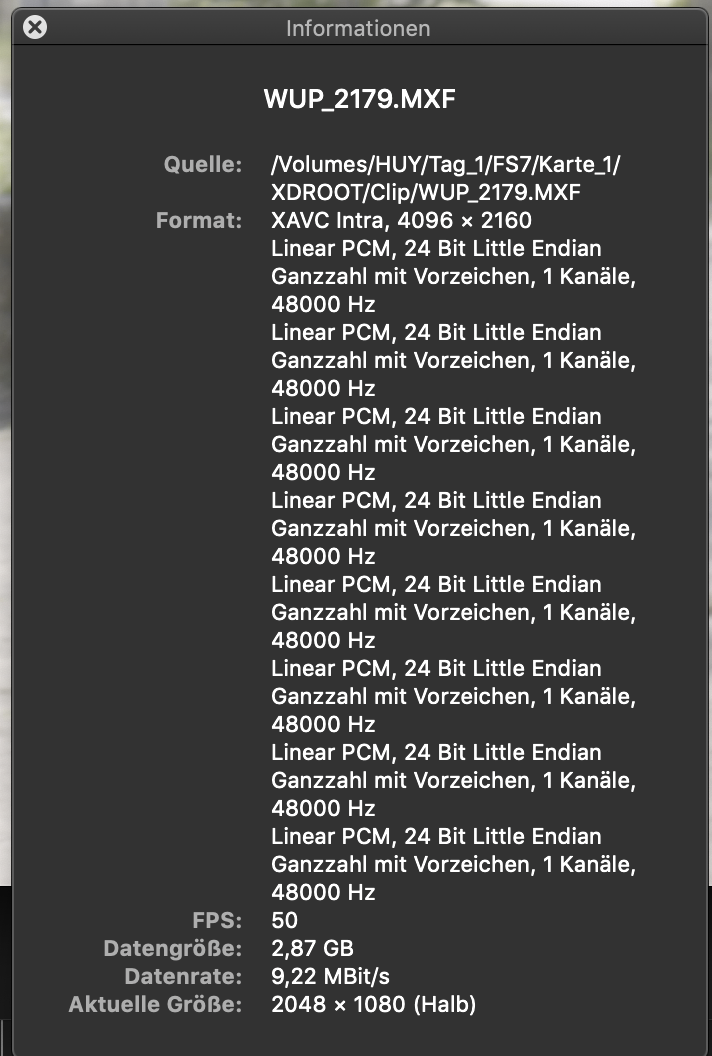
sorry the screenshot of the data sheet was from some alpha footage. actually I found the mxf.
so its 4K AVC-I with 50 fps.
Please Log in to join the conversation.
- theschnitt.de
-
Topic Author
- Offline
- Junior Member
-
Less
More
- Posts: 21
- Thank you received: 0
25 Jun 2020 15:00 #108178
by theschnitt.de
Replied by theschnitt.de on topic Best SONY FS7 Workflow
but this happens to me basically with every FS7 footage I ever got (i guess mostly with that same resolution and codec).
I just feel its not that smooth for being on so modern machine and working off an SSD.
I just feel its not that smooth for being on so modern machine and working off an SSD.
Please Log in to join the conversation.
25 Jun 2020 16:51 - 25 Jun 2020 16:52 #108181
by joema
I then externally re-wrapped both using EditReady2 and imported with "leave files in place". That made no difference - 4k XAVC-I was fast and 4k XAVC-L was very slow. That is often seen, since Long GOP codecs are typically harder to decode. There are exceptions such as Panasonics 10-bit All-I codec from the GH5 and S1 is very sluggish on FCPX, and their 8-bit Long GOP codec is faster.
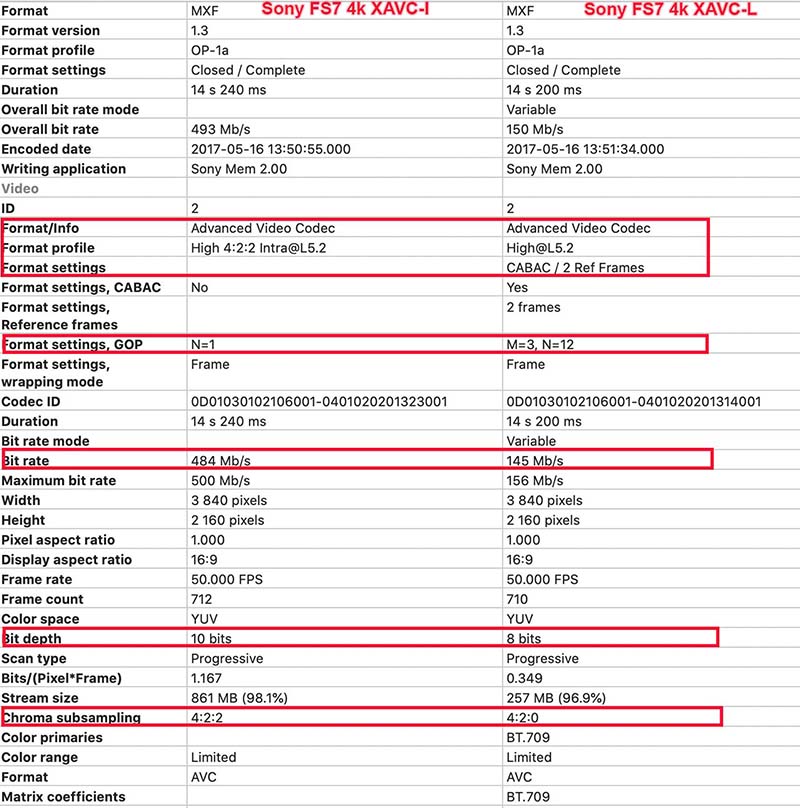
If your FS7 material seems very slow, I suspect it is XAVC-L not XAVC-I. See attached output from Invisor which shows the difference.
I also tested both FS7 clips on the latest version of Premiere 14.3.0 on the same machine. Both were slower than FCPX 10.4.8, esp regarding lag time to JKL input. That was with Premiere set to 1/4 resolution.
I then tested both FS7 clips on the latest version of Resolve Studio 16.2.3 on the same machine and it was similar to FCPX - XAVC-I was fast and XAVC-L was sluggish.
In general with 4k Long GOP codecs you will need proxies or optimized media for the smoothest, most lag-free performance - even on higher-end hardware. There are exceptions to this and there is wide variation in how H264 material is encoded, how well the computer's hardware acceleration works for decoding, and how well the specific NLE leverages this.
But for the 4k XAVC-I and XAVC-L clips I tested, they followed a familiar pattern: the All-I clip was faster, the Long GOP clip was slower, FCPX and Resolve were much faster than Premiere.
If anyone else wants to test the material, the clips I found were here: drive.google.com/open?id=0B2YfoQqKYTrTVDJ4WVd1d1dhZkU
Replied by joema on topic Best SONY FS7 Workflow
OK, I scoured the internet and finally found some FS7 test material I could download. It appears that 4k XAVC-I is relatively fast on my 10-core Vega 64 iMac Pro, but 4k XAVC-L is quite sluggish. This is regardless of whether they are imported using copy to library or "leave files in place".Franke wrote: but this happens to me basically with every FS7 footage I ever got (i guess mostly with that same resolution and codec). I just feel its not that smooth for being on so modern machine and working off an SSD.
I then externally re-wrapped both using EditReady2 and imported with "leave files in place". That made no difference - 4k XAVC-I was fast and 4k XAVC-L was very slow. That is often seen, since Long GOP codecs are typically harder to decode. There are exceptions such as Panasonics 10-bit All-I codec from the GH5 and S1 is very sluggish on FCPX, and their 8-bit Long GOP codec is faster.
If your FS7 material seems very slow, I suspect it is XAVC-L not XAVC-I. See attached output from Invisor which shows the difference.
I also tested both FS7 clips on the latest version of Premiere 14.3.0 on the same machine. Both were slower than FCPX 10.4.8, esp regarding lag time to JKL input. That was with Premiere set to 1/4 resolution.
I then tested both FS7 clips on the latest version of Resolve Studio 16.2.3 on the same machine and it was similar to FCPX - XAVC-I was fast and XAVC-L was sluggish.
In general with 4k Long GOP codecs you will need proxies or optimized media for the smoothest, most lag-free performance - even on higher-end hardware. There are exceptions to this and there is wide variation in how H264 material is encoded, how well the computer's hardware acceleration works for decoding, and how well the specific NLE leverages this.
But for the 4k XAVC-I and XAVC-L clips I tested, they followed a familiar pattern: the All-I clip was faster, the Long GOP clip was slower, FCPX and Resolve were much faster than Premiere.
If anyone else wants to test the material, the clips I found were here: drive.google.com/open?id=0B2YfoQqKYTrTVDJ4WVd1d1dhZkU
Last edit: 25 Jun 2020 16:52 by joema.
Please Log in to join the conversation.
- Tom Wolsky
-

- Offline
- Moderator
-

25 Jun 2020 17:31 #108182
by Tom Wolsky
Replied by Tom Wolsky on topic Best SONY FS7 Workflow
You wouldn’t still happen to have links to that media? I’d like very much to try it out. Thank you.
Please Log in to join the conversation.
25 Jun 2020 19:23 - 25 Jun 2020 19:24 #108184
by joema
Tom if you mean me, the media I found is at the previously-posted Google Drive link. You should be able to download it from here: drive.google.com/file/d/0B2YfoQqKYTrTVDJ4WVd1d1dhZkU/view
It's a 1.1 GB ZIP file that contains a folder named "FS7 Card", inside of which is the usual folder tree and two MXF files. The larger one is 4k XAVC-I, and the smaller one 4k XAVC-L.
Replied by joema on topic Best SONY FS7 Workflow
Tom Wolsky wrote: You wouldn’t still happen to have links to that media? I’d like very much to try it out. Thank you.
Tom if you mean me, the media I found is at the previously-posted Google Drive link. You should be able to download it from here: drive.google.com/file/d/0B2YfoQqKYTrTVDJ4WVd1d1dhZkU/view
It's a 1.1 GB ZIP file that contains a folder named "FS7 Card", inside of which is the usual folder tree and two MXF files. The larger one is 4k XAVC-I, and the smaller one 4k XAVC-L.
Last edit: 25 Jun 2020 19:24 by joema.
Please Log in to join the conversation.
- theschnitt.de
-
Topic Author
- Offline
- Junior Member
-
Less
More
- Posts: 21
- Thank you received: 0
25 Jun 2020 19:36 #108185
by theschnitt.de
Replied by theschnitt.de on topic Best SONY FS7 Workflow
Yes creating Proxies is my approach too. Just thought I’m doing something wrong.
ProRes works just so much better... hate it so much that so many people shot on the fs7 haha
ProRes works just so much better... hate it so much that so many people shot on the fs7 haha
Please Log in to join the conversation.
- Tom Wolsky
-
- Offline
- Moderator
-
25 Jun 2020 19:43 #108188
by Tom Wolsky
Replied by Tom Wolsky on topic Best SONY FS7 Workflow
Thank you very much. That's great.
Please Log in to join the conversation.
