


- Posts: 45
- Thank you received: 0
3 Post Moderation Rule for New Boarders (25 Jan 2021)
New boarders will have their posts moderated - Don't worry if you cannot see your post immediately.
Apple 8TB SSD as media drive?
16 Jun 2020 17:28 #107944
by cog2803
Apple 8TB SSD as media drive? was created by cog2803
Historically, I've always adhered to the idea that Media should never be stored on your boot drive. With the news that Apple has the option for a "factory installed" 8TB SSD drive does this old adage still ring true?
Whenever we start to buy capital budget items again...I've got a new MacPro coming my way. I was planning on the 1TB SSD boot drive and an OWC Accelsior 4M2 8TB as my media drive with the Promise Pegasus JT 8TB for a daily backup of media.
The advertised read/write speeds of the OWC Accelsior 4M2 8TB are insane. Would the Apple factory 8TB SSD even come close since the Accelsior is essentially a RAID 0 of four M.2 NVMe drives?
Thanks.
Whenever we start to buy capital budget items again...I've got a new MacPro coming my way. I was planning on the 1TB SSD boot drive and an OWC Accelsior 4M2 8TB as my media drive with the Promise Pegasus JT 8TB for a daily backup of media.
The advertised read/write speeds of the OWC Accelsior 4M2 8TB are insane. Would the Apple factory 8TB SSD even come close since the Accelsior is essentially a RAID 0 of four M.2 NVMe drives?
Thanks.
Please Log in to join the conversation.

19 Jun 2020 03:57 #107997
by arc
Replied by arc on topic Apple 8TB SSD as media drive?
If you are editing 4K and 6K files from the Red cameras or even BRAW at 6 K you might want to have 30 TB of storage. The M.2 SSD have great speeds but how big are your clients files usually? There is a reason people stripe hard drives together. You will get good read and write speeds and have plenty of storage.
Please Log in to join the conversation.


19 Jun 2020 11:58 #108007
by JoeEditor
Replied by JoeEditor on topic Apple 8TB SSD as media drive?
You will never get the full speed of published specs for any drive or RAID.
Please Log in to join the conversation.
19 Jun 2020 13:20 #108015
by arc
Here is what 5 SATA drives in RAID 0 can do. Imagine if a had 10 SATA drives in RAID 0. You can get good read and write speeds form SATA drives and also have plenty of storage for large files like 4K and 6K Pro Res and R3D files. If you edit H.264 one 8 TB M.2 SSD might be bigger enough but probably expensive compared to SATA drives. A single SATA drive can edit multiple layers of 4K H.264. An 8TB M.2 SSD might work but is it the best option? Maybe maybe not.
Replied by arc on topic Apple 8TB SSD as media drive?
FCPX.guru wrote: You will never get the full speed of published specs for any drive or RAID.
Here is what 5 SATA drives in RAID 0 can do. Imagine if a had 10 SATA drives in RAID 0. You can get good read and write speeds form SATA drives and also have plenty of storage for large files like 4K and 6K Pro Res and R3D files. If you edit H.264 one 8 TB M.2 SSD might be bigger enough but probably expensive compared to SATA drives. A single SATA drive can edit multiple layers of 4K H.264. An 8TB M.2 SSD might work but is it the best option? Maybe maybe not.
Please Log in to join the conversation.
19 Jun 2020 16:13 - 19 Jun 2020 16:14 #108016
by cog2803
Replied by cog2803 on topic Apple 8TB SSD as media drive?
I do shoot Canon 4K but still also a fair bit of HD via DSLR and/or GoPro. The projects are typically small in that they are 30 commercials for local advertisers that get archived over to an eight drive Drobo for near-line access and then eventually to individual spinning disk for off-line access as required. My basic setup now are two RAID 0 arrays with 6TB each. Those are backed up once a day so they function as clones of each other in case of failure.
I think I can continue to manage with 8TB as I only have about half a TB used now for OS and applications.
Just curious if there was an angle to "not" combining media and OS/Apps on the same drive since I would be doing daily backups to the internal spinning disk in the Promise slot.
I think I can continue to manage with 8TB as I only have about half a TB used now for OS and applications.
Just curious if there was an angle to "not" combining media and OS/Apps on the same drive since I would be doing daily backups to the internal spinning disk in the Promise slot.
Last edit: 19 Jun 2020 16:14 by cog2803.
Please Log in to join the conversation.

19 Jun 2020 17:46 - 19 Jun 2020 18:16 #108021
by joema
Your question was about the 2019 MP internal SSD vs the OWC Accelsior 4M2 8TB PCIe SSD, and whether media/OS/Apps could be combined on one of those.
The old advice about not putting media or FCPX libraries on the system drive probably doesn't apply to SSD RAID drives which can do 3,000-6,000 MB/sec and maybe 1,000 IOs per second. I think the MP internal SSD is RAID-0, (similar to the iMac Pro internal SSD), however I'm not sure.
Whether 3,000 or 6,000 MB/sec, it's unlikely you'll see a significant real-world performance difference on an FCPX workflow. Once the IO bandwidth reaches a certain level, the bottleneck is somewhere else. Typical video editing tasks entail a lot of CPU and GPU. If using a compressed codec like H264 or HEVC the computational overhead is so high that IO is rarely an issue -- even on a mechanical drive array.
If your media is multiple streams of 4k ProRes, that is a higher IO load but I seriously doubt you'd measure a real-world performance difference between the Mac Pro internal SSD vs the Accelsior.
With a mechanical array, contention between two different IO types can happen. E.g, a stream of small random IOs and a simultaneous stream of large sequential IOs. As the OS time shares between the streams, the drives must constantly re-seek. You even see this effect when doing two folder copies in Finder. With a mechanical drive it's usually faster to do them sequentially than in parallel. With SSDs it's more often faster to do those tasks in parallel. For those reasons, on a super-fast SSD system drive there is probably limited performance conflict between IO streams from OS, apps and media.
Replied by joema on topic Apple 8TB SSD as media drive?
cog2803 wrote: ...Just curious if there was an angle to "not" combining media and OS/Apps on the same drive since I would be doing daily backups to the internal spinning disk in the Promise slot.
Your question was about the 2019 MP internal SSD vs the OWC Accelsior 4M2 8TB PCIe SSD, and whether media/OS/Apps could be combined on one of those.
The old advice about not putting media or FCPX libraries on the system drive probably doesn't apply to SSD RAID drives which can do 3,000-6,000 MB/sec and maybe 1,000 IOs per second. I think the MP internal SSD is RAID-0, (similar to the iMac Pro internal SSD), however I'm not sure.
Whether 3,000 or 6,000 MB/sec, it's unlikely you'll see a significant real-world performance difference on an FCPX workflow. Once the IO bandwidth reaches a certain level, the bottleneck is somewhere else. Typical video editing tasks entail a lot of CPU and GPU. If using a compressed codec like H264 or HEVC the computational overhead is so high that IO is rarely an issue -- even on a mechanical drive array.
If your media is multiple streams of 4k ProRes, that is a higher IO load but I seriously doubt you'd measure a real-world performance difference between the Mac Pro internal SSD vs the Accelsior.
With a mechanical array, contention between two different IO types can happen. E.g, a stream of small random IOs and a simultaneous stream of large sequential IOs. As the OS time shares between the streams, the drives must constantly re-seek. You even see this effect when doing two folder copies in Finder. With a mechanical drive it's usually faster to do them sequentially than in parallel. With SSDs it's more often faster to do those tasks in parallel. For those reasons, on a super-fast SSD system drive there is probably limited performance conflict between IO streams from OS, apps and media.
Last edit: 19 Jun 2020 18:16 by joema.
Please Log in to join the conversation.
19 Jun 2020 20:03 - 19 Jun 2020 20:07 #108028
by arc
What kind of speeds do you get with your RAID setup?
With the new M.2 SSD you can put your OS and media on the same drive. That being said if the OS is doing a scheduled backup for you it might also be backing up the OS and wasting some hard drive space each time. I imagine you can scheduled the Mac OS to just back up certain folders.
Replied by arc on topic Apple 8TB SSD as media drive?
cog2803 wrote: I My basic setup now are two RAID 0 arrays with 6TB each. Those are backed up once a day so they function as clones of each other in case of failure.
Just curious if there was an angle to "not" combining media and OS/Apps on the same drive since I would be doing daily backups to the internal spinning disk in the Promise slot.
What kind of speeds do you get with your RAID setup?
With the new M.2 SSD you can put your OS and media on the same drive. That being said if the OS is doing a scheduled backup for you it might also be backing up the OS and wasting some hard drive space each time. I imagine you can scheduled the Mac OS to just back up certain folders.
Last edit: 19 Jun 2020 20:07 by arc.
Please Log in to join the conversation.
20 Jun 2020 15:43 - 20 Jun 2020 15:43 #108046
by cog2803
Replied by cog2803 on topic Apple 8TB SSD as media drive?
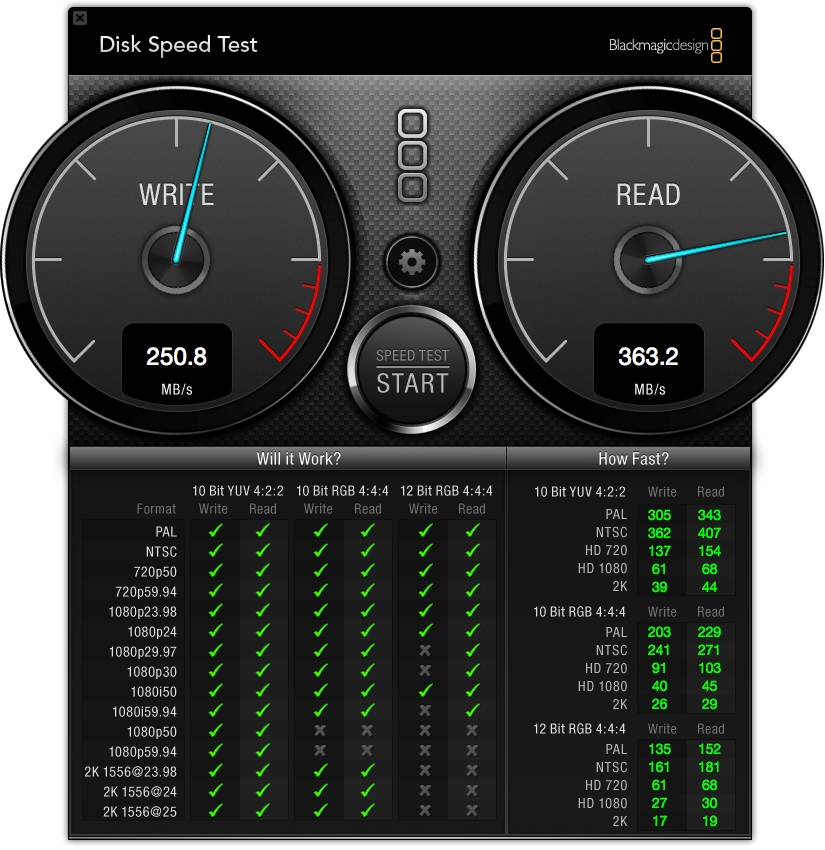
I get roughly 250 MB/s read and 350 MB/s write using the Blackmagic Speed Test app.
Thanks for the feedback. It is appreciated.
Thanks for the feedback. It is appreciated.
Last edit: 20 Jun 2020 15:43 by cog2803.
Please Log in to join the conversation.
20 Jun 2020 15:44 #108047
by cog2803
Replied by cog2803 on topic Apple 8TB SSD as media drive?
Thank you for the feedback. It is appreciated.
Please Log in to join the conversation.
20 Jun 2020 16:29 #108049
by arc
Thanks for posting but I think that is from the Promise Pegasus JT 8TB. What are the speeds from the eight drive Drobo? That being said I think the Mac Pro should have had 8 generic drive bays.
Replied by arc on topic Apple 8TB SSD as media drive?
cog2803 wrote: I get roughly 250 MB/s read and 350 MB/s write using the Blackmagic Speed Test app.
Thanks for the feedback. It is appreciated.
Thanks for posting but I think that is from the Promise Pegasus JT 8TB. What are the speeds from the eight drive Drobo? That being said I think the Mac Pro should have had 8 generic drive bays.
Please Log in to join the conversation.
