


- Posts: 35
- Thank you received: 0
3 Post Moderation Rule for New Boarders (25 Jan 2021)
New boarders will have their posts moderated - Don't worry if you cannot see your post immediately.
List of FCPX keywords
- Itstonybabyvlog
-
 Topic Author
- Offline
- Junior Member
-

Less
More
10 Jun 2020 01:59 #107786
by Itstonybabyvlog
List of FCPX keywords was created by Itstonybabyvlog
Hello everyone, I've started using keywords in FCPX to identify video clips by key words. I've created a few, deleted a few, and figured out how to search by keywords. My question today is, where can I find a list of all the keywords I have used? Just as an example, in the keyword search I did below, you will see all the keywords I have created for various clips. But I created a few duplicates (capitalized, different words, ect) and a few of the keywords listed in this list actually don't have any videos associated with them. For example, 3 Jovellar Park is now just Jovellar Park, and all the footage tagged with 3 Jovellar Park has now been retagged with just Jovellar Park. So 3 Jovellar Park still shows up in my search, but there are no videos associated with it, and there are a few other keywords that are like that.
So where can I find a list of all the keywords I have created so I can modify them, or change their names, or delete them? Thanks for your feedback folks!
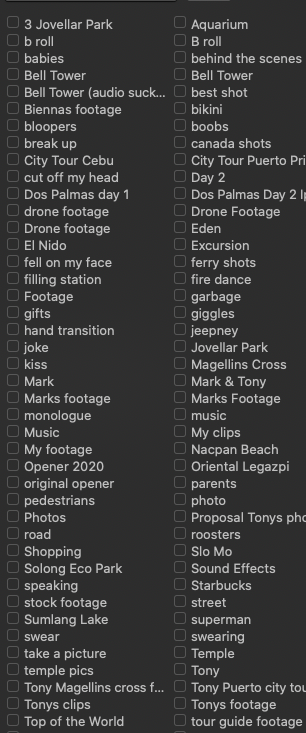
So where can I find a list of all the keywords I have created so I can modify them, or change their names, or delete them? Thanks for your feedback folks!
Please Log in to join the conversation.


10 Jun 2020 13:20 #107799
by JoeEditor
Replied by JoeEditor on topic List of FCPX keywords
Make a smart search.
Please Log in to join the conversation.
- Itstonybabyvlog
-
Topic Author
- Offline
- Junior Member
-
Less
More
- Posts: 35
- Thank you received: 0
10 Jun 2020 14:53 - 10 Jun 2020 14:54 #107804
by Itstonybabyvlog
Replied by Itstonybabyvlog on topic List of FCPX keywords
The screenshot is a smart search. I need a list, not a search. I need to be able to edit the LIST, not the keywords. Is there a way to edit the list in smart search I'm unaware of?
Last edit: 10 Jun 2020 14:54 by Itstonybabyvlog.
Please Log in to join the conversation.

10 Jun 2020 14:55 #107805
by VTC
Replied by VTC on topic List of FCPX keywords
Ordinarily I can dig around in the program to discover where keywords are stored but haven't come across them yet. The thing I found helpful is to tag before ingest because doing so afterwards via FCP is so tedious.
I use Sony Catalyst Browse (free) to review then highlight relevant clips, reveal in finder, then batch tag. Tags stick as keywords in FCP with the added benefit of being able to mass locate the exact files in finder if you don't import into the library. (I never do.)
The tagging isn't dynamic meaning FCP won't grab the tags after the files have already been referenced in FCP but that's remedied by deleting the untagged referenced files then reimporting the finder tagged ones.
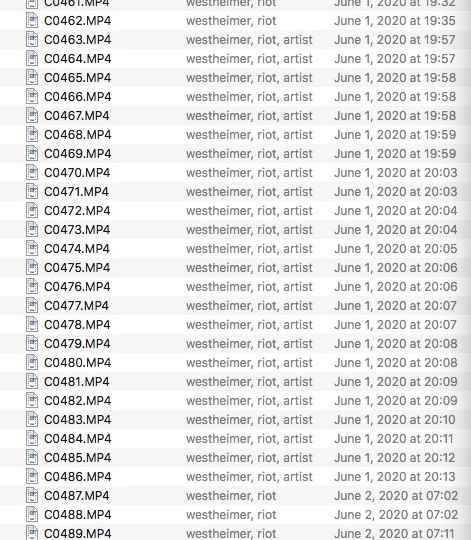
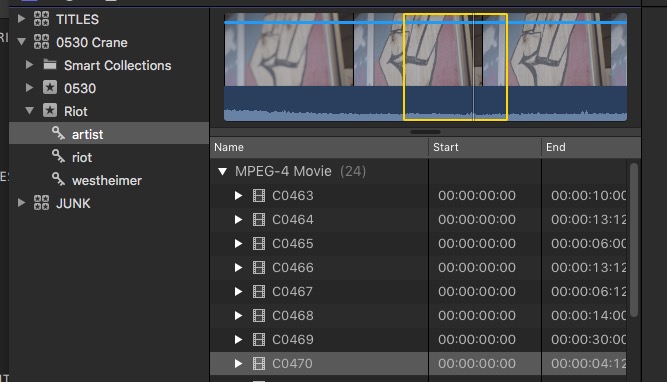
I use Sony Catalyst Browse (free) to review then highlight relevant clips, reveal in finder, then batch tag. Tags stick as keywords in FCP with the added benefit of being able to mass locate the exact files in finder if you don't import into the library. (I never do.)
The tagging isn't dynamic meaning FCP won't grab the tags after the files have already been referenced in FCP but that's remedied by deleting the untagged referenced files then reimporting the finder tagged ones.
Please Log in to join the conversation.

10 Jun 2020 14:56 - 10 Jun 2020 15:08 #107806
by joema
In general you don't search for keywords, you use keywords to find previously-tagged material. If you have so many keywords you feel a need to search those, that's often a sign you have too many.
The best approach is not to wade into material and start keywording everything in sight. Rather this is part of a sequential process:
1. Create and sync any multicam material, which includes single-cam clips with external audio. The multicam clips should be rated and keyworded, not the parent clips.
2. Reject any junk, unusable or simply low quality material. This reduces the quantity. Also reject all multicam parent clips to avoid accidental use of them in the timeline. Thereafter run the Browser filter in "hide rejected".
3. As part of getting familiar with the material, think about your planned keyword system. The system for a scripted narrative is likely very different from a documentary, a wedding or a educational lecture.
4. The keyword approach should rely on (a) The final editor will be familiar with the material and (b) The skimmer is very fast. IOW it's not like a blind database where every conceivable combination of tag words are used. Rather The overall goal is assist the editor in useful ways - don't confuse the editor with 100 granular keywords.
5. The FCPX keyword system is not designed for an editor who is unfamiliar with the material. It's not like a photo search database for a reporter writing a news article. The lead editor should be very familiar with the material. A well-thought-out sparse keyword system can help him/her if properly planned. Keywords are not designed to keep the editor from using the skimmer and looking through the material.
Example: for a wedding it doesn't make sense to keyword bridal shots, ceremony and reception. Those are always sequential and in chronological order. It would be wasted keywords. Plus the editor can visually see which is which.
A more appropriate use of keyword would be interviews, b-roll, establishing, historical, etc.
The main goal is think about what actions will be difficult for the editor, then design the keyword system to help that. So it's not a "gut reaction" of see a clip and assign whatever keyword comes to mind. Rather it involves thinking ahead, putting yourself in the editor's shoes for this particular type of project, and designing a well-thought-out keyword system which will help, not confuse. In general a keyword system should be somewhat sparse with each keyword covering 10 or more clips, not highly granular. You normally shouldn't have keywords that cover only 1 or 2 clips. There should be no keywords with different spellings or capitalizations. If study shows similar keywords like "happy" and "smiling", those should be consolidated. Ideally you avoid that situation by properly planning the keyword system - ahead of time.
But what the editor often struggles with is finding matching b-roll for an interview, or finding visuals to cover an interview statement. If properly done, *that* is helpful. But it's lot of work for the assistant editor (whether a separate person or yourself).
A simple system for interview b-roll is simply use the subject name for both interview and b-roll shots. Then in FCPX clicking on that name will bring up both. If lots of interviews exist you can create an "Interviews" folder to place the keyword collections for both interviews and b-roll. When keywording interview b-roll, a visual match is fairly fast. The reverse - finding visuals to match spoken dialog is hard and slow. However if done well, *those* types of keywords save the final editor a huge amount of time.
Replied by joema on topic List of FCPX keywords
Itstonybabyvlog wrote: Hello everyone, I've started using keywords in FCPX to identify video clips by key words....So 3 Jovellar Park still shows up in my search, but there are no videos associated with it, and there are a few other keywords that are like that....So where can I find a list of all the keywords I have created so I can modify them, or change their names, or delete them? Thanks for your feedback folks!...
In general you don't search for keywords, you use keywords to find previously-tagged material. If you have so many keywords you feel a need to search those, that's often a sign you have too many.
The best approach is not to wade into material and start keywording everything in sight. Rather this is part of a sequential process:
1. Create and sync any multicam material, which includes single-cam clips with external audio. The multicam clips should be rated and keyworded, not the parent clips.
2. Reject any junk, unusable or simply low quality material. This reduces the quantity. Also reject all multicam parent clips to avoid accidental use of them in the timeline. Thereafter run the Browser filter in "hide rejected".
3. As part of getting familiar with the material, think about your planned keyword system. The system for a scripted narrative is likely very different from a documentary, a wedding or a educational lecture.
4. The keyword approach should rely on (a) The final editor will be familiar with the material and (b) The skimmer is very fast. IOW it's not like a blind database where every conceivable combination of tag words are used. Rather The overall goal is assist the editor in useful ways - don't confuse the editor with 100 granular keywords.
5. The FCPX keyword system is not designed for an editor who is unfamiliar with the material. It's not like a photo search database for a reporter writing a news article. The lead editor should be very familiar with the material. A well-thought-out sparse keyword system can help him/her if properly planned. Keywords are not designed to keep the editor from using the skimmer and looking through the material.
Example: for a wedding it doesn't make sense to keyword bridal shots, ceremony and reception. Those are always sequential and in chronological order. It would be wasted keywords. Plus the editor can visually see which is which.
A more appropriate use of keyword would be interviews, b-roll, establishing, historical, etc.
The main goal is think about what actions will be difficult for the editor, then design the keyword system to help that. So it's not a "gut reaction" of see a clip and assign whatever keyword comes to mind. Rather it involves thinking ahead, putting yourself in the editor's shoes for this particular type of project, and designing a well-thought-out keyword system which will help, not confuse. In general a keyword system should be somewhat sparse with each keyword covering 10 or more clips, not highly granular. You normally shouldn't have keywords that cover only 1 or 2 clips. There should be no keywords with different spellings or capitalizations. If study shows similar keywords like "happy" and "smiling", those should be consolidated. Ideally you avoid that situation by properly planning the keyword system - ahead of time.
But what the editor often struggles with is finding matching b-roll for an interview, or finding visuals to cover an interview statement. If properly done, *that* is helpful. But it's lot of work for the assistant editor (whether a separate person or yourself).
A simple system for interview b-roll is simply use the subject name for both interview and b-roll shots. Then in FCPX clicking on that name will bring up both. If lots of interviews exist you can create an "Interviews" folder to place the keyword collections for both interviews and b-roll. When keywording interview b-roll, a visual match is fairly fast. The reverse - finding visuals to match spoken dialog is hard and slow. However if done well, *those* types of keywords save the final editor a huge amount of time.
Last edit: 10 Jun 2020 15:08 by joema.
Please Log in to join the conversation.
- Itstonybabyvlog
-
Topic Author
- Offline
- Junior Member
-
Less
More
- Posts: 35
- Thank you received: 0
11 Jun 2020 03:29 #107823
by Itstonybabyvlog
Replied by Itstonybabyvlog on topic List of FCPX keywords
Both excellent and thoughtful replies, thank you both! I'm still learning this whole tagging thing, and yes it is tedious doing it after the fact. But, its not something I was familiar with or even interested in learning while I was trying to learn the finer details of FCPX. Now, I'm more comfortable branching out into other features of the software, tags and keyword searches being one of them.
I'll just work with what I got, and some great pointers and information next time I do a project to save me some work.
I'll just work with what I got, and some great pointers and information next time I do a project to save me some work.
Please Log in to join the conversation.
