


- Posts: 12
- Thank you received: 1
3 Post Moderation Rule for New Boarders (25 Jan 2021)
New boarders will have their posts moderated - Don't worry if you cannot see your post immediately.
Modifying Minimum Frames for Imported Subtitles
- kaminote00
-
 Topic Author
- Offline
- New Member
-

Less
More
07 Jun 2020 14:27 - 07 Jun 2020 14:30 #107732
by kaminote00
Modifying Minimum Frames for Imported Subtitles was created by kaminote00
Hello Everyone,
I'd appreciate any help I can get on an issue I'm currently trying to solve. I have been working on a series of projects that involve kinetic typography. Essentially, while a speaker is speaking (and I'm including the talking head footage) the words they're saying animate on screen in any negative space. I'm trying to speed up my workflow and got the idea to send the audio through Simon Says (which breaks audio word-by-word down to the millisecond.). Simon says does a great job, and I can export the generated transcript (which I separate out word-by-word), back into FCP X as titles. What I'd LIKE for FCPX to do is to place each title directly when the word is being said according to its timecode. However, FCPX seems to have this "minimum title duration" rule. (Maybe each titles has to last at least 1 second or something). So The xml file imports back into FCPX just fine, but the titles (though all in order) are not placed at the proper timecode. Is there a way to decrease the minimum duration of titles generated from subtitles, so that all the words appear at the proper place in the timeline?
Clifford
I'd appreciate any help I can get on an issue I'm currently trying to solve. I have been working on a series of projects that involve kinetic typography. Essentially, while a speaker is speaking (and I'm including the talking head footage) the words they're saying animate on screen in any negative space. I'm trying to speed up my workflow and got the idea to send the audio through Simon Says (which breaks audio word-by-word down to the millisecond.). Simon says does a great job, and I can export the generated transcript (which I separate out word-by-word), back into FCP X as titles. What I'd LIKE for FCPX to do is to place each title directly when the word is being said according to its timecode. However, FCPX seems to have this "minimum title duration" rule. (Maybe each titles has to last at least 1 second or something). So The xml file imports back into FCPX just fine, but the titles (though all in order) are not placed at the proper timecode. Is there a way to decrease the minimum duration of titles generated from subtitles, so that all the words appear at the proper place in the timeline?
Clifford
Last edit: 07 Jun 2020 14:30 by kaminote00.
Please Log in to join the conversation.
- Andreas Kiel
-
- Offline
- Platinum Member
-

Less
More
- Posts: 1077
- Thank you received: 189
09 Jun 2020 17:04 #107768
by Andreas Kiel
Replied by Andreas Kiel on topic Modifying Minimum Frames for Imported Subtitles
By default there is no minimum duration, maybe the title you're using is special.
Please Log in to join the conversation.

09 Jun 2020 19:22 #107770
by Albo
Replied by Albo on topic Modifying Minimum Frames for Imported Subtitles
Might be a good idea to do this in Motion.
Please Log in to join the conversation.

09 Jun 2020 19:53 #107771
by JoeEditor
If he's using Closed Captioning, I think there is a minimum, right?
Replied by JoeEditor on topic Modifying Minimum Frames for Imported Subtitles
Andreas Kiel wrote: By default there is no minimum duration, maybe the title you're using is special.
If he's using Closed Captioning, I think there is a minimum, right?
Please Log in to join the conversation.
- kaminote00
-
Topic Author
- Offline
- New Member
-
Less
More
- Posts: 12
- Thank you received: 1
09 Jun 2020 20:54 #107776
by kaminote00
Replied by kaminote00 on topic Modifying Minimum Frames for Imported Subtitles
Thank you. Okay there is no minimum frame rule that program is trying to do; yet the fcpxml generates from Simon Says is off. And when talking to the techs at Simon says, they mention their software is word-by-word transcription and it marks timecode down to milliseconds?.
Please Log in to join the conversation.
- kaminote00
-
Topic Author
- Offline
- New Member
-
Less
More
- Posts: 12
- Thank you received: 1
09 Jun 2020 20:58 #107777
by kaminote00
Replied by kaminote00 on topic Modifying Minimum Frames for Imported Subtitles
Albo, thanks for the suggestion. I actually thought of doing this in motion if it’s a minimum duration issue, but I think it has to do with FCPX captioning perhaps. I do not know which title FCP X uses to bring in captions as titles (I need it to be titles because titles are the only way I can use any font I want to style the kinetic typography.). And because I do not know, I don’t know which title to bring into motion to modify it’s duration.
Please Log in to join the conversation.
- kaminote00
-
Topic Author
- Offline
- New Member
-
Less
More
- Posts: 12
- Thank you received: 1
09 Jun 2020 21:05 #107778
by kaminote00
Replied by kaminote00 on topic Modifying Minimum Frames for Imported Subtitles
FCPX.guru—you may be right. The problem may have to do with the captioning system. I’m not converting to captions (per se) but since it is transcription I guess FCPxml uses its captioning structure to make the titles, so the titles aren’t matched to the proper timecode. Is there a way around this? Another method I tried was saving my transcription as a document with timecode signatures and then going into FCP X “Index” window and modifying the timecodes for all the titles via the index pane. However, the index pane only allows me to edit the text or make notes. It won’t allow me to change the starting timecode.
Please Log in to join the conversation.
10 Jun 2020 13:17 #107797
by JoeEditor
Replied by JoeEditor on topic Modifying Minimum Frames for Imported Subtitles
Now I'm confused and my head hurts...
Please Log in to join the conversation.
- kaminote00
-
Topic Author
- Offline
- New Member
-
Less
More
- Posts: 12
- Thank you received: 1
10 Jun 2020 13:21 #107800
by kaminote00
Replied by kaminote00 on topic Modifying Minimum Frames for Imported Subtitles
Sorry to make things confusing. I’ll lay it out clearer in a future post to come.
Please Log in to join the conversation.
- Andreas Kiel
-
- Offline
- Platinum Member
-
Less
More
- Posts: 1077
- Thank you received: 189
10 Jun 2020 13:28 #107801
by Andreas Kiel
Replied by Andreas Kiel on topic Modifying Minimum Frames for Imported Subtitles
Seems be be a lot of misunderstandings here.
There is no lower limit for duration – neither for titles nor captions.
For CEA captions there is a minimum gap between captions.
@ Clifford
Caption and Ttites and Generators are all different things. A 'description' of those can be saved as XML. An XML does have no 'captioning structure to make the titles'. So a simple XML describes either Titles or Captions but nothing 'on the fly'.
Furthermore if an XML import has bad timing the XML is wrong and this has nothing to do with 'the captioning system'.
The Timeline Index doesn't allow to edit the text - it allows you to edit the 'Name' of the title (in case it is not a caption). It allows to add notes too – as you said.
You are obviously new to FCP and working with titles and or captions. The best you can do is post an example or some more descriptive things like parts of the file(s) from Simon Says.
I'm sure somebody here can help you.
There is no lower limit for duration – neither for titles nor captions.
For CEA captions there is a minimum gap between captions.
@ Clifford
Caption and Ttites and Generators are all different things. A 'description' of those can be saved as XML. An XML does have no 'captioning structure to make the titles'. So a simple XML describes either Titles or Captions but nothing 'on the fly'.
Furthermore if an XML import has bad timing the XML is wrong and this has nothing to do with 'the captioning system'.
The Timeline Index doesn't allow to edit the text - it allows you to edit the 'Name' of the title (in case it is not a caption). It allows to add notes too – as you said.
You are obviously new to FCP and working with titles and or captions. The best you can do is post an example or some more descriptive things like parts of the file(s) from Simon Says.
I'm sure somebody here can help you.
Please Log in to join the conversation.
- kaminote00
-
Topic Author
- Offline
- New Member
-
Less
More
- Posts: 12
- Thank you received: 1
10 Jun 2020 15:00 - 10 Jun 2020 15:05 #107807
by kaminote00
Replied by kaminote00 on topic Modifying Minimum Frames for Imported Subtitles
@FCPX.guru, I apologize for making your head hurt.
@Andreas Kiel, yes, It has occurred to me that I will need to break things down a little further to get the help I need.
So Here Goes (This is going to be long): I've been doing short interviews AND shorter 1-minute clips of each interview for use in social media. My question concerns an easier workflow with my one minute clips which employ a lot of kinetic typography (well appearing text, less moving text); an example of my finished product can be found here:
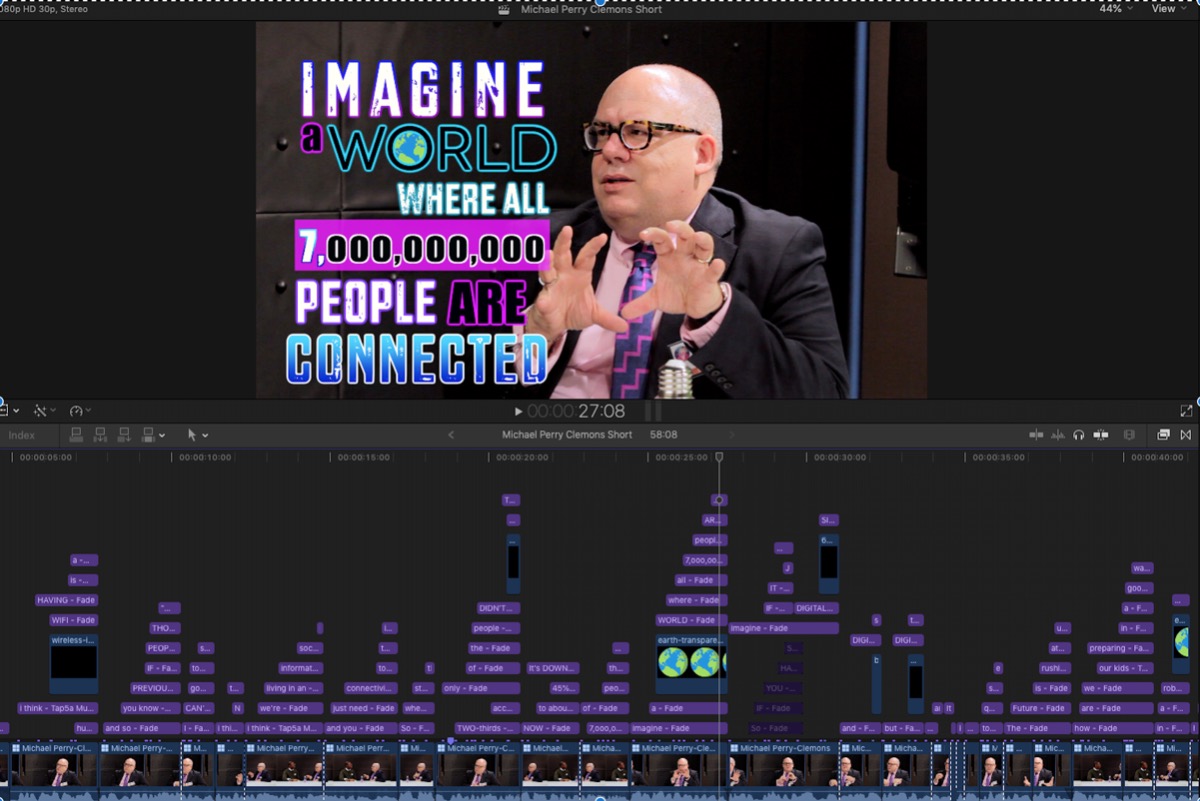
Now in order to achieve this I used titles. I manually went through and at each new spoken word, created a new title to appear on the screen. My timeline looked like this (see image: Sample Timeline.jpg). This took HOURS just trying to get the words to appear at just the right time, even before changing their text styles and trying to create word art. I have over a dozen more of these types of videos to produce; so I'm looking for a way to make things more efficient. Enter Simon Says.
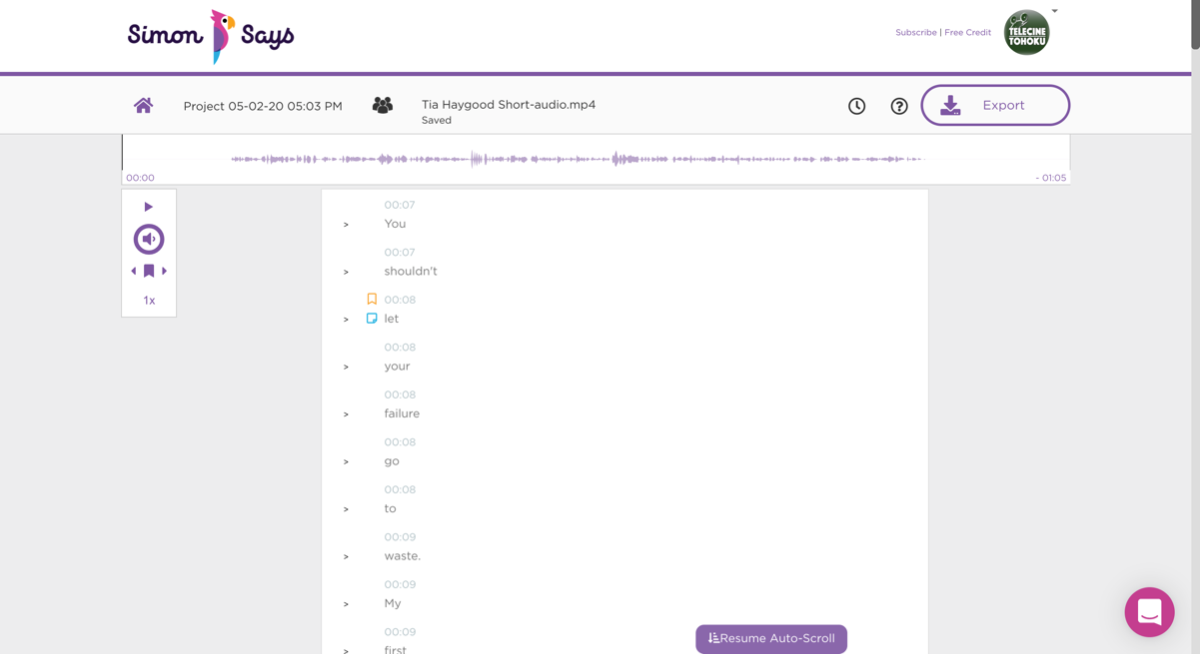
I thought, what if I slightly reverse-engineer the process. I'd cut the 1-minute clip, then send the audio out to Simon Says to be transcribed. The transcribed video does so at a word-by-word level, so my next step would be to break the dialogue down one word at a time. (See Screen Shot, 2020-06-10 at 23.02.36). My reason for breaking it down word-by-word, is that so when I exported it as titles back into FCPX, each word would have its own separate title (half of my work is already done).
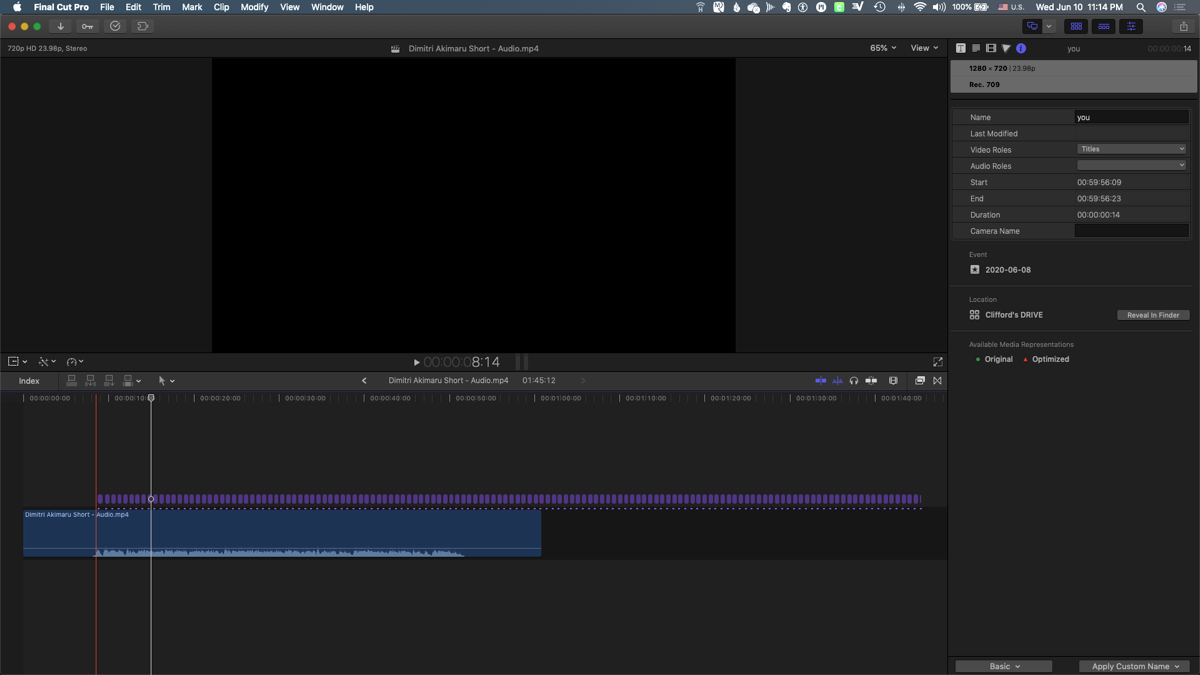
I was told by the Simon Says tech guy that even though the website still reflected the timecode signature of each word down to the second on the user-end, on the backend it was broken down even more precisely (maybe milliseconds)--so timecode shouldn't be a problem. Each title would appear exactly as the word was being said in the video (that's my goal anyways). I would then export these as "titles" back into FCPX (because titles are the only form of caption/subtitle/whatever that allows unlimited formatting (which I need to make the word-art). When I chose that option it generated a .fcpxml, which I opened in FCPX. But rather than having each title start where I thought they would with their timecode signatures, I got something that looked like this: (see 23.14.34). I was hoping to get each title to start at its right timecode signature with the audio, and I could extend each title to the desired length, and use my pre-saved text styles to change each text and create word art. By doing it this way, all I really needed to do was design the final arrangement of the words at the end of each sentence (e.g. the titles would terminate at the same point ) [because if the timecode was perfect for when each word appeared (the inpoint), I didn't have to worry about them animating on screen at the right time. (Yes, I could make little tweaks if needed, but mainly the heavy lifting would be done)].
However, the titles from the fcpxml file generated from Simon Says arranged the titles in sequential order (but with no regard for the timecode signature). And it seemed as if each title had to remain on screen for a minimum number of frames (like 14 frames or so)--which is why I wondered if FCPX had some minimum duration rule for titles that was causing the fcpxml to generate the titles with this undesired timing. I guess I'm asking for help to figure out what is causing the problem represented by Screen Shot 2020-06-10 at 23.14.34, and how can I get around it?
Possible Solution #1 If there was a minimum frame required, I could go into Motion and mess with parameters to shorten the threshold, re-export the xml and see if the timecode linked titles are better timed at their inpoints. (Problem: I don't know what default title FCPX uses for the titles generated from transcriptions, so I don't know which one to modify in Motion and test out this solution).
Possible Solution #2 I also got Simon Says to export a separate word document with the timecode signatures of each word. Armed with this information, I would select the "Titles" pane of the Index Editor and simply edit the "Position" column with the proper timecode for each title. However, it seems I can edit notes, and the name of the title (as Andreas Kiel has pointed out) but not the timecode in the "position" column. In my case, this would be powerful. It'd take time, but I'd know each title appeared exactly when I wanted it to.
So I'm asking for help: does anyone know what's causing this lack of syncing the titles to their proper timecode signature, because if I could figure it out and find a way to solve this problem, that would save me at least 2 hours of time per video. It'd also be a pretty awesome discovery--period.
And sorry for the lack of clear communication and lack of proper terminology. I've been an FCPX user since 2011, but yes as I primarily operate on my own, semi-professionally, and do rudimentary stuff most of the time, I haven't commented in forums as I can get a lot of my questions answered through YouTube videos or FCP training, but this challenge has me puzzled and I honestly need help. I hope my post has made things a little clearer. Any help would be appreciated.
Kaminote00
@Andreas Kiel, yes, It has occurred to me that I will need to break things down a little further to get the help I need.
So Here Goes (This is going to be long): I've been doing short interviews AND shorter 1-minute clips of each interview for use in social media. My question concerns an easier workflow with my one minute clips which employ a lot of kinetic typography (well appearing text, less moving text); an example of my finished product can be found here:
Now in order to achieve this I used titles. I manually went through and at each new spoken word, created a new title to appear on the screen. My timeline looked like this (see image: Sample Timeline.jpg). This took HOURS just trying to get the words to appear at just the right time, even before changing their text styles and trying to create word art. I have over a dozen more of these types of videos to produce; so I'm looking for a way to make things more efficient. Enter Simon Says.
I thought, what if I slightly reverse-engineer the process. I'd cut the 1-minute clip, then send the audio out to Simon Says to be transcribed. The transcribed video does so at a word-by-word level, so my next step would be to break the dialogue down one word at a time. (See Screen Shot, 2020-06-10 at 23.02.36). My reason for breaking it down word-by-word, is that so when I exported it as titles back into FCPX, each word would have its own separate title (half of my work is already done).
I was told by the Simon Says tech guy that even though the website still reflected the timecode signature of each word down to the second on the user-end, on the backend it was broken down even more precisely (maybe milliseconds)--so timecode shouldn't be a problem. Each title would appear exactly as the word was being said in the video (that's my goal anyways). I would then export these as "titles" back into FCPX (because titles are the only form of caption/subtitle/whatever that allows unlimited formatting (which I need to make the word-art). When I chose that option it generated a .fcpxml, which I opened in FCPX. But rather than having each title start where I thought they would with their timecode signatures, I got something that looked like this: (see 23.14.34). I was hoping to get each title to start at its right timecode signature with the audio, and I could extend each title to the desired length, and use my pre-saved text styles to change each text and create word art. By doing it this way, all I really needed to do was design the final arrangement of the words at the end of each sentence (e.g. the titles would terminate at the same point ) [because if the timecode was perfect for when each word appeared (the inpoint), I didn't have to worry about them animating on screen at the right time. (Yes, I could make little tweaks if needed, but mainly the heavy lifting would be done)].
However, the titles from the fcpxml file generated from Simon Says arranged the titles in sequential order (but with no regard for the timecode signature). And it seemed as if each title had to remain on screen for a minimum number of frames (like 14 frames or so)--which is why I wondered if FCPX had some minimum duration rule for titles that was causing the fcpxml to generate the titles with this undesired timing. I guess I'm asking for help to figure out what is causing the problem represented by Screen Shot 2020-06-10 at 23.14.34, and how can I get around it?
Possible Solution #1 If there was a minimum frame required, I could go into Motion and mess with parameters to shorten the threshold, re-export the xml and see if the timecode linked titles are better timed at their inpoints. (Problem: I don't know what default title FCPX uses for the titles generated from transcriptions, so I don't know which one to modify in Motion and test out this solution).
Possible Solution #2 I also got Simon Says to export a separate word document with the timecode signatures of each word. Armed with this information, I would select the "Titles" pane of the Index Editor and simply edit the "Position" column with the proper timecode for each title. However, it seems I can edit notes, and the name of the title (as Andreas Kiel has pointed out) but not the timecode in the "position" column. In my case, this would be powerful. It'd take time, but I'd know each title appeared exactly when I wanted it to.
So I'm asking for help: does anyone know what's causing this lack of syncing the titles to their proper timecode signature, because if I could figure it out and find a way to solve this problem, that would save me at least 2 hours of time per video. It'd also be a pretty awesome discovery--period.
And sorry for the lack of clear communication and lack of proper terminology. I've been an FCPX user since 2011, but yes as I primarily operate on my own, semi-professionally, and do rudimentary stuff most of the time, I haven't commented in forums as I can get a lot of my questions answered through YouTube videos or FCP training, but this challenge has me puzzled and I honestly need help. I hope my post has made things a little clearer. Any help would be appreciated.
Kaminote00
Last edit: 10 Jun 2020 15:05 by kaminote00.
Please Log in to join the conversation.
- Andreas Kiel
-
- Offline
- Platinum Member
-
Less
More
- Posts: 1077
- Thank you received: 189
10 Jun 2020 17:33 #107812
by Andreas Kiel
Replied by Andreas Kiel on topic Modifying Minimum Frames for Imported Subtitles
Looking at the screenshot with the audio/titles it seems to XML just have wrong timing – or better: kind of no timing at all.
You can send me the XML to spherico(dot)mail(at)gmail(dot)com and I'll have a look what's going on there.
It definitively has nothing to do with "minimum durations"
You can send me the XML to spherico(dot)mail(at)gmail(dot)com and I'll have a look what's going on there.
It definitively has nothing to do with "minimum durations"
Please Log in to join the conversation.
- Andreas Kiel
-
- Offline
- Platinum Member
-
Less
More
- Posts: 1077
- Thank you received: 189
11 Jun 2020 11:29 - 11 Jun 2020 11:31 #107828
by Andreas Kiel
Replied by Andreas Kiel on topic Modifying Minimum Frames for Imported Subtitles
Clifford - thanks for the files.
As I guessed before both the XML and the time list don't have any timing in a way that makes sense:
Every 0.709 seconds there is a word for a duration of 0.584 seconds.
So obviously this is a problem with Simon Says. It seems they/you are not able to save the time per word correctly to file - at least for this 'single word process'.
As I guessed before both the XML and the time list don't have any timing in a way that makes sense:
Every 0.709 seconds there is a word for a duration of 0.584 seconds.
So obviously this is a problem with Simon Says. It seems they/you are not able to save the time per word correctly to file - at least for this 'single word process'.
Last edit: 11 Jun 2020 11:31 by Andreas Kiel.
Please Log in to join the conversation.
- kaminote00
-
Topic Author
- Offline
- New Member
-
Less
More
- Posts: 12
- Thank you received: 1
11 Jun 2020 12:37 #107829
by kaminote00
Replied by kaminote00 on topic Modifying Minimum Frames for Imported Subtitles
Thank you for checking out my files Andreas. So then a follow up question would be, do you know of any workarounds or transcription to titles 3rd party plugins that would solve my problem
Please Log in to join the conversation.
- Andreas Kiel
-
- Offline
- Platinum Member
-
Less
More
- Posts: 1077
- Thank you received: 189
14 Jun 2020 16:23 #107884
by Andreas Kiel
Replied by Andreas Kiel on topic Modifying Minimum Frames for Imported Subtitles
I did a check with another 3 of the AI services: rev.com, otter.ai, SpeedScriber.
The only one which would allow something like you're trying to achieve is SpeedScriber. The other 2 behave like SimonSays and 'save a word every other second'
But it's a bit tricky and cumbersome to do that SpeedScriber - while the result is 'impressive' regarding sync and translation.
From there (text and sync per word) it still would require a lot of steps to get the desired 'effect'.
The only one which would allow something like you're trying to achieve is SpeedScriber. The other 2 behave like SimonSays and 'save a word every other second'
But it's a bit tricky and cumbersome to do that SpeedScriber - while the result is 'impressive' regarding sync and translation.
From there (text and sync per word) it still would require a lot of steps to get the desired 'effect'.
Please Log in to join the conversation.
