


- Posts: 1
- Thank you received: 0
3 Post Moderation Rule for New Boarders (25 Jan 2021)
New boarders will have their posts moderated - Don't worry if you cannot see your post immediately.
Media flashes red and moves for one frame.
30 May 2020 19:33 - 31 May 2020 17:16 #107575
by emvw
Media flashes red and moves for one frame. was created by emvw
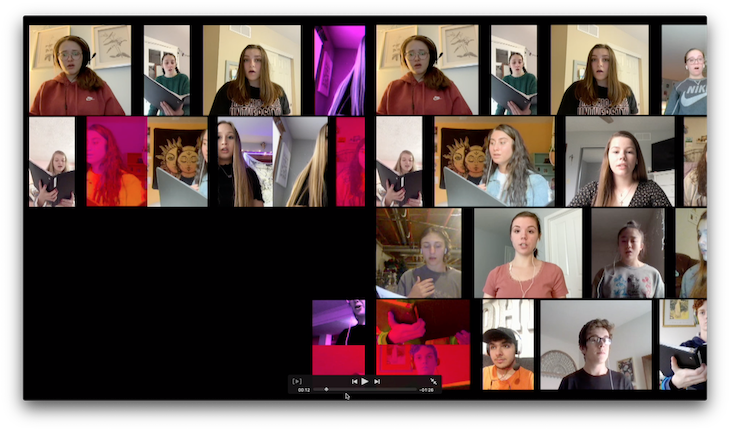
Any idea WHY this is happening?
The screen should be full of individual videos - like a zoom call.
The media flashes red and moves for one frame. Happens repeatedly, with different media each time.
No sign of this when working with proxy files.
Each video was submitted by the user. The sources were various.
I did 3 other projects like this with no issues.
MacBook Pro Mid 2014
2.2 GHz Intel Core i7
16GB 1600 MHz DDR3
Intel Iris Pro 1536 MB
The screen should be full of individual videos - like a zoom call.
The media flashes red and moves for one frame. Happens repeatedly, with different media each time.
No sign of this when working with proxy files.
Each video was submitted by the user. The sources were various.
I did 3 other projects like this with no issues.
MacBook Pro Mid 2014
2.2 GHz Intel Core i7
16GB 1600 MHz DDR3
Intel Iris Pro 1536 MB
Last edit: 31 May 2020 17:16 by emvw. Reason: system specs
Please Log in to join the conversation.
- Tom Wolsky
-

- Offline
- Moderator
-

31 May 2020 13:20 #107578
by Tom Wolsky
Replied by Tom Wolsky on topic Media flashes red and moves for one frame.
Please give complete specs of your system including drives and graphics capabilities, specs for the media.
Please Log in to join the conversation.


31 May 2020 13:43 - 31 May 2020 13:44 #107580
by JoeEditor
Replied by JoeEditor on topic Media flashes red and moves for one frame.
You may have too many videos overwhelming your system's resources. If you mute them all but one, does it playback ok then?
And what Tom said.
And what Tom said.
Last edit: 31 May 2020 13:44 by JoeEditor.
Please Log in to join the conversation.

02 Jun 2020 11:56 - 02 Jun 2020 12:01 #107615
by joema
Replied by joema on topic Media flashes red and moves for one frame.
In addition to what Tom said, be sure to state what version of MacOS and what version of FCPX. If you are unsure about the codec, play it in Quicktime Player and do CMD+I, then post that info.
State what kind of hard drive the media is on. A split screen presentation pulls multiple data streams concurrently. A fully-rendered timeline is backed by ProRes 422 cache files. Multiple streams is a lot of I/O data per second.
If it doesn't happen with proxy files, this could indicate the system is just overloaded. But it should generally play OK using original media (not proxy) if the timeline is rendered -- assuming no I/O problem. Turn off background rendering, delete all render files with Files>Delete Generated Library Files>Delete Render Files>All, then do a one-time render of the timeline with CMD+A to select and CTRL+R to render. Make sure the viewer is set to "Better Performance". After that completes try to play it.
If it stiill won't play properly run Blackmagic Disk Speed Test on the drive holding the media and also the library and cache files.
State what kind of hard drive the media is on. A split screen presentation pulls multiple data streams concurrently. A fully-rendered timeline is backed by ProRes 422 cache files. Multiple streams is a lot of I/O data per second.
If it doesn't happen with proxy files, this could indicate the system is just overloaded. But it should generally play OK using original media (not proxy) if the timeline is rendered -- assuming no I/O problem. Turn off background rendering, delete all render files with Files>Delete Generated Library Files>Delete Render Files>All, then do a one-time render of the timeline with CMD+A to select and CTRL+R to render. Make sure the viewer is set to "Better Performance". After that completes try to play it.
If it stiill won't play properly run Blackmagic Disk Speed Test on the drive holding the media and also the library and cache files.
Last edit: 02 Jun 2020 12:01 by joema.
Please Log in to join the conversation.


27 May 2021 17:21 #114680
by Yarrow
Replied by Yarrow on topic Media flashes red and moves for one frame.
This just happened to me (minus movement) on a video with only two layers: a masked & scaled P-i-P over a talking head. Thanks to this thread's suggestion that it could be some kind of render error (it WAS present on export), I tried moving the P-i-P layer by one frame to force a re-render. This WORKED. I assume deleting the render files would have as well, but in my case this was faster & easier.
Thank you!
FCP 10.5.2
macOS Big Sur 11.2.3
2017 i7 iMac 5k 48GB RAM Radeon Pro 580 8GB
OWC Thunderbay Mini with OWC Mercury SSDs
Thank you!
FCP 10.5.2
macOS Big Sur 11.2.3
2017 i7 iMac 5k 48GB RAM Radeon Pro 580 8GB
OWC Thunderbay Mini with OWC Mercury SSDs
Please Log in to join the conversation.
