


- Posts: 9
- Thank you received: 0
3 Post Moderation Rule for New Boarders (25 Jan 2021)
New boarders will have their posts moderated - Don't worry if you cannot see your post immediately.
Cross dissolve between clips on different layers/tracks
- hiphopsuperman
-
 Topic Author
- Offline
- New Member
-

Less
More
27 May 2020 03:32 #107485
by hiphopsuperman
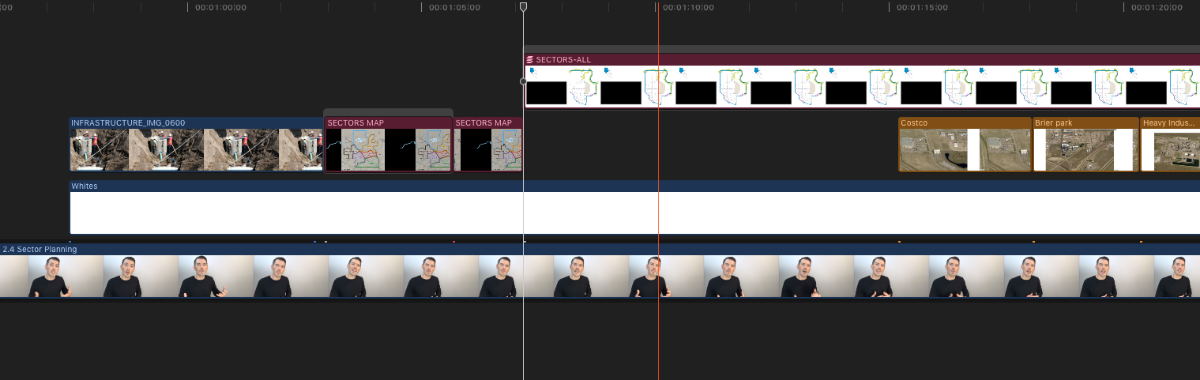
I'm new to FCPX 10.4.4 from PPro CS6. How am I supposed to add a cross dissolve between 2 clips if they are on different layers? As you can see on the attached screenshot, clip 2 (SECTORS-ALL) is on a higher level, because there is another clip below it.
In PPro, I would move clip 1 (SECTORS MAP) up a track and apply a cross dissolve between the 2 clips. This isn't possible with the magnetic timeline.
This seems so simple, but I can't find the answer anywhere! Any help?
In PPro, I would move clip 1 (SECTORS MAP) up a track and apply a cross dissolve between the 2 clips. This isn't possible with the magnetic timeline.
This seems so simple, but I can't find the answer anywhere! Any help?
Please Log in to join the conversation.
27 May 2020 05:36 #107487
by jvo
Replied by jvo on topic Cross dissolve between clips on different layers/tracks
To make transitions between connected clips, you need to move them into a "secondary storyline." See this Apple help article:
support.apple.com/guide/final-cut-pro/ad...ines-ver8e3f1748/mac
It looks like "SECTORS-ALL" is already part of a secondary storyline, so just drag that SECTORS-MAP clip you want to dissolve from into the secondary storyline. You can tell what's a storyline by noticing the gray bar across the clip(s) in it.
Cheers.
It looks like "SECTORS-ALL" is already part of a secondary storyline, so just drag that SECTORS-MAP clip you want to dissolve from into the secondary storyline. You can tell what's a storyline by noticing the gray bar across the clip(s) in it.
Cheers.
Please Log in to join the conversation.


27 May 2020 11:43 - 27 May 2020 12:09 #107493
by JoeEditor
Replied by JoeEditor on topic Cross dissolve between clips on different layers/tracks
Once you get used to FCPX, you'd have placed all those clips into the same connected storyline naturally. I can see that Infrastructure clip and all the Sectors clips should all be in the same connected storyline to start with.
Drag the first clip into the connected storyline your second clip is in, adjust the position of that connected storyline, apply crossfade.
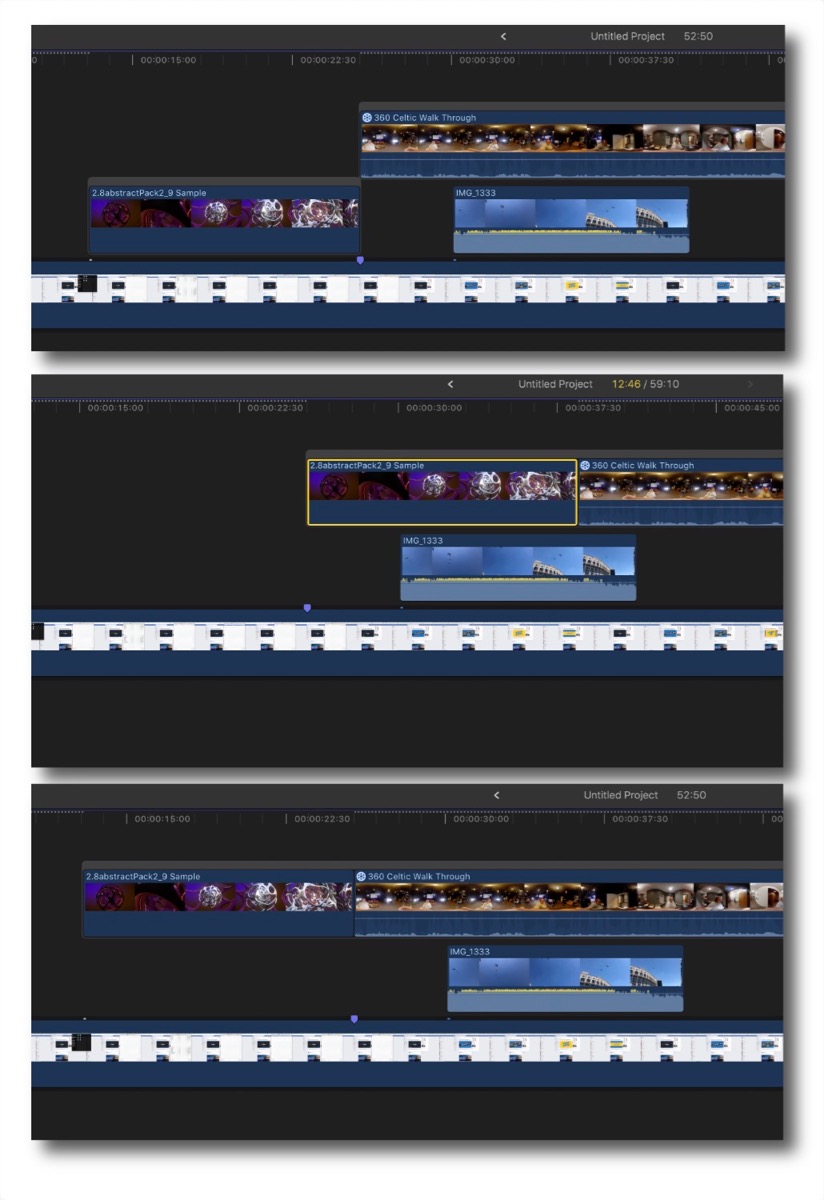
Drag the first clip into the connected storyline your second clip is in, adjust the position of that connected storyline, apply crossfade.
Last edit: 27 May 2020 12:09 by JoeEditor.
Please Log in to join the conversation.
- hiphopsuperman
-
Topic Author
- Offline
- New Member
-
Less
More
- Posts: 9
- Thank you received: 0
27 May 2020 14:57 #107496
by hiphopsuperman
Replied by hiphopsuperman on topic Cross dissolve between clips on different layers/tracks
Thanks so much for your reply and screenshots for clarity.  I've managed to move the clip above as you described. I'm struggling to understand what a "Storyline" is, and generally how the magnetic timeline works.
I've managed to move the clip above as you described. I'm struggling to understand what a "Storyline" is, and generally how the magnetic timeline works. Please Log in to join the conversation.
