


- Posts: 1
- Thank you received: 0
3 Post Moderation Rule for New Boarders (25 Jan 2021)
New boarders will have their posts moderated - Don't worry if you cannot see your post immediately.
Colors look extremely saturated after export.
24 May 2020 17:01 #107434
by ci1990
Colors look extremely saturated after export. was created by ci1990
Dear FCP Forum Team,
I've shot a short clip on Sony A7III with Atomos Ninja V. (4K 25fps, Slog2 and ProRes422).
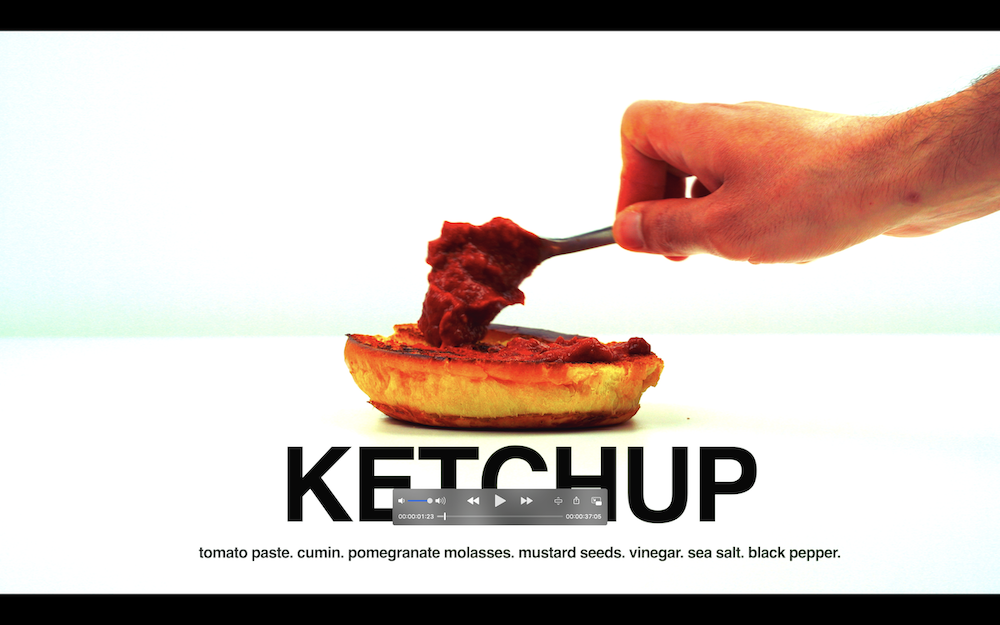
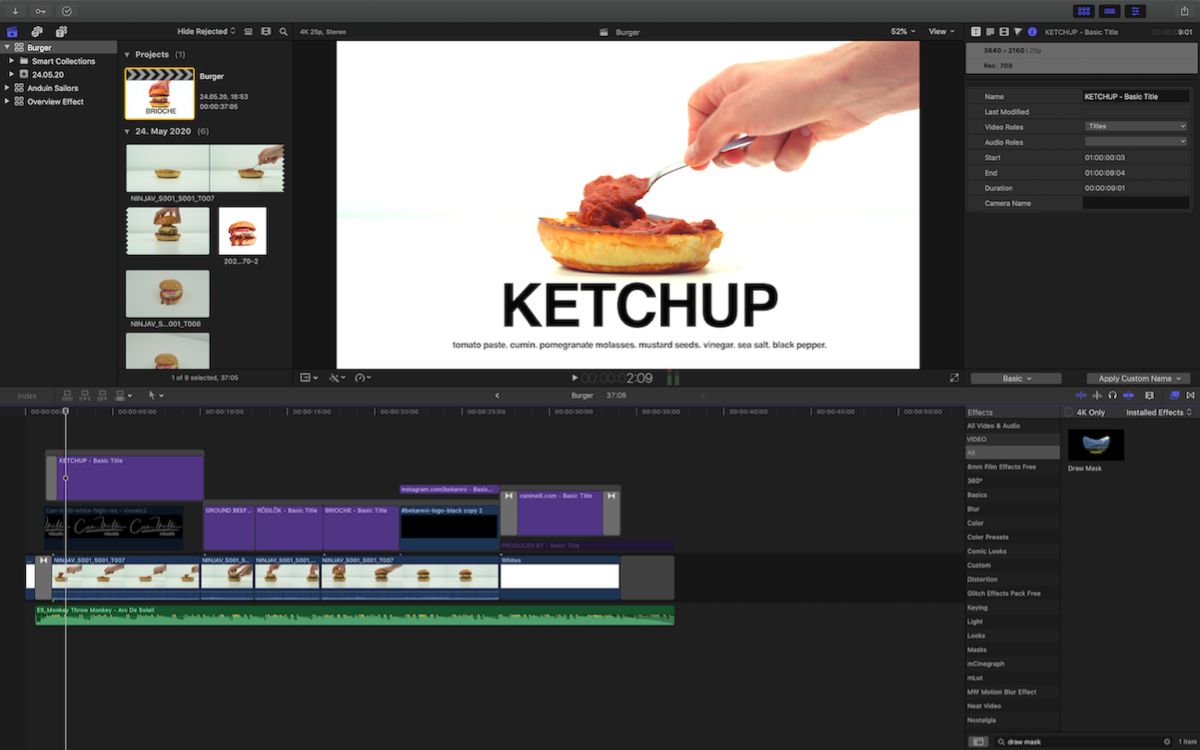
I've used the Ninja V clips and edited my video. After I export it I get overly saturated colors. What might be the reason? I've turned on "Legalize" option while shooting with the Ninja V. May that be the reason for this weird issue?
Attached you can see screenshots before and after export.
Would be glad if someone can help me. Thanks a lot beforehand.
Best regards,
Can
I've shot a short clip on Sony A7III with Atomos Ninja V. (4K 25fps, Slog2 and ProRes422).
I've used the Ninja V clips and edited my video. After I export it I get overly saturated colors. What might be the reason? I've turned on "Legalize" option while shooting with the Ninja V. May that be the reason for this weird issue?
Attached you can see screenshots before and after export.
Would be glad if someone can help me. Thanks a lot beforehand.
Best regards,
Can
Please Log in to join the conversation.


25 May 2020 08:10 #107439
by JoeEditor
Replied by JoeEditor on topic Colors look extremely saturated after export.
Turn on your video scopes, that will tell you if it's oversaturated or not for sure. Vector scope and Luma scope.
Please Log in to join the conversation.
- Buhardilla
-

- Offline
- Premium Member
-

Less
More
- Posts: 105
- Thank you received: 16
25 May 2020 18:32 - 25 May 2020 18:50 #107455
by Buhardilla
Replied by Buhardilla on topic Colors look extremely saturated after export.
As FCPGuru wrote videoscope are the main tools for grading. But, where do you check your videoclips? external monitor? computer display?
I'm currently only using my iMac 27" 5K Retina display calibrated with Datacolor SpyderX . I know that best choice would be an external broadcast auto calibrated monitor but I feel that I can get decent results with an iMac panel
About your clips, What LUT were applied to Slog2 files and when were applied? at moment Ninja recording? in FCPX inspector window clip before to edition? last at grading after balance and levels correction ?
I'm currently only using my iMac 27" 5K Retina display calibrated with Datacolor SpyderX . I know that best choice would be an external broadcast auto calibrated monitor but I feel that I can get decent results with an iMac panel
About your clips, What LUT were applied to Slog2 files and when were applied? at moment Ninja recording? in FCPX inspector window clip before to edition? last at grading after balance and levels correction ?
Last edit: 25 May 2020 18:50 by Buhardilla.
Please Log in to join the conversation.

26 May 2020 00:19 #107457
by dgwvideo
Creating history....one edit at a time !
Replied by dgwvideo on topic Colors look extremely saturated after export.
Generally, if the FCPX viewer looks correct and the exported file is oversaturated, this tends to be a gamma issue. As mentioned above, knowing what you are viewing the exported file on is helpful in analyzing the problem. This can happen easily in Divinci Resolve also, but there are more options in Resolve to match output gamma curves of the playback display to the viewer. In your case, using FCPX, I would check the color profiles of the display you are playing back the exported file on. If it is the same Mac screen as FCPX is running on, check your display preferences in the OS preferences. You can remove, modify or repair any color profile that may be set for that display. As another form of test, share a still frame from FCPX and likely that will look oversaturated as well. If so, the color profile is probably damaged or incorrect.
Creating history....one edit at a time !
Please Log in to join the conversation.

26 May 2020 04:19 #107461
by Larrie
Replied by Larrie on topic Colors look extremely saturated after export.
Knowing what you are viewing the output on is critical. If you are viewing it on the same Mac screen you used for editing and it looks over saturated then it is probably a profile issue as stated above. If you are viewing on another device that is not calibrated then all bets are off.
For example, I recently finished a video and watched it via AirPlay to my Samsung TV. The colors were way over saturated. Like you, I wondered what the heck? I then watched it on a Panasonic TV and the colors were more like the colors on my MBP, and when viewed on the MBP the colors were spot on.
For example, I recently finished a video and watched it via AirPlay to my Samsung TV. The colors were way over saturated. Like you, I wondered what the heck? I then watched it on a Panasonic TV and the colors were more like the colors on my MBP, and when viewed on the MBP the colors were spot on.
Please Log in to join the conversation.
20 Mar 2021 16:08 - 22 Mar 2021 13:38 #113533
by nveer
Replied by nveer on topic Colors look extremely saturated after export.
I’m having a similar issue where my export looks great on : MBP, dell external monitor, iPad and iPhone all look great, but when I aur-play to my LG TV it looks super high contrast. Doesn’t make sense to me.
Last edit: 22 Mar 2021 13:38 by nveer.
Please Log in to join the conversation.
- Tom Wolsky
-

- Offline
- Moderator
-

20 Mar 2021 16:30 #113534
by Tom Wolsky
Replied by Tom Wolsky on topic Colors look extremely saturated after export.
I don't really understand what you're saying. "iPad and iPhone hi I received, but when airlines layer to my LG it looks super high contrast."
Please Log in to join the conversation.
